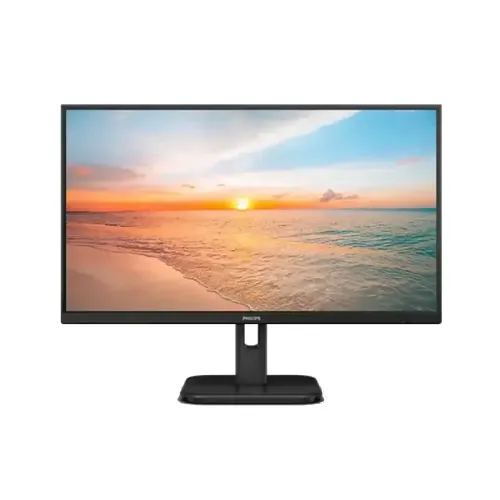
Philips 22E1N1100 21.5-inch Full HD IPS Monitor
Model identity and regional version
The Philips 22E1N1100 is a 21.5-inch Full HD monitor from Philips’ 1000 Series. Philips regional documents identify versions such as 22E1N1100/69 and 22E1N1100/71. The current BiponiBD record names the base model but does not identify the suffix on the physical unit, so this description uses the manufacturer’s /71 document for detailed specifications and calls out where regional confirmation matters. It must not be confused with 22E1N1100LA, a separate VA-panel model with different specifications. Check the rear label and included documentation before relying on region-specific ratings or warranty conditions.
Screen, resolution and panel
The official /71 leaflet lists a 21.5-inch (54.5cm) IPS LCD with a W-LED backlight, 1920 × 1080 Full HD resolution and a 16:9 aspect ratio. Philips lists 178-degree horizontal and vertical viewing angles, 250 cd/m² typical brightness and a 1000:1 typical static contrast ratio. SmartContrast Mega Infinity DCR is an image-processing feature, not the static contrast value. The Philips sheet also lists 105 PPI and a pixel pitch of 0.2493 × 0.241mm; these two detailed figures do not reconcile exactly with the published diagonal and resolution, so verify the precise regional sheet if pixel density is important.
100Hz standard and 120Hz overclock
Philips specifies Full HD at 100Hz as the standard maximum and labels 120Hz as overclocked. For the /71 revision, the HDMI vertical scan range is listed up to 120Hz, while VGA is listed from 48Hz to 75Hz. This means the 120Hz mode is tied to the supported HDMI path and overclock setting; it should not be described as a guaranteed native 120Hz mode on either input. The graphics hardware, cable, regional revision and selected display mode all affect which refresh rates appear. Set a supported mode in the operating system after connecting the monitor.
Response time and motion features
The manufacturer lists 4ms Gray-to-Gray through SmartResponse and a separate 1ms MPRT mode. These values describe different technologies and should not be combined as if both are ordinary pixel transition times. Philips explains that MPRT reduces motion blur by synchronously strobing the backlight; this can cause visible flicker and brightness changes, and brightness cannot be adjusted while MPRT is enabled. Use the mode that suits the content and your comfort. Adaptive Sync is listed for variable refresh behavior, but this does not establish NVIDIA G-SYNC certification.
Color, comfort and surface
The Philips /71 sheet lists 16.7 million colors and typical color-gamut area figures of 102.08% sRGB, 83.31% Adobe RGB, 78.55% DCI-P3 and 86% NTSC, with measurement standards defined in its notes. Gamut-area coverage does not guarantee calibration, color accuracy or suitability for a professional color workflow. Other listed features include Flicker-free, LowBlue Mode, EasyRead, SmartImage and an anti-glare surface with 3H hardness and 25% haze.
Connections and audio
The official /71 specifications list one HDMI 1.4 input, one VGA input, HDCP 1.4 over HDMI and audio out. The documented scan ranges support up to 120Hz over HDMI for that revision but list VGA vertical refresh up to 75Hz. The sources do not list DisplayPort, USB-C or a USB hub. Philips does not list built-in speakers; an audio-out connector is for routing sound to compatible external audio equipment, not evidence of speakers inside the screen.
Stand, VESA mounting and dimensions
The supplied stand is listed with -5° to +20° tilt. Philips lists VESA mounting at 100 × 100mm; height adjustment, swivel and pivot are not specified. For /71, the monitor measures 494 × 285 × 41mm without its stand and 494 × 380 × 180mm with the stand at maximum height. Packaging measures 595 × 376 × 110mm. Listed weights are 2.40kg with stand, 2.05kg without stand and 4.12kg packaged. These are regional manufacturer-sheet figures; check the actual suffix if the unit’s fit or shipping weight is critical.
Power, warranty and buying checks
Philips specifies an internal power supply accepting 100–240V AC at 50–60Hz for /71. Typical consumption is 14.51W on, 0.5W in standby and 0.3W off. Some Bangladesh retailer attribute tables call the power type external, which conflicts with the Philips leaflet; this catalog uses the manufacturer’s value and flags the conflict. Bangladesh retailer pages advertise three-year warranty coverage, but they do not prove the warranty provider or claim conditions for this BiponiBD unit. Confirm the printed regional suffix, what is included in the box, current local warranty terms, seller price and stock before ordering.
Who may find it suitable
This compact monitor may suit everyday office tasks, online study, browsing and casual gaming when a 21.5-inch Full HD IPS screen and HDMI connectivity match your setup. Its higher refresh modes can provide smoother movement than basic 60Hz displays when the computer can drive them. Buyers should also account for the tilt-only stand, absence of listed built-in speakers and the fact that 120Hz is an overclocked HDMI mode in the manufacturer specification. For color-critical work, validate the particular regional model and calibration needs rather than relying on gamut-area figures alone.
Key features
- 21.5-inch IPS LCD with W-LED backlight and Full HD 1920 × 1080 resolution
- Three-sided frameless design with 100Hz standard refresh; up to 120Hz overclocked on HDMI for /71
- 4ms Gray-to-Gray SmartResponse and a separate 1ms MPRT blur-reduction mode
- 250 cd/m² typical brightness, 1000:1 typical static contrast, 178°/178° viewing angles
- Typical manufacturer-published color-gamut area figures for sRGB, Adobe RGB, DCI-P3 and NTSC
- Flicker-free, LowBlue Mode, EasyRead, SmartImage and Adaptive Sync features
- Anti-glare screen with 3H coating and 25% haze
- One HDMI 1.4 input with HDCP 1.4, one VGA input and audio out
- 100 × 100mm VESA mount and -5° to +20° tilt stand
- Internal 100–240V AC power supply; typical on-mode power 14.51W for /71
Pros and points to consider
Pros
- Full HD IPS panel with wide 178° viewing angles suits common office, study and home use.
- 100Hz standard refresh with an HDMI 120Hz overclock option provides a higher motion ceiling than a basic 60Hz display.
- Adaptive Sync, Flicker-free and LowBlue Mode features are listed by Philips.
- HDMI and VGA support both newer and older computers; audio out is available.
- 100 × 100mm VESA mounting and a compact 21.5-inch footprint support flexible desk setups.
Cons and limitations
- 120Hz is an overclocked mode, not the standard 100Hz rating; the exact regional suffix should be checked.
- 1ms MPRT uses backlight strobing and can cause visible flicker or reduced brightness; it is not the same as 1ms GTG.
- The stand offers tilt only; height adjustment, swivel and pivot are not listed.
- No built-in speakers are specified; the audio-out connector does not provide speakers.
- The BiponiBD record omits the Philips regional suffix, and retailer power-supply descriptions conflict with Philips’ internal-supply specification.
- Philips PPI and pixel-pitch figures in its /71 leaflet do not reconcile exactly with the stated diagonal.
Frequently asked questions
What is the exact Philips monitor model and screen size?
This listing is for the Philips 22E1N1100, with a 21.5-inch (54.5cm) 16:9 display. Philips regional documents add suffixes such as /69 or /71. The BiponiBD record does not identify its regional suffix, so check the product label and included documentation for the exact market version. Do not confuse it with the similarly named 22E1N1100LA model, which has different panel specifications.
What is its native resolution and pixel density?
Native resolution is Full HD 1920 × 1080. Philips’ /71 leaflet states 105 PPI and a pixel pitch of 0.2493 × 0.241mm; those figures do not reconcile cleanly with the 21.5-inch diagonal, so the resolution and size are the dependable identification details.
Is the 22E1N1100 an IPS display?
Philips identifies IPS technology and a W-LED backlight for the 22E1N1100. The similarly named 22E1N1100LA is a separate VA model and should not be used as the specification source for this IPS product.
Does it run at 100Hz or 120Hz?
Philips lists 1920 × 1080 at 100Hz as the maximum standard mode and describes 120Hz as overclocked. The /71 document’s scan ranges specify HDMI vertical rates up to 120Hz, while VGA is listed up to 75Hz. Achievable refresh depends on the exact regional revision, graphics card, cable and display settings.
What are the response-time ratings, and what does MPRT change?
Philips lists 4ms Gray-to-Gray through SmartResponse and 1ms MPRT. These are different measurement modes, not equivalent guarantees. Philips notes that MPRT strobes the backlight, may visibly flicker or reduce brightness, and cannot adjust brightness while enabled.
How bright and high-contrast is the screen?
The manufacturer lists 250 cd/m² typical brightness and 1000:1 typical contrast. SmartContrast is separately described as Mega Infinity DCR; it is a dynamic processing feature and should not be presented as the static contrast ratio.
What color range does Philips publish?
Philips lists 16.7 million colors and typical gamut-area figures of Adobe RGB 83.31%, DCI-P3 78.55%, sRGB 102.08% and NTSC 86%, with measurement standards identified in the leaflet. These area values are not a promise of professional calibration or color accuracy.
Which ports does the Philips 22E1N1100 have?
The official /71 specifications list one HDMI 1.4 input and one VGA input, with HDCP 1.4 over HDMI. They also list audio out. No USB-C, DisplayPort, USB hub or second HDMI port is listed.
Does it have built-in speakers?
The Philips /71 specification lists audio out but does not list built-in speakers. Audio out is not the same as an internal speaker system. Use your computer’s audio output or connect compatible external audio equipment.
Can I mount it on a VESA arm, and how does the stand adjust?
Philips lists a 100 × 100mm VESA mount and tilt adjustment from -5° to +20°. The standard stand is not specified as height-, swivel- or pivot-adjustable. Check arm load rating and screw instructions before mounting.
What are the dimensions and weight?
For the /71 revision, Philips lists 494 × 285 × 41mm without the stand, 494 × 380 × 180mm with the stand at maximum height, and package dimensions of 595 × 376 × 110mm. Weight is 2.40kg with stand, 2.05kg without stand and 4.12kg packaged. Confirm the regional leaflet if these measurements are critical.
What power and warranty details should I expect?
Philips lists an internal 100–240V AC, 50–60Hz power supply; typical on-mode consumption is 14.51W, standby 0.5W and off mode 0.3W for /71. Bangladesh retailers advertise three-year warranty coverage, but the provider and claim conditions for a BiponiBD unit are not established by those listings. Confirm the exact regional suffix and written local warranty before purchase.