Overview
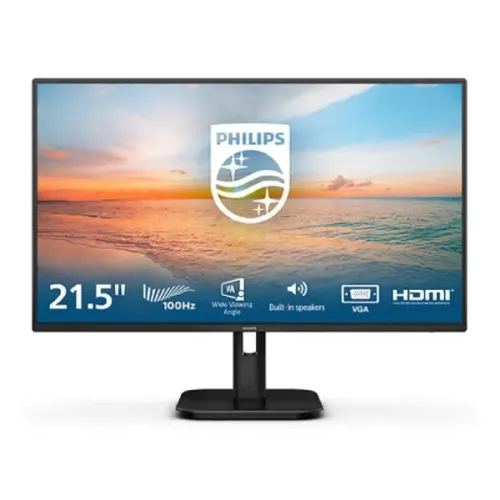
The Philips 22E1N1100LA is a 21.5-inch Full HD monitor for everyday office work, study, browsing and home entertainment. It uses a VA LCD panel with W-LED backlighting and a 16:9 aspect ratio. The native resolution is 1920 × 1080, so text, web pages and video use the familiar Full HD format. Philips lists a typical static contrast ratio of 4000:1 and a typical brightness of 250 cd/m². These specifications make the model a practical compact display for a desk where a moderate footprint matters. The listing should not be confused with the similarly named Philips 22E1N1200A or 22E1N1200AW: those are separate IPS models with different ports and panel specifications.
Refresh rate and motion response
Bangladesh listings commonly describe this product as a 100Hz monitor, which is its standard Full HD refresh rating. Philips’ regional /71 leaflet also specifies a maximum HDMI timing of 1920 × 1080 at up to 120Hz when overclocked and supported by the connected graphics device. The official leaflet lists lower maximum vertical frequency for VGA, so the 120Hz claim must not be generalized to every port or computer. Choose the HDMI input, a compatible cable and a supported refresh setting in the graphics control panel. Philips specifies 4ms Gray-to-Gray using SmartResponse. A separate 1ms MPRT mode is intended to reduce perceived motion blur using synchronized backlight strobing; Philips cautions that this can visibly change brightness or cause flicker. It is therefore clearer to describe both modes and their conditions instead of presenting “1ms” as the ordinary GtG response.
Picture quality and viewing comfort
The VA panel has a listed 4000:1 typical static contrast ratio and 178-degree horizontal and vertical viewing angles at the specified contrast threshold. The display supports 16.7 million colors and Philips lists sRGB mode, but the reviewed leaflet does not state a percentage color-gamut coverage. For that reason, this listing avoids unsupported “wide gamut” or exact sRGB coverage claims. The screen surface is anti-glare with a 3H coating and 25% haze. Flicker-Free technology and LowBlue Mode offer display settings intended for more comfortable viewing. EasyRead adjusts the picture for text-heavy reading, and SmartImage supplies image presets. These tools can help adapt the display to a task, though comfort still depends on brightness, ambient light, viewing distance and breaks.
Built-in audio and connections
The “A” in this model name belongs to a speaker-equipped variant. Philips specifies two internal speakers rated at 2W each. The official connection list includes one HDMI 1.4 input with HDCP 1.4, one VGA input, a PC audio-in connection and a headphone/audio-out connection. HDMI is the digital input for compatible computers and media devices; VGA supports older equipment. This model does not list DisplayPort or USB-C, so check the source device before ordering. Its built-in speakers are convenient for calls, system sounds and casual video, while separate speakers or headphones may suit music or louder listening better.
Stand, mounting and physical details
The included stand provides tilt adjustment from −5 degrees to +20 degrees. Philips also lists a 100 × 100 mm VESA interface for compatible arms or wall mounts and a Kensington lock for physical security. The reviewed /71 specification sheet lists dimensions of 493 × 376 × 220 mm with the stand and 493 × 294 × 45 mm without it. Listed weight is 2.61 kg with the stand and 2.23 kg without the stand; packaging weighs 4.08 kg. Measure desk space and confirm mount capacity before installation. The stock stand’s listed adjustment is tilt; height, swivel and pivot are not specified.
Power and warranty
The /71 leaflet specifies an external power supply rated for 100–240V AC at 50–60Hz. Typical on-mode power is listed as 17.5W in that regional leaflet; another Philips regional listing reports 14.6W, so the exact consumption figure can vary by region or test configuration. The /71 leaflet lists 0.5W typical standby and 0.3W typical off-mode consumption. Bangladesh sellers describe a three-year warranty, but terms depend on the local distributor, seller and the exact regional unit. Check the carton suffix, authorized service provider, warranty claim conditions and invoice at purchase. The catalog uses the model-level name 22E1N1100LA because the product images do not show a readable box label confirming the final /xx code.
Technical specifications
Key features
- 21.5-inch VA LCD panel with Full HD 1920 × 1080 resolution and 16:9 aspect ratio.
- 100Hz standard rating; Philips lists maximum 1920 × 1080 at up to 120Hz over HDMI for compatible sources.
- 250 cd/m² typical brightness and 4000:1 typical static contrast.
- 4ms Gray-to-Gray SmartResponse and a separate 1ms MPRT blur-reduction mode.
- 178°/178° viewing angles, anti-glare 3H coating and 25% haze.
- Flicker-Free, LowBlue Mode, EasyRead and SmartImage picture modes.
- Two built-in 2W speakers; PC audio-in and headphone/audio-out.
- One HDMI 1.4 (HDCP 1.4) input and one VGA input.
- Tilt adjustment from −5° to +20°; 100 × 100 mm VESA mounting and Kensington lock.
- External 100–240V AC power supply; typical on-mode power varies by regional sheet (14.6–17.7W); standby 0.5W, off 0.3W.
Advantages
- VA panel’s 4000:1 typical static contrast supports deeper dark tones than many basic IPS panels.
- 100Hz standard refresh and an official up-to-120Hz HDMI mode can provide smoother compatible motion.
- Built-in 2×2W speakers and audio input/output reduce the need for separate desktop audio for basic listening.
- Flicker-Free, LowBlue, EasyRead and anti-glare features serve reading and general office use.
- VESA 100×100 mm and a compact tilt stand support mounting and simple angle adjustment.
Things to consider
- Only HDMI and VGA video inputs are listed; there is no DisplayPort or USB-C.
- The supplied stand lists tilt adjustment only; height, swivel and pivot adjustments are not listed.
- The 1ms MPRT figure is a blur-reduction mode, not the 4ms GtG response specification; MPRT may reduce brightness and flicker.
- The 120Hz maximum requires HDMI and a compatible graphics source/settings; VGA is limited to lower refresh rates.
- Warranty route and exact regional suffix should be checked on the local invoice and box label.
Frequently asked questions
What is the exact model?
The model is Philips 22E1N1100LA. Philips publishes regional product codes including /71 and /75; confirm the final regional suffix on the unit carton because the catalog images do not show its label.
Is the panel IPS or VA?
It is a VA LCD panel with W-LED backlighting. Do not confuse it with Philips 22E1N1200A or 22E1N1200AW, which are different IPS models.
What resolution and screen size does it have?
The monitor has a 21.5-inch (54.5 cm diagonal) 16:9 screen with 1920 × 1080 Full HD resolution.
Is it a 100Hz or 120Hz monitor?
Bangladesh listings and the model name describe it as 100Hz. Philips’ /71 technical leaflet lists 1920 × 1080 at 100Hz standard and up to 120Hz overclocked via HDMI. The actual rate depends on the computer, HDMI signal and settings; VGA is lower.
What response time does Philips specify?
Philips lists 4ms Gray-to-Gray (SmartResponse). The separate 1ms MPRT mode uses backlight strobing for blur reduction and can change brightness or introduce visible flicker; it is not the same response-time measurement.
Does it have built-in speakers?
Yes. Philips specifies two built-in speakers rated 2W each. It also lists PC audio-in and headphone/audio-out.
Which video and audio connections are available?
The official leaflet lists one HDMI 1.4 input with HDCP 1.4, one VGA input, PC audio-in and headphone/audio-out. It does not list DisplayPort or USB-C.
What are brightness and contrast?
Philips specifies 250 cd/m² typical brightness and 4000:1 typical static contrast. SmartContrast is a separate dynamic contrast feature.
What is the pixel density and pixel pitch?
Philips’ reviewed /71 leaflet lists 102 PPI and pixel pitch of 0.2493 mm horizontal × 0.241 mm vertical. Some retailer tables show 92.56 PPI and 0.2745 mm; those values conflict with the manufacturer geometry for this 21.5-inch model.
Does Adaptive-Sync mean it is G-SYNC certified?
Philips lists Adaptive-Sync. That does not establish NVIDIA G-SYNC certification, which is not stated in the reviewed Philips leaflet.
Can it be mounted on a monitor arm?
Yes. Philips lists a 100 × 100 mm VESA mounting interface and a Kensington lock. Check the arm’s weight limit and mounting instructions.
What warranty is available in Bangladesh?
Bangladesh retailers list three years. Warranty coverage depends on the seller/distributor and the exact regional unit, so verify the authorized provider, claim conditions and invoice before purchase.
Specifications are based on Philips’ reviewed regional leaflet and may vary with regional suffix. Verify current price, stock, included accessories and local warranty with the seller.