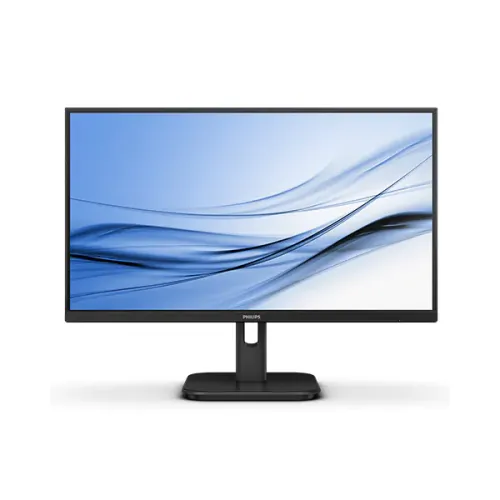
Philips 22E1N1200A/69 21.5-Inch 100Hz Full HD IPS Monitor
Model identity and regional version
The Philips 22E1N1200A is a 1000-series Full HD monitor. Philips’ APAC leaflet identifies the regional model as 22E1N1200A/69, and a Bangladesh retailer listing gives the same manufacturer code. Shops also use their own inventory numbers: Star Tech’s code and Ryans’ product ID identify local shop records, not Philips part numbers. The product and variant MPN fields therefore use the Philips regional code rather than a retailer identifier.
This model should not be confused with the Philips 22E1N1100A, which retailers list with fewer video ports, or with the larger 24E1N1200A and 27E1N1200A. It is also different from 221V8-family displays that use a VA panel and lower refresh rates. Matching the complete model is important because screen technology, port selection and refresh timing can vary between products with similar names.
Full HD IPS panel and surface
The 22E1N1200A has a 21.5-inch (54.5 cm) diagonal IPS display with a W-LED backlight, Full HD 1920 × 1080 resolution and a 16:9 shape. Philips lists typical brightness of 250 cd/m², 16.7 million colors, 1000:1 typical static contrast and 178° horizontal and vertical viewing angles at the stated contrast threshold. The screen is sized for a compact desk and common office, learning, browsing and video work. It provides less workspace than a 23.8-inch or 27-inch display at the same resolution.
The Philips leaflet describes an anti-glare surface with a 3H coating and 25% haze. This finish can reduce reflections from diffuse room lighting but does not eliminate glare from direct sunlight or a lamp aimed at the screen. Philips also lists Mega Infinity DCR. That is dynamic contrast processing and must not be confused with the 1000:1 static contrast rating.
Pixel geometry and color coverage
Philips lists 102 pixels per inch for this display. Its regional materials differ on the exact pixel pitch and effective viewing area. The newer /69 leaflet prints a 0.2493 × 0.241 mm pitch, while an earlier family manual lists a 476.064 × 267.786 mm active area, which is consistent with an approximately 0.248 mm square pitch for 1920 × 1080. The published diagonal, resolution and 16:9 geometry support roughly 102 PPI. The catalog preserves this discrepancy rather than presenting a conflicting pixel figure as physically verified.
The newest Philips /69 leaflet reports 83.31% Adobe RGB, 78.55% DCI-P3, 102.08% sRGB and 86% NTSC coverage and identifies the measurement standards. Older manuals and some Bangladesh listings only say that sRGB is supported. Coverage depends on the color-space measurement method, and it does not constitute an individual calibration report. Color-critical print and grading work should use an appropriate calibration workflow.
100Hz refresh and response-time methods
Philips lists a maximum Full HD refresh rate of 100Hz over HDMI 1.4 and DisplayPort 1.2. A higher refresh lets a compatible source update the picture more often than a 60Hz mode. It can make scrolling or supported motion appear smoother, but the monitor cannot create frames that a computer did not render. The graphics device, cable, driver and operating-system settings must all support the chosen resolution and timing.
Philips specifies typical 4ms Grey-to-Grey (GtG) response and 1ms MPRT. GtG describes a liquid-crystal transition; MPRT describes motion persistence. The MPRT mode strobes the backlight in time with refresh, which Philips notes can change brightness and may cause visible flicker. It is inaccurate to relabel this product as a native 1ms GtG display. Users can choose the motion mode based on the content and comfort.
Adaptive-Sync and SmartImage
Philips lists Adaptive-Sync, also described as variable refresh rate, for compatible sources. The digital HDMI and DisplayPort inputs are the listed high-refresh connections. The computer graphics, driver and software must also support variable refresh. Some Bangladesh retailer pages use the FreeSync label, but Philips’ /69 leaflet calls the feature Adaptive-Sync and does not state a separate AMD FreeSync certification. The page therefore avoids claiming a certification that the manufacturer sheet does not confirm. NVIDIA G-SYNC certification is not listed either.
Philips SmartImage provides selectable picture modes, and the monitor’s menu includes input, volume and display controls. Retailers list game-oriented modes such as FPS, racing and RTS, while exact menu names can vary by firmware. A picture preset changes display settings; it does not guarantee a particular gaming frame rate or change the monitor’s panel hardware.
Video ports, audio and stereo speakers
The connection panel includes one HDMI 1.4 input, one DisplayPort 1.2 input and one VGA (D-Sub) input. Philips lists 100Hz Full HD timing on HDMI and DisplayPort. VGA has a lower scan range, with the regional Philips timing table listing vertical frequencies from 48Hz to 75Hz. HDCP 1.4 is specified for HDMI and DisplayPort. The three inputs support a mix of contemporary digital computers and older analog equipment, although the display selects one active source at a time.
The monitor also has one 3.5 mm PC audio-in and one 3.5 mm audio-out/headphone connector in the regional manual. Philips rates the built-in stereo speakers at 2W × 2. HDMI and DisplayPort can carry digital audio. VGA carries analog video only, so the PC audio-in can feed the internal speakers when using VGA. The headphone jack is an output for private listening and should not be confused with the audio input.
LowBlue, Flicker-free and EasyRead
Philips lists LowBlue Mode, Flicker-free technology and EasyRead. LowBlue adjusts the screen’s blue-light presentation. Flicker-free is a manufacturer backlight feature. EasyRead changes the picture presentation for text-heavy material. These are monitor settings, not medical treatments or guarantees that long work sessions will not cause fatigue. Users should set brightness for the room, reduce reflections, use a comfortable viewing position and take breaks.
The anti-glare surface and IPS viewing angles are useful for everyday documents and shared viewing. Gamut figures from a product leaflet should not be treated as a factory calibration certificate. No unit-specific measurement report is included in the catalog record. Professionals with color-critical requirements should confirm that the monitor and calibration process meet their target standards.
Stand, mounting and physical fit
Philips lists stand tilt from −5° to +20°. Height adjustment, swivel and pivot are not listed for the supplied stand. The monitor supports a 100 × 100 mm VESA pattern, which can be used with a compatible arm or bracket; the arm’s weight limit and mounting screws must suit the actual unit. Philips also specifies a Kensington security slot for a compatible cable lock.
The newest Philips /69 leaflet, version 3.3.1 issued in May 2026, lists 494 × 380 × 180 mm at maximum stand height and 494 × 285 × 41 mm without the stand. Its weights are 2.40 kg with stand and 2.05 kg without. Earlier manuals and Bangladesh listings show different dimensions or weights. The latest regional manufacturer sheet is used as the primary figure here, with the source conflict noted for buyers who need tight shelf clearance or an exact arm load.
Power input and regional documentation
The latest Philips /69 leaflet states an internal power supply with 100–240V AC, 50–60Hz input. It lists typical on-mode consumption of 13.4W, standby of 0.5W and off-mode of 0.3W. Older manual or retailer material describes an external adapter and publishes slightly different dimensions and power figures. Because these details affect the connector and installation, the product listing records the conflicting source versions instead of implying every regional batch is identical.
Before connecting the display, inspect its rear label and use only the cord or adapter specified for the supplied revision. A retailer’s accessory list may reflect another regional package. If the monitor will be used on a UPS, check the exact input rating from the supplied unit and allow for other connected devices.
Box contents and Bangladesh warranty
The latest Philips leaflet gives packaged dimensions of 595 × 376 × 110 mm and packed weight of 4.21 kg. A Bangladesh retailer lists VGA and HDMI cables, a three-pin power cord, 3.5 mm audio cable and user manual among the accessories. Package contents can vary by country and sales lot, so the exact items for this unit should be confirmed from the carton. Do not assume a DisplayPort cable is included unless the seller confirms it.
Bangladesh retailers advertise a three-year warranty for the 22E1N1200A. The local seller, provider, coverage and claim conditions should be confirmed on the purchase invoice. Keep the original box if the provider requires it. External shop prices are used only as market context; they are not a claim about BiponiBD’s price, live stock or customer reviews.
Setup and model-specific limits
To use 100Hz, connect over HDMI or DisplayPort, select 1920 × 1080 and choose a refresh rate supported by the computer and display. On VGA, choose a timing in the manufacturer’s lower analog range. Adaptive-Sync depends on compatible graphics hardware and software. MPRT is optional and may reduce perceived brightness or cause flicker, so disable it if those effects are uncomfortable.
Place the stand on a stable desk and adjust tilt to suit the viewing position. If more height or swivel adjustment is needed, use a suitable riser or VESA arm. Select the correct input in the on-screen menu. Remember that the 3.5 mm PC audio jack is an input while the headphone connector is an output. The black product images show the monitor’s appearance but cannot establish the power-supply revision, accessory box contents or warranty terms.
Confirmed specifications and remaining unit checks
Philips’ sources confirm the 21.5-inch Full HD IPS screen, 100Hz digital inputs, 4ms GtG and 1ms MPRT, HDMI/DisplayPort/VGA, Adaptive-Sync, LowBlue, Flicker-free, EasyRead, 2W × 2 speakers, audio-in/out, VESA mounting and tilt. The newest official /69 leaflet is the primary source for current gamut, power, size and weight. The exact regional suffix is also listed by a Bangladesh retailer.
The older and newer specifications conflict on pixel geometry, power-supply type, dimensions and mass. The individual BiponiBD carton is not photographed, so this description does not claim that those revision-specific details have been checked on the physical stock unit. Buyers whose installation depends on the power connector, dimensions, cables or warranty provider should verify the box and invoice before purchase.