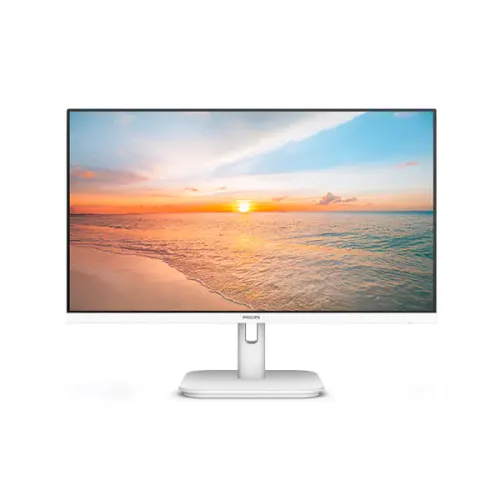
Philips 22E1N1200AW/11 21.5-Inch 100Hz FHD IPS Monitor in White
Model identity and white finish
The Philips 22E1N1200AW/11 is the white version of a Philips 1000 Series 21.5-inch Full HD IPS monitor. Philips’ /11 product page and leaflet show the exact AW model and white chassis. The model family includes a black 22E1N1200A sibling, but the AW suffix identifies the white housing; the current record stays specific to the white product. The Bangladesh listing from Ryans also shows the regional code 22E1N1200AW/11. Retail product IDs such as 08.02.037.75 and 40597 belong to individual stores and are not MPNs.
The panel is listed as 21.5 inches (54.5 cm diagonal), although retailers sometimes describe the monitor as 22-inch class. The title and technical copy use 21.5 inches for the viewable screen and retain the complete manufacturer model code. The product images show the white housing and stand, so the color description is based on the actual variant artwork and Philips’ leaflet.
Full HD IPS panel
The display uses an IPS panel with W-LED backlighting and native Full HD resolution of 1920 × 1080 in a 16:9 format. Its 21.5-inch diagonal suits desks where a compact screen is preferred. Philips lists a 250 cd/m² typical brightness, 1000:1 typical static contrast and approximately 16.7 million display colors. The official viewing-angle specification is 178 degrees horizontally and vertically at C/R greater than 10.
The screen has an anti-glare surface with 3H hardness and 25% haze in Philips’ product specification. Philips also lists EasyRead mode, SmartImage and the EasySelect menu control. These functions let users choose available picture modes and navigate settings; they do not guarantee calibrated color or a particular result for every application.
The white enclosure and matching pedestal distinguish this AW model from its black A sibling. The product images show a thin frame around the front, a front-facing view, and rear views of the housing and stand. They should not be read as a laboratory measurement of bezel width or as proof of features not shown in the leaflet.
100Hz operation and connection timing
Philips’ exact /11 leaflet specifies a maximum Full HD timing of 1920 × 1080 at 100Hz through HDMI and DisplayPort. The VGA timing table lists 1920 × 1080 at up to 75Hz. This distinction matters when selecting a cable or connecting an older computer: the 100Hz mode is not listed for VGA. Philips also gives horizontal and vertical scan-frequency ranges for the different input types.
Choose a supported output in the computer’s display settings after connecting the monitor. If 100Hz does not appear, check the graphics driver, output port, cable, selected resolution and manual. The monitor cannot raise the frame rate generated by the computer or game. A suitable source is needed for smooth motion at the advertised maximum.
The product supports Adaptive-Sync according to Philips and has HDMI 1.4, DisplayPort 1.2 and VGA. HDCP 1.4 is specified for HDMI and DisplayPort. The catalog identifies the ports and the maximum refresh by connector from Philips’ exact /11 timing information; it does not infer an additional HDMI revision, color depth or console mode.
Response time: GtG and MPRT are different
The most important response-time correction is the difference between 4ms GtG and 1ms MPRT. Philips’ /11 specification lists 4ms as the typical gray-to-gray response value and separately lists 1ms MPRT. Some Bangladesh retailer pages call the monitor “1ms GtG,” which does not match the manufacturer’s method-specific specification. The catalog therefore uses Philips’ separate values and documents the retailer conflict.
MPRT describes a motion-blur reduction mode. Philips explains that MPRT operates by adjusting brightness and that the mode may cause visible flicker; it recommends switching the mode off when not gaming. It should not be presented as the same measurement as a pixel transition time. GtG and MPRT numbers are not directly interchangeable without matching measurement conditions.
For everyday work, web use and casual games, response claims are only one part of display behavior. Frame rate, motion processing, source performance and user settings all affect the result. The exact /11 sheet is preferred for this AW variant because it directly states the two separate methods.
Color gamut and the pixel-geometry issue
The official Philips /11 leaflet lists color gamut values of sRGB 102.08%, NTSC 86%, Adobe RGB 83.31% and DCI-P3 78.55%. Philips notes that these values are based on different measurement standards: Adobe RGB and DCI-P3 use CIE1976, sRGB uses CIE1931 and NTSC uses CIE1976. They should not be compared as though they all used one identical measurement method. They are manufacturer-published gamut values, not an independent calibration report for a specific unit.
The /11 leaflet also prints an active viewing area of 478.656 × 260.28 mm, pixel pitch of 0.2493 × 0.241 mm and pixel density of 102 PPI. These geometry figures are unusual: the horizontal and vertical pitch differ, while the advertised format is 16:9. Older or retailer specifications for the Philips 22E1N1200A/AW family show a different active area and 0.2745 mm pitch, which are also associated with a 23.8-inch sibling in some product data. The exact AW /11 values are retained with the source note; the old 92.56 PPI entry is not carried forward as an established fact.
If a precise pixel geometry is critical for engineering or design work, verify the serial-specific leaflet or panel datasheet with Philips support. This listing clearly distinguishes the published manufacturer values from a geometry calculation.
Audio and speakers
Philips lists built-in 2W × 2 stereo speakers, a PC Audio-In connector and a headphone/audio output. A connected HDMI or DisplayPort source can send digital video and audio over the cable; VGA is analog video, so a separate audio connection may be needed when using VGA. The audio jacks and speaker details are part of the model’s product specification, not inferred from the image gallery.
Built-in monitor speakers are convenient for voice calls, basic system sounds or casual viewing without a separate speaker set. They are small integrated speakers; buyers who need stronger or room-filling sound may prefer external audio equipment. A headphone output is available for private listening.
Stand, VESA and physical dimensions
The included stand supports tilt adjustment from approximately −5° forward to +20° backward. Philips does not list height adjustment, swivel or portrait pivot for this stand. The rear of the monitor supports the standard 100 × 100 mm VESA pattern, suitable for compatible desk arms or wall mounts. Follow the product guide when removing the stand and use a bracket rated for the monitor.
Philips’ exact /11 leaflet lists dimensions of 494 × 380 × 180 mm with stand, 494 × 285 × 41 mm without stand, and package size 595 × 376 × 110 mm. The corresponding weights are 2.40 kg with stand, 2.05 kg without, and 4.21 kg packaged. These differ from some Bangladesh retailer pages that repeat older 493 × 376 × 220 mm and 2.61 kg figures. The exact /11 leaflet is used for these values, with the regional variation recorded in the audit.
The monitor also includes a Kensington security slot. Use the image of the actual rear housing as a guide to orientation, but confirm all screw and cabling details with the instruction leaflet before installing an arm.
Power supply, consumption and environment
For model 22E1N1200AW/11, the official Philips leaflet lists an internal power supply rated for 100–240V AC at 50–60Hz. Typical on-mode power is 13.4 watts at 230V/50Hz; standby is 0.5W and off mode is 0.3W. Some retailer pages describe an external adapter and publish 13.3W, likely reflecting generic or older family data. The exact /11 leaflet is prioritized for this white regional variant.
The published operating range is 0°C to 40°C, with relative humidity from 20% to 80%. Philips lists MTBF of 50,000 hours excluding the backlight. These are product-sheet operating conditions and reliability metrics; they should not be interpreted as a guarantee of a particular lifespan in every environment.
Use the supplied mains lead and follow the manual’s safety instructions. Leave airflow around the rear housing and avoid using the monitor in damp or excessively hot locations. The exact contents of a Bangladesh retail carton should be checked with the invoice because accessory bundles can vary by market.
Eye-comfort and adaptive display features
Philips lists LowBlue mode, Flicker-Free technology and EasyRead mode. LowBlue changes the display profile to reduce blue-light output, while EasyRead offers a reading-oriented presentation. These are display settings and should not be described as medical treatment. The matte anti-glare surface helps reduce reflections from windows and overhead lighting, though room placement and screen brightness still affect visibility.
Adaptive-Sync is specified by Philips to match supported frame output and reduce tearing within compatible operating ranges. Retailers also use AMD FreeSync wording, but the official /11 sheet confirms Adaptive-Sync, not a separate AMD certification mark. The catalog uses the manufacturer’s named feature and avoids asserting an unverified certification level.
SmartImage modes and the OSD controls provide picture presets. The monitor is listed as compatible with DDC/CI, sRGB and Windows 10/11; macOS compatibility is also listed in some retailer documentation. Operating system output and graphics drivers can affect available modes.
Installation and compatibility
Place the monitor on a stable surface and attach the white pedestal according to the instruction guide. Connect the power supply, then choose HDMI, DisplayPort or VGA based on the computer. HDMI or DisplayPort can carry digital audio as well as video; VGA carries analog video. Connect external audio to the PC audio input if VGA is used and route headphone output as needed.
Set the source to 1920 × 1080 and select a supported refresh rate. The Philips /11 timing table lists 100Hz for HDMI/DisplayPort and 75Hz for VGA. Use the supplied cable or another cable suited to the source and required timing. If the image is unstable, lower the mode to a supported value and check the source’s display settings before changing hardware.
For VESA installation, verify that the arm supports 100 × 100 mm and the stated weight. Use the correct screws and follow the manual. The supplied stand allows tilt but does not provide listed height, swivel or pivot adjustment, so an arm may be useful where a wider range of movement is required.
Bangladesh warranty and package verification
Bangladesh retailers list a three-year warranty for the Philips 22E1N1200AW. Confirm the warranty provider, claim location, start date, panel-pixel policy and proof-of-purchase requirements on the invoice. The official product leaflet states technical specifications; the local seller’s invoice and warranty documentation govern the regional service terms.
Check that the carton identifies the white AW model and the correct regional code. The Philips page lists a monitor, stand and accessories according to market; local packaging may include a power cord, HDMI cable, documentation and warranty information. Verify the contents at delivery and retain the invoice, serial number, packaging and warranty card for service.
External shop prices and availability change. The catalog does not use those values as a BiponiBD offer, nor does it add stock or review claims. The existing catalog price fields and Active status are preserved separately from research about third-party listings.
Technical comparison notes and limitations
The white AW model belongs to the same Philips family as the black 22E1N1200A, but the complete code and region suffix matter. This record is for 22E1N1200AW/11; it should not inherit a sibling’s color, MPN suffix, older dimensions or panel geometry automatically. The exact /11 leaflet provides the primary data used here, while Bangladesh retailers confirm the white model and local three-year warranty.
There are documented differences between the exact /11 leaflet and some retailer pages in response-time labeling, power-supply type, power consumption, dimensions, weights and pixel geometry. The manufacturer leaflet distinguishes 4ms GtG from 1ms MPRT and lists an internal AC supply. Retailers often repeat 1ms GtG and older external-supply values. Both the source and the resolution are explained rather than hiding the discrepancy.
Per-port timing is specified for HDMI/DP and VGA. Exact noise, input lag and an independent color-calibration report are not published in the reviewed sources. No unsupported HDR rating, user review, BiponiBD inventory claim or measured individual-unit performance is added.
Specifications at a glance
The white Philips 22E1N1200AW/11 is a 21.5-inch IPS W-LED Full HD display with 16:9 aspect ratio, 100Hz timing over HDMI and DisplayPort, and VGA timing up to 75Hz. Philips specifies 4ms typical GtG and 1ms MPRT, 250 cd/m² brightness, 1000:1 static contrast, 178°/178° viewing angles, 2W × 2 speakers, one HDMI 1.4, one DP 1.2, one VGA, PC audio-in and headphone out.
The exact leaflet lists 100 × 100 mm VESA, tilt from −5° to +20°, internal 100–240V AC power, typical 13.4W use at 230V/50Hz, 0.5W standby, 0.3W off, and updated dimensions and weights. The manufacturer code is 22E1N1200AW/11. The three-year Bangladesh warranty duration is sourced from local retail listings and should be confirmed on the purchase invoice.
All 37 existing catalog attributes are mapped in the accompanying matrix. Brand, model, regional MPN, title, long/short descriptions, SEO fields, feature highlights, pros/considerations, FAQs and four image alt texts have been revised, while product identity and existing offer/media IDs remain preserved.