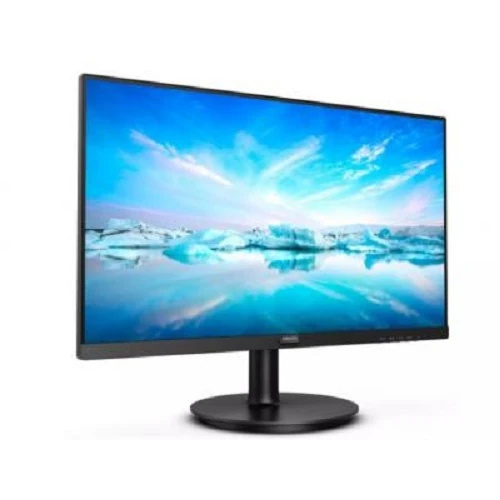
A practical 23.8-inch Full HD desktop display
The Philips 241V8 product listing describes a 23.8-inch class IPS monitor for desktop work, study and home use. Its Full HD 1920 × 1080 resolution and 16:9 aspect ratio support familiar computer layouts for documents, browser windows, video calls and presentations. The product gallery shows a black widescreen monitor on a circular base, along with side and rear views. Bangladesh retailers advertise this listing as a 100Hz model, but the captured product record omits the complete manufacturer suffix. Philips publishes multiple closely named V8 variants with different panel technologies and refresh limits. This description therefore identifies local claims and official family information separately. Buyers should confirm the complete rear-label model code before choosing it for a particular refresh rate or panel requirement.
Screen size, resolution and workspace
The retailer product sheet lists a 23.8-inch diagonal and Full HD 1920 × 1080 resolution. Philips documents describe a 23.8-inch wide (60.5 cm) panel, commonly marketed in the 24-inch category. A 16:9 canvas suits typical desktop software and video. Full HD is a mainstream resolution for office productivity and general viewing; it does not provide the pixel density or workspace of a 1440p or 4K display. Text size and usable desktop area can be adjusted in the connected computer’s display settings. Use the native 1920 × 1080 resolution where possible to avoid scaling softness, and ensure the cable and graphics output support the intended resolution and refresh rate.
Panel technology and viewing angle
The seller identifies this catalog item as IPS. Philips confirms IPS technology for base 241V8 and some related variants, while other models in the same V8 naming family use VA panels. Philips lists a typical 178-degree horizontal and vertical viewing angle for the IPS specification. Because the exact suffix is absent here, the catalog title alone is insufficient to identify every panel detail of the shipped revision. The panel label or Philips suffix-specific specification should be used when panel type matters, especially for multi-viewing arrangements or color-sensitive work. A wide nominal viewing angle does not itself guarantee calibrated colors or uniform brightness across the screen.
Refresh rate and model suffix conflict
The local product title and retailer pages advertise 100Hz and 4ms GtG. Philips’ official technical tables distinguish several suffixes. In one family document, base 241V8 supports 48–60Hz over VGA and up to 75Hz over HDMI, while 241V8B is an IPS model with HDMI support up to 100Hz. A newer family table lists 241V8LB among the 100Hz HDMI models but identifies that suffix as VA; 241V8LAB is also in the 100Hz group and IPS. These suffix-dependent differences explain why “241V8 IPS 100Hz” cannot be verified from the incomplete model name alone. Check the unit’s full code and matching Philips specification before purchase. A 100Hz mode also requires a compatible HDMI source, correct cable and host settings.
Brightness, contrast and color
The local specification lists 250 cd/m² brightness, 1000:1 contrast and 16.7 million colors. Philips documentation supports these figures for the base 241V8, while related suffixes may use different contrast ratios. Philips lists sRGB support in family documents, but that does not provide a numerical gamut coverage percentage or factory calibration report. Use the monitor’s OSD controls and the host display settings to adjust brightness and color for the room. For photo editing, print proofing or other color-critical work, request an exact-suffix color gamut and calibration report. The retailer’s marketing text calls the colors realistic but does not establish measured color accuracy.
Eye-comfort features
Philips family materials list Flicker Free and LowBlue Mode, and Bangladesh retailer listings repeat those features for this product. These modes can help users choose display settings that feel more comfortable for their environment, but individual comfort varies. Take regular breaks, set appropriate room lighting and adjust brightness to avoid excessive contrast with the surroundings. Feature menus and naming may vary by exact 241V8 suffix, so inspect the OSD after setup. The product listing should not imply that eye-comfort features prevent eye strain or replace healthy screen habits.
Connectivity: VGA, HDMI and audio
The Bangladesh listing specifies VGA and HDMI. Philips technical documents list one VGA input and one HDMI 1.4 input across the family. This gives compatibility with older analog video output and common digital HDMI sources, provided the correct cable and output mode are used. The base 241V8 routes HDMI audio out; this may refer to audio signal passing from HDMI rather than a separate physical headphone connector. The retailer record has inconsistent wording between “Audio Out” and “HDMI audio out,” so check the rear-panel ports on the exact revision. No USB-C or DisplayPort input is listed for this unit. A computer with only USB-C or DisplayPort may require an appropriate active or passive adapter, depending on the source.
Adaptive Sync and general motion
The retailer lists FreeSync support, and Philips’ family technical documentation lists Adaptive Sync. Exact mode availability and operating range depend on the model suffix, source graphics card, cable and monitor settings. Enable the feature only when supported by both source and display. A 100Hz refresh claim should be treated as variant-dependent until the code is confirmed. Ordinary tasks do not require Adaptive Sync; it is relevant mainly when compatible graphics hardware varies its frame output. The catalog page does not establish a precise Adaptive Sync range, so no range is promised here.
Stand, tilt and VESA mounting
Local specifications list tilt adjustment from 5 to 20 degrees, and Philips family documentation states a −5° to +20° tilt range. The standard stand shown in the images uses a round base and central upright. The seller lists VESA mounting at 100 × 100 mm, which can allow use with a compatible arm or wall mount. The captured source does not establish height adjustment, swivel or pivot support for the standard stand. If those movements are needed, plan for a VESA-compatible arm and verify the screw size and monitor weight. Position the monitor on a stable desk and tighten the mount according to its instructions.
Power use and physical setup
The listing states a built-in power supply and 100–240V AC, 50–60Hz input. Philips documentation gives typical operating consumption around 20W for base 241V8, with lower sleep and off-mode values. Actual use varies with brightness and operating conditions. The local seller lists dimensions of approximately 540 × 416 × 220 mm with the stand and 540 × 322 × 50 mm without it, plus a weight near 3.06 kg with stand. Those physical figures are retailer information and should be checked against the suffix-specific datasheet if desk clearance or mounting load is critical. Connect directly to a suitable grounded outlet and follow the included safety guidance.
What the model documentation establishes
Philips’ official technical documents are decisive about family differences: base 241V8 is IPS and has up to 75Hz HDMI in the cited technical tables; separate suffix models can support 100Hz. Depending on suffix, the panel may be IPS or VA, contrast can vary, and audio features differ. Bangladesh sellers consistently advertise this catalog title as IPS and 100Hz, but without a visible complete model code those claims do not identify the exact manufacturer configuration. This listing keeps the local offer identity while warning shoppers about the suffix ambiguity. The box label and seller invoice should show the exact product code. Do not infer a missing letter suffix from retailer shorthand.
Warranty and Bangladesh purchase checks
The captured product record states a three-year warranty, and local retailers also list three years. Warranty duration alone does not identify the service provider or the conditions. Ask whether coverage is handled by an authorized Philips distributor or the selling retailer, what invoice or serial information is required, and how dead pixels or backlight defects are assessed. Confirm whether the original box is needed for a claim. Local price and inventory are time-sensitive; the catalog’s variant price is not independently guaranteed by the reference research. Confirm the current price, availability, exact model suffix, stand, cable and warranty terms at checkout.
Who this monitor may suit
This Philips monitor may fit a home office, study desk or general desktop setup where Full HD resolution, a 23.8-inch screen and HDMI/VGA inputs meet the user’s needs. Its IPS claim and Philips’ eye-comfort features may appeal to users seeking a conventional flat display. People who specifically need a verified 100Hz panel, a particular IPS/VA technology, integrated speakers, USB-C, DisplayPort, height adjustment or a measured color gamut should verify those details against the exact suffix first. The model conflict is the main purchase check; matching the rear-label code to Philips’ official data sheet removes ambiguity about refresh rate and panel.
Setup checklist
Before connecting, read the model code on the back label and compare the suffix with the official Philips specification. Use VGA or HDMI according to the source output. Open the computer’s display settings and select 1920 × 1080, then choose only a refresh rate the exact model, port and host support. Adjust tilt and brightness for the desk. If using an arm, confirm the VESA pattern and load rating. Route sound through HDMI only if the source and monitor revision support it; do not expect built-in speakers on the base model. If the expected refresh option is unavailable, update the graphics driver, check the HDMI cable and verify the model suffix before assuming the monitor is defective.
Technical specification summary
Key features
- Retailer listing identifies a Philips 241V8-series monitor with a 23.8-inch (60.5 cm) widescreen panel.
- The displayed resolution is listed as Full HD 1920 × 1080 with a 16:9 aspect ratio.
- Bangladesh sellers identify an IPS panel; Philips documentation confirms IPS on base 241V8 and some suffix variants.
- Bangladesh listings claim 100Hz refresh and 4ms GtG, but the exact suffix is needed to verify those figures.
- The base Philips 241V8 official specification states 48–75Hz over HDMI and 48–60Hz over VGA; some suffix models support 100Hz HDMI.
- Philips documentation lists 250 cd/m² brightness, 1000:1 contrast and 16.7 million display colors for the base family.
- The Philips family document lists VGA ×1 and HDMI 1.4 ×1 with HDCP 1.4.
- The base 241V8 routes HDMI audio out and does not list built-in speakers in the retailer specification.
- Philips lists Flicker Free, LowBlue Mode and Adaptive Sync in family documentation; feature availability depends on the exact model.
- Bangladesh retailers list a three-year warranty; verify the authorized local provider and written claim terms.
Advantages
- A 23.8-inch Full HD workspace fits common office, study and home-computing tasks.
- VGA and HDMI inputs can accommodate older and newer desktop or laptop video outputs with the right cable.
- IPS on the base 241V8 and select variants supports broad viewing angles; Philips states 178° horizontal and vertical.
- Philips documentation lists eye-comfort functions including Flicker Free and LowBlue Mode.
- Local sellers advertise three-year warranty coverage, subject to the seller/distributor terms.
Points to consider
- Model suffix is missing from the listing; refresh rate, panel type and related specs vary among 241V8 family models.
- The seller advertises 100Hz, but base 241V8 official documentation states up to 75Hz HDMI; verify the model label before purchase.
- The monitor has no USB-C or DisplayPort input listed for this model; connectivity is VGA and HDMI.
- The included stand is described as tilt-only; height, swivel and pivot adjustment are not established.
- Built-in speakers are not listed for the base model, and the catalog audio-jack field needs clarification for the exact revision.
Frequently asked questions
Which exact model is this listing for?
The Bangladesh listing names Philips 241V8 but does not include a complete suffix in the captured product title. Philips documents several related models such as 241V8, 241V8B, 241V8LB and 241V8LAB, with different panels and refresh limits. Confirm the full code from the rear label or box before purchase.
What resolution does it use?
Local listings specify Full HD 1920 × 1080. Philips documentation for the 241V8 family also identifies 1920 × 1080 as the native resolution. The exact model and video connection determine the supported refresh rate.
Is it a 100Hz monitor?
Bangladesh retailers advertise the listing as 100Hz. Philips official documents show base 241V8 HDMI supports up to 75Hz, while 100Hz HDMI belongs to certain suffix variants. Ask for the full suffix on the physical unit and a suffix-matched Philips data sheet before relying on 100Hz.
Is the panel IPS?
Retailers describe this product as IPS. Philips identifies base 241V8 and some suffix versions as IPS, but other related variants, including 241V8LB, use VA. The missing model suffix makes the delivered panel revision important to confirm.
What is the screen size and aspect ratio?
Retailers list 23.8 inches and 16:9. Philips gives the panel as 23.8-inch wide (60.5 cm), which is often marketed as a 24-inch class monitor.
What brightness and contrast are specified?
The local page lists 250 cd/m² brightness and 1000:1 contrast. Philips documentation confirms 1000:1 for base 241V8; other suffixes can differ, so use the exact model specification if you need a precise comparison.
What ports are available?
The captured Bangladesh listing lists HDMI and VGA. Philips family documentation specifies VGA ×1 and HDMI 1.4 ×1. The base 241V8 can route audio out over HDMI; this is not the same as a built-in speaker or necessarily a physical headphone jack.
Does it have built-in speakers?
The retailer specification says no for the base product listing, and the base Philips document does not list integrated speakers for 241V8. Some other V8 family models add speakers. Confirm the full suffix and unit before expecting onboard audio.
Can I mount it on a monitor arm?
The Bangladesh listing specifies a 100 × 100 mm VESA mount. Confirm that the mounting holes and screws are present on the delivered revision, and use an arm rated for the monitor’s weight.
Can the stand adjust height or rotate?
The listing reports tilt adjustment from approximately −5° to +20°; Philips documentation gives −5°/+20°. Height, swivel and pivot are not established for the standard stand, so use a compatible VESA arm if those movements are required.
What is the warranty in Bangladesh?
The local listing states three years. Ask which authorized seller or distributor handles the claim, whether the invoice and original packaging are required, and what pixel or panel defects are covered.
Why does the catalog say “0–40 Degrees” for color temperature?
That value is not a meaningful color-temperature specification and appears to be a catalog data error. Philips OSD colour settings vary by model and preset; this listing now flags that field for confirmation instead of presenting it as a valid temperature range.
The exact Philips suffix is missing from the retailer title. Confirm the rear-label model code; Philips documents different IPS/VA panels and refresh-rate limits across 241V8 variants.