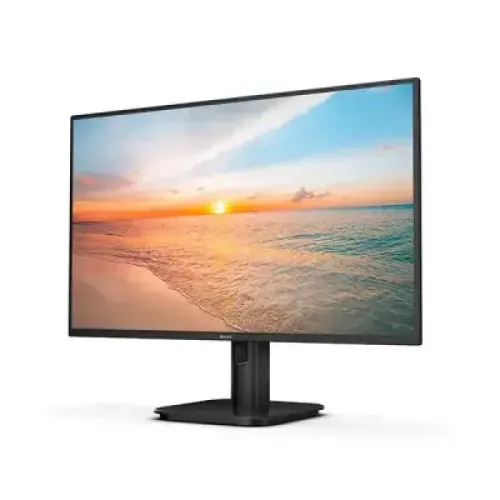
A Full HD monitor for desk, study and entertainment
The Philips 24E1N2100A is a 23.8-inch IPS LCD monitor in the familiar 24-inch product class. It combines 1920 × 1080 Full HD resolution with a maximum 120Hz refresh rate over HDMI, built-in stereo speakers and a tilt stand. That mix can suit a home office, study desk or everyday gaming setup where a compact screen, common video connections and basic audio are useful. Philips’ official datasheet for regional model 24E1N2100A/69 is the primary source used here. Since the exact regional suffix on the catalog unit is not visible, the listing uses the family model number without guessing the suffix.
Screen size and Full HD workspace
The panel diagonal is 23.8 inches, or about 60.5 cm. Philips lists an effective viewing area of 527.04 × 296.46 mm and a native resolution of 1920 × 1080 pixels in a 16:9 shape. This standard format works with typical Windows desktops, laptops, streaming video and many console outputs. It gives a useful balance between visible workspace and desk footprint for documents, browser windows, class material and video. Full HD does not provide the extra detail or workspace of QHD or 4K, so users who regularly work with complex timelines, high-resolution source files or many dense windows may want to compare larger or higher-resolution monitors.
IPS viewing and picture characteristics
Philips uses an IPS panel with horizontal and vertical viewing angles rated at 178 degrees at a contrast threshold above 10:1. The wide-angle rating is useful when someone views the screen from beside the desk or when the display is shared. It does not mean the image looks identical from every possible angle. Typical brightness is 300 cd/m², typical contrast is 1500:1, and color support is 16.7 million colors. SmartContrast adjusts backlight and image treatment according to the displayed content; it is a processing feature, not the same measurement as the native typical contrast ratio.
Color coverage and practical limits
Philips’ regional datasheet lists sRGB area at 102.66%, Adobe RGB at 84.49% and DCI-P3 at 81.39%, with the footnote specifying different measurement standards for those values. These figures describe gamut area and are not a factory calibration certificate. They can be informative for general web graphics and media, but they do not prove that each unit is calibrated to a professional target. If work depends on exact color, use a suitable calibration device and workflow, and check the application’s color-management behavior. The entry should preserve the manufacturer’s measurement wording so an area value is not incorrectly described as exact coverage.
120Hz refresh and connection choice
Philips specifies a maximum Full HD resolution of 120Hz over HDMI, with an HDMI vertical frequency range from 48 to 120Hz. VGA’s vertical range ends at 75Hz. Therefore, use HDMI 1.4 when 120Hz matters. The source computer must be able to output 1920 × 1080 at 120Hz, and the graphics settings must be configured to use that mode. A cable, adapter, docking station or other intermediate device can reduce the available refresh modes. A 120Hz monitor refreshes the display up to 120 times per second; it does not make a computer render 120 frames per second automatically.
Response time and MPRT blur reduction
The Philips datasheet lists a typical 4ms Gray-to-Gray response and a separate 1ms MPRT mode. MPRT is a motion-blur reduction feature that synchronizes or strobes the LED backlight to the refresh cycle. Philips warns that this can make the picture visibly flicker and that brightness cannot be adjusted while MPRT is enabled. Treat 1ms MPRT as an optional motion mode, not as a claim that every pixel transition always completes in one millisecond. The typical 4ms GtG value describes a different response-time measurement. Users can decide whether the motion effect is worth the brightness and flicker trade-off for their content.
Adaptive-Sync for variable frame rates
Philips lists Adaptive-Sync / variable refresh rate. When a compatible graphics source and connection operate within a supported range, variable refresh can help align display refresh with frame delivery and reduce tearing or judder in supported content. Actual support depends on the source hardware, software driver, display mode and system configuration. The product entry does not claim NVIDIA G-SYNC certification; a seller’s use of “G-Sync” as a broad compatibility phrase is not the same as a manufacturer certification record. Buyers who need a specific console or graphics-card feature should check that device’s supported output modes and verify them after connection.
Ports, HDCP and computer compatibility
The official Philips regional datasheet lists one VGA input and one HDMI 1.4 input, plus audio-in and audio-out. HDCP 1.4 is specified on the HDMI connection. There is no DisplayPort or USB-C input listed for that regional sheet. HDMI carries video and compatible digital audio; VGA carries analog video and may need a separate audio path. A computer with only USB-C output will require a compatible video adapter or dock. Verify that adapter’s Full HD 120Hz support if the highest refresh rate is important. The built-in speakers are useful for basic sound but do not replace a dedicated headset or speakers where audio quality matters.
Built-in speakers and audio use
Philips rates the integrated stereo speakers at 2W per channel. They can be convenient for system alerts, a lesson, a short call or casual video without adding another device to the desk. Their small power rating means they are best treated as basic convenience audio rather than a high-volume or bass-rich sound system. The product sheet lists audio-in and audio-out connections as well, although the exact routing of a connected source can depend on the selected input and device setup. A headset or external speakers connected to the computer remain a better choice for private listening, games where positional audio matters, or a room with background noise.
Eye-comfort and screen surface
Philips lists SoftBlue, LowBlue Mode, Flicker-free and EasyRead features. These options are intended to provide different viewing modes; they do not remove the need for sensible lighting, viewing distance and breaks during long sessions. The datasheet describes an anti-glare coating with 3H hardness and 25% haze. An anti-glare surface can reduce mirror-like reflections under ordinary indoor lighting, though bright windows and lamps can still create glare. EasyRead is a picture preset intended for document-like content, and the user can switch modes through the on-screen display when the task changes.
Stand, tilt and VESA mounting
The supplied stand supports −5 to +20 degrees of tilt. Philips does not list height adjustment, swivel or pivot for the stand, so buyers who need precise eye-level positioning may use a stable riser or compatible monitor arm. The display supports a 100 × 100 mm VESA mount and includes a Kensington lock slot. Before attaching an arm or wall bracket, confirm that its weight rating and screw pattern match the monitor and follow the mount maker’s installation instructions. Adjust the screen to reduce reflections and keep a comfortable viewing position; do not apply pressure to the LCD panel while fitting the stand.
Dimensions and package weight
With the stand at maximum height, the monitor measures 542 × 417 × 180 mm and weighs about 2.92 kg. Without the stand, it measures 542 × 316 × 45 mm and weighs about 2.57 kg. The product’s shipping package measures 610 × 370 × 124 mm and weighs 4.68 kg. Those last two figures include packaging and should not be used for desk-fit or monitor-arm sizing. Allow additional space for the power and video cable bends behind the screen, and retain the original box if a local warranty provider requires it for transit or a claim.
Power use and operating details
Philips lists an internal 100–240V AC power supply at 50–60Hz. Typical on-mode use is 14W, standby use is 0.5W and off-mode use is 0.3W in the official specification. Actual use can vary with brightness, selected modes and operating conditions. The built-in supply means the monitor connects to mains power rather than relying on a separate external brick, despite some catalog or retail listings using the ambiguous word “external.” Use a correctly rated power cable and a safe outlet. The Philips datasheet also lists an operating temperature range from 0 to 40°C and a 50,000-hour MTBF figure excluding the backlight; these are manufacturer test/specification values, not a promise of a specific individual unit lifespan.
Sustainability and regional paperwork
Philips lists RoHS compliance, 100% recyclable packaging material and a PVC/BFR-free housing for the /69 datasheet configuration. It also says regional products and accessories can differ, and specifications may change. The official leaflet’s sample imagery may not match the exact unit’s appearance. These notes are reasons to check the product carton and included paperwork on delivery. An EAN printed for a particular regional configuration should not be copied into this catalog as the verified barcode for a Bangladesh product without confirming that exact suffix on the supplied stock.
Who may want this monitor
This Philips can fit a student or home-office user who wants a Full HD IPS screen, common HDMI and VGA inputs, integrated speakers and a higher-than-60Hz refresh rate. Casual gaming is possible when the computer supports the HDMI 120Hz mode and Adaptive-Sync path. The eye-comfort modes and compact footprint can also be helpful for everyday documents and browsing. Compare another model if you specifically need USB-C docking, DisplayPort, height-adjustable ergonomics, a high-resolution workspace, high-powered speakers or verified color calibration. Philips does not list HDR for this model in the regional sheet, so 300 nits and IPS color should not be mistaken for HDR certification.
Bangladesh warranty and market context
Bangladesh retail pages advertise a three-year warranty and show different prices depending on seller, stock and promotions. Such listings are seller-specific and may change; they are not a permanent Philips promise for every imported regional suffix. Confirm whether the unit is covered by the local service provider, which parts or panel defects are included, where service is handled and whether the original carton is required. This catalog description does not claim a current BiponiBD price, stock state, delivery period, customer review or rating. Compare the live offer page and invoice rather than relying on an older external price snapshot.
A quick setup checklist
After placing the monitor on a stable desk or installing a compatible VESA mount, connect power and use HDMI for the highest refresh setting. In the operating system, choose 1920 × 1080 and then select up to 120Hz if that option is available. If the mode is missing, verify the source graphics output, cable, adapter, dock, driver and selected monitor input. Enable Adaptive-Sync only when the graphics source supports it. Try MPRT only if its strobing effect is comfortable; disable it if flicker or reduced brightness is distracting. Set a moderate brightness for the room, route cables safely and use the on-screen controls to adjust audio volume and picture mode.
Technical specifications
Key features
- 23.8-inch / 60.5 cm IPS display with a 1920 × 1080 Full HD image and 16:9 aspect ratio.
- Up to 120Hz at Full HD over HDMI; Philips lists a VGA vertical frequency range up to 75Hz.
- 300 cd/m² typical brightness, 1500:1 typical contrast and 16.7 million display colors.
- 1ms MPRT motion-blur reduction mode and 4ms Gray-to-Gray typical response; these are different measurements.
- 178° horizontal and vertical viewing angles, anti-glare 3H coating and 25% haze.
- sRGB area 102.66%, Adobe RGB 84.49% and DCI-P3 81.39% on the regional Philips datasheet; gamut standards differ.
- One HDMI 1.4 input, one VGA input, HDCP 1.4 on HDMI, audio-in and audio-out connections.
- Built-in stereo speakers rated 2W × 2; a Kensington lock slot and VESA 100 × 100 mm mounting.
- Philips SoftBlue, LowBlue Mode and Flicker-free features; EasyRead and SmartImage picture presets.
- Internal AC supply, 14W typical on-mode, 0.5W standby and 0.3W off mode in Philips datasheet.
Advantages
- 120Hz over HDMI provides smoother desktop motion and can support high-refresh casual gaming when the computer outputs the compatible mode.
- IPS viewing angles and Philips-published color-area figures suit general work, study, web content and everyday media viewing.
- Built-in 2W × 2 speakers provide convenient basic audio without adding separate desk speakers for light use.
- HDMI and VGA cover common digital and legacy computer connections, and HDMI supports HDCP 1.4 content protection.
- VESA mounting, tilt adjustment, Kensington lock and Philips eye-comfort features give useful setup choices for shared work areas.
Things to consider
- The supplied stand tilts but has no listed height adjustment, swivel or pivot; users may need a riser or VESA arm.
- The VGA input is limited to 75Hz vertical scanning; use HDMI for the advertised 120Hz mode.
- The built-in speakers are rated at 2W each and are intended for convenient basic sound, not room-filling or high-fidelity audio.
- The display is Full HD rather than QHD or 4K, so detailed creative work and dense multitasking have less screen workspace.
- 1ms MPRT uses backlight strobing, may visibly flicker and reduces brightness control; it is not the same as 1ms GtG response.
Frequently asked questions
What is the exact model and regional suffix?
The catalog model is Philips 24E1N2100A. Philips publishes an official datasheet for 24E1N2100A/69, which matches the listed feature family. The suffix printed on the Bangladesh unit is not visible in the supplied catalog images, so this entry does not assert that regional code as the unit MPN.
Is the screen 24 inches?
Philips specifies a 23.8-inch (60.5 cm diagonal) IPS panel, commonly sold in the 24-inch class. The active viewing area is 527.04 × 296.46 mm, with 1920 × 1080 pixels.
Does the Philips 24E1N2100A support 120Hz?
Yes. Philips lists a maximum 1920 × 1080 at 120Hz and an HDMI vertical scan range of 48–120Hz. The computer, graphics output, cable, active input and operating-system display setting must all support the mode.
Can VGA reach 120Hz?
No. Philips specifies VGA vertical scanning from 48Hz to 75Hz. Connect through HDMI 1.4 to use the monitor’s 120Hz Full HD mode.
What do 1ms MPRT and 4ms GtG mean?
Philips lists 1ms MPRT for its blur-reduction mode and a typical 4ms Gray-to-Gray response. MPRT works by synchronizing/strobing the backlight, can cause visible flicker and changes brightness control; it is not a universal 1ms pixel transition.
What are the brightness and contrast ratings?
Philips specifies 300 cd/m² typical brightness and 1500:1 typical contrast. Mega Infinity DCR is a dynamic contrast feature and is separate from the typical static contrast figure.
What color gamut does it cover?
Philips regional datasheet lists sRGB area 102.66%, Adobe RGB 84.49% and DCI-P3 81.39%. The measurements use different color-space definitions and should not be treated as factory calibration or as proof of professional color accuracy.
Which ports and audio connections are available?
Philips specifies one HDMI 1.4 and one VGA input, with HDCP 1.4 over HDMI, audio-in and audio-out. The monitor also includes two 2W speakers. There is no DisplayPort or USB-C input listed in the /69 datasheet.
Does it support Adaptive-Sync or FreeSync?
Philips lists Adaptive-Sync / variable refresh rate. This description does not claim NVIDIA G-SYNC certification. Compatibility can depend on the graphics card, connection, driver and selected display mode.
Can I mount it on a monitor arm?
Yes. Philips specifies a 100 × 100 mm VESA mount and a Kensington lock slot. Check the mount’s supported weight and screw requirements. The included stand supports −5° to +20° tilt, without listed height adjustment.
What are its dimensions and weight?
Philips lists 542 × 417 × 180 mm with stand at maximum height and 2.92 kg with stand. The panel alone is 542 × 316 × 45 mm and 2.57 kg. Packaging is 610 × 370 × 124 mm and 4.68 kg; package measurements are not monitor dimensions.
What warranty and box contents should I expect in Bangladesh?
Philips datasheet states accessories and products may vary by region; the specific /69 leaflet does not establish the Bangladesh seller’s service terms or a complete carton list. Bangladesh retailers advertise three years. Confirm the suffix on the unit, local warranty provider, service conditions, included cable(s), stand, paperwork and invoice with the seller.
Specifications are based primarily on Philips official 24E1N2100A/69 datasheet. Regional unit suffix, carton contents and local warranty should be verified with the seller.