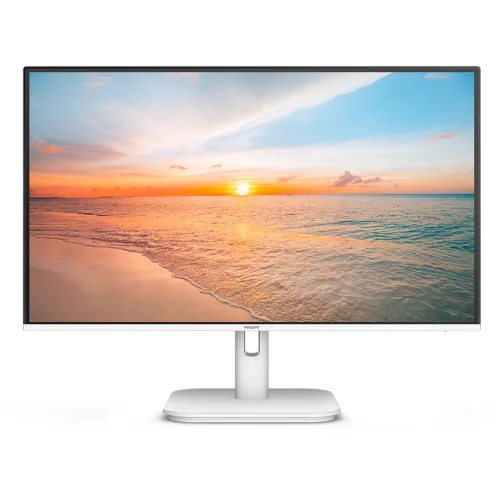
A white Full HD monitor for mixed use
The Philips 24E1N2100AW is a 23.8-inch white desktop display designed for home, study and gaming setups. Philips regional documentation identifies an IPS panel, Full HD resolution and a maximum refresh rate of 120Hz over HDMI. It also specifies built-in stereo speakers and eye-comfort features. The five catalog images show a white-framed monitor with a matching stand, a front view displaying a sunset, angled and side profiles, and rear views of the mount and connection area. Those images help distinguish the white AW model from a visually similar black variant. Regional suffix and bundle matter: the official AW/69 datasheet lists HDMI and VGA, while Bangladesh retailers also mention DisplayPort. Confirm the complete code and actual rear-panel connections for the unit being sold.
Screen size, resolution and pixel density
The display is 23.8 inches diagonally (60.5 cm), with a 16:9 aspect ratio and native resolution of 1920 × 1080. Philips lists a pixel pitch of 0.2745 × 0.2745 mm and pixel density around 93 PPI. This provides a familiar Full HD workspace for documents, browsing, video calls, study and gaming. Set the computer to 1920 × 1080 for the native image. Full HD at this size is a practical mainstream format, although buyers who need finer text or a larger workspace may compare QHD or 4K screens. Scaling and viewing distance affect perceived sharpness, so make display settings comfortable for the desk and user.
IPS picture and published color coverage
Philips specifies IPS technology, a W-LED backlight, 16.7 million colors and a typical 178-degree horizontal/vertical viewing angle. The AW/69 regional sheet lists gamut area values of 102.66% sRGB, 89.36% NTSC, 81.39% DCI-P3 and 84.49% Adobe RGB. The document notes that sRGB area uses CIE1931 while DCI-P3 and Adobe RGB/NTSC use other measurement standards. Gamut area is not the same as calibrated color accuracy or a guarantee that every unit is factory profiled. For photo editing, print work or color grading, request calibration evidence and use a colorimeter if required. These specifications are stronger evidence than general retail claims about vivid color.
120Hz and input-specific refresh limits
Philips lists a maximum 1920 × 1080 refresh rate of 120Hz, with HDMI supporting 48–120Hz and VGA 48–75Hz. The input matters: VGA cannot provide the full 120Hz range according to the specification. After connecting by HDMI, select 1920 × 1080 at 120Hz in the host operating system if the graphics output, cable and source support it. If 120Hz is unavailable, check the selected input, cable, graphics driver and display mode. A display refreshes only as often as its source provides frames; game performance also depends on the computer and application. Do not use the VGA port expecting the maximum HDMI refresh specification.
Response time: 4ms GtG and 1ms MPRT
Philips gives both 4ms Gray-to-Gray typical response and 1ms MPRT. They are distinct metrics. MPRT is a gaming-oriented motion mode that synchronizes backlight strobing with refresh to reduce perceived blur. Philips cautions that this can cause noticeable brightness changes and flicker, and brightness cannot be adjusted while MPRT is active. Turn the mode off when you are not using it or if flicker is uncomfortable. The 1ms number should therefore not be advertised as 1ms GtG. Motion perception also depends on frame rate, refresh rate, transitions and settings. This product copy keeps both manufacturer measures with their proper labels.
Brightness, contrast and SmartContrast
The Philips AW/69 datasheet specifies typical brightness of 300 cd/m² and a typical contrast ratio of 1500:1. It also lists SmartContrast Mega Infinity DCR, a dynamic picture enhancement feature. Brightness can be adjusted to suit room lighting; a high setting in a dark room may be uncomfortable. Static and dynamic contrast descriptions are not interchangeable, so the typical 1500:1 figure is the useful panel comparison. Retailer data for this exact product broadly matches Philips on brightness and contrast. Actual perception can vary with the picture preset, source material, viewing environment and regional hardware.
Adaptive Sync, gaming and HDR claims
Philips documents Adaptive Sync, SmartImage and 120Hz refresh for the 24E1N2100AW. Adaptive Sync can coordinate refresh behavior with compatible graphics output and help reduce tearing. The official AW/69 datasheet does not list HDR support, so this description does not promise HDR. Some other Philips product pages or retail templates may combine features across models; the exact regional sheet is the source of truth for the features stated here. Philips does not establish Nvidia G-SYNC certification in the source reviewed, so “G-SYNC certified” is not claimed. Check the graphics control panel and monitor OSD for the actual available adaptive-sync option.
LowBlue, SoftBlue, Flicker-free and EasyRead
The Philips regional product sheet lists LowBlue Mode, SoftBlue, Flicker-free and EasyRead. These picture options can help users tune the screen for reading, ordinary work or evening use. SoftBlue is described by Philips as a technology paired with the low-blue-light panel, and its document cites third-party testing for that technology. Individual comfort differs; adjust brightness, take breaks and avoid using a very bright screen in a dark room. EasyRead and LowBlue are display modes, not medical treatments. The anti-glare screen coating is listed as 3H with 25% haze, which helps manage reflections but does not eliminate glare in strong direct light.
Ports, speakers and regional connector differences
Philips AW/69 official documentation lists one HDMI 1.4 input, one VGA input, one audio input and one audio output, with HDCP 1.4 over HDMI. It also lists built-in 2W × 2 speakers. Bangladesh retailer pages add a DisplayPort 1.2 connector to the port list, but that is not present in the official AW/69 source used here. The catalog image of the rear panel visually shows several ports, but its small graphic does not prove every connector’s type. This listing records the official HDMI/VGA set and separately flags the seller’s DP claim. Inspect the actual rear panel or ask for a photo of the exact stock item before relying on DisplayPort.
Stand, VESA mounting and dimensions
The official datasheet lists stand tilt from −5° to +20°, a 100 × 100 mm VESA mount and a Kensington lock. The product gallery shows a white stand and rear mounting area. Height adjustment, swivel and pivot are not listed for the standard stand. Philips gives dimensions of 542 × 417 × 180 mm with stand and 542 × 316 × 45 mm without it. Weight is 2.92 kg with the stand and 2.57 kg without it. Check desk depth, arm load and mounting hardware before setup. Route cables without putting strain on the panel or connectors.
Internal power and operating consumption
Unlike displays that use an external brick, Philips specifies an internal power supply rated for 100–240V AC at 50–60Hz. Typical active power use is approximately 14W, with 0.5W standby and 0.3W off mode. Actual consumption depends on brightness, content and operating conditions. Use the monitor’s supplied AC cable and a suitable outlet. The catalog “Type: External” value was inaccurate; this record corrects it to an internal AC supply based on Philips documentation. The rear product images show the AC inlet near the connection panel. Keep ventilation unobstructed and follow the manufacturer’s safety guidance.
Retailer bundle and warranty checks
Bangladesh retailers list three-year warranty for the 24E1N2100AW. Confirm the service provider, claim location, dead-pixel policy, required invoice and serial number, and whether the package must be retained. The exact regional suffix can affect connectors and bundled accessories. Ask whether a DisplayPort cable is included if your selected unit actually has that input. Philips’ regional datasheet lists built-in speakers and audio in/out; confirm the physical ports and power cable in the shipped box. Prices and stock change and are not guaranteed by this specification review. Keep the invoice and product label photo for future support.
Who this monitor may suit
This model can suit home users who want an IPS Full HD screen, 120Hz HDMI refresh, built-in speakers and an understated white finish. Its HDMI and VGA connectivity fit common computers and media devices; regional seller claims of DisplayPort need verification. It may not suit buyers who need a higher pixel resolution, USB-C docking, a height-adjustable stand, or guaranteed HDR. For gaming, check that the computer can output Full HD at 120Hz over the port used. For color-sensitive work, consider a calibrated display rather than relying solely on gamut coverage. Compare the documented regional model code, connector set, local warranty and included cables before buying.
Setup checklist
Read the rear model code and check the regional suffix. Connect over HDMI for access to 120Hz; VGA is limited to 75Hz by Philips’ specification. Select 1920 × 1080 and a supported refresh rate in the computer settings. Enable Adaptive Sync only when the graphics hardware supports it. If using MPRT, note Philips’ warning that the mode can reduce brightness and introduce flicker. Route sound to the built-in 2W × 2 speakers or an external audio device. Confirm whether the particular unit has DisplayPort before planning a DP connection. Set tilt and brightness, verify stable placement and keep the three-year local warranty documents.
Technical specification summary
Key features
- 23.8-inch (60.5 cm) IPS W-LED display with Full HD 1920 × 1080 and a 16:9 aspect ratio.
- Up to 120Hz refresh over HDMI; VGA supports up to 75Hz in Philips specifications.
- Philips lists typical brightness of 300 cd/m² and typical contrast ratio of 1500:1.
- Color specification lists 16.7 million colors and regional gamut values including 102.66% sRGB area.
- Response metrics are 4ms Gray-to-Gray and 1ms MPRT; Philips notes MPRT changes brightness and may flicker.
- Adaptive Sync, SmartImage, EasyRead, LowBlue and SoftBlue features are listed by Philips.
- Built-in stereo speakers rated at 2W × 2 and audio input/output are specified in AW/69 datasheet.
- Official AW/69 connectivity lists HDMI 1.4 and VGA; Bangladesh seller pages additionally claim DisplayPort 1.2.
- White cabinet, tilt stand, VESA 100 × 100 mm and Kensington lock support flexible desk placement.
- Internal 100–240V AC power supply and three-year Bangladesh retailer warranty claim.
Advantages
- 120Hz over HDMI provides smoother motion than a standard 60Hz display when the host supports it.
- IPS panel, 178° viewing angles, Full HD resolution and Philips regional color figures suit everyday work and media.
- HDMI and VGA are documented by Philips; built-in 2W × 2 speakers and audio in/out add convenience.
- Adaptive Sync and 1ms MPRT gaming mode can improve motion presentation on supported sources.
- White finish, VESA pattern and three-year local warranty listing are useful buying considerations.
Points to consider
- Full HD at 23.8 inches gives less desktop detail than QHD or 4K screens.
- Maximum refresh differs by input: Philips lists 120Hz over HDMI and 75Hz over VGA.
- A Bangladesh retailer lists DP 1.2, but Philips AW/69 datasheet lists HDMI/VGA only; verify the actual regional unit.
- MPRT mode strobes the backlight and can reduce brightness or cause visible flicker; it is not the same as 1ms GtG.
- The included stand is tilt-only; height, swivel and pivot adjustment are not confirmed.
Frequently asked questions
What is the exact model?
The monitor is Philips 24E1N2100AW, a white 23.8-inch Full HD IPS display. Regional product suffixes such as /69, /96 and others can have different bundles or port descriptions. Check the rear label and seller invoice for the exact regional SKU.
What resolution does it support?
Philips specifies native Full HD 1920 × 1080 at 60Hz and maximum 1920 × 1080 at 120Hz over HDMI. Use the native resolution for the sharpest picture.
Does it support 120Hz?
Yes over HDMI according to Philips. The official regional specification lists VGA refresh up to 75Hz and HDMI up to 120Hz. The source device, cable and graphics settings must support the selected mode.
What does 1ms MPRT mean?
Philips lists 1ms MPRT and 4ms Gray-to-Gray as separate measures. MPRT is a motion-picture mode that strobes the backlight; Philips notes it can change brightness and create flicker. It should not be described as 1ms GtG.
What panel and brightness does it have?
Philips specifies an IPS panel with W-LED backlight and 300 cd/m² typical brightness. It also lists a 1500:1 typical contrast ratio and 178° viewing angles.
What color gamut is specified?
Philips regional datasheet lists sRGB area 102.66%, NTSC 89.36%, DCI-P3 81.39% and Adobe RGB 84.49%, with the measurement standards noted in the datasheet. These are gamut area figures, not a guarantee of factory calibration or color accuracy.
Does it support HDR?
The official AW/69 specification used in this review does not list HDR support. Do not assume HDR merely because the display has wide-gamut figures; verify the exact regional model if HDR is important.
What inputs are included?
The official 24E1N2100AW/69 datasheet lists one HDMI 1.4 and one VGA input, plus audio in and audio out. Bangladesh retailer pages also list DisplayPort 1.2, which conflicts with the official regional sheet. Check the rear panel and exact SKU before buying.
Does it have built-in speakers?
Yes. Philips lists built-in stereo speakers rated at 2W × 2 for this AW model. Audio level and quality depend on the source and room; external speakers may be preferable for fuller sound.
Can I mount it on an arm?
Philips lists a 100 × 100 mm VESA mount and Kensington lock. Confirm the arm’s load rating and mounting screws. The standard stand is listed with tilt from −5° to +20°; height, swivel and pivot are not established.
What are the dimensions and weight?
Philips lists 542 × 417 × 180 mm with stand, 542 × 316 × 45 mm without stand, and 2.92 kg with stand. Regional bundles and packaging can differ; check clearance and load needs against the exact unit.
What warranty applies in Bangladesh?
The Bangladesh listing states three years. Confirm the local warranty provider, claim process, invoice/serial requirements, dead-pixel policy and accessory coverage with the seller before purchase.
Based on Philips’ AW/69 regional datasheet and Bangladesh retailer cross-check. Verify the exact regional SKU and whether DisplayPort is physically present before purchase.