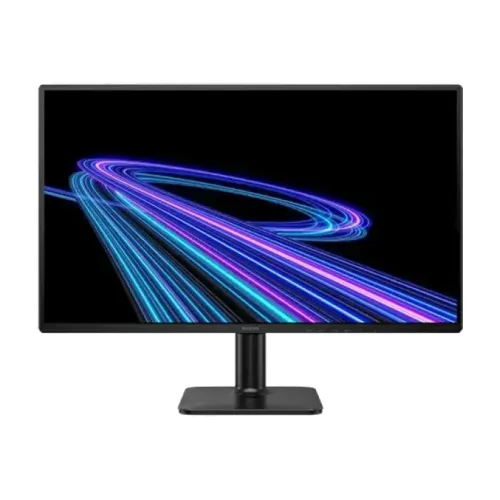
A Full HD screen for work and gaming
The Philips 24E2G2200 is a 23.8-inch desktop monitor designed for a mix of everyday computing and faster-paced visual content. Philips’ official product specification identifies an IPS panel, Full HD resolution and up to 144Hz refresh. That combination keeps the familiar 1920 × 1080 workspace while allowing more frequent image updates than a standard 60Hz screen when the computer can supply them. The five catalog images show the front, angled front, side profile and rear housing with the stand. The rear image visibly shows HDMI, DisplayPort and power connections. This is a conventional wired monitor, not a portable display; it uses an external power supply and expects a desk, stand or compatible VESA mount.
Screen size, resolution and pixel density
The panel measures 23.8 inches diagonally, or 60.5 cm, with a 16:9 aspect ratio. Its native resolution is 1920 × 1080 Full HD and the pixel density is approximately 93 pixels per inch. Philips lists a pixel pitch of 0.2745 × 0.2745 mm. These specifications make the display straightforward to pair with common desktop software and video sources. At this size, Full HD offers a familiar balance of workspace and readable interface elements, although users who need finer text or more simultaneous content may prefer QHD or 4K. For the sharpest image, set the computer to 1920 × 1080 and avoid non-native scaling unless accessibility or viewing distance calls for it.
IPS panel, colors and viewing angles
Philips specifies IPS technology with a W-LED backlight, 16.7 million display colors and typical 178-degree horizontal and vertical viewing angles. The panel specification supports broad off-center viewing compared with narrow-angle panel types, but it does not promise professional color calibration. Philips lists sRGB support without publishing a percentage coverage figure on the exact datasheet used here. The effective viewing area is 527.04 × 296.46 mm. For work involving print matching or color grading, request a measured gamut and calibration report rather than inferring accuracy from the IPS label alone. Use the monitor’s color presets and system controls to match the screen to room lighting and the intended work.
144Hz refresh rate and compatible setup
The official 24E2G2200 datasheet lists a maximum resolution of 1920 × 1080 at 144Hz and a vertical scanning range up to 144Hz. A high refresh rate can make cursor movement, scrolling and supported games appear smoother when the graphics card renders enough frames. The source output, cable, selected input and operating-system settings all need to support the requested mode. After connecting by DisplayPort or HDMI, open the advanced display settings and confirm that 144Hz is available. A lower setting may appear if the cable, graphics output, driver or game console limits the signal. The monitor cannot create extra frames that the source does not render, so performance depends on the whole computer.
Response time: GtG and MPRT
Philips publishes two motion figures: 4ms Gray-to-Gray typical response and 0.5ms MPRT. Gray-to-Gray describes a pixel transition measurement; MPRT is a motion-picture response metric that can relate to perceived blur and may use a motion-reduction mode. They are not interchangeable measurements and should not be compared as though both describe the same condition. The 144Hz refresh rate and response modes can improve motion presentation, but the actual experience depends on the selected settings, frame rate and content. Keep expectations grounded in the official figures and consult the monitor’s on-screen menu for the available motion options.
HDR10, contrast and brightness
The Philips regional specification lists HDR10 and a typical contrast ratio of 1500:1, alongside SmartContrast Mega Infinity DCR. HDR playback requires compatible content and source settings; the HDR10 label alone does not establish a premium HDR brightness class. Philips’ exact model datasheet gives typical brightness as 300 cd/m². Star Tech’s Bangladesh page lists 250 cd/m², while another Bangladesh retailer repeats 300 cd/m². The difference may reflect a listing error or a regional/revision detail, but the source material does not settle it for every shipped unit. This product copy records the manufacturer’s 300 cd/m² value and explicitly alerts buyers to the local listing discrepancy.
Adaptive Sync and gaming features
Philips identifies Adaptive Sync, or variable refresh rate, for the 24E2G2200. With compatible graphics hardware and a supported connection, variable refresh can help align display updates with the graphics output and reduce tearing. Philips also describes the monitor as a 144Hz gaming display and lists SmartImage enhancements. The available official sheet does not establish Nvidia G-SYNC certification, so this listing describes the verified feature as Adaptive Sync rather than promising certified G-SYNC compatibility. If using an AMD or Nvidia graphics card, check the card’s driver control panel and monitor OSD for the supported adaptive-sync mode. Feature ranges and operation can vary with input, driver and frame rate.
Eye comfort and screen coating
The specification lists Flicker-free operation and LowBlue Mode, plus EasyRead for a paper-like reading presentation. The display surface uses an anti-glare coating with 3H hardness and 25% haze. These options can help users adapt the picture to bright rooms, long reading sessions or text-focused work, though comfort is personal and settings do not replace breaks or suitable lighting. Select the mode that preserves readable contrast for the task. Philips publishes these capabilities for the exact model, while the actual OSD labels may depend on the regional firmware. The matte-style coating can reduce reflections compared with a glossy panel, but strong direct light may still affect visibility.
Inputs, audio and HDCP
The official connectivity table lists one HDMI 1.4 input and one DisplayPort 1.4 input. HDCP 1.4 is supported over both digital connections. Philips lists audio output, which allows sound carried over a digital input to be routed out; the specification does not list built-in speakers. Confirm the physical audio connector on the unit if you intend to use headphones. The display does not list USB-C input, so a laptop with only USB-C may require a compatible USB-C-to-DisplayPort or USB-C-to-HDMI adapter that supports the desired resolution and refresh rate. Use a suitable cable and input source, then choose the correct input through the monitor’s menu.
Stand, VESA mounting and placement
Bangladesh retailer specifications list tilt adjustment from −5° to +20° and a 100 × 100 mm VESA pattern. The gallery shows a central upright with a flat rectangular base and rear mounting area. Height adjustment, swivel and pivot are not confirmed for the included stand, so use a VESA-compatible arm when those movements are required. Check that the arm is rated for the monitor’s weight and that the correct screws are used. Place the stand on a level surface and route the external power cable and video cables so they do not pull on the display. The monitor is a standard desktop panel rather than a battery-powered travel screen.
Power supply and energy figures
This product uses an external power supply and accepts 100–240V AC at 50–60Hz. Philips documentation lists typical on-mode consumption of about 14.3W, 0.5W in standby and 0.3W when off. Exact consumption varies with image settings and operating conditions. Keep the power adapter ventilated and use the supplied or seller-approved unit. The Bangladesh retailer states the monitor’s power source is external, and the rear gallery image shows the associated power input. Verify that the box includes the appropriate adapter and local plug before setup. Do not infer battery operation: this is a mains-powered monitor and the catalog does not identify any internal battery.
Retailer specifications and manufacturer differences
Most of the captured catalog specifications match Philips’ exact-model documentation: 23.8-inch IPS, 144Hz, Full HD, 1500:1 contrast, 16.7 million colors, HDMI 1.4, DisplayPort 1.4 and Adaptive Sync. The notable numeric mismatch is brightness: Philips lists 300 cd/m², while Star Tech lists 250 cd/m² and another Bangladesh seller lists 300. The official spec is used as the primary value while the retailer discrepancy remains disclosed. The 4ms GtG and 0.5ms MPRT values are both retained with their distinct measurement labels. This distinction prevents an attractive marketing number from obscuring how the manufacturer actually describes the panel.
Warranty and buying checks in Bangladesh
The product record and Bangladesh retailers state a three-year warranty. Confirm whether this is official distributor coverage, the seller’s own support or a combined arrangement. Ask for the service provider’s name, claim location, invoice requirements and dead-pixel policy. Verify the model code 24E2G2200 and regional suffix on the box, the adapter and cable contents, and the current seller price at checkout. The reference seller prices and stock change over time and are not guaranteed BiponiBD offer data. Keep the serial number and invoice after delivery. If brightness or warranty conditions are important to your decision, ask the seller to confirm them in writing for the unit being dispatched.
Who should consider the 24E2G2200
The 24E2G2200 can suit a user who wants a 23.8-inch Full HD IPS monitor with a 144Hz maximum refresh rate for a home computer, gaming setup or general office desk. HDMI and DisplayPort give flexibility across desktop graphics cards and laptops with appropriate adapters. Adaptive Sync, HDR10 and LowBlue Mode provide additional settings to explore. Buyers seeking a higher resolution, USB-C docking, integrated speakers or an adjustable height stand should compare alternatives or add appropriate accessories. Users should also confirm the 300-versus-250 cd/m² local brightness discrepancy and three-year warranty provider. Match the monitor to the computer’s output and intended games before relying on 144Hz.
Quick setup checklist
Connect the external power adapter, then choose HDMI or DisplayPort based on the source device. For a computer, select 1920 × 1080 in display settings and enable 144Hz if the output chain supports it. Turn on Adaptive Sync only when supported by the graphics driver and monitor input. Set brightness and LowBlue/EasyRead options for the room and content. Route audio through the monitor output or directly through the computer; do not expect built-in speakers. If using a VESA arm, verify its 100 × 100 mm pattern and load rating. Keep the serial number and invoice for the local three-year warranty claim. If 144Hz is unavailable, check the source port, cable, driver and selected input before troubleshooting the monitor itself.
Technical specification summary
Key features
- 23.8-inch (60.5 cm) IPS panel with Full HD 1920 × 1080 resolution and a 16:9 widescreen layout.
- Up to 144Hz refresh rate for smoother motion when the connected computer and cable support the mode.
- Philips rates the panel at 4ms Gray-to-Gray and 0.5ms MPRT; these use different response-time measurement methods.
- Official Philips datasheet lists 300 cd/m² typical brightness; one Bangladesh retailer page lists 250 cd/m².
- 1500:1 typical contrast ratio and 16.7 million display colors are listed by Philips.
- HDR10 support, SmartImage and Adaptive Sync (VRR) are included in Philips regional documentation.
- Anti-glare screen coating is rated 3H hardness with 25% haze in the datasheet.
- Connectivity includes one HDMI 1.4 input and one DisplayPort 1.4 input, both with HDCP 1.4 support.
- Philips lists Flicker-free, LowBlue Mode, EasyRead and sRGB support for this monitor.
- The monitor uses an external power supply; Bangladesh sellers list three-year warranty coverage.
Advantages
- 144Hz at native Full HD gives more frequent frame updates than a conventional 60Hz office monitor.
- IPS technology and 178° horizontal/vertical viewing angles support broad viewing positions.
- HDMI and DisplayPort provide two common digital connection choices for PCs and consoles.
- Adaptive Sync, HDR10, Flicker-free and LowBlue Mode provide useful display options when supported by source content.
- The official datasheet is available and Bangladesh retailers advertise a three-year local warranty.
Points to consider
- Full HD on a 23.8-inch display is less detailed than QHD or 4K alternatives.
- To use 144Hz, the source, port, cable and operating-system settings must all support 1920 × 1080 at 144Hz.
- The 0.5ms MPRT figure is a motion-picture response mode, not the same measurement as 4ms GtG.
- Brightness is inconsistent across references: Philips says 300 cd/m²; Star Tech says 250 cd/m².
- The product has no documented USB-C input or built-in speakers; check the audio-out connector and external adapter contents.
Frequently asked questions
What is the Philips 24E2G2200?
It is a 23.8-inch Full HD IPS LCD monitor in Philips’ 2000 series. The official datasheet identifies the model as 24E2G2200 and lists a 144Hz maximum refresh rate, HDMI and DisplayPort inputs, and Adaptive Sync.
What resolution and refresh rate does it support?
Philips lists native Full HD 1920 × 1080 and a maximum refresh rate of 144Hz. Select 1920 × 1080 and 144Hz in your computer’s display settings, and confirm that the graphics output and cable support the mode.
Is the panel IPS?
Yes. Philips specifies IPS technology and a W-LED backlight. It gives a typical 178-degree horizontal and vertical viewing angle.
How bright is the screen?
Philips official regional datasheets list 300 cd/m² typical brightness. Star Tech’s Bangladesh product page lists 250 cd/m². The manufacturer datasheet is used as primary evidence here, while the retailer discrepancy is disclosed for confirmation against the delivered revision.
What do 4ms GtG and 0.5ms MPRT mean?
Philips lists both 4ms Gray-to-Gray and 0.5ms MPRT. They are different response-time measurement approaches; the smaller MPRT number should not be read as a replacement for the GtG figure under every setting.
Does it support HDR?
Philips lists HDR10 support. HDR playback also depends on the source, content, settings and operating system. HDR support alone does not imply a particular HDR certification tier or high peak brightness.
What is Adaptive Sync?
The Philips datasheet lists Adaptive Sync (variable refresh rate). When enabled with compatible graphics hardware and software, it can synchronize display refresh with rendered frames to reduce tearing. Philips does not establish Nvidia G-SYNC certification in the source used here.
What ports are included?
The official datasheet specifies one HDMI 1.4 input and one DisplayPort 1.4 input. It also lists HDCP 1.4 over HDMI and DisplayPort, plus audio output. This monitor does not list USB-C video input.
Does it have built-in speakers?
The Philips datasheet reviewed lists audio output but does not list built-in speakers. Plan to use headphones or speakers connected to the computer or the monitor audio output, after checking the physical connector type.
What is the brightness discrepancy in Bangladesh listings?
Philips datasheets for 24E2G2200 regional variants list 300 cd/m². Star Tech lists 250 cd/m² for its Bangladesh product page, while another local retailer lists 300. Ask the seller to confirm the exact regional SKU if brightness is important.
How does the stand adjust and can it be VESA-mounted?
Retailers list tilt from −5° to +20° and 100 × 100 mm VESA mounting. The reviewed manufacturer page confirms standard convenience features, while local listing provides the exact mount pattern. Height, swivel and pivot adjustments are not established for the included stand.
What warranty applies in Bangladesh?
The catalog and Bangladesh retailer pages state three years. Confirm the local service provider, claim process, required invoice/serial number, dead-pixel policy and whether the adapter is included before purchase.
Specifications are based on Philips’ 24E2G2200 regional datasheet and Bangladesh retailer checks. Philips lists 300 cd/m² brightness; one local listing says 250 cd/m². Confirm regional bundle and local warranty terms.