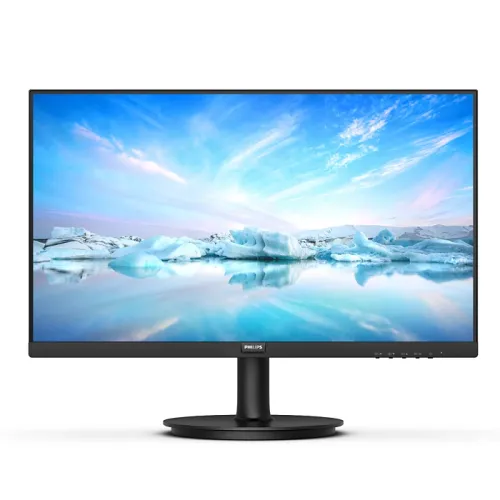
Philips 271V8B 27-inch Full HD IPS Monitor
The Philips 271V8B is a 27-inch class monitor for a home office, study desk, shared workspace or entertainment setup. Philips regional literature identifies the 271V8B/89 as a 27-inch (68.6cm) V Line Full HD display, with a measured diagonal close to 68.6cm. Its native 1920 × 1080 resolution uses the familiar 16:9 format found in laptops, desktop graphics cards, web video and office software. The large panel offers more physical viewing area than a compact 21.5-inch monitor, while Full HD keeps text and images compatible with common computer hardware. Because 1920 × 1080 is spread across a 27-inch panel, users who need especially fine text or extensive simultaneous windows may prefer a QHD monitor at a similar size.
The exact 271V8B/89 Philips datasheet calls the panel IPS technology and the backlight a W-LED system. IPS is useful for shared screens and varied seating because the maker specifies 178-degree horizontal and vertical viewing angles. The display has 16.7 million colors and sRGB support. Philips lists a typical 250 cd/m² brightness and typical 1300:1 contrast ratio. The screen uses an anti-glare coating with 3H hardness, helping diffuse reflections in ordinary indoor lighting. The measured panel pixel pitch is 0.3114mm and density about 81.59 pixels per inch. These are product-family figures and do not promise factory calibration; color-critical production should use a calibrated display and verify the exact regional unit.
The 100Hz refresh capability is an important distinction of the B variant. Philips technical documentation explicitly separates 271V8B from related 271V8 and 272V8A models: at 1920 × 1080, 271V8B can reach 100Hz using HDMI, whereas VGA tops out at 60Hz. The monitor’s vertical range on HDMI is 48–100Hz and its horizontal frequency range is 30–115kHz. To use the maximum refresh rate, connect through HDMI 1.4 and select 1920 × 1080 at 100Hz in the operating system or graphics control panel. The actual available mode depends on the source, graphics hardware, cable and configuration.
Philips rates response at 4ms Gray-to-Gray using its SmartResponse function. This figure should be read alongside the refresh rate rather than as a guarantee that every pixel transition takes exactly four milliseconds. Philips notes that response values are typical and tied to a response mode. Adaptive Sync allows a compatible graphics source to coordinate frame delivery with the panel’s refresh timing to reduce tearing. Star Tech lists G-Sync Support, but the Philips datasheet identifies Adaptive Sync and does not establish NVIDIA certification for this exact SKU. We therefore describe Adaptive Sync and avoid promising certified G-Sync operation. Fast competitive gamers should compare independent response testing and higher refresh options before choosing.
The OSD includes Philips SmartImage presets that adjust picture handling for different content, including office, internet, game and economy modes. EasyRead is intended to improve the appearance of text-heavy material such as PDFs and ebooks. LowBlue Mode uses a software setting to reduce short-wavelength blue light, while Flicker-Free technology regulates brightness to reduce visible flicker. These options can be useful during long work sessions, although comfort is personal and they are not medical treatments. The anti-glare screen also helps control reflections, but a 250-nit typical panel is designed for indoor use and should not be expected to remain vivid in direct sunlight.
Connectivity is deliberately straightforward. The rear connections include one HDMI 1.4 port with HDCP 1.4 and one analog VGA port. HDMI is the digital connection for modern desktops, laptops and compatible media players, and it is the input required for the 100Hz maximum mode. VGA supports older office computers and equipment but is limited to Full HD at 60Hz. Philips describes audio out over HDMI; the exact model documentation does not list built-in speakers or a separate headphone connector. A computer or source device should therefore provide the audio connection for external speakers or headphones. No USB hub or DisplayPort input is listed for this model.
The supplied stand is simple and compact. Philips specifies tilt adjustment from -5 to +20 degrees, but does not list height adjustment, swivel or portrait pivot for the stand. For a more adjustable desk position, the back supports a standard 100 × 100mm VESA mount, so a compatible arm or wall bracket can be used after verifying its load rating and installation. Philips also specifies a Kensington lock provision for a compatible security cable. The front product image presents a black textured cabinet and slim bezel styling, while the rear images show the stand and input bay. Stand assembly and the viewing angle should be adjusted on a stable surface before use.
Power is built into the monitor according to the Philips exact 271V8B/89 datasheet, which specifies 100–240V AC at 50–60Hz. The maker lists typical on-mode consumption at 17.5W, standby at 0.5W and off mode at 0.3W. This does not require an external power brick in that documented regional configuration. The existing catalog record and some flattened seller fields say “External”; that conflicts with Philips documentation and should be checked against the actual unit label and rear AC inlet. Regional product versions may differ, so this description records the exact datasheet evidence and preserves the discrepancy for physical confirmation.
The Philips leaflet gives useful desk and shipping dimensions. With stand, maximum height, the monitor measures 613 × 456 × 231mm; without stand, it is 613 × 363 × 50mm. Packaging measures 663 × 464 × 131mm. Weight is 3.82kg with stand, 3.39kg without stand and 5.29kg packaged. The 27-inch width should be considered when planning a desk or dual-monitor arrangement. Leave room behind the display for power and video cables and for the stand’s footprint. The packaging measurements can help assess transport or shelf space, but do not substitute for measuring the available desk.
Philips lists RoHS, recyclable packaging, mercury-free and PVC/BFR-free housing information for the documented product family. Regulatory approvals in the regional leaflet include CB, CE Mark, CCC, CECP, CEL, FCC Class B and ICES-003. The leaflet also lists DDC/CI, sRGB and operating system compatibility for Windows and Mac OS versions. Such approvals and included materials can vary with the destination region and production batch. The exact country of origin is not established by this family datasheet, so the catalog should not infer it. The images show a black finish, and the document identifies the cabinet as textured.
The exact model suffix matters. Philips provides regional model identifiers such as 271V8B/89, while local retailer pages usually shorten the name to 271V8B. The official datasheet for /89 specifies IPS and the 100Hz HDMI mode. Star Tech and TechLand also describe the Bangladesh listing as IPS, Full HD and 100Hz. Philips has other monitors with similar 271V8 model names, including variants with different panels and refresh limits, so shoppers should confirm that the packaging states 271V8B and inspect the region code. The MPN and GTIN printed on the unit or box are more authoritative for that specific stock item than a family name alone.
Warranty information also needs regional context. Star Tech and TechLand list three years for their Bangladesh retail offers, while Philips consumer warranty duration is tied to the product code and market. The three-year retailer statement is not enough to claim that the same terms apply to every imported unit. Confirm which local service center handles the warranty, what proof of purchase is required, and whether panel defects or accessories are covered. The catalog record does not include a photographed warranty card or exact box label. Accordingly, local retailer warranty is described as seller-listed and should be verified for the specific unit.
In daily use, the 271V8B is best understood as a large FHD productivity and general-use screen with a smoother 100Hz ceiling over HDMI. It pairs IPS viewing angles, Adaptive Sync, anti-glare treatment and low-blue/flicker options with common HDMI and VGA connections. Its key trade-offs are the FHD pixel density at 27 inches, the tilt-only stand, lack of built-in audio, and the fact that maximum refresh is not available over VGA. Users who need height adjustment can use VESA mounting; users who need USB-C docking, speakers or higher resolution should select another model. The listing describes verified capabilities and leaves market price and stock to the current BiponiBD product record.
This product copy is based on Philips regional documentation and cross-checks against current Bangladesh retailer listings. Philips specifies 27-inch IPS, 1920 × 1080, 100Hz maximum over HDMI, 4ms GtG SmartResponse, 250 cd/m², 1300:1, internal power and VESA mounting. Retailer specification tables align on display basics but may flatten fields such as power supply, color gamut, G-Sync and audio. The exact /89 suffix is a documented regional example and is not assumed to identify the particular physical unit in the BiponiBD warehouse. Please verify the box label, included cables and warranty terms when receiving the monitor.
Technical summary