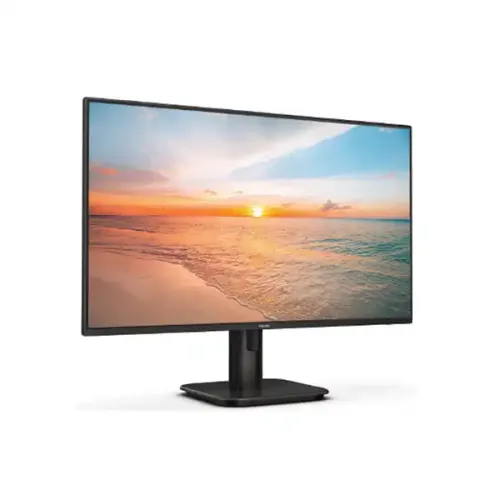
Philips 27E1N1800A 27-Inch 4K UHD IPS Monitor — Complete Technical & Buyer Guide
The Philips 27E1N1800A (part of the Philips 1000 Series, officially documented under the exact 4K UHD specification datasheet 27E1N1800A/27) is a purpose-built 27-inch (68.6 cm) UltraClear 4K UHD (3840 x 2160) desktop monitor engineered for professionals, software developers, content creators, data analysts, and everyday multimedia users who prioritize high pixel density, factory color accuracy, and panel luminance uniformity over high-refresh esports frame rates. By packing 8.29 million pixels across a 27-inch flat IPS (In-Plane Switching) panel with a W-LED backlight system, the 27E1N1800A achieves an ultra-fine 0.1554 x 0.1554 mm pixel pitch and 163.18 PPI (Pixels Per Inch) density. Combined with 1.07 billion display colors (8-bit + Hi-FRC), Delta E < 2 (sRGB) color accuracy, SmartUniformity 93% to 105%, 350 cd/m² typical luminance, HDR10 support, Adaptive-Sync variable refresh technology, integrated 2W x 2 stereo speakers, and a triple-input digital hub (2x HDMI 2.0 and 1x DisplayPort 1.4), it serves as a dependable single-screen or multi-monitor workstation centerpiece.
UltraClear 4K UHD (3840 x 2160) Resolution & 163.18 PPI Text Sharpness
Stepping up from a standard 27-inch Full HD (1920 x 1080, ~82 PPI) or QHD (2560 x 1440, ~109 PPI) screen to the Philips 27E1N1800A's native 3840 x 2160 resolution quadruples the pixel count of 1080p and increases total workspace detail by 77% compared to 1440p. At normal desktop viewing distances of 50 cm to 70 cm, individual subpixels are virtually indistinguishable, producing print-like typography in code editors, word processors, PDF technical drawings, and complex financial spreadsheets.
- Effective Viewing Area: 597.888 mm (H) x 336.312 mm (V) on the official Philips 27E1N1800A/27 4K specification datasheet, maintaining a true 16:9 aspect ratio across the 68.6 cm diagonal canvas.
- OS Scaling & HiDPI Workspace Advantage: Because 100% native scaling at 163.18 PPI renders user interface controls quite compact on a 27-inch canvas, Windows 10/11 and macOS users typically configure 125% or 150% HiDPI scaling. At 150% scaling, you receive the exact workspace layout geometry of a 2560 x 1440 QHD monitor but rendered with 4K retina-grade font smoothing, razor-sharp vector icons, and zero pixelation along diagonal lines.
- CAD, Photography & Timeline Editing: High-resolution 4K video footage (3840 x 2160) can be previewed at 1:1 native pixel accuracy, while multi-track audio/video timelines, GIS mapping tools, and CAD viewports display fine grid lines and dense layer hierarchies without aliasing artifacts.
IPS Wide-View Panel, 10-Bit (8-Bit + Hi-FRC), Delta E < 2 & SmartUniformity
The Philips 27E1N1800A utilizes an advanced IPS LED wide-view panel rated for 178° horizontal and 178° vertical viewing angles (@ C/R > 10). Unlike twisted nematic (TN) or vertically aligned (VA) matrices that exhibit gamma shift or contrast wash-out when viewed off-center, this IPS panel maintains stable hue, saturation, and luminance across the entire 27-inch surface—critical when reviewing color-sensitive layouts or collaborating with colleagues around a desk.
- 1.07 Billion Colors (8-Bit + Hi-FRC): Through high-frame-rate temporal dithering (Hi-FRC) over an 8-bit native RGB pipeline, the monitor processes 10-bit color gradients (1,024 shades per channel rather than 256), minimizing visible posterization or banding in sky backdrops, studio lighting vignettes, and scientific grayscale imagery.
- Delta E < 2 Accuracy & SmartUniformity 93–105%: A standout specification confirmed in the official Philips 27E1N1800A/27 datasheet is factory calibration for Delta E < 2 color accuracy in sRGB alongside Philips SmartUniformity (93% to 105%). Fluctuations in brightness and color across LCD panels are a common challenge for photographers and designers; SmartUniformity compensates for brightness drop-offs toward screen edges to maintain consistent luminance across the full 27-inch workspace.
- Color Gamut Coverage & sRGB Preset: According to Philips' official 4K specification sheet, the panel reaches typical gamut volumes of sRGB 128.7%, NTSC 109.0%, DCI-P3 96.2%, and Adobe RGB 91.4%, plus a dedicated factory sRGB mode inside the OSD for standardized web and UI design workflows.
- 350 cd/m² Brightness & 1000:1 Static Contrast: With a 350-nit W-LED backlight and a 1000:1 typical static contrast ratio (paired with Philips SmartContrast Mega Infinity DCR), the screen easily overcomes ambient fluorescent or daylight office lighting. Its Anti-Glare, 3H hard-coated surface with 25% haze diffuses direct reflections from overhead lamps and windows without introducing grainy sparkle over white documents.
- HDR10 Support & Realistic Expectations: The monitor accepts HDR10 metadata over both HDMI 2.0 and DisplayPort 1.4, expanding highlight detail and tone mapping in compatible 4K streaming content and console games. Buyers should note that because the panel uses an edge-lit W-LED backlight at 350 cd/m² without full-array local dimming zones, HDR10 serves as an entry-level dynamic range enhancement rather than a high-nit mini-LED or OLED HDR mastering reference.
60Hz Refresh Rate, 4ms GtG Response & Adaptive-Sync Performance
Engineered primarily for 4K resolution clarity and visual accuracy, the Philips 27E1N1800A operates at a native vertical refresh rate of 60Hz (scanning frequency 30 – 140 kHz horizontal / 40 – 60 Hz vertical) with a 4ms (Grey-to-Grey) response time. To enhance motion smoothness in casual gaming, video playback, and real-time 3D rendering, Philips integrates Adaptive-Sync variable refresh rate support.
- Tear-Free 40–60Hz VRR Window: When connected to a compatible AMD Radeon or NVIDIA GeForce GPU, Adaptive-Sync dynamically synchronizes the monitor's refresh cycle with GPU frame output between 40 FPS and 60 FPS. Since rendering native 3840 x 2160 resolution in modern AAA games is demanding on mid-range and upper-mid-range graphics cards, having VRR active between 40 and 60 FPS eliminates horizontal screen tearing and reduces frame-pacing judder in 4K RPGs, adventure titles, strategy games, and flight simulators.
- SmartImage Picture Enhancement Presets: Philips' exclusive SmartImage technology analyzes on-screen content and offers instant one-button presets—including Office, Photo, Movie, Game, Economy, LowBlue Mode, SmartUniformity, and EasyRead—dynamically tuning contrast, color saturation, sharpness, and pixel overdrive to match your active task.
Digital Connectivity Hub: 2x HDMI 2.0, DisplayPort 1.4 & Audio Architecture
The rear downward-facing I/O bay is equipped to handle up to three simultaneous 4K UHD 60Hz video sources without tedious cable swapping:
- 2 x HDMI 2.0 Ports (with HDCP 1.4 / HDCP 2.2): Both HDMI ports support full 3840 x 2160 @ 60Hz bandwidth along with HDCP 1.4 and HDCP 2.2 content protection, allowing seamless 4K UHD playback from Windows/Mac laptops, desktop PCs, Apple TV / Fire TV 4K media streamers, PlayStation 5, and Xbox Series X/S consoles.
- 1 x DisplayPort 1.4 Input (with HDCP 1.4 / HDCP 2.2): Delivers full uncompressed 4K 60Hz 10-bit RGB/4:4:4 output and Adaptive-Sync variable refresh from dedicated desktop graphics cards or USB-C-to-DisplayPort laptop adapters.
- Important Model Suffix Collision Warning (27E1N1800A/27 4K vs 27E1N1800A/00 FHD USB-C): Prospective buyers researching online must carefully avoid confusing this Philips 27E1N1800A 4K UHD (3840 x 2160, 27E1N1800A/27 datasheet) monitor with the separate European 27E1N1800A/00 Full HD USB-C model, which is an entirely different product specification collision. The 4K UHD 27E1N1800A model features 2x HDMI 2.0 and 1x DisplayPort 1.4 and does not include a USB Type-C port or built-in USB hub.
- Built-In 2W x 2 Stereo Speakers & 3.5mm Audio Out: Both the official Philips 27E1N1800A/27 product page and official specification PDF confirm integrated 2W x 2 stereo speakers for system alerts, video conferencing, online lectures, and casual media playback, alongside a 3.5mm Audio Out (headphone/earphone jack) for routing digital HDMI/DisplayPort audio to external powered speakers or headphones. Source Verification Note: The official Philips 27E1N1800A/27 4K specification PDF explicitly specifies 2W x 2 built-in speakers (whereas several Bangladesh retail listings inaccurately state 3W x 2).
Eye-Care Engineering: Flicker-Free, LowBlue Mode & EasyRead
For professionals, programmers, and students spending eight or more hours daily in front of dense 4K text, Philips incorporates three dedicated visual comfort technologies:
- Flicker-Free Backlight Control: Regulates W-LED luminance smoothly across brightness levels rather than relying on low-frequency pulse-width modulation (PWM) dimming, helping minimize eye fatigue, dry eyes, and headaches during marathon coding or financial auditing sessions.
- LowBlue Mode: Uses intelligent software algorithms to reduce shortwave blue light wavelengths emitted by the LED backlight without washing out readable interface contrast.
- EasyRead Mode: Converts the display into a high-contrast monochrome paper-like presentation ideal for reviewing long legal contracts, academic papers, e-books, and technical documentation.
Ergonomics, VESA Mounting, Internal Power Supply & Physical Dimensions
Visually inspected from the official product studio render, the Philips 27E1N1800A features a clean 3-sided narrow-bezel (frameless-style) matte-black cabinet supported by a central cylindrical column with an integrated cable-routing slot and a compact rounded-square desktop base.
- Stand Ergonomics & VESA 100x100mm Compatibility: The included stand provides -5° to +20° tilt adjustment and keeps cables neatly routed through the rear pillar cutout. Because the stock stand does not offer height, swivel, or portrait pivot adjustment, users who want full multi-axis ergonomic positioning can detach the stand and use the standard 100 x 100 mm VESA mount pattern with any compatible gas-spring monitor arm or dual-screen desk bracket. A Kensington security lock slot and rear EasySelect menu toggle key round out the physical hardware controls.
- Exact Dimensions & Weights (Official 27E1N1800A/27 PDF): According to the official Philips 27E1N1800A/27 specification PDF, the monitor measures 613 x 465 x 211 mm with the stand (max height), 613 x 365 x 54 mm without the stand, and 690 x 455 x 141 mm in its shipping carton. Official weights are 4.35 kg with the stand, 3.92 kg without the stand, and 6.92 kg packaged with carton (note that some Bangladesh retailer tables quote 613 x 461 x 192 mm and 4.78 kg with stand / 4.18 kg without stand).
- Internal Power Supply & Consumption: The official Philips 27E1N1800A/27 4K specification PDF explicitly confirms an internal 100–240 VAC, 50–60 Hz power supply drawing 27.24 W (typical) in On mode, 0.5 W (typical) in Standby mode, and 0.3 W (typical) in Off mode, with a white operation and flashing white standby LED indicator (correcting local retailer spec tables that erroneously list the power supply as external).
Who Should Buy the Philips 27E1N1800A (And Who Should Look Elsewhere)
- Ideal Buyers: Software engineers, writers, accountants, graphic designers, photo/video editors, MacBook and Windows ultrabook users (connecting via HDMI or USB-C-to-DisplayPort cable), and PS5/Xbox Series X console players seeking an affordable, factory-calibrated (Delta E < 2, SmartUniformity 93–105%) 27-inch 4K UHD (3840 x 2160) IPS monitor with built-in 2W x 2 stereo speakers and three digital inputs.
- When to Consider Alternatives: Competitive FPS esports players who require 144Hz–320Hz refresh rates (where a 27-inch QHD high-refresh Fast IPS monitor is a better fit) or users who strictly need single-cable USB-C Power Delivery laptop charging without a dock.
Price & Warranty Context in Bangladesh
In the Bangladesh computer hardware market, the Philips 27E1N1800A 27-Inch 4K UHD IPS Monitor carries a saved catalog reference MSRP of BDT 37,500, aligning closely with dated major retail listings (such as Star Tech, Ryans Computers, and TechLand BD, checked November 2026 at approximately BDT 37,500 to BDT 37,800). It is typically backed by a 3-year seller/distributor warranty; buyers should always confirm exact in-box video cables (such as HDMI cable inclusion) and dead-pixel warranty terms directly with the fulfilling seller before ordering.