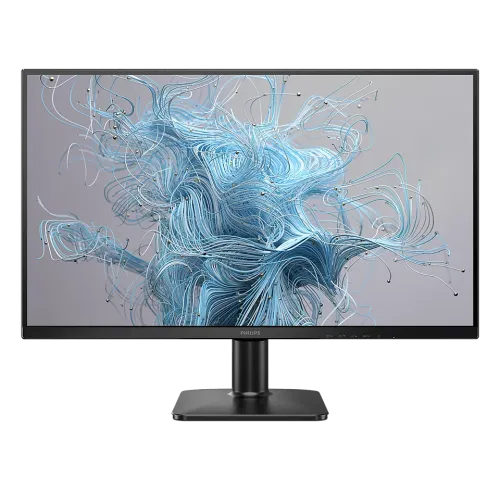
Philips 27E2N2500: 27-inch 2K QHD IPS monitor
The Philips 27E2N2500 is a flat 27-inch monitor in Philips’ 2000 Series. Philips lists a Quad HD resolution of 2560 × 1440, a 16:9 aspect ratio and refresh support up to 120Hz. The model combines an IPS LCD panel with a W-LED backlight, Adaptive-Sync, HDR10 input support and Philips SmartImage picture controls. It is suited to mixed desk use: documents and spreadsheets gain more pixel detail than Full HD at the same screen size, while a 120Hz mode can make supported desktop motion and games look smoother than a conventional 60Hz screen. The monitor is sold in regional variants, so some connection and mechanical figures differ among documents. This guide marks those differences clearly and keeps the regional suffix unspecified because the supplied unit images do not identify it.
Resolution, workspace and pixel density
The 2560 × 1440 panel contains about 3.69 million pixels, roughly 78% more than a 1920 × 1080 Full HD panel. At 27 inches, its pixel pitch is 0.2331 × 0.2331 mm and the catalog calculates approximately 108.79 pixels per inch. Philips rounds this figure to 109 PPI. The added resolution provides more room for a browser beside an office document, a longer editing timeline, a development environment with several panels, or a wide spreadsheet. Text and interface elements can be scaled in Windows or macOS to suit eyesight and viewing distance; no single scaling percentage is right for every user. QHD is also more demanding for games than Full HD, so the computer must render the desired frame rate. Resolution alone does not guarantee that a game will run at 120 frames per second.
IPS panel, surface and viewing angles
Philips identifies the panel as IPS technology with a W-LED backlight. Its specifications list 178-degree horizontal and vertical viewing angles at a contrast-to-ratio threshold greater than 10. Wide viewing angles help keep the picture more consistent when the viewer is off-centre or when two people share the screen. They do not eliminate reflections or make the monitor suitable for every color-critical workflow. Philips lists an anti-glare coating rated 3H with 25% haze. The listed active viewing area is 596.736 × 335.664 mm. The manufacturer describes an ultra-slim bezel and the six supplied product images show a black cabinet, narrow top and side borders, a central Philips badge and a compact stand. Screen coating, room lighting and brightness settings all affect perceived clarity, so position the panel to avoid direct window reflections.
Refresh rate, response ratings and variable refresh
Philips lists a maximum resolution of 2560 × 1440 at 120Hz and a vertical scanning range from 48Hz to 120Hz. The monitor also supports Adaptive-Sync, which can coordinate refresh with compatible graphics output within supported configurations. The exact computer, graphics card, driver, cable and selected display mode matter; verify the mode in the operating system after connecting. Philips rates response at 4ms grey-to-grey and 1ms MPRT. These are different measurements and should not be presented as the same response test. Philips’ footnote explains that MPRT uses backlight strobing for blur reduction, can cause noticeable flicker, and locks brightness adjustment while active. The documentation lists separate MPRT and Adaptive-Sync controls, but the reviewed material does not establish every compatibility combination. For that reason, this description does not promise that they operate together or claim they must always be mutually exclusive.
Color information and contrast disclosure
Philips lists 16.7 million display colors and sRGB support. It does not publish an exact NTSC, DCI-P3 or Adobe RGB percentage in the reviewed specification, nor a factory Delta E report. Buyers who need print proofing or wide-gamut grading should seek a calibrated display with measured coverage for the relevant color space. There is a documented static contrast difference: Philips’ UK page and regional PDF for model suffix /00 list 1500:1 typical, while Bangladesh retailer specification tables for the catalog unit list 1000:1. Those values are preserved as a regional-document discrepancy rather than combined into a single unqualified promise. Philips also lists SmartContrast Mega Infinity DCR, a dynamic picture feature that is distinct from a static contrast measurement. Typical brightness is 300 cd/m². Brightness is not a measure of color accuracy.
HDR10 and realistic viewing expectations
HDR10 input support is listed by Philips, so compatible content and source devices can send HDR metadata. HDR input compatibility should not be confused with a VESA DisplayHDR certification: no DisplayHDR tier is listed on the reviewed product page or datasheet. The published brightness figure is 300 cd/m², and the reviewed specifications do not document a local-dimming system. Buyers should therefore treat HDR10 as supported input format and set expectations according to the monitor’s published brightness and contrast data. Streaming applications, operating-system HDR settings and game output can also affect the result. If consistent desktop color is the priority, compare SDR and sRGB modes and use the mode that matches the work. The screen can display supported HDR content, but this listing does not promise a particular HDR impact or substitute for a formal certification.
Gaming features and everyday eye comfort
Adaptive-Sync and a 120Hz maximum refresh can help provide smoother motion when the source device supports suitable output. Philips lists a 1ms MPRT blur-reduction rating and 4ms typical GtG response; the MPRT figure has the backlight-strobing caveats described above. SmartImage provides picture presets, including game-oriented options. For reading and long desk sessions, Philips lists LowBlue Mode, Flicker-free operation and EasyRead mode. EasyRead adjusts the image for text-heavy reading. These options may help users tune a display to their tasks, but they do not guarantee that eye fatigue will be prevented. Sensible screen brightness, a comfortable viewing distance, glare control and regular breaks remain useful. The OSD controls include power, menu, brightness, input and SmartImage functions. Select settings by viewing real work and game content rather than assuming a marketing label guarantees a preferred image.
Ports, cables, audio and connected devices
Bangladesh listings describe one HDMI 2.0 input and one DisplayPort input, commonly labelled DisplayPort 1.2. Philips’ official regional /00 page and PDF list one HDMI 2.0 and one DisplayPort 1.4. Because the catalog does not identify the exact regional suffix, the DP version is disclosed as a source difference and should be confirmed against the unit label or seller. The rear photographs show HDMI, DisplayPort and a DC power input. No built-in speakers or 3.5mm audio output are listed for the Bangladesh retail configuration, so connect headphones or external speakers to the computer, console controller, or an appropriate audio adapter. HDMI and DisplayPort carry digital video; choose a cable and source that support the required QHD refresh mode. Package contents are region dependent: retailer listings mention a stand, power adapter and power lead, and an HDMI cable; verify whether a DisplayPort cable is included before purchase.
Stand, VESA mount and desk fit
The supplied stand supports tilt adjustment from approximately -5 to +20 degrees. Height adjustment, swivel and portrait pivot are not listed, so buyers who need those movements may prefer a compatible monitor arm. Philips specifies a 100 × 100 mm VESA mounting pattern and a Kensington lock provision. The gallery’s rear views show the four-hole VESA area, recessed video connections and security slot; the side view illustrates the thin upper panel and tilt stand. Dimensions differ slightly between official regional material and local retailer pages. The official /00 sheet lists 616 × 454 × 200 mm with the stand at maximum height and 616 × 359 × 33 mm without it. A Bangladesh listing gives 614 × 457 × 200 mm with the stand and 614 × 363 × 35 mm without. Check desk depth and mounting clearance using the exact seller’s unit dimensions.
Power, dimensions, weight and shipping
The monitor uses an external power supply rated for 100–240 VAC at 50–60 Hz. Philips lists typical on-mode consumption of 22.97W on the official /00 sheet; Bangladesh distributor specifications list 25.6W. The same official sheet reports 0.5W typical standby and 0.3W off-mode consumption. This variation is recorded rather than collapsed into a single exact usage promise. The official /00 document lists a 3.22kg net weight with stand, 2.85kg without stand and 5.56kg packaged. A Bangladesh retailer lists 3.18kg with stand, 2.81kg without and 5.6kg gross. Its carton is listed at 690 × 420 × 126 mm; Philips regional packaging dimensions differ. Shipping weight and carton dimensions are estimates for delivery planning, not assembled monitor measurements. Allow room for the stand footprint, cables and ventilation, and confirm courier limits for remote delivery.
Warranty and Bangladesh price
At the time of this review, Star Tech lists the Philips 27E2N2500 at ৳27,000 and says it includes three years of warranty. Ryans and Tech Land Bangladesh also list a three-year term; prices and availability may differ by seller or promotion. The catalog’s current variant price is ৳27,000 and remains unchanged. Before paying, confirm that the invoice names the exact 27E2N2500 model, who provides the warranty, what parts are covered, how service is requested, and whether any display-pixel policy applies. A retailer price is a dated market observation, not a guaranteed future price. The country-of-origin and barcode for the exact physical unit have not been verified and are left unset. The catalog brand mapping is “Others”; this content work preserves that ID and mapping while using Philips in the product copy and search metadata.
Who should consider this monitor?
This model is a sensible candidate for someone wanting a 27-inch QHD IPS screen for mixed productivity, reading, video and casual or competitive gaming at up to 120Hz. QHD gives a more detailed desktop than Full HD at this screen size, while IPS viewing angles suit shared viewing. Adaptive-Sync and Philips’ eye-comfort modes add useful options for compatible setups. Check the exact regional port revision, contrast figure, included cables and warranty provider before ordering because the official suffix /00 specifications and Bangladesh retailer information do not match on every line. Buyers who require a height-adjustable stand, multiple HDMI inputs, built-in audio, published wide-gamut coverage or a certified HDR tier should compare those requirements against another monitor. Match the graphics hardware to QHD gaming, use a suitable cable, and confirm that the selected 120Hz mode appears in the computer’s display settings.