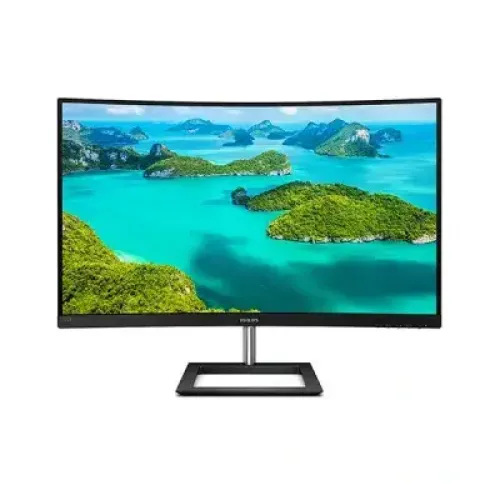
Philips 322E1CB 31.5-inch 100Hz FHD Curved VA Monitor: Complete Buying Guide
Product identity and fit
The Philips 322E1CB is a curved Full HD display in Philips’ E-line/home monitor family. Its regional code is 322E1CB/75, while the customer-facing model is commonly written 322E1CB. The /75 suffix identifies the regional configuration and is kept in the model/part-number metadata where appropriate. This is not the older 322E1C, nor the Philips 322E1GSJ gaming model, 325E8 QHD monitor or 328E1CA 4K display. Those other products differ in refresh rate, panel resolution, ports and sometimes speakers. This guide is based on the Philips 322E1CB/75 official specification and documents; the catalog title, slug, Active status, Philips brand, category and current variant price stay unchanged.
31.5-inch curved Full HD image
Philips identifies the panel as a 31.5-inch (80cm) VA LCD with a 1920 × 1080 native resolution and 16:9 aspect ratio. The product is marketed as a 32-inch class screen, but its actual visible diagonal is 31.5 inches. Its 1500R curvature creates a gentle inward arc across the wide panel. The effective viewing area measures 698.4 × 392.85mm, and Philips lists 0.36375mm pixel pitch and about 70 pixels per inch. This size is useful for large windows, video and casual use, but Full HD across 31.5 inches is less sharp than QHD. Buyers who sit close to the panel or read small text should compare pixel density before choosing.
VA contrast, brightness and surface
The VA panel has a typical static contrast ratio of 3000:1, 300 cd/m² brightness and 16.7 million display colours. These specifications can produce deeper blacks than many standard IPS panels and suit films, shows and general games. Philips also lists SmartContrast, a dynamic picture adjustment feature distinct from the 3000:1 static measurement. The screen coating is anti-glare with a 3H hard coat and Haze 40% on the current official product sheet. The matte surface helps diffuse reflections but is not scratch-proof. Viewing angles are 178 degrees horizontally and vertically at a contrast ratio above 10:1. Choose room lighting and brightness carefully to keep the curved image comfortable.
100Hz refresh and response modes
The monitor supports 1920 × 1080 at up to 100Hz over HDMI and DisplayPort. The analog VGA input is limited to 75Hz at Full HD, so choose a digital input for the full refresh rate. Philips lists typical 4ms grey-to-grey response and a 1ms MPRT mode. These values describe different behavior: MPRT uses a motion-blur reduction technique and is not a conventional pixel transition time. Philips notes that enabling MPRT can cause a noticeable change in brightness or flicker. Adaptive-Sync is also supported for variable refresh with compatible sources. For office use, 100Hz can make scrolling and pointer movement smoother; for gaming, results depend on source frame rate and the selected settings.
Inputs and device compatibility
The 322E1CB/75 provides one HDMI 1.4 input, one DisplayPort 1.2 input and one VGA analog input. HDMI and DisplayPort support native Full HD at 100Hz; VGA supports up to 75Hz at 1920 × 1080. There is one 3.5mm audio output. The port list matters if you plan to connect a current desktop, an older office PC or multiple devices. This model does not include USB-C, a USB hub or a built-in speaker system. Its HDMI and DisplayPort inputs support HDCP 1.4. Choose the correct source using the monitor menu and confirm that the computer is configured for its native resolution and refresh rate.
Audio output and built-in speakers
The 3.5mm socket is an audio output, not an audio input and not an integrated speaker. It can pass through compatible audio received over HDMI or DisplayPort to wired headphones or external speakers. Users should plan their desktop audio separately if they do not already use computer speakers or a headset. Do not infer speaker presence from a 3.5mm jack or confuse the product with a related Philips display such as the 328E1CA, which has different audio specifications. For VGA-connected systems, video is analog and audio must be routed separately from the computer because VGA does not carry digital sound.
Eye comfort, SmartImage and SmartContrast
Philips lists Flicker-Free, LowBlue Mode and SmartImage Game among the picture features. LowBlue Mode changes the display profile to reduce blue-light output, and Flicker-Free is intended to reduce backlight flicker. SmartImage offers picture presets, while SmartContrast adjusts dynamic presentation. These controls can be useful for reading, video or games, but the best setting depends on ambient light and personal preference. Comfort also depends on screen distance, text size, room lighting and breaks. The monitor supports DDC/CI and common operating systems, so you can use the on-screen controls or compatible software to manage basic settings. These features are not medical safeguards and do not guarantee that every user will avoid eye strain.
Stand, curve placement and VESA mounting
The supplied U-shaped stand supports tilt from -5° to +20° and includes a cable-routing path in the column. It does not provide height adjustment, swivel or pivot. Philips lists a 100 × 100mm VESA mount for users who want an adjustable arm or wall bracket. The 1500R curve works best when the viewer sits centred in front of the display; consider desk depth and seating position before placing it beside flat monitors. Dimensions with stand are 709 × 523 × 281mm, and without stand 709 × 425 × 88mm. The monitor weighs 6.74kg with the stand and 5.92kg without. Verify a mount’s load rating and leave room for rear cable access.
Power, package and daily operation
The monitor uses an internal power supply rated for 100–240VAC at 50–60Hz. Philips lists typical on-mode consumption of 35.2W, standby 0.5W and off mode 0.3W. Package dimensions are 780 × 610 × 224mm and gross weight is 11.84kg, useful when arranging delivery or checking courier limits. The monitor also has a Kensington lock slot and supports DDC/CI control. The product carton may vary by market and production batch; confirm included cables and local packaging details with the seller. Leave ventilation around the rear housing, route cables through the stand channel, and use a stable grounded outlet for regular operation.
Price, warranty and buyer checklist in Bangladesh
The catalog variant is ৳31,700. Bangladesh listings reviewed ranged from approximately ৳31,700 to ৳33,500, with retailers showing a three-year warranty. Stock and price can change, and TechLand’s listing showed out-of-stock status during the review. Before ordering, confirm the exact 322E1CB model, whether the local unit is 322E1CB/75, the final payment price, seller authorization, warranty provider and service process. Check return terms, dead-pixel policy, included cables and carton condition on delivery. Country-of-origin information on third-party sites can be generic or conflicting, so it is left blank until the unit’s own label or official regional packaging confirms it.
Who should choose this monitor
Choose the Philips 322E1CB if you want a large curved Full HD display with VA contrast, 100Hz HDMI/DisplayPort support, Adaptive-Sync and both digital and analog video inputs. It can fit home media, casual gaming, general office and multi-device use when the lower Full HD pixel density is acceptable. Consider a QHD screen for sharper desktop text, a height-adjustable stand for ergonomic flexibility, or another model if you need built-in speakers, USB connectivity or verified NVIDIA G-SYNC certification. Remember that 100Hz requires HDMI or DisplayPort; VGA tops out at 75Hz. Match the model suffix and warranty documentation to the product you receive, and compare current local seller terms before checkout.