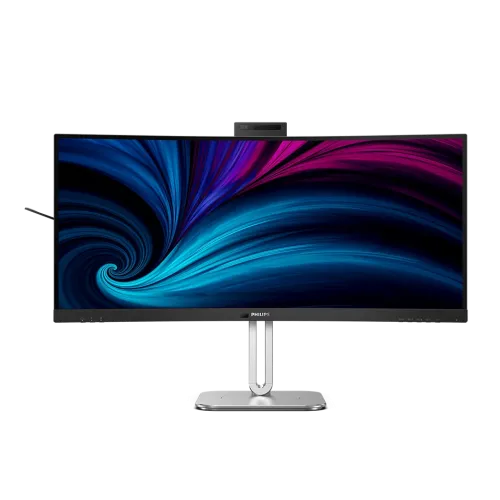
34-inch ultrawide business display
The Philips 34B2U6603CH is a 34-inch curved business monitor with a 21:9 aspect ratio and 3440 × 1440 WQHD/UWQHD resolution. The wide desktop can place two application windows side by side and provide extra horizontal room for spreadsheets, video timelines, code editors and conferencing. Its VA LCD panel uses a 1500R curve and W-LED backlight. Philips lists 110 pixels per inch and an active viewing area of 797.22 × 333.72mm at the specified curvature.
The panel has a typical 4000:1 native contrast ratio, 178-degree viewing angles horizontally and vertically, 16.7 million colors with 8-bit color, and a typical 4ms gray-to-gray response time. Philips lists NTSC area coverage of 101% and sRGB area coverage of 120%, with Delta E below 2 for the sRGB mode. These are manufacturer specifications; use a controlled workflow and suitable calibration where color accuracy is critical.
The anti-glare surface is rated 3H hardness with 25% haze. Adaptive Sync, SmartImage, EasyRead, SmartUniformity and Flicker-Free features are listed. The curved ultrawide form is designed for workspace and collaboration, and its 120Hz maximum can make compatible desktop motion appear smoother than a conventional 60Hz monitor. This model is still a business display with a 21:9 VA panel, not a substitute for every color-reference or high-refresh gaming display.
Refresh rate depends on the input
Philips specifies 3440 × 1440 at up to 120Hz through DisplayPort 1.4 or Thunderbolt 4. HDMI 2.0 inputs support the same native resolution up to 100Hz. The port-specific maximum matters when connecting a computer: an HDMI-connected source will not reach the 120Hz ceiling described for DP and Thunderbolt. The computer, graphics output, cable, operating system and selected display mode must also support the chosen timing.
There are two HDMI 2.0 ports, one full-size DisplayPort 1.4 and two Thunderbolt 4 ports. The upstream Thunderbolt 4 connection carries video and data and supplies up to 100W Power Delivery to a compatible laptop. A second downstream Thunderbolt 4 port carries data/video and provides up to 15W for a compatible connected device or daisy-chain arrangement. Philips lists HBR3 over DisplayPort/Thunderbolt and HDCP 1.4 and 2.2 support across HDMI, DisplayPort and Thunderbolt.
If a source is not showing the desired refresh rate, check which physical input is connected, the computer’s supported external-display modes, cable certification and operating-system display settings. A USB-C or Thunderbolt connector shape alone does not guarantee Thunderbolt features; the host and cable must support the relevant protocol. Do not confuse the 100W upstream laptop input with the downstream port’s 15W charging limit.
Docking, USB hub and network
The monitor includes four USB-A 3.2 Gen 2 downstream ports with up to 10Gbps signaling; one is identified for BC 1.2 fast charging. Its USB-C2 downstream port carries data and offers up to 45W charging. Together with the Thunderbolt downstream connection, these ports can serve accessories and compatible peripherals. The 45W USB-C2, 15W downstream Thunderbolt and 100W upstream laptop charging ratings are distinct port roles.
An RJ45 Ethernet port supports up to 2.5Gbps LAN and Wake on LAN. SmartKVM lets compatible keyboard/mouse peripherals move between hosts connected through Thunderbolt 4/USB-C1. MultiView offers picture-in-picture or picture-by-picture for two devices. These functions need the required host and USB/TB connections; merely plugging two video sources into HDMI does not automatically route USB devices between both computers.
The monitor also includes PowerSensor 2 and LightSensor functions intended to sense user presence and ambient conditions. Busylight can indicate meeting status, including supported Microsoft Teams synchronization. Exact features depend on Philips SmartControl/software version and the attached computer. Review current compatibility and organizational policies before enabling app integrations.
Webcam, microphones and conferencing
The pop-up webcam is a 5-megapixel camera with an LED indicator, auto-framing and a ±30-degree tilt function. Philips describes automatic framing that adjusts the crop as participants enter or leave the camera view. A Busylight on the camera can signal availability. The built-in webcam includes a microphone with noise-cancellation support, making it a useful integrated conferencing setup without a separate camera on the monitor.
The monitor has two integrated 5W speakers and a 3.5mm audio-out/microphone-in combo jack. Video-call quality depends on room noise, seating distance, software selection, webcam framing, connection and the conference application. The webcam is a privacy-sensitive feature; it is pop-up and has an indicator, so users can lower it when not in use. Confirm that the USB/TB upstream connection is connected so computer software can access camera and hub features.
The product specifications list DDC/CI and compatibility with Windows 10/11 and macOS. Webcam, KVM and monitor-control features may have different requirements across OS versions and applications. Check software support for a managed workstation before relying on automatic framing, presence sensing or Teams status integration.
HDR and eye comfort
The 34B2U6603CH supports VESA DisplayHDR 400. Philips lists 450 nits for SDR and 550 nits for HDR peak brightness; the PDF uses “DHR” in the brightness field, apparently a typographical label. Typical native contrast is 4000:1. HDR mode requires compatible source content and display settings; a peak-brightness rating does not describe sustained full-screen output or guarantee that every video is HDR.
Philips lists Eyesafe 2.0, SoftBlue, Flicker-Free and adaptive-sync features. These options can help users tune the viewing experience but are not medical claims. Use appropriate room lighting, text scaling and screen distance, and select display modes for the work being done. The monitor’s 8-bit, 16.7-million-color specification and broad gamut should be considered alongside any workflow-specific bit-depth, calibration or color-management requirements.
Available convenience modes include SmartImage, EasyRead and sRGB. Philips also specifies SmartUniformity from 93% to 105%. Choose a mode appropriate to the task, and review the on-screen settings when changing HDR, adaptive sync or refresh rate because some options may depend on the active input or signal.
Stand, dimensions, power and accessories
The stand offers 180mm of height adjustment, −5 to +30 degrees of tilt and ±180 degrees of swivel. It does not provide pivot rotation. A 100 × 100mm VESA mounting pattern supports compatible arms. With stand at maximum height, the monitor measures 807 × 575 × 281mm (W×H×D); without the stand it is 807 × 369 × 112mm. The carton is 980 × 525 × 188mm.
Net weight is 10.61kg with stand and 7.85kg without stand; packaged weight is 11.15kg. Confirm that a desk, arm or wall mount can carry the monitor, and leave room for its wide footprint, curvature, cable connections and swivel range. Philips lists an internal power supply accepting 100–240V AC at 50–60Hz, so it does not require the external power adapter implied by the catalog field.
Power figures include 26.6W typical in ECO mode, 31.59W typical on-mode by the Energy Star test method, and 0.4W typical standby. The box contents listed by retailers include an HDMI cable, DisplayPort cable, Thunderbolt 4 cable, power cable, stand and user documentation. Verify the regional carton and warranty papers with the seller before purchase.
Bangladesh price, warranty and model identity
Bangladesh retailer pages reviewed showed approximately ৳96,000 at Star Tech and Ryans and ৳96,500 at TechLand. The observed current offer range is about ৳96,000–৳96,500; prices and stock change. The existing variant MSRP of ৳96,000 is retained rather than replacing it with a temporary discount.
Retailer pages commonly list three years of warranty. Confirm the current warranty provider, service center, invoice model number, box-retention requirements and written coverage before purchase. Philips model suffixes vary by region, including /00, /01 and /75; this catalog record uses the base model 34B2U6603CH. Country of origin is not asserted unless verified from the specific unit label or official regional documentation.
Before buying, confirm the exact input you need for 120Hz, laptop charging wattage, the included Thunderbolt cable, webcam privacy preferences, KVM host compatibility and desk/mount dimensions. These checks distinguish the monitor’s port capabilities and local seller terms from broad marketing copy.
Setup and compatibility guidance
For a laptop docking setup, connect the computer to the display’s upstream Thunderbolt 4 port with the supplied certified Thunderbolt cable. That link carries display and data and provides up to 100W Power Delivery; actual charging depends on the laptop’s USB-C/Thunderbolt profile, its power demand, and cable support. Use the Thunderbolt downstream port for a compatible fast peripheral or display chain. Do not assume the separate USB-C2 port is a second laptop video input: Philips lists it as a downstream data and charging connection up to 45W.
For desktop graphics, connect DisplayPort 1.4 or Thunderbolt 4 when you want the specified 120Hz refresh at 3440 × 1440. HDMI 2.0 supports up to 100Hz at that resolution. Refresh can depend on the computer graphics adapter, operating system, cable and selected display mode. The monitor supports Adaptive Sync, but confirm compatibility in the graphics settings and use the manufacturer recommended cable before diagnosing a flicker or refresh issue.
The four USB-A ports are a downstream hub, while USB-B is an upstream connection for host setups that use the monitor’s USB hub without Thunderbolt. The two Thunderbolt ports and USB-C2 have different roles and charging limits, so connect the host to the upstream port and check the port labels before attaching devices. The RJ45 jack supports up to 2.5GbE; network speed also depends on the router or switch, cable category, computer, and service plan.
The SmartKVM function supports sharing compatible peripherals between connected computers, and MultiView offers picture-in-picture or picture-by-picture display modes. Review Philips setup instructions for supported host-port combinations and hotkey behavior. The webcam is a pop-up design with an LED indicator; lower it when it is not needed. Confirm conferencing software permissions and Windows Hello compatibility on the target computer before relying on face sign-in or camera framing.
A wide curved display needs sufficient desk width and depth. Philips lists the unit as 807mm wide, 281mm deep and up to 575mm tall on its stand; it weighs 10.61kg with the stand. For a desk arm or wall mount, use the 100 × 100mm VESA pattern and confirm the mount load rating includes the monitor weight. The stand supports 180mm height adjustment, tilt from −5° to +30° and ±180° swivel; it does not pivot to portrait orientation.
The listed package includes HDMI, DisplayPort, Thunderbolt 4 and power cables, but retailer cartons and regional bundles can vary. Inspect the sealed box contents and model suffix with the seller. The regional product suffix can identify a market variant; do not infer country of manufacture from that suffix. Use the serial and unit label for origin and warranty verification.