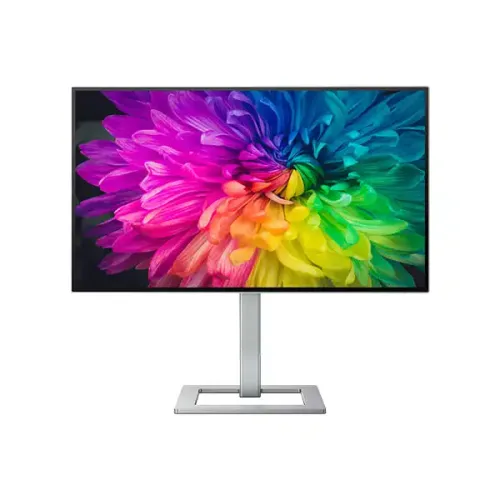
Philips Creator Series 7000 27E2F7901 overview
This 27-inch Philips Creator Series 7000 monitor is built around an IPS Black panel and a native 4K UHD resolution of 3840 × 2160 pixels. The flat 16:9 display is intended for detailed desktop work, photography and video editing, design review, office productivity and high-resolution media. Philips model code 27E2F7901 identifies the product; regional sales suffixes such as /00, /27, /75 and /94 may indicate market variants. Check the exact suffix and local warranty before ordering.
The display area measures about 596.7 × 335.7mm, with a 0.1554mm pixel pitch and approximately 163.18 pixels per inch. Fine text and detailed images can appear sharply rendered at native resolution, though operating-system scaling may be useful on a 27-inch 4K screen. Available scaling options depend on the connected computer and application.
The Creator Series positioning reflects the combination of high pixel density, IPS Black contrast, broad color-space coverage, factory calibration and workstation connectivity. The listing describes manufacturer specifications rather than independent lab measurements of an individual unit. For professional color-critical delivery, use a color-managed workflow and validate the actual monitor with suitable calibration equipment.
IPS Black panel, contrast and viewing
Philips specifies IPS Black technology with a typical static contrast ratio of 2000:1. This is higher than the common 1000:1 figure for many conventional IPS panels and can help dark interface areas and shadow detail look deeper in a controlled viewing environment. Philips also lists SmartContrast up to 80,000,000:1; that is a dynamic processing claim and should not be confused with the panel’s static 2000:1 specification.
Brightness is listed at 400 cd/m², and the monitor carries VESA DisplayHDR 400 certification. HDR performance depends on supported content, operating-system configuration, connection and application. The certification identifies a display class; it does not mean that this monitor has local dimming or the peak brightness of higher HDR tiers.
The panel supports 178-degree horizontal and vertical viewing angles at the manufacturer’s stated contrast criterion. An anti-glare coating rated 3H with 25% haze helps manage reflections in typical office lighting. As with any display, direct sunlight and strong light sources can still create reflections, so placement and room lighting remain important.
4K resolution and 60Hz desktop use
The native 3840 × 2160 resolution provides four times the pixel count of Full HD. This offers room for detailed canvases, high-resolution previews, large spreadsheets and multiple application panels, provided the graphics source can output 4K. The model is specified for 60Hz operation at its optimal resolution, making it a high-detail productivity and creator display rather than a high-refresh gaming monitor.
The rated gray-to-gray response time is 4ms. Response-time figures are measured under specified conditions and do not represent the complete input latency of a computer or guarantee identical transitions in every picture mode. AMD FreeSync is listed for supported variable-refresh operation; compatibility depends on the graphics device, driver, connection and supported refresh range.
At this pixel density, interface scaling may make controls easier to read while retaining crisp text. Video playback and games can use different resolutions or frame rates depending on the source. For best results, select 3840 × 2160 at 60Hz in the computer display settings and use a certified cable suited to the chosen input.
Color gamut and factory calibration
The 27E2F7901 supports 1.07 billion colors using 8-bit plus advanced frame-rate control. Philips lists 100% sRGB, 100% Rec.709, 98% DCI-P3, 112.4% NTSC and 108.6% Adobe RGB coverage, with Delta E below 2 for the factory-calibrated sRGB mode. These measurements and coverage figures are manufacturer claims under stated conditions, not a guarantee that every unit or every picture mode has identical results.
Available color modes include sRGB, Rec.709, DCI-P3, Display P3, D-image and Native. Choosing the mode that matches the delivery target can help avoid editing against a wider gamut than the final output supports. SmartUniformity is specified at 97% to 102% and is intended to improve luminance consistency across the screen. Actual uniformity may vary by unit and operating conditions.
For web graphics, sRGB is generally the relevant target; video workflows may use Rec.709 or a wider cinema gamut as required by the project. Keep monitor mode, application color management, operating-system profile and exported color space aligned. The claimed factory calibration report is useful documentation, but color-critical teams may still perform their own periodic calibration.
HDR and image enhancement
The monitor is VESA Certified DisplayHDR 400 and supports HDR input. HDR playback requires compatible content, software, operating system and graphics output. The monitor’s 400 cd/m² specification and certification should be understood as entry-level HDR capability; users should not infer OLED-like blacks, extensive local dimming or a premium HDR brightness range from the label alone.
Philips lists SmartImage picture presets, SmartUniformity and SmartContrast processing. These options can adjust the presentation for different content or operating preferences. For consistent editing, select an appropriate fixed color mode and avoid changing enhancement settings mid-project unless the workflow calls for them.
The anti-glare surface, wide viewing angles and 4K pixel density also help with ordinary office and media use. Image quality depends on source quality, scaling, connection bandwidth and settings. A 4K panel cannot restore detail missing from a low-resolution source, though scaling can make that source fit the screen.
USB-C docking and laptop power
The main USB-C upstream port supports DisplayPort 1.4 Alt Mode, USB data and up to 96W Power Delivery. With a compatible laptop and suitable USB-C cable, one connection can carry display, USB hub data and charging. The computer must support video over USB-C and accept the supplied power level; charging speed can vary with the laptop’s own power requirements and active workload.
A second USB-C upstream data connection supports the MultiClient KVM workflow. The downstream hub includes one USB-C port with up to 15W power delivery and four USB-A 3.2 Gen 2 ports rated up to 10Gbps; one USB-A port supports BC 1.2 fast charging. Connected peripherals share the upstream path, so actual transfer speed depends on the host, cable, device and simultaneous traffic.
The monitor also includes HDMI 2.0, DisplayPort 1.4 input and a separate DisplayPort output for MST daisy-chaining. MST support and the number of usable chained displays depend on the computer’s graphics hardware, operating system and display bandwidth. HDCP 1.4 and 2.2 are listed across HDMI, DisplayPort and USB-C paths for compatible protected content.
KVM, MultiView and desk workflow
MultiClient Integrated KVM lets a compatible workstation share a keyboard and mouse across two connected computers. Connect each computer to the appropriate video and USB upstream path, then select the matching KVM source in the monitor controls. KVM switching does not make one computer control another; it routes the connected peripherals between the selected hosts.
MultiView supports picture-in-picture and picture-by-picture viewing from two sources. This can be useful when monitoring a second computer, but each source and layout may use a reduced portion of the 4K canvas. The monitor’s on-screen display controls input, picture and MultiView settings.
A DisplayPort output enables compatible MST daisy-chain setups, while USB-C docking can reduce cable clutter for a laptop workstation. Configuration varies with host support and chosen resolution. Confirm operating-system MST support before planning multiple external screens from one connection.
Ergonomics, stand and mounting
The SmartErgoBase stand provides 130mm of height adjustment, swivel from −45° to +45°, tilt from −5° to +20° and portrait pivot through ±90°. These adjustments support different seated positions and desk layouts. Set the top of the active display near eye level and adjust viewing distance to suit the user; ergonomic comfort depends on the full workstation, not the monitor alone.
The VESA mounting pattern is 100 × 100mm, and Philips lists a VESA bracket in the package. Check the mount’s supported weight, screw depth and clearance before installation. The product includes a Kensington security-lock slot. The exterior combines a black front bezel with a silver rear cabinet and stand.
Dimensions are approximately 614 × 568 × 200mm with stand at maximum height and 614 × 355 × 38mm without stand. The monitor weighs about 5.38kg with the stand and 4.05kg without it. Packaging measures around 730 × 471 × 161mm and weighs about 9.26kg; allow additional clearance and safe handling when unpacking.
Audio, power and included items
This model does not have built-in speakers. It provides a 3.5mm audio output for compatible headphones or external speakers. Audio routing depends on the selected input and computer configuration. Buyers who need integrated sound should plan for separate speakers or a headset.
Philips specifies an external power adapter using 100–240VAC, 50–60Hz. Typical consumption is 26.6W under EnergyStar conditions, with 25.2W in ECO mode, 0.5W standby and 0.3W off. These are manufacturer figures under defined test modes; actual consumption changes with brightness, connected devices and usage.
Listed box contents include the monitor and stand, HDMI cable, DisplayPort cable, 1.8m USB-C to USB-A/C Y-cable, power cable and external adapter, VESA bracket, documentation and factory calibration report. Package contents can differ by region or sales batch, so inspect the local package listing and confirm accessories with the seller.
Bangladesh availability, price and warranty
Bangladesh retailer listings reviewed place the Philips 27E2F7901 around ৳82,000–৳86,300, with three-year warranty language commonly shown. Star Tech and Ryans list a price near ৳82,000 in the research snapshot. Prices, promotional discounts, stock and delivery charges change, so confirm the current amount and availability directly before ordering.
Retail warranty wording may mean official or seller-provided coverage and can vary by import channel and regional product suffix. Ask the seller to state the warranty provider, service location, dead-pixel policy and start date on the invoice. Keep the invoice and serial number for future service.
This product page retains the existing variant MSRP as catalog data; the research price range is a dated market reference, not a promise of today’s selling price. Confirm that the carton label and invoice identify 27E2F7901 and that included regional accessories match the seller’s description.
Compatibility and purchase considerations
A computer intended for native 4K at 60Hz should have a suitable HDMI 2.0, DisplayPort 1.4 or USB-C video output and a compatible graphics driver. USB-C laptop charging and display require appropriate host support. A USB-C connector by itself does not guarantee DisplayPort Alt Mode or 96W charging.
For multi-monitor daisy-chaining, verify MST capability and total bandwidth on the source computer. For KVM use, connect the video and USB upstream cables for both machines and configure the monitor’s source mapping. Some operating systems or graphics devices impose limits on the number of supported displays.
For photo and video work, choose the correct color mode and application profile. HDR should be enabled only when the operating system and content pipeline are configured for it. The product is a 60Hz 4K creator display; buyers prioritizing competitive high-frame-rate gaming should compare refresh-rate requirements separately.
Care and setup
Place the screen on a stable surface or mount rated for its weight. Use two hands to handle the panel and avoid pressing the LCD surface. Connect power and signal cables with the monitor switched off, then select the correct input and native resolution. Route cables with enough slack for stand height, swivel and pivot adjustments.
Clean the screen using the manufacturer’s care guidance and a soft, lint-free cloth. Do not spray liquid directly onto the display or allow moisture into openings. Avoid abrasive materials that could damage the anti-glare coating. Keep ventilation openings clear and disconnect power before cleaning the enclosure.
Retain the box and protective materials for transport where practical. If the display is moved on its stand, lock or support the panel and avoid twisting the neck. For a VESA installation, follow the mounting hardware instructions and use the included bracket where required.
Who this monitor suits
The 27-inch 4K resolution and IPS Black contrast make the 27E2F7901 a fit for users who want high pixel density, multiple color modes, USB-C laptop docking and a shared two-computer workspace. Designers, editors and office users may value the color coverage, factory sRGB calibration claim, KVM and adjustable stand. Evaluate software, graphics hardware and color workflow before relying on any monitor for professional delivery.
Its 60Hz refresh rate, lack of built-in speakers and external power adapter are relevant trade-offs to consider. The extensive USB hub and DisplayPort output may be useful in a desk setup, while users with simpler needs may not use every connection. Check whether the desk, arm, laptop and cables support the intended 4K and USB-C configuration.
Before checkout, verify exact model suffix, price, stock, regional warranty, included cables, dead-pixel terms and seller invoice. The specifications here are model-level information gathered from Philips and Bangladesh retail references; a local package or regional SKU may have different bundled accessories or coverage terms.