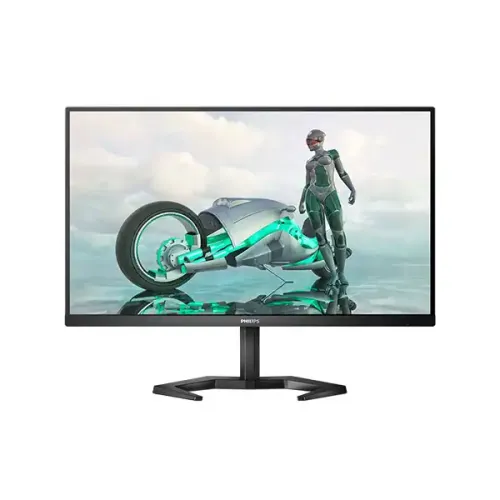
Philips Evnia 24M1N3200ZA 23.8-inch 165Hz FHD Gaming Monitor: Complete Buyer Guide
The Philips Evnia 24M1N3200ZA is a 23.8-inch Full HD gaming monitor with an IPS panel, 165Hz maximum refresh rate, Adaptive-Sync technologies and an adjustable stand. It is designed for players who want smooth motion and clear 1080p images from a compact desk display, while its built-in stereo speakers, two HDMI inputs and DisplayPort connection also suit everyday work and video. Philips identifies regional product codes such as 24M1N3200ZA/00, /69 and /94. The catalog uses the core model 24M1N3200ZA; because the exact suffix on the Bangladesh stock unit is not confirmed, this guide does not claim a regional suffix or UPC for that unit. The official Philips product sheet is the technical authority for specifications. Retailer pages help confirm local price and warranty offers, but some repeat inconsistent port and stand details; those differences are called out below.
A 23.8-inch Full HD IPS picture
The display has a 23.8-inch (60.5cm) diagonal IPS panel with a 1920 × 1080 native resolution and 16:9 aspect ratio. Philips lists a 527.04 × 296.46mm effective viewing area, 0.2745mm pixel pitch and 92.56 pixels per inch. At ordinary desk distance, Full HD gives games, video, documents and browser windows a clear image without demanding a high-end graphics card to render every frame. IPS technology and 178-degree horizontal and vertical viewing angles help keep the picture consistent when viewed away from the center. Its anti-glare coating is rated 3H with 25% haze, which helps reduce reflections from common indoor lighting. The panel is flat, not curved. It is a practical size for a single gaming display or a multi-monitor arrangement, although users who need very fine text or detailed creative work may prefer a higher-resolution screen at a similar size.
165Hz motion, Adaptive-Sync and response terminology
The maximum resolution is 1920 × 1080 at up to 165Hz, with vertical scan frequencies from 48 to 165Hz. When the graphics card can produce high frame rates and the selected connection and system settings are configured correctly, the screen can refresh more often than a standard 60Hz monitor. This can make fast camera pans, scrolling and competitive games look smoother. Philips lists AMD FreeSync Premium and NVIDIA G-SYNC compatibility over DisplayPort; adaptive synchronization can coordinate supported graphics output and display refresh to reduce tearing. The exact experience depends on the GPU, driver, game and settings. Philips specifies 4ms gray-to-gray response (SmartResponse) and a separate 1ms MPRT mode. These are different measurements: MPRT uses backlight strobing for motion clarity and can visibly reduce brightness or introduce flicker, so it is not a universal panel response guarantee. The monitor also lists low input lag and SmartImage Game presets. No claim is made that every game will run at 165 frames per second; the computer must render those frames.
Brightness, contrast and color
Philips rates brightness at 250 cd/m² and typical contrast at 1100:1, with SmartContrast Mega Infinity DCR as a separate dynamic processing specification. It lists 16.7 million display colors and a wide color gamut of NTSC 106%, sRGB 123.9% and Adobe RGB 90.4%, with measurement standards noted in the product sheet. Those gamut percentages describe coverage or area under the manufacturer's stated methods and do not certify factory calibration or print-proof accuracy. The monitor includes a selectable sRGB mode, LowBlue mode, EasyRead and Flicker-free operation. LowBlue and flicker reduction are useful options for extended viewing, but they are not medical claims and do not remove the need for suitable room light, breaks and comfortable brightness. Philips describes SmartImage Game presets including FPS, Racing, RTS and saved user profiles. Buyers doing color-critical work should use a calibrated reference workflow rather than treating a broad gamut figure as proof of calibrated color.
Connections: verify the rear panel before purchase
Philips's official specification lists two HDMI 2.0 inputs and one DisplayPort 1.2 input, all with HDCP 2.2 support, plus one audio-out jack. The HDMI inputs or DisplayPort can carry the supported maximum resolution and refresh rate when the source and cable are suitable. The sheet does not list a VGA input, USB hub, USB-C video, microphone input or built-in webcam. However, the current Star Tech Bangladesh listing includes a VGA entry and labels HDMI HDCP as 1.4, which conflict with the Philips sheet. The local listing also otherwise matches the exact panel and refresh model. This product update follows Philips for ports and records the seller discrepancy in the evidence notes; a buyer should inspect the delivered regional unit's rear I/O and packaging before relying on a port not shown in the manufacturer document. The built-in audio is two 3W speakers (3W × 2), while the audio jack is an output for headphones or external sound.
Stand adjustment, VESA mounting and desk fit
The SmartErgoBase offers 130mm of height adjustment, -5 to +20 degrees of tilt, up to 45 degrees of swivel in either direction and 90-degree pivot in either direction. Philips lists VESA 100 × 100mm mounting, so the display can be attached to a compatible arm or wall mount after removing the supplied stand. The exact assembly and fasteners should follow the manual for the delivered regional version. With the stand at maximum height, dimensions are 540 × 513 × 213mm (width × height × depth); without the stand they are 540 × 321 × 43mm. The stand's full-height measurement is not a fixed height setting, since the lift range can be adjusted. The monitor weighs 3.78kg with stand, 2.40kg without, and 5.73kg packaged. Check desk depth and the arm's load capacity before installation. The stand's swivel and pivot are useful when sharing a screen or rotating a document view, while a multi-monitor mount may provide a wider adjustment range.
Power, contents and warranty
The monitor uses an external power supply rated 100–240VAC, 50–60Hz. Philips specifies typical on-mode consumption of 23.8W, 0.5W standby and 0.3W off mode, with Energy Label class E on the /00 sheet. The official box contents list the monitor with stand, HDMI cable, DisplayPort cable, power cable and user documentation. Regional bundles can differ, so check the package label and included accessories when opening the unit. Philips lists Kensington lock compatibility and RoHS compliance; the packaging is stated as 100% recyclable, and Philips describes the housing as mercury-free and PVC/BFR-free. Bangladesh retailer pages advertise three years of warranty, but that is a local seller offer and not enough to prove the coverage attached to every imported serial number. Confirm the warranty provider, service location, invoice requirement and dead-pixel terms with the seller before payment. The product's catalog variant price is ৳24,700; Star Tech currently shows ৳24,700 cash price and a higher regular price. Market prices and stock can change.
Who this monitor suits
The 24M1N3200ZA is a good fit for a player seeking Full HD at a high refresh rate in a 23.8-inch format, especially when a desktop or laptop can output 165Hz over HDMI or DisplayPort. FreeSync Premium and DisplayPort G-SYNC compatibility make it relevant to users who want variable refresh support, subject to graphics hardware and driver compatibility. The included speakers can handle basic desktop audio, while a 3.5mm output supports headphones or speakers. It can also serve as an everyday home or study display thanks to its IPS viewing angles, adjustable stand, anti-glare surface and eye-comfort settings. Its limits matter: 250 nits is intended for typical indoor conditions rather than bright sunlight, Full HD is not QHD or 4K, and 1ms MPRT is a motion mode rather than a blanket response-time guarantee. Buyers requiring USB-C docking, VGA, HDR certification, a USB hub or verified local official-distributor warranty should confirm these exact requirements before choosing this model.
Model identity and related variants
The core model name is Philips Evnia 24M1N3200ZA, also marketed in the Evnia 3000 series as a 24-inch-class (23.8-inch actual) Full HD gaming monitor. Philips publishes regional product pages and documents with suffixes including /00, /69 and /94. These suffixes identify region or sales configuration, and the box may carry a 12NC and EAN associated with that specific SKU. The /00 product sheet gives 12NC 8670 001 79612 and EAN 8712581781040; those identifiers must not be assigned to this Bangladesh catalog item unless the physical box or invoice confirms that exact suffix. Likewise, do not confuse the IPS ZA version with sibling 24M1N3200Z or VA-based 24M1N3200V-family products, which may have different panel technology or specifications. The existing BiponiBD seller SKU and product identity are retained, and the product/variant MPN is standardized to the evidenced core model rather than guessing an unverified regional code.
Buying checklist
Before ordering, confirm the carton and monitor label read 24M1N3200ZA, and ask the seller to identify the regional suffix and the local warranty provider in writing. Confirm that the delivered model has the advertised HDMI 2.0 × 2 and DisplayPort 1.2 × 1 ports; the current retailer listing has a conflicting VGA line, which is not present in Philips's official port list. If using a high refresh rate, connect through HDMI or DisplayPort with an appropriate cable, update the graphics driver, select 1920 × 1080 at 165Hz in the operating system and enable adaptive sync as supported by the GPU. For G-SYNC compatibility, Philips specifies DisplayPort. If using MPRT, expect a brightness change and possible flicker as described in the product documentation. Check that a planned arm supports VESA 100 × 100mm and the monitor's weight. Finally, compare the live cash price and regular price, verify stock, and retain the invoice and serial number for warranty service. These checks resolve regional and seller-data uncertainty without changing the product's URL or store identity.