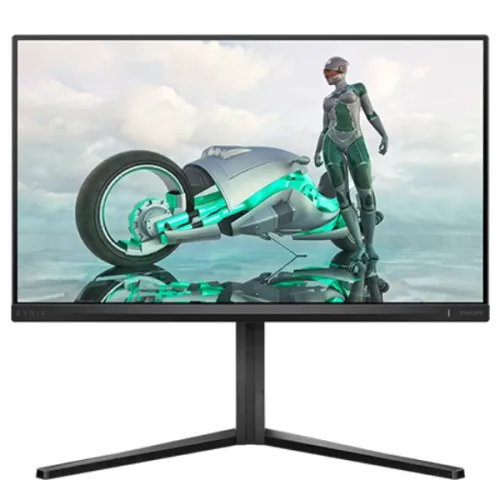
Philips Evnia 24M2N3200A 23.8-inch Full HD 180Hz Fast IPS Monitor: Bangladesh buyer guide
The Philips Evnia 24M2N3200A is a 23.8-inch Full HD gaming monitor in the Evnia 3000 series. Philips publishes model code 24M2N3200A and regional package numbers such as 24M2N3200A/00; the exact suffix on a Bangladesh box is not independently confirmed here, so the catalog uses the core model code. The current Philips regional specification sheet describes a Fast IPS panel, 1920 × 1080 resolution and refresh rates up to 180Hz. It also lists Smart MBR at 0.5ms and response time at 1ms gray-to-gray. These are distinct measurements and should not be condensed into one ambiguous response-time claim. The monitor adds HDR10 input, Adaptive Sync (VRR), two HDMI 2.0 inputs, DisplayPort 1.4, stereo speakers and an adjustable stand. This guide separates manufacturer specifications from Bangladesh retailer pricing and warranty claims. It does not treat seller ratings, colors or marketing language as independent test results.
Screen size, resolution and panel
The visible panel measures 23.8 inches diagonally (Philips describes the class as 24 inches) with a 16:9 aspect ratio and native 1920 × 1080 Full HD resolution. Philips lists an effective viewing area of 527.04 × 296.46mm, 93 pixels per inch, and pixel pitch of 0.2745 × 0.2745mm. At this size, Full HD keeps interface text and game assets clear at normal desktop distance while asking less of the graphics processor than QHD or 4K. The panel is Fast IPS with a W-LED backlight, 178° horizontal and vertical viewing angles, typical 300cd/m² brightness and 1000:1 contrast. These are manufacturer ratings rather than guarantees of uniformity or measured accuracy on every unit. The screen coating is anti-glare, 3H hardness, 25% haze. Color is rated at 16.7 million colors. Philips lists typical color-gamut figures of 113% NTSC, 126% sRGB and 110% Adobe RGB, with measurement area standards noted in the footnotes; gamut coverage does not itself prove calibration accuracy or a low Delta E.
180Hz refresh and response time
The maximum resolution specification is 1920 × 1080 at 180Hz, with a vertical scanning range listed to 180Hz. A 180Hz refresh allows the display to redraw up to 180 times per second when the source, port, cable, graphics card and operating-system settings provide a compatible mode. The PC must still render the game at a high frame rate to show new frames at that pace. Philips lists 1ms gray-to-gray (SmartResponse) and 0.5ms Smart MBR. Smart MBR is a motion-blur-reduction/backlight-strobing mode; Philips notes it changes brightness and may produce flicker. It is not the same measurement as pixel gray-to-gray response and should not be advertised as a single universal 0.5ms response-time result. Try the mode that suits your game and comfort, and expect the display to be dimmer while Smart MBR is active. Independent instrument testing for this exact model was not part of the reviewed evidence.
Adaptive Sync, HDR10 and gaming tools
Philips specifies Adaptive Sync (variable refresh rate) and low input lag features. Star Tech also labels the monitor as G-Sync support, but the Philips specification reviewed here states Adaptive Sync rather than an explicit NVIDIA certification; check current GPU compatibility for the exact computer rather than assuming certification. HDR10 input is supported, but the reviewed product sheet does not claim a VESA DisplayHDR tier or local-dimming zones. Treat HDR10 as format/input support, not proof of high-end HDR brightness or contrast. SmartImage Game includes genre-focused presets. Philips also lists Smart Crosshair, EasySelect OSD access, SmartContrast, sRGB mode and EasyRead. These software and OSD options change how the picture is presented; they do not replace hardware calibration. Choose a preset based on the application, then adjust brightness and color to suit the room.
Ports, refresh modes and audio
The official Philips regional specification lists HDMI 2.0 × 2 and DisplayPort 1.4 × 1, plus an audio output. It also lists HDCP 1.4 and HDCP 2.2 for HDMI/DisplayPort. These connections allow a PC and another device to remain attached at the same time; use the monitor input selector to switch between them. Philips states the maximum 1920 × 1080 at 180Hz works over either HDMI input or DisplayPort, but the graphics card still needs to provide the mode. Use a suitable cable and check the operating system or graphics control panel if the refresh menu defaults below 180Hz. The monitor has built-in stereo speakers rated at 2W × 2. They are convenient for basic desktop sounds, video and calls, while a headset or external speakers will usually be preferable for stronger bass, immersive gaming or clear voice chat. The audio-out connection can feed compatible headphones or external audio equipment.
Ergonomics, stand and VESA fit
Philips calls the stand SmartErgoBase and lists up to 130mm of height adjustment, tilt from -5° to +20°, swivel of ±30° and pivot of ±90°. The stand can help align the top of the screen with eye level, turn the display toward another seat, or rotate it to portrait when an application benefits from a tall workspace. The official regional sheet gives maximum-height assembled dimensions of 540 × 515 × 261mm (W × H × D), and 540 × 325 × 55mm without the stand. A 100 × 100mm VESA mounting pattern is listed, as is a Kensington lock. Philips lists 4.56kg with stand and 2.76kg without stand. These values come from the /00 regional specification and should be compared with the actual unit label and local mount instructions. If using an arm, verify its load rating, screw depth and the monitor’s real weight before removing the stand.
Power, package contents and care
The reviewed Philips regional specification lists an internal power supply with 100–240VAC, 50–60Hz input, typical on-mode consumption of 18.7W, typical standby of 0.5W and off-mode of 0.3W. Actual power use varies with brightness, refresh mode, audio and connected sources. The manufacturer package list includes the monitor with stand, HDMI cable, DisplayPort cable, power cable and documentation; accessories can differ by region, seller bundle or production batch, so check the sealed Bangladesh carton. Philips specifies operating temperature from 0°C to 40°C and relative humidity of 20%–80%, along with RoHS and mercury-free / PVC-BFR-free housing claims on the regional sheet. Keep ventilation openings clear, use a dry soft cloth and avoid pressure on the LCD surface. Retain the carton and invoice through the seller’s return or replacement window.
Bangladesh price and warranty
Checked Bangladesh listings place this model around ৳25,500–৳28,175: Star Tech lists ৳25,500, Techland ৳26,500, Ryans ৳26,500, UltraTech ৳26,500 and SmartDeal ৳28,175 at the time reviewed. The existing BiponiBD variant price of ৳25,500 is preserved. These are retailer offers and can change with stock, promotion or payment method. Several Bangladesh retailers advertise a three-year warranty, but local service provider, dead-pixel policy, adapter coverage and claim conditions must be checked on the invoice. Philips UK displays a different regional warranty policy; do not substitute that regional period for the Bangladesh seller’s written commitment. Confirm the exact model label and package suffix, included cables, warranty issuer and service address before payment.
Who this monitor suits and what to check
This Evnia is a practical option for Full HD gaming where high refresh, an IPS panel and an adjustable stand matter. Its 23.8-inch size fits many desks, and the 180Hz ceiling can pair with esports titles when the computer can produce high frame rates. It also works for everyday browsing, study and office applications, with speakers and multiple inputs reducing setup friction. Consider a QHD model if you need more workspace or finer detail, or a display with documented HDR certification and local dimming if HDR image quality is a priority. Before purchase, confirm that the product label reads 24M2N3200A, ask which regional suffix applies, verify the included HDMI/DisplayPort cables and local warranty terms, and check the physical screen and stand. After setup, select 1920 × 1080 and 180Hz in the graphics settings, enable Adaptive Sync if appropriate, and test Smart MBR separately from normal use because it affects brightness.
Model identity and specification scope
The core model is Philips Evnia 24M2N3200A, Evnia 3000 series. Philips regional pages and documents add suffixes such as /00 or /01; the exact local suffix should be taken from the Bangladesh unit’s label rather than guessed from the global model. The exact local catalog identity remains 24M2N3200A. Philips documentation lists Full HD, Fast IPS, W-LED, 180Hz, 1ms gray-to-gray, 0.5ms Smart MBR, 300cd/m², 1000:1, HDR10, Adaptive Sync, HDMI 2.0 × 2, DisplayPort 1.4, audio out and 2W × 2 speakers. Bangladesh sellers align on three-year local warranty advertising and current prices, but warranty issuer and stock terms differ. A product page is not an independent review; the catalog does not add invented customer ratings or claim performance measurements that were not found.