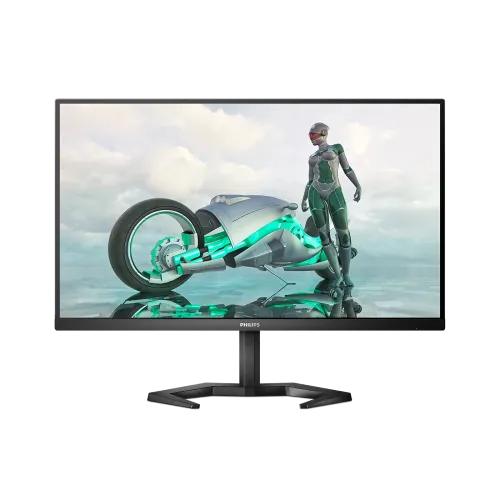
Philips Evnia 27M1N3200ZA 27-inch 165Hz IPS Gaming Monitor: Complete Guide
Model identification and series
The Philips 27M1N3200ZA is a 27-inch gaming monitor in Philips’ Momentum 3000 model family; Bangladesh retailers also merchandise it under the Evnia gaming name. Philips identifies regional model variants such as 27M1N3200ZA/00. The base model code is 27M1N3200ZA. Do not confuse it with 27M1N3200VA or VS, which are VA-panel models, or with Z and ZS suffix products whose exact features and certifications differ. This guide follows the Philips 27M1N3200ZA specification and user manual. The product name and existing SEO slug are retained to preserve the established catalog identity and URL, while model and manufacturer part number fields are normalized to the exact base model. The catalog category and Active status remain unchanged.
Full HD IPS picture
This monitor uses a 27-inch IPS panel with a native 1920 × 1080 resolution and 16:9 aspect ratio. Philips lists 250 cd/m² typical brightness, 1100:1 typical static contrast and 178-degree horizontal and vertical viewing angles. The 0.3114mm pixel pitch corresponds to approximately 81.6 pixels per inch. Full HD can make interface text and objects comfortably large at a typical desktop distance, but it is less finely detailed than QHD on a 27-inch screen. Set the computer to 1920 × 1080 for the intended image quality. Philips Ultra Wide-Color documentation lists 122% sRGB, 107% NTSC and 90.4% Adobe RGB figures with the stated measurement conventions. Gamut size describes the range of colors, not measured color accuracy; calibrate the monitor if color-critical output matters.
165Hz gaming and motion modes
The 27M1N3200ZA supports up to 165Hz at 1920 × 1080 on HDMI and DisplayPort. A 165Hz refresh can update the image more frequently than a standard 60Hz display when the computer can render enough frames. Philips lists 4ms typical gray-to-gray response and 1ms MPRT. MPRT is a blur-reduction mode that strobes the backlight; it is not a claim that every pixel transition is 1ms. Philips’ manual notes that MPRT requires at least 75Hz, may cause visible flicker or brightness changes, and cannot be enabled at the same time as AMD FreeSync Premium. Choose settings according to the game, frame rate and visual comfort. A compatible GPU and a cable supporting the desired mode are required to reach the maximum resolution and refresh rate.
Adaptive sync and model-specific compatibility
Philips specifies AMD FreeSync Premium for the 27M1N3200ZA. Adaptive-Sync can coordinate supported display refresh with graphics output to reduce tearing and judder. Certification claims must follow the model suffix: Philips documentation separately labels NVIDIA G-SYNC Compatible for 27M1N3200Z and 27M1N3200ZS, not ZA. For that reason, this product page does not promise official G-SYNC compatibility. The monitor’s OSD includes Adaptive-Sync controls. Availability and behavior depend on the graphics card, driver, connection and game settings. If your purchase depends on a particular NVIDIA compatibility certification, verify the exact model number on the packaging and current Philips support materials before buying rather than relying on a general Evnia family description.
Ports, speakers and desk setup
Two HDMI 2.0 inputs and one DisplayPort 1.2 input allow multiple devices to remain connected. Philips also lists a 3.5mm audio output and AC power input. The built-in stereo speakers are rated at 5W per channel and can handle basic desktop or console audio; headphones or dedicated speakers may provide a more immersive result. The rear control joystick operates the on-screen display, including input selection and gaming settings. HDMI and DisplayPort can carry digital audio from a compatible source; the 3.5mm jack is an output for headphones or external sound equipment. Check each source’s output capabilities and set the monitor to native Full HD at the desired refresh rate. Cable quality, GPU support and console video modes affect the available choices.
Ergonomics, mounting and physical fit
The SmartErgoBase is one of the model’s practical advantages. It supports up to 130mm of height adjustment, ±45-degree swivel, ±90-degree pivot and -5 to +20-degree tilt. Philips also shows a headset hook and cable management feature. The stand helps align the screen for sitting or standing positions and can rotate the display to portrait orientation when software supports it. Its V-shaped feet use desk space, so measure the base footprint and rear clearance before placing it on a narrow desk. For an arm or wall mount, Philips specifies a 100 × 100mm VESA pattern. Confirm that the mount is rated for the monitor’s weight and use the fasteners and removal instructions in the manual. Do not lift the display by the panel or force the articulated stand. Height adjustment can improve alignment with a seated eye line, while swivel and tilt help reduce awkward neck positions when sharing the screen. Pivot is useful for long documents, coding, chat or portrait-format content, but remember to check that cables have enough slack before rotating the panel. The headset hook is a small convenience rather than a replacement for careful cable routing. Keep the stand stable and avoid placing the monitor where the V-shaped base can be knocked by a chair or foot traffic. If you mount it on a third-party arm, verify both the 100 × 100mm interface and load rating before removing the supplied base.
Power, weight and packaging
Philips specifies a built-in power supply for 100–240V AC, 50/60Hz. Typical consumption at 230V/50Hz is listed at 28.7W, with 0.5W in standby and 0.3W when off. The monitor weighs about 5.30kg with the stand and 3.70kg without it. Its packaged weight is approximately 9.96kg. The manufacturer’s package dimensions for the ZA variant are 780 × 521 × 224mm, or 78 × 52.1 × 22.4cm. Those are useful shipping measurements; delivery carriers may calculate volumetric charges from the carton. The variant logistics fields use packaged gross weight and box dimensions. Keep the outer packaging for transport and check that the power cable and other region-specific accessories are present when unboxing.
Bangladesh price and warranty checks
The catalog variant price is ৳31,700. Research across local Bangladesh seller listings showed prices from ৳31,700 to about ৳34,000 depending on seller and availability. These offers can change, so confirm the payable amount, stock and delivery charge at checkout. Local sellers advertise three-year warranty coverage for the Philips monitor. Warranty entitlement is tied to the seller, distributor, serial number and purchase document; inspect the printed warranty card and invoice rather than assuming that another retailer’s terms apply. Confirm whether dead-pixel, panel and accessory coverage have separate conditions. No physical label evidence was available for barcode, GTIN or country of origin, so those identifiers are left blank. Do not infer origin from the Philips brand or from a listing for another regional suffix.
Who should choose the 27M1N3200ZA
Choose the 27M1N3200ZA if you want a high-refresh 27-inch IPS monitor for Full HD gaming, with an adjustable stand, FreeSync Premium, built-in speakers and multiple digital inputs. It suits competitive play when the graphics card can deliver high frame rates at 1920 × 1080. Consider a QHD display if higher pixel density is important at 27 inches, or a different model if official G-SYNC certification is a purchase requirement. The monitor can also serve general productivity and media use, though 165Hz is most useful when applications deliver more than 60 frames per second. Before buying, confirm the suffix on the carton, the exact local price, warranty terms, included power cable and enough desk space for the stand. Use the model-specific datasheet rather than borrowing details from the VA 27M1N3200VA/VS variants.