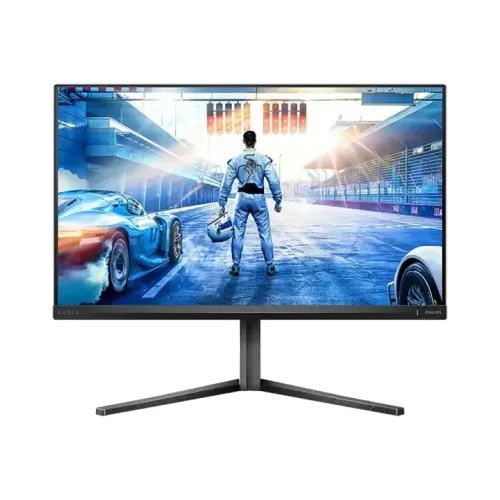
Philips Evnia 27M2N5500Q 27-Inch 2K QHD 200Hz Fast IPS Gaming Monitor Overview
The Philips Evnia 27M2N5500Q is a 27-inch (68.5 cm) flat Fast IPS gaming and creative monitor from the Philips Evnia 5000 series. Engineered for players and power users who want both high-density 2K Quad HD (2560 × 1440) clarity and competitive esports speed, it pairs a 200Hz native refresh rate with a 1ms GtG response time and 0.3ms Smart MBR (MPRT) motion-blur reduction. Unlike standard 27-inch QHD IPS monitors that cap out at 165Hz–180Hz and 250–300 nits brightness, the Evnia 27M2N5500Q steps up to VESA DisplayHDR 400 certification—delivering 350 cd/m² typical SDR brightness, 450 cd/m² peak HDR brightness, and a heightened 1200:1 static contrast ratio.
Finished in Philips’s Dark Slate Grey textured housing, the monitor combines a four-way adjustable SmartErgoBase with NVIDIA G-SYNC Compatible and Adaptive Sync support. Its published color coverage of 99.5% sRGB / 92% DCI-P3 / 90% Adobe RGB makes it relevant to web design, photo work, and video editing as well as gaming. These are manufacturer coverage figures; they do not replace calibration when a color-managed workflow requires a measured profile.
27-Inch 2K QHD Resolution and 200Hz Fast IPS Performance
A 27-inch screen with a native 2560 × 1440 (16:9 QHD) resolution hits the widely recognized sweet spot for desktop gaming and productivity—offering a crisp 109 PPI pixel density and 0.2331 × 0.2331 mm pixel pitch that provides 77% more pixels than Full HD (1920 × 1080) without placing the extreme GPU workload of 4K UHD on midrange graphics cards:
- 200Hz Refresh Rate (via DisplayPort 1.4): Driving 200 frames per second reduces the frame interval to exactly 5.0 milliseconds. Fast horizontal tracking, flick shots, and rapid camera turns in Counter-Strike 2, Valorant, Apex Legends, and Call of Duty feel noticeably smoother and more connected than on 144Hz or 165Hz screens.
- 1ms GtG & 0.3ms Smart MBR: Philips’s Fast IPS liquid crystal formulation achieves a 1ms Gray-to-Gray (GtG) transition speed to suppress ghosting and trailing. When maximum motion sharpness is needed in high-tempo competitive matches, enabling Smart MBR (Motion Blur Reduction) strobes the W-LED backlight in sync with panel refreshes to achieve a 0.3ms MPRT rating.
- NVIDIA G-SYNC Compatible & Adaptive Sync: Certified NVIDIA G-SYNC Compatible and supporting VESA Adaptive Sync / AMD FreeSync, the monitor dynamically matches its refresh rate to the real-time frame output of NVIDIA GeForce and AMD Radeon GPUs, preventing screen tearing and judder.
Wide Color Gamut (99.5% sRGB, 92% DCI-P3, 90% Adobe RGB) and DisplayHDR 400
Many esports-focused monitors sacrifice color richness or contrast for pixel speed, but the Philips Evnia 27M2N5500Q combines competitive responsiveness with creator-grade optical performance:
- 1.07 Billion Colors (8-Bit + FRC): The 10-bit (8-bit + FRC) pipeline renders smooth tonal gradients across skies, shadows, and color ramps without visible banding, maintaining consistent color and contrast across 178° horizontal and 178° vertical viewing angles.
- Multi-Space Gamut Coverage: Factory specification tables confirm 99.5% sRGB, 92% DCI-P3, 90% Adobe RGB, and 100% NTSC coverage. Whether you are editing sRGB web assets, grading DCI-P3 video timelines, or preparing Adobe RGB photography, the panel reproduces vibrant, natural hues.
- VESA DisplayHDR 400 & 1200:1 Contrast: With 350 nits typical brightness when HDR is off and 450 nits peak brightness when HDR is active—paired with a 1200:1 static contrast ratio and Mega Infinity DCR—highlights pop cleanly even in brightly lit rooms, while the Anti-Glare 3H (25% haze) coating diffuses harsh reflections.
Evnia Gaming Toolkit: Stark ShadowBoost and Smart Crosshair
Controlled via the rear EasySelect 5-way OSD joystick, Philips builds a suite of hardware-level gaming enhancements directly into the Evnia 5000 firmware:
- Stark Shadow Boost: Offers three selectable levels that enhance visibility in dark corners, tunnels, and night maps without washing out bright daytime highlights.
- Smart Crosshair: Displays a centered aiming reticle that can automatically shift its color to contrast against the background environment for faster target acquisition.
- SmartImage Game Presets: One-touch switching between FPS, Racing, RTS, LowBlue Mode, EasyRead (monochrome paper-like reading mode), and two customizable user profiles (Gamer 1 and Gamer 2).
Connectivity, Refresh Rate by Port, and Internal Power Supply Reconciliation
Inspecting the bottom I/O photograph (image 3) and official Philips technical documentation highlights important connectivity and power details for buyers:
- 1 × DisplayPort 1.4 Input: Required to unlock the full 2560 × 1440 @ 200Hz refresh rate with 10-bit color and G-SYNC / Adaptive Sync on desktop PCs and laptops (via USB-C to DisplayPort).
- 2 × HDMI 2.0 Inputs (with HDCP 2.2): Two HDMI 2.0 ports support up to 2560 × 1440 @ 144Hz on PCs and 1440p / 1080p @ 120Hz with HDR on PlayStation 5 and Xbox Series X|S consoles, letting you keep two HDMI devices connected alongside your DisplayPort gaming PC.
- 1 × 3.5 mm Audio-Out Jack: Because the 27M2N5500Q does not have internal speakers, digital audio carried over DisplayPort or HDMI can be routed directly to wired gaming headphones or external desktop speakers through the rear 3.5 mm jack.
- Internal 100–240VAC Power Supply Reconciliation: Although several Bangladesh retailer specification tables list Power Type: External, visual inspection of the monitor’s rear connector bay (image 3) and official Philips Evnia 5000 series datasheets confirm a built-in internal 100–240VAC, 50–60Hz power supply with a standard 3-prong IEC power inlet—meaning there is no bulky external power brick to hide under your desk. Active power consumption is rated at just 26.90W typical (0.5W standby, 0.3W off).
SmartErgoBase Ergonomics, Physical Dimensions, and Warranty in Bangladesh
Long gaming sessions and workdays benefit from Philips’s SmartErgoBase stand and eye-care engineering:
- Full 4-Way Stand Adjustment: Supports 130 mm of smooth height adjustment, -5° to +20° tilt, -30° to +30° swivel, and -90° to +90° bidirectional portrait pivot, plus an integrated rear clip on the stand column for tidy cable routing.
- VESA 100 × 100 mm & Weight: Measures 614 × 519 × 261 mm (5.60 kg) with the stand at maximum height, or 614 × 368 × 60 mm (3.75 kg) without the stand for mounting on any standard 100 × 100 mm VESA monitor arm. Includes a Kensington security lock slot.
- Flicker-Free & LowBlue Mode: DC-regulated Flicker-Free dimming and Philips LowBlue Mode reduce eye fatigue during extended nighttime play or coding sessions.
Recommended Setup & Calibration Guide for PC and Console Users
To get the best visual and competitive performance out of the Philips Evnia 27M2N5500Q right after unboxing, follow these practical configuration guidelines:
- Use DisplayPort 1.4 for 200Hz PC Gaming: Connect a compatible desktop GPU to the monitor’s DisplayPort 1.4 input, then open Windows Display Settings → Advanced Display and set the refresh rate to 200Hz at native 2560 × 1440 resolution. Enable G-SYNC Compatible or Adaptive Sync when supported by the graphics card and selected mode.
- Configure Response and Smart MBR: For variable refresh rate play, use the display’s response setting and verify motion in the intended game. When trying Philips’s 0.3ms Smart MBR backlight-strobing mode, review the manual’s brightness and synchronization notes; strobing behavior can affect image brightness and compatibility with other display modes.
- Optimize Color and HDR Modes: For photo editing, graphic design, or video color grading, select the standard color profile with HDR disabled to take advantage of the panel’s 99.5% sRGB, 92% DCI-P3, and 90% Adobe RGB coverage at a steady 350 cd/m² brightness. When launching HDR-mastered games or 1440p streaming media, enable Windows HDR and the monitor’s DisplayHDR 400 mode to unlock up to 450 cd/m² peak luminance.
- Console 1440p 120Hz Output: Connect PlayStation 5 or Xbox Series X|S to either of the two HDMI 2.0 (HDCP 2.2) inputs and select 1440p @ 120Hz in the console video output menu, routing console audio through the monitor’s rear 3.5 mm audio-out jack to your headset or desktop speaker system.
Choosing the Right Connection and Workspace Setup
For a desktop PC, use the DisplayPort input when the goal is the panel’s maximum 200Hz refresh rate at 2560 × 1440. The two HDMI 2.0 inputs provide another convenient path for a laptop, console, or streaming device; the manufacturer specification lists QHD up to 144Hz over HDMI. Available refresh modes also depend on the graphics hardware, cable, operating system, and selected color settings, so check the source device’s display menu after connecting. The monitor’s 3.5 mm output can pass audio from a connected HDMI or DisplayPort source to wired headphones or external speakers. It has no built-in speakers listed in the reviewed product specifications.
The supplied stand supports a 130 mm height range, tilt from -5° to +20°, swivel up to 30° in either direction, and portrait pivot up to 90° each way. If the included stand does not fit the desk, the 100 × 100 mm VESA pattern supports a compatible monitor arm; allow for the 3.75 kg display head when checking the arm rating. With the stand, the monitor weighs 5.60 kg and measures up to 614 × 519 × 261 mm; without it, it measures 614 × 368 × 60 mm. The internal 100–240 V AC power supply means the monitor connects to mains power directly.
Philips lists DisplayHDR 400, 350 cd/m² typical brightness with HDR off, and 450 cd/m² with HDR on. HDR results depend on the source content and operating-system settings. For everyday desktop work, QHD at 27 inches provides more workspace than FHD while keeping interface text legible at normal viewing distances. For color-sensitive work, use an appropriate display profile and confirm the intended gamut in the application rather than assuming every workflow uses the same color space.
Bangladesh retailer listings reviewed for this audit describe a 3-year warranty, but warranty coverage is seller and market dependent. Confirm the written warranty provider and service conditions with the selected retailer before purchase. The observed retailer prices are a dated market snapshot and are not a promise of current price or stock.