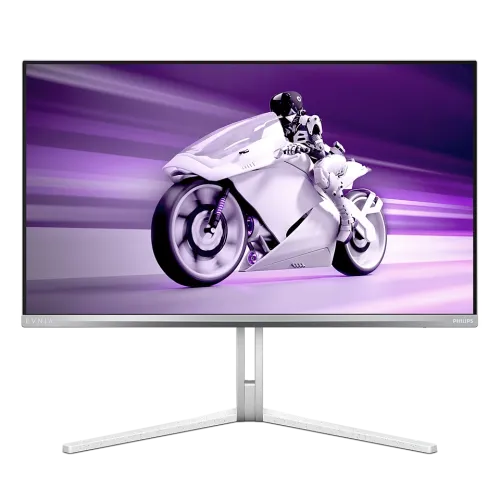
Philips Evnia 27M2N8500 overview
The Philips Evnia 27M2N8500 is a 27-inch-class QHD gaming monitor built around a 26.5-inch viewable Quantum Dot OLED panel. It combines a native 2560 × 1440 resolution with a maximum refresh rate of 360Hz and Philips’ rated 0.03ms gray-to-gray response time. Those headline figures make it a high-refresh PC display, while the QD-OLED panel, 1,500,000:1 typical contrast rating and VESA DisplayHDR True Black 400 certification shape its image presentation. This is a product-specific description for model 27M2N8500. It should not be confused with other Evnia 27-inch models such as the 27M2N5500Q or 27M2N5500, which use different panel technologies and refresh specifications. The screen is marketed as 27 inches, while Philips lists 26.5 inches as the viewable diagonal. The catalog’s existing product URL is preserved for continuity. Philips regional product suffixes identify market variants; because the catalog record does not establish the box suffix, this page uses the base model code rather than guessing a regional MPN.
QHD clarity and 360Hz motion
At 2560 × 1440 pixels, the display provides a 16:9 QHD workspace with approximately 110.84 pixels per inch and 0.2292mm pixel pitch. Text, game interfaces and desktop windows therefore have more pixel detail than a 1920 × 1080 panel of comparable size, while QHD is less demanding to render than 4K. Philips rates the monitor up to 360Hz at the native resolution. A 360Hz refresh corresponds to a frame interval of about 2.78 milliseconds, but the screen alone cannot create high frame rates: the computer, GPU, game, connection, cable and selected display mode must all support the desired timing. Philips lists both HDMI 2.1 and DisplayPort 1.4 inputs for QHD at up to 360Hz. Connect a compatible gaming PC, select the supported high-refresh mode in the operating system or graphics control panel, and confirm the active signal information. Consoles and older PCs may offer lower refresh rates or resolutions. The 0.03ms GtG figure is the manufacturer-rated pixel response specification; it does not mean every transition or full system input-to-photon path takes exactly that time.
QD-OLED contrast, color and HDR
The 27M2N8500 uses a Quantum Dot OLED panel. OLED pixels generate their own light, so the monitor is not an LED-backlit LCD. Philips publishes a typical contrast ratio of 1,500,000:1 and true 10-bit color support for 1.07 billion colors. Its published gamut figures are DCI-P3 98.5%, sRGB 147.5% area, NTSC 120% and Adobe RGB 118%; area percentages above 100% describe gamut size relative to the reference space and must not be mistaken for percentage coverage. Philips also lists factory-calibrated Delta E below 2 in sRGB mode. The monitor carries VESA DisplayHDR True Black 400 certification. Brightness is specified under different test conditions: 250 cd/m² in SDR at 100% average picture level, 450 cd/m² in HDR at 10% APL and a 1000 cd/m² peak at 3% APL. These small-window peaks do not mean the screen sustains 1000 nits across the whole display. For color-managed work, choose the appropriate picture mode and application color profile; wide-gamut output may look oversaturated in unmanaged sRGB content.
Adaptive sync and Philips gaming tools
Philips lists AMD FreeSync Premium Pro and NVIDIA G-SYNC Compatible support. Variable refresh can synchronize the display with supported GPU output to reduce tearing and judder within the supported operating range. The exact range and behavior depend on the graphics card, connection, driver and settings. Philips’ SmartImage Game modes, Stark ShadowBoost, Smart Crosshair and Smart Sniper provide on-screen adjustments for different game scenes. These are optional image and aiming aids rather than changes to a game’s underlying rendering or a guarantee of competitive results. Evnia Precision Center provides software controls on compatible computers. MultiView PIP/PBP can show two input sources at once in supported layouts, useful when a PC and another device need to remain visible together. Three-sided AI Ambiglow projects responsive lighting around the display; users can adjust or disable the effect in the monitor controls. The monitor also includes low-blue-light and flicker-free features. Configure each tool to suit the game and room, and consult Philips’ manual for mode combinations and restrictions.
Connections, USB hub and audio
The input and hub layout includes two HDMI 2.1 ports, one DisplayPort 1.4 input, a USB-B upstream connection, two USB-A 3.2 Gen 1 downstream ports and one 3.5mm headphone output. Philips specifies one of the downstream USB-A ports with BC 1.2 fast charging up to 7.5W. Connect the USB-B upstream cable to the computer to use the monitor’s USB hub. The official port list does not include USB-C or Thunderbolt 4; an older retailer-derived catalog value incorrectly described three Thunderbolt USB ports and has been replaced. The USB-A ports are downstream peripheral connections, not a USB-C laptop dock or video input. Philips also specifies built-in stereo speakers rated 2 × 5W with DTS Sound. For private listening or external audio equipment, use the headphone output. Two HDMI inputs allow multiple devices to remain connected alongside a DisplayPort PC, although the active refresh and features still depend on each source. Check the exact box contents and cable types with the Bangladesh seller before purchase, because regional bundles can vary.
Stand, dimensions and desk fit
The Philips 27M2N8500/00 regional data used for this listing specifies a stand with 130mm of height adjustment, tilt from −5° to +20° and swivel of ±20°. A pivot/portrait rotation feature is not listed. The monitor supports a 100 × 100mm VESA mounting pattern and Philips includes a VESA bracket. Regional suffixes can have different stand ranges, so buyers should confirm the precise boxed suffix if swivel range is important. The manufacturer’s /00 product information lists dimensions of 609.3 × 513.7 × 274.5mm with the stand at maximum height and 609.3 × 357.7 × 61mm without the stand. Net weight is 7.35kg with the stand and 6.00kg without; the carton is listed as 780 × 455 × 141mm and 11.01kg gross. These are product and manufacturer package measurements, not necessarily a courier’s final parcel charge dimensions. Leave shipping-package dimensions to the merchant’s fulfillment data. The stand’s height and tilt adjustments help align the screen to a seated position; use a sturdy desk or correctly rated arm and follow the included mounting instructions.
OLED care, power and long-term use
OLED technology benefits from built-in panel-care controls. Philips lists Screen Saver, Pixel Orbiting, Pixel Refresh, Multi-Logo Protection, Boundary Dimmer, Taskbar Dimmer and Thermal Protection. These options are designed to manage static content and panel conditions. Keep the care features enabled as recommended, vary static desktop elements where practical and follow the on-screen prompts. Philips’ manual explains that Pixel Refresh may be requested after cumulative use and a mandatory refresh prompt should be followed rather than interrupted. OLED burn-in or image retention depends on usage and cannot be ruled out by a feature list. Any warranty treatment for OLED panel behavior is governed by the local written warranty and the specific care conditions; check those terms with the Bangladesh seller. Philips lists an internal 100–240VAC, 50–60Hz power supply, with 29.8W typical consumption, 0.5W standby and 0.3W off for the /00 reference. Regional energy values may differ. Use the supplied power cord and leave ventilation around the rear of the monitor. The QD-OLED stack also uses a graphene-film heat-dissipation design according to Philips product information.
Bangladesh price, availability and warranty
The reviewed Star Tech Bangladesh listing showed a cash price of ৳105,000, a regular price of ৳113,930 and a three-year warranty. Other local retailer pages showed offers in a similar range, but prices, stock and service terms can change. The current BiponiBD variant price of ৳105,000 is retained. Before ordering, confirm that the exact product is model 27M2N8500, check the included cable and VESA bracket, inspect the unit and packaging, and obtain the invoice and written warranty information. A three-year retailer listing does not establish that every seller provides the same warranty provider or OLED coverage. Ask whether the warranty terms include pixel defects or OLED image retention and what care settings are required. Do not infer a regional suffix from the product title; check the label on the unit if market-specific stand or power details matter. The price snapshot is useful for local shopping context and SEO, but it is not a promise of a future offer. The existing product status, slug, seller offer, SKU and variant identifiers remain as captured.
Choosing among similar Philips Evnia monitors
The Philips Evnia lineup contains several 27-inch-class displays with similar names. The 27M2N8500 is the QD-OLED model described on this page, with QHD resolution and up to 360Hz. The 27M2N5500Q is a separate QHD Fast IPS model listed at up to 200Hz, while the 27M2N5500 is another IPS model with its own refresh specification. These are not interchangeable records: their panel technology, motion behavior, ports and features differ. This catalog also contains a second product record whose title names the exact 27M2N8500/00 model. It may be a duplicate, but this content task does not merge, deactivate or delete either product. The records should be reconciled separately after checking merchant ownership, offers, media, publication history and canonical URL strategy. The current reviewed product keeps its existing ID and slug. Shoppers should compare the complete model code and panel type rather than relying only on “Evnia,” 27-inch class or QHD search terms. Confirm whether the desired balance is OLED contrast and 360Hz or a different panel and refresh target.