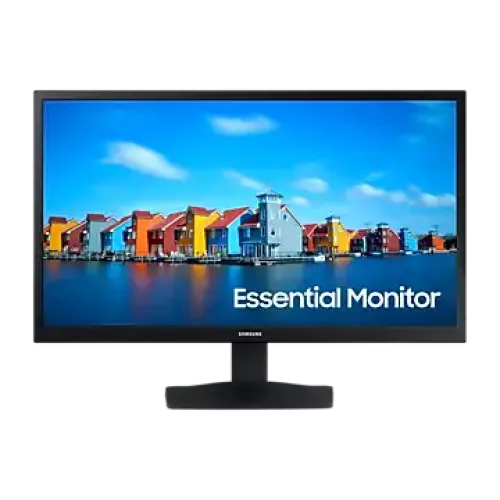
Samsung LS19A330NHW monitor overview The Samsung LS19A330NHW is a compact 19-inch class LED monitor listed for everyday desktop use at home, in a study area, or at a small office workstation. Its familiar 16:9 screen format, VGA and HDMI connectivity, and simple flat-panel design make it suitable for a basic computer setup where desk space and straightforward connections matter. The local seller listing identifies the panel as TN and the screen resolution as HD at 1,366 × 768 pixels. Samsung’s Bangladesh support page is associated with model family S19A330NHW, but its page heading describes a 19-inch FHD monitor. Because that heading conflicts with the exact-code local listing, confirm the model label and actual panel resolution with the seller before ordering. Screen size, resolution and image detail The Bangladesh listing describes the display size as 19 inches and specifies a native resolution of 1,366 × 768. That resolution is commonly described as HD. It provides a practical workspace for web browsing, office documents, online classes, dashboards and other everyday computer tasks. Text and interface elements can be kept comfortably readable at a small monitor size, while the 16:9 aspect ratio fits standard widescreen video. Resolution is not Full HD: users who need more detailed image editing, large spreadsheets, high-density text, or Full HD video should compare a higher-resolution display before choosing this model. The published seller specification lists a TN panel, typical brightness of 250 cd/m² (minimum 200 cd/m²), a typical contrast ratio of 600:1, 16.7 million colours and 72% colour gamut. These values are useful for setting expectations: the monitor is positioned for basic productivity and general viewing, rather than colour-critical design work or premium HDR use. The listed viewing angle is 90° horizontally and 65° vertically, so the picture is best viewed from in front of the screen. Colour and contrast may look different when viewed from the side or from above and below. Refresh rate and response The LS19A330NHW listing states a maximum refresh rate of 60Hz and a 5ms gray-to-gray response time. This is a standard combination for office applications, study, browsing and video playback. It is not a high-refresh gaming monitor; competitive players who prioritize smoother motion should compare 100Hz, 144Hz or faster models and check that the graphics device and cable support the chosen display mode. Eye-comfort options The seller’s key-features section names Eye Saver Mode and Flicker Free. The detailed specification table also lists Low Blue Light and Flicker Free as supported. These features may help users tailor the display for longer reading or computer sessions, but they do not remove the need for regular breaks, suitable room lighting and a comfortable screen position. Eye-comfort options should be checked in the monitor’s on-screen menu when the exact supplied unit is available. Connections and setup The listed input options are one HDMI 1.4 connection and one D-Sub (VGA) connection. HDMI is the usual choice for a modern computer, while VGA can help connect older desktop systems that still have an analog display output. The listing specifies an external power adapter, AC 100–240V input and 12W power consumption. Confirm that the supplied adapter, power cable and any required video cable are included with the seller’s package; included accessories can vary by offer. The stand is listed with tilt adjustment from approximately −5° to +21°, with stated tolerances of ±2°. A 75 × 75 mm VESA mounting pattern is listed for compatible stands or wall mounts. Check the mount’s supported VESA spacing and weight capacity before purchasing separately. The monitor is described as black and flat, and the built-in-speaker specification is No, so plan to use separate speakers, headphones or audio equipment if sound output is needed. Who should consider this monitor? • Students who need a basic screen for lessons, documents, research and browsing. • Home users setting up a compact workstation for email, web apps and everyday tasks. • Small offices that need a straightforward 60Hz monitor with HDMI and VGA inputs. • Users replacing an older display who want a simple monitor without gaming or colour-work requirements. Consider a larger Full HD display if you regularly keep several windows open side by side, work with detailed images, need more vertical workspace, or watch high-resolution video at native detail. Choose a higher-refresh-rate display for smoother gaming, and an IPS or other suitable wide-view panel for shared viewing or colour-sensitive work. Specifications and purchase checks The exact-code Bangladesh retailer listing provides the resolution, panel, refresh rate, response time, inputs, eye-comfort features and several mechanical and power specifications shown on this page. It lists a three-year warranty, but warranty terms depend on the selling merchant, unit source, invoice and eligibility conditions. Confirm the written warranty provider, coverage, service process and duration on the invoice before purchase. Samsung’s support listing links to manuals and official support for model family S19A330NHW; check the rear product label to confirm that the delivered unit matches LS19A330NHW. Seller pages and Samsung’s support page do not fully agree on the resolution label: the exact LS19A330NHW local listing says HD 1,366 × 768, while Samsung’s support page heading says FHD for S19A330NHW. Treat the exact sticker and the monitor’s reported native display mode as decisive. This product description keeps that discrepancy visible instead of presenting the conflicting labels as settled fact. Product images, stock, price, accessories, delivery options and warranty can also differ between merchants and may change over time. At a glance • Model: Samsung LS19A330NHW • Seller-listed screen: 19-inch class LED, flat, 16:9 • Seller-listed resolution: HD (1,366 × 768); verify the supplied unit due to a conflicting Samsung support-page heading • Panel and motion: TN, up to 60Hz, 5ms GTG • Inputs: 1 × HDMI 1.4 and 1 × D-Sub (VGA) • Listed eye-comfort options: Eye Saver Mode, Flicker Free and Low Blue Light • Mounting: 75 × 75 mm VESA; tilt-adjustable stand • Audio: no built-in speakers listed • Power: external adapter, AC 100–240V, 12W listed consumption • Warranty: seller-listed as three years; confirm written coverage with the merchant Check the current offer details on BiponiBD and confirm the resolution, box contents and warranty with the selected seller before completing an order.