Overview
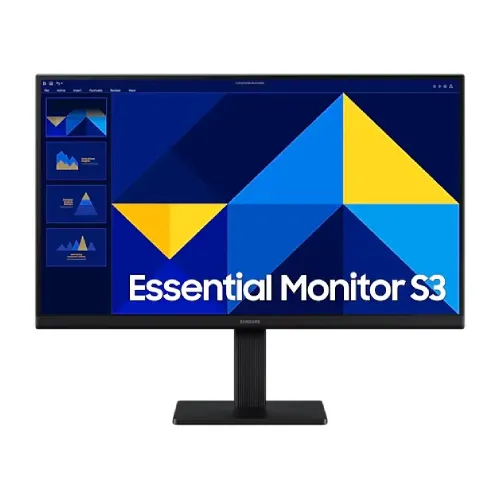
The Samsung Essential Monitor S3 LS22D300GAW is a flat 21.5-inch Full HD IPS monitor with a maximum refresh rate of 100Hz. Samsung categorizes it in the 54.6cm (22-inch) class, while the active image area measures 47.6 × 26.77cm and the actual diagonal is 21.5 inches. This distinction is useful when comparing it with monitors advertised by class size. The 1920 × 1080 resolution and 16:9 shape fit everyday office documents, web pages, online classes, video and general home use. Its IPS panel supports wide published viewing angles, while the black finish and simple stand are suited to a conventional desk setup. Check the precise box label and regional SKU suffix on the unit because Samsung’s India product page uses LS22D300GAWXXL; the base model is LS22D300GAW.
Display clarity and color
Samsung specifies Full HD 1920 × 1080 resolution, 250 cd/m² typical brightness and 200 cd/m² minimum brightness. The typical static contrast ratio is 1000:1. Samsung separately labels dynamic contrast as “Mega”; this is not the same measurement as the native static contrast ratio. The display supports up to 16.7 million colors and a gamut value of 72% (CIE 1931). These figures describe general display capability and do not replace an independent color calibration report. For ordinary documents, streaming and web use, the screen’s Full HD pixel grid provides a clear 16:9 workspace. Image appearance can vary with picture mode, input signal, room light and the individual unit. If precise color matching is necessary for professional photo or print work, evaluate the display with a calibrated workflow and compare the required gamut rather than relying on a broad color-accuracy claim.
IPS panel and viewing
The LS22D300GAW uses an IPS panel with a published 178° horizontal and 178° vertical viewing angle. Wide viewing-angle specifications can make it easier to share a screen or view content when not seated exactly in front of it. Actual color and contrast perception still changes with position, room lighting and the content displayed. The panel is flat, not curved. Samsung’s active area is 47.6cm wide by 26.77cm high. A 21.5-inch active diagonal is compact enough for many desks while still showing a Full HD desktop. If you sit far from the monitor or regularly work with several windows side by side, compare the usable viewing size with a larger monitor before deciding. Set the display at a comfortable distance and use the operating system’s text scaling if controls appear too small.
Refresh rate and response
Samsung lists a maximum refresh rate of 100Hz and a 5ms Gray-to-Gray response time. A 100Hz display can refresh more often than a 60Hz monitor, which may make pointer movement, scrolling and supported games appear smoother when the computer produces an appropriate signal. It does not guarantee that a game will render at 100 frames per second; the graphics hardware, software and selected resolution determine that. The 5ms GtG value is a separate response-time measurement and should not be confused with refresh rate. The monitor is not described as a high-end competitive gaming display, and Samsung lists FreeSync and G-Sync as unavailable on its official product page. If motion synchronization or a particular refresh mode is important, check the official regional page and the exact connection settings before purchase.
Ports and audio
Samsung lists one HDMI 1.4 input and one D-Sub (VGA) input. HDCP 1.4 is supported over HDMI. The HDMI connector is suitable for many current computers and media devices, while VGA can connect compatible older systems. The display does not list DisplayPort, USB-C or a USB hub. Samsung also lists no built-in speaker and no headphone output. Plan to route sound through the computer or use external speakers connected to the source device. An adapter may be needed if a computer’s output does not match HDMI or VGA; check that the adapter supports the intended resolution and refresh rate. Samsung’s India product information lists an HDMI cable in the box, but accessory contents can differ by region and seller. Confirm what is included in the Bangladesh package rather than assuming the regional box contents are identical.
Eye-comfort features
Samsung lists Eye Saver Mode and Flicker Free. Eye Saver Mode is intended to reduce blue light from the screen, and Flicker Free is listed as a feature of the model. These features do not establish a medical result or eliminate all sources of eye fatigue. Comfort also depends on the room’s lighting, brightness, viewing distance, breaks and posture. Samsung’s product page describes the features as helping users stay comfortable during longer sessions. If you need a specific certification or measured blue-light reduction, consult the documentation for the exact regional product variant. The screen is a conventional LCD monitor, and the main eye-comfort features can be selected through the on-screen display as described by Samsung’s manual.
Stand, dimensions and mounting
The supplied stand is a simple tilt design. Samsung lists approximately −2° (±2°) to +21° (±2°), with height adjustment unavailable. Swivel and pivot adjustment are not listed. The 100 × 100mm VESA interface can support a compatible monitor arm or wall bracket. Check the mount’s load rating and the manufacturer’s mounting instructions before installation. Samsung lists dimensions with the stand of 48.99 × 40.00 × 17.51cm and without the stand of 48.99 × 29.19 × 3.62cm. The set weighs about 2.1kg with the stand and 1.6kg without it; the package weight is listed as 3.1kg. Leave space for the adapter and cables, and secure the display safely if mounting it above a desk.
Power, supplied accessories and local warranty
Samsung lists an external adapter, AC 100–240V input, and a maximum power consumption of 25W. Power use varies with settings and display content. Use the adapter supplied for the monitor and check its label if a replacement is needed. Samsung’s India product page lists an HDMI cable and a 1.5m power cable; local box contents should be confirmed with the Bangladesh seller. Bangladesh sellers commonly advertise a three-year warranty for this model. That local seller listing is separate from Samsung’s regional India support information and does not prove coverage for every imported unit. Before buying, confirm who handles warranty service, what exclusions apply, whether the box must be retained, and what serial-number and invoice evidence is needed for a claim. Keep the purchase documents and check the product label on arrival.
Who may choose the LS22D300GAW
This monitor may suit people who want a compact Full HD IPS screen for study, office work, browser-based tools, online classes and general entertainment. The 100Hz maximum refresh rate adds a smoother option when supported by the source. HDMI and VGA allow connection to a mix of newer and older equipment, and VESA mounting can help free desk space. It may not fit users who need USB-C docking, DisplayPort, integrated audio, height adjustment, adaptive sync or a larger viewing area. The actual active diagonal is 21.5 inches, even though Samsung labels the product 22-inch class. Confirm connection compatibility, regional accessories and the Bangladesh warranty terms for the specific unit. No price, availability or review rating is embedded because those details change by seller and time.
Technical specifications
Key features
- 21.5-inch active display (54.6cm product class) with Full HD 1920 × 1080 resolution and a 16:9 aspect ratio.
- IPS panel with 178°/178° viewing-angle specification and LED backlight.
- Up to 100Hz refresh rate and 5ms Gray-to-Gray response time.
- 250 cd/m² typical and 200 cd/m² minimum brightness; 1000:1 typical static contrast.
- 72% color gamut (CIE 1931) and up to 16.7 million colors per Samsung specification.
- Eye Saver Mode and Flicker Free features.
- One HDMI 1.4 input and one D-Sub (VGA) input; HDCP 1.4 over HDMI.
- Flat panel, tilt-only stand and 100 × 100mm VESA mount pattern.
- No built-in speaker, headphone output, USB hub or USB-C listed.
- External adapter, AC 100–240V input; Samsung lists up to 25W power consumption.
Advantages
- Full HD resolution on a compact 21.5-inch screen provides crisp text and a familiar 16:9 workspace for office and home tasks.
- IPS panel and wide published viewing angles suit shared viewing and everyday content.
- 100Hz maximum refresh rate is smoother than 60Hz when the computer and connection support it.
- HDMI and VGA connections can serve newer and legacy desktop systems.
- Eye Saver Mode, Flicker Free, VESA compatibility and tilt adjustment add practical desk flexibility.
Things to consider
- The supplied stand is tilt-only; height adjustment, swivel and pivot are not available.
- The display is 21.5 inches active, despite the 22-inch/54.6cm class naming; compare by actual viewable diagonal.
- No built-in speakers, headphone output, USB hub or USB-C port are listed.
- Only one HDMI and one VGA input are available; HDMI is version 1.4.
- Three-year Bangladesh warranty is seller-listed and should be confirmed for the exact imported unit.
Frequently asked questions
What is the actual screen size?
Samsung specifies a 54.6cm (22-inch class) product with a 21.5-inch active display area. The viewable diagonal is 21.5 inches.
What is its native resolution?
The native Full HD resolution is 1920 × 1080 pixels in a 16:9 aspect ratio.
Does it support 100Hz?
Yes. Samsung lists a maximum refresh rate of 100Hz. The computer, HDMI/VGA output, cable and display settings must support the selected mode.
What panel and viewing angle does it use?
It uses an IPS panel with 178° horizontal and 178° vertical viewing angles listed by Samsung.
How bright is the screen?
Samsung lists 250 cd/m² typical and 200 cd/m² minimum brightness. Actual appearance depends on settings, source and room lighting.
What is its response time?
Samsung specifies 5ms Gray-to-Gray. The response figure is distinct from the monitor’s 100Hz maximum refresh rate.
What ports are included?
There is one HDMI 1.4 input and one D-Sub (VGA) input. Samsung lists HDCP 1.4 over HDMI.
Does it have built-in speakers or a headphone jack?
Samsung lists no built-in speaker and no headphone output for this model. Use audio through the computer or separate speakers.
Can the stand adjust height?
No. Samsung lists a simple tilt stand with a range of approximately −2° to +21° and no height adjustment.
Can I mount it using VESA?
Yes. Samsung lists a 100 × 100mm wall-mount pattern. Confirm bracket support and required hardware before mounting.
What eye-comfort features are included?
Samsung lists Eye Saver Mode and Flicker Free. These are display features and do not promise a medical outcome.
What warranty applies in Bangladesh?
Bangladesh sellers list three years. Confirm the service provider, coverage terms, serial eligibility and required invoice with the seller.
Specifications are based on Samsung documentation for LS22D300GAW and Bangladesh seller warranty listings. Confirm regional model suffix, box contents and warranty terms with the seller.