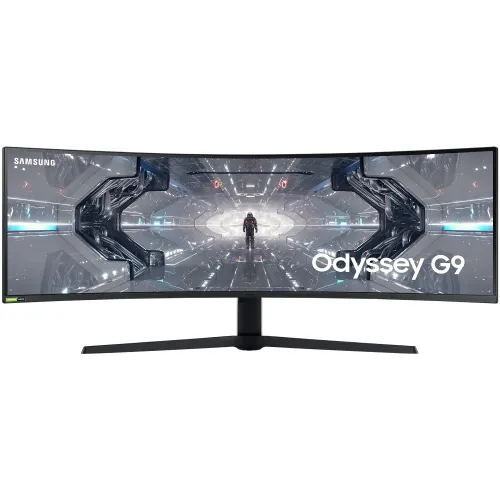
Samsung Odyssey G9 C49G95TSSW is a 49-inch 32:9 curved Dual QHD gaming monitor with up to 240Hz refresh rate, 1000R curvature and a 5120 × 1440 workspace. Samsung Bangladesh confirms the model family and 240Hz format. The local seller currently lists it as upcoming, with price to be announced.
A super-ultrawide gaming and work display
The Samsung Odyssey G9 C49G95TSSW is a 49-inch curved monitor designed around an unusually wide 32:9 screen. Its 5120 × 1440 Dual QHD resolution gives two horizontal Full HD work areas in one continuous display, with no central bezel between them. That format can be useful for editing timelines, wide spreadsheets, multiple application windows, financial dashboards, simulation tools and supported games. Samsung Bangladesh’s support page identifies the model family as a 123.9cm (49-inch) monitor with 32:9 aspect ratio and 240Hz refresh rate. The screen’s size changes the desk setup: check available width and depth, viewing distance, stand placement and the location of speakers or other equipment. This product is a specialist large-format display, so its physical fit is as important as its refresh rate.
Resolution and aspect ratio
At 5120 × 1440, the Odyssey G9 provides 7.37 million pixels across a 32:9 canvas. The pixel count and ratio let users place two wide applications side by side while keeping a continuous view across the middle. The same format can expose more of a game world in titles that support super-ultrawide resolutions. Support varies: some games render the full width, some use a narrower field of view, and some show side bars or require adjustments. Video content made for 16:9 will not normally fill a 32:9 screen without cropping or stretching, so expect unused space during many films and streams. Operating systems and productivity apps can also benefit from window-management tools. Before buying, confirm that the main applications use the resolution comfortably and that the computer has the required graphics output.
1000R curve and panel viewing
A 1000R curve bends the panel toward the viewer with a radius of approximately one metre. Across a 49-inch display, that curve can make the edges easier to see without turning the head as far as a flat screen of similar width might require. The best result depends on sitting near the centre and at a suitable distance. VA panel technology is listed, along with a typical 2500:1 contrast ratio. Higher native contrast can produce deeper dark scenes than many basic IPS displays, while viewing angle behaviour and colour uniformity can vary across a large curved VA panel. Users should sit centrally for consistent geometry and check the panel under their own lighting. Samsung and retailer details describe a curved 49-inch product; the curve does not remove the need to plan the desk layout.
Refresh rate and response
Samsung Bangladesh’s official support listing confirms a 240Hz refresh rate for the C49G95TSSW family. Star Tech’s direct exact-model page lists up to 240Hz and a 1ms GTG response time. These figures describe capability, not a guarantee that every computer can run 5120 × 1440 at 240 frames per second. A powerful graphics card, suitable cable, supported input and correct settings are needed, and the actual frame rate also depends on the game. Some display modes may trade resolution, colour depth or refresh rate. The combination can benefit fast PC gaming when the entire system supports it. For everyday office work, the 240Hz maximum remains available as a smoother desktop option, but it adds little for media sources limited to lower frame rates.
Colour, brightness and HDR
The retailer lists Quantum Dot Color, up to 1.07 billion colours, 125% sRGB typical coverage, 92% Adobe RGB typical coverage and 95% DCI coverage. These broad gamut figures can make colourful content vivid, but colour-critical workflows still benefit from suitable colour management and calibration. Brightness figures should be read carefully: the detailed specification page lists typical brightness at 420 cd/m², peak brightness at 1000 cd/m² and minimum at 300 cd/m². The older body copy formats these figures inconsistently; this description distinguishes typical from peak values and does not imply constant 1000 cd/m² output. HDR is listed, and Samsung product material identifies an HDR display. Confirm the exact local certification and supported HDR format for the regional SKU before relying on a specific HDR standard. Source content, settings and ambient light also shape the result.
Adaptive sync and gaming tools
Star Tech lists G-Sync support and AMD FreeSync Premium Pro for this model. Compatible adaptive sync can help coordinate monitor refresh with the graphics card’s frame delivery, reducing visible tearing in supported situations. Actual compatibility depends on the GPU, drivers, input, cable and selected mode. The listed gaming functions include Black Equalizer, Refresh Rate Optimizer and Super Arena Gaming UX. Eye Saver Mode and Flicker Free are also included in the feature list. These tools let users adjust visibility, picture behaviour and comfort; they do not increase the graphics card’s performance or remove the need to tune a game. Competitive players should check their preferred games at the monitor’s native 5120 × 1440 resolution and choose a refresh mode the system can sustain.
Picture-by-Picture and multiple sources
Picture-by-Picture and Picture-in-Picture allow more than one input source to appear at a time. This can be helpful when monitoring a work computer and another source, or when a user wants to compare two systems without switching the full display. The two inputs share the same physical panel, so the picture areas are smaller than the full screen and mode-specific resolution or refresh restrictions may apply. Check the monitor’s current manual for supported source combinations and settings before designing a workflow around them. DisplayPort and HDMI connections are listed, along with two USB 3.0 hub ports. Connect each computer to an available video input and configure the output resolution individually. Not all USB-C or laptop docking configurations will provide video to this monitor without a suitable adapter or dock.
Ports and audio
The direct Star Tech listing specifies two DisplayPort 1.4 inputs, one HDMI input, two USB 3.0 hub ports and a headphone output. This selection can accommodate a desktop PC and additional video source while providing a local connection point for compatible USB accessories. The product has no built-in speakers, so plan for headphones or external speakers connected to the monitor or computer. The exact HDMI version and maximum performance combination should be confirmed from the supplied manual for the regional variant; the listing’s specification table only says HDMI version 2. Use certified cables rated for the target resolution and refresh. Cable quality, length and host output capability can determine which modes are available. The display’s USB hub also needs its upstream connection to the host to provide USB data functionality.
Stand, adjustment and mounting
The stand is designed to support the wide panel and offers height adjustment around 120mm, tilt and swivel. The Star Tech table lists tilt from about -3° to +13° and swivel around ±15°, with small tolerances. A 100 × 100mm VESA mounting pattern is also listed. At 16.7kg with its stand and 14.1kg without, the panel requires a sturdy desk or a mount rated for the actual load and leverage. The installed footprint is approximately 1147.6 × 537.2 × 416.4mm with stand, according to the retailer. Check desk thickness, edge clearance, arm extension and cable routing before mounting. Leave enough room behind the screen for its curve and connections. The black finish and broad form make the monitor a dominant part of the desk.
Who should consider it
The Odyssey G9 suits people who intentionally want a very wide display for games, productivity or simulation. It can replace a dual-monitor arrangement for users whose workflow benefits from one continuous canvas, and its 240Hz maximum refresh is aimed at fast gaming systems. It may be less suitable when desk width is limited, when applications do not support ultrawide layouts, or when the primary content is standard widescreen video. Users seeking simple office work at modest cost may not need this scale or refresh capability. People who share the screen from off-centre seating should assess whether a curved VA panel suits their viewing pattern. The best match is a computer with DisplayPort 1.4 output, ample graphics performance, a sturdy mounting surface and games or software that make use of the 32:9 workspace.
Power, package and warranty
The retailer specification lists an internal power supply and AC 100–240V input. It reports standby consumption below 0.5W and off-mode consumption below 0.3W, while maximum and typical operating power are shown as unavailable. No operating wattage is invented here. Samsung Bangladesh provides model-family manuals and support information for LC49G95TSSWXXL. The direct Star Tech product page lists a three-year warranty. Confirm which provider backs that warranty, what failures are covered, and how service is handled in Bangladesh before ordering. The exact accessory bundle can vary by region; check the carton contents with the seller. Because the monitor is heavy and large, also confirm delivery, installation and return arrangements before completing a purchase.
Current Bangladesh availability
The exact-model Star Tech page opened during this review shows status “Up Coming” and a price field “To be announced.” The same page’s older descriptive text and search snippets mention ৳175,000, but that price conflicts with the current status and price field. It is not treated as a confirmed live offer and is excluded from the product’s market price range. Other search results were not used as a substitute for direct current availability. The product listing therefore shows no verified local price until a merchant publishes an active offer. Ask the seller to confirm stock, final price, delivery timing and written warranty terms when the page changes. A high-value monitor should be purchased only after those details and the intended return process are clear.
Summary of the verified model
The verified identity is Samsung Odyssey G9 C49G95TSSW, product family LC49G95TSSWXXL. Samsung Bangladesh confirms the 49-inch 32:9 format and 240Hz refresh rate. The direct Star Tech exact-model specification lists 5120 × 1440 resolution, 1000R curvature, VA panel, up to 240Hz, 1ms GTG, Quantum Dot Color, adaptive sync features, DisplayPort 1.4, HDMI, a USB hub, Picture-by-Picture and Picture-in-Picture, ergonomic adjustment and VESA mounting. Brightness source wording distinguishes 420 cd/m² typical from 1000 cd/m² peak. The local seller currently marks the product upcoming with price to be announced, so no current Bangladesh market price is asserted. Confirm regional details, stock and warranty directly with the merchant before ordering.
Frequently asked questions
What is the exact model?
This is the Samsung Odyssey G9 C49G95TSSW, also identified by Samsung Bangladesh support under product family code LC49G95TSSWXXL.
What size and resolution does it have?
Samsung identifies a 123.9cm (49-inch), 32:9 monitor. The direct retailer specifications list 5120 × 1440 Dual QHD resolution.
What does 1000R curvature mean?
The panel curves with a 1000mm radius. Its broad 49-inch span benefits from careful viewing distance and placement; personal comfort varies.
Does it support 240Hz?
Samsung’s Bangladesh support listing confirms 240Hz. The computer, cable, selected resolution and display mode must support the chosen refresh rate.
Is it suitable for competitive gaming?
It is a fast gaming monitor with up to 240Hz and 1ms GTG listed. Graphics performance, game support and connection settings determine the experience.
Which adaptive sync technologies are listed?
Star Tech lists G-Sync support and FreeSync Premium Pro. Compatibility depends on the GPU, drivers, connection and selected display mode.
What ports are available?
The Star Tech product table lists two DisplayPort 1.4 inputs, one HDMI input, two USB 3.0 hub ports and a headphone output.
Does it have speakers?
No built-in speakers are listed. Use headphones through the audio output or connect external audio to the source device.
Can I show two computers at once?
Picture-by-Picture and Picture-in-Picture are listed. The supported input combinations, scaling and refresh rates depend on the mode.
Can I mount it on an arm?
The retailer lists a 100 × 100mm VESA mount. Confirm the mount’s load rating and physical clearance for this large curved panel.
How much desk space does it need?
The direct listing gives 1147.6 × 537.2 × 416.4mm with the stand. Measure the desk width, depth and viewing distance before buying.
What is the Bangladesh price and warranty?
Star Tech currently displays Up Coming and To be announced. The seller lists a three-year warranty, but confirm local warranty coverage and final price in writing when stock is announced.