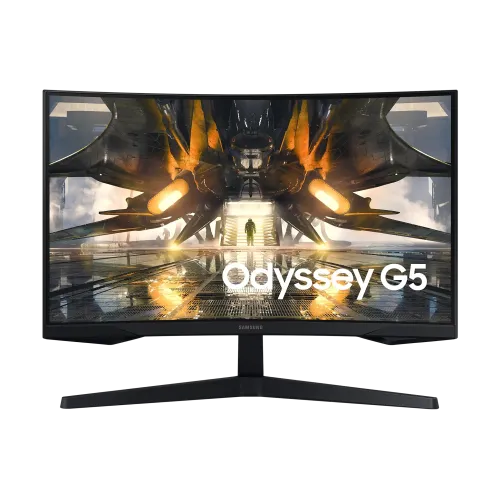
Samsung Odyssey G5 LS32CG550EWX overview
The Samsung Odyssey G5 LS32CG550EWX is a 32-inch class curved gaming monitor with a QHD 2560 × 1440 resolution, VA panel and maximum 165Hz refresh rate. The model code LS32CG550EWX is present in the catalog title and exact-model Bangladesh listings reviewed. It combines a 1000R curve, 1ms MPRT response-time rating, HDR10 and AMD FreeSync features for PC gaming and entertainment. The curved panel and broad 16:9 canvas shown in all six catalog images match the exact model family. This page is specific to the LS32CG550EWX regional configuration; it does not borrow features from other Odyssey G5 screen sizes or model suffixes. Local price and warranty are separately dated because they change by seller and promotion.
QHD resolution and 32-inch workspace
Native resolution is QHD 2560 × 1440, displaying 3,686,400 pixels in a 16:9 layout. That gives games and desktop applications more detail than Full HD while retaining a 32-inch viewing area. A QHD monitor can show more workspace for timelines, document windows, and browser panels, and many recent graphics cards can render QHD at useful frame rates. Running demanding titles at 165 frames per second still depends on the GPU, game settings, and the game itself. Set the computer to 2560 × 1440 for native output and choose a scaling level that fits your viewing distance. A lower-resolution source can be scaled, but it does not acquire real QHD detail. Console output modes may differ from PC modes, so verify the selected resolution and refresh on the connected device.
165Hz refresh and gaming response
The exact-model Bangladesh listings specify a maximum 165Hz refresh rate and 1ms MPRT response time. A 165Hz panel can update the image frequently when the source delivers frames and the connection supports that mode. This can make fast movement and camera pans appear smoother than on a 60Hz screen, but the display cannot create frames the graphics system does not render. Confirm 165Hz in the operating-system display settings and use the appropriate DisplayPort connection and cable when targeting the maximum refresh. The 1ms figure is MPRT, a motion-picture response measurement. It is not a guarantee that all pixel transitions have a one-millisecond gray-to-gray response at every overdrive setting. Motion clarity can vary with the game's frame rate, response mode, and the content shown.
1000R curvature and viewing position
The 1000R curve follows a nominal 1,000mm radius, making the display more visibly curved than a flat panel. On a 32-inch screen, this curvature can bring the left and right edges closer to the viewer when seated near the center. Whether it feels immersive or distracting is personal and depends on viewing distance, desk position, and the kind of work displayed. Center the monitor and sit far enough away to see the whole image comfortably. Users who often share the screen with people viewing from the side should consider that curved panels present edge content at a different angle. The six catalog images show the curved design from the front, side, top, and rear. The stand and panel occupy more desk depth than a flat screen, so measure the space before ordering.
VA panel, contrast and brightness
The VA display is listed with typical brightness of 300 cd/m², minimum brightness of 200 cd/m², and a typical 1000:1 contrast ratio by the Bangladesh sources checked. Retailer descriptions sometimes also repeat a 2500:1 contrast figure in marketing text, while their structured specification tables show 1000:1. To avoid overstating performance, this product content uses the table's 1000:1 typical value and flags the variance for seller verification. VA panel technology is often chosen for dark-room contrast, although black level and shadow detail depend on the actual unit, picture mode and lighting. The 178-degree viewing-angle rating is nominal; color and luminance can change off-axis. Adjust brightness for the room and compare a calibrated picture mode before judging dark scenes.
HDR10 and picture quality expectations
Samsung Odyssey G5 local exact-model listings identify HDR10 support. HDR10 describes a signal format; the label alone does not prove a particular HDR certification or peak-brightness result. The structured local sources list typical brightness around 300 cd/m², so buyers should set expectations accordingly and not treat HDR10 as a promise of bright specular highlights like a much brighter HDR display. Compatible HDR content, a suitable graphics card or console, and the correct operating-system or game settings are required. The picture mode affects how HDR is tone-mapped. If a desktop looks washed out or too dim after enabling HDR, check the source configuration, monitor menu, and game mode. HDR experience varies by mastering and room lighting; the feature is best judged with compatible content rather than a logo alone.
AMD FreeSync and variable refresh
Retailer specifications list AMD FreeSync, which can synchronize monitor refresh timing with compatible graphics output within a supported operating range. This can reduce visible tearing when frame delivery fluctuates. The exact range and compatibility depend on the graphics card, driver, connection, and display mode. The monitor does not guarantee a specific frame rate or remove all motion blur. Turn on the relevant option in the monitor menu and graphics software, then verify the feature is active. Some listings also state G-Sync support, but the exact certification and supported mode were not confirmed in an official Samsung page for this regional code; check with the seller if a certified G-Sync feature is required. The 165Hz refresh and variable-refresh support work best when the source and cable are configured for the same resolution and rate.
Ports and device connections
Exact-model Bangladesh specifications list one HDMI 2.0 input and one DisplayPort 1.4 input. The ports allow a PC and a console or other source to stay connected, with the active input selected from the monitor controls. DisplayPort is the listed route for 165Hz output; HDMI may have a different maximum mode depending on the source and timing. Check cable quality and the graphics device's supported output before connecting. The listings show no built-in speakers; use a headset or external speakers for audio. Some sources list a headphone jack, while not every seller's page includes the connection in its summary. Confirm local I/O and accessories with the seller if a specific audio output is important. For a gaming PC with a discrete GPU, connect the monitor to the graphics card output.
Eye comfort and gaming controls
Bangladesh product tables list Flicker Free and Low Blue Light, while exact-model retailer pages also mention eye-care or gaming modes. These features can support a preferred image setting, but visual comfort still depends on brightness, viewing distance, ambient lighting, posture, and regular breaks. Samsung's Odyssey family includes screen controls for selecting picture modes and input behavior; available menu options can vary by firmware and regional configuration. Avoid running the screen brighter than needed in a dim room. If text looks too small at native QHD, adjust scaling instead of moving unusually close to the panel. The 1000R curve is a design preference and does not guarantee reduced eye strain. Buyers who prioritize long reading sessions should compare curved and flat panels in person if possible.
Stand, VESA mounting and physical fit
The bundled stand supports tilt adjustment, with local exact-model specifications listing approximately −2 to +18 degrees. Height adjustment is not listed. VESA mounting is listed as 75 × 75mm, so verify compatibility because many monitor arms expect 100 × 100mm. Check the arm's load rating, screw length, clearance around the stand mount, and cable routing before installation. Retailer tables list dimensions of about 616.6 × 477.4 × 272.6mm with the stand and 614.6 × 382.8 × 120mm without, with net weight near 4.1kg including the stand. The 1000R curve and stand depth affect desk placement. The stand has a gaming-oriented shape shown in the product images; confirm the exact local package and mounting screws before installation.
Power and warranty in Bangladesh
Local listings identify an external power adapter and 100–240V AC input. Warranty information is seller-specific: Star Tech and TechLand list three years, while other regional offers may have different service arrangements. The catalog's existing three-year warranty is retained, but buyers should confirm the written local warranty, service center, panel and dead-pixel terms, accessories, and invoice before payment. A stock status or discount can change without notice. Compare the monitor's model code on the carton and rear label to LS32CG550EWX, and confirm that the regional suffix matches the order. If buying online, inspect the screen for damage and test the selected input during the return window. The catalog does not promise a particular warranty provider or today's stock status.
Bangladesh price snapshot and fit
Listings checked on 5 November 2026 showed prices including ৳46,100 at ZettaByte, ৳47,000 at Star Tech and Premier Computer, and ৳51,000 at Ultra Technology. These are seller listings from a dated snapshot, not a guaranteed final price; stock, offer eligibility, delivery, VAT, and payment methods can change. The catalog variant MSRP of ৳47,000 remains unchanged. The Odyssey G5 can suit PC players who want QHD detail, a high refresh rate, VA contrast, and a pronounced curve. It may be less suitable for buyers who need a flat screen, height-adjustable stand, USB-C docking, built-in audio, or verified high-end HDR performance. Check the connection and graphics output needed for the games you play before choosing it.
Summary
Samsung Odyssey G5 LS32CG550EWX combines a 32-inch QHD panel, 165Hz maximum refresh, VA technology, 1000R curvature, 1ms MPRT, HDR10 and AMD FreeSync. Local exact-model sources list one HDMI 2.0 and one DisplayPort 1.4, a 75 × 75mm VESA pattern, and tilt adjustment. Contrast-ratio values vary between retailer marketing text and specification tables; this page uses the structured 1000:1 typical value and calls out the discrepancy. The manufacturer-hosted spec page for this exact regional suffix was not located during the review, so hardware claims were cross-checked among Bangladesh retailers. Confirm the exact suffix, current seller price, warranty and included accessories when ordering.