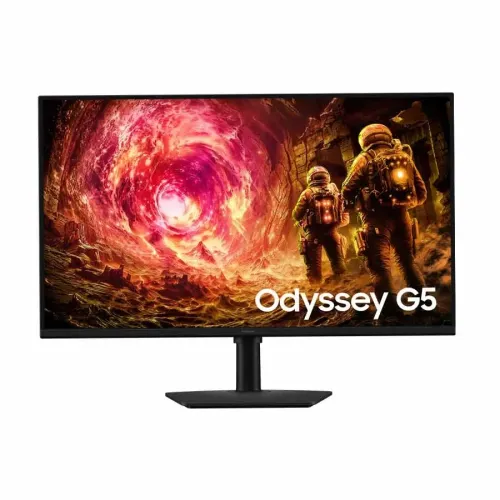
Samsung Odyssey G5 LS32FG502EW overview
The Samsung Odyssey G5 LS32FG502EW is a 32-inch-class flat gaming monitor with a QHD 2560 × 1440 resolution, Fast IPS panel and maximum 180Hz refresh rate. Samsung’s official product page identifies the LS32FG502EW as the G50F flat IPS model and lists 1ms grey-to-grey response time, HDR10 support, FreeSync and G-Sync Compatible support. It is designed for players who want a large screen with higher resolution than Full HD and smoother motion than a standard 60Hz display. The same combination can also work for everyday desktop use, browser windows, documents, media and creative applications, subject to the user’s colour and workflow requirements. Samsung specifies 300 cd/m² typical brightness, 1000:1 typical static contrast, 99% sRGB coverage, one HDMI 2.0 input, one DisplayPort 1.2 input, and an ergonomic stand with height adjustment, swivel and pivot. The catalog retains the existing product slug, active status, Monitors category, Samsung brand, single variant, SKU, MSRP and three-year warranty. This page distinguishes HDR10 from a VESA DisplayHDR certification and GTG response time from MPRT claims found in some retailer text.
QHD resolution on a 32-inch display
The monitor’s native 2560 × 1440 resolution is commonly called QHD or 1440p. It provides more pixels than 1920 × 1080 Full HD and can display finer detail in games, photographs and text. On a 32-inch display, the physical screen is large enough for a more immersive image and broad desktop workspace, while pixel density is lower than on a 27-inch QHD screen. The best viewing distance and operating-system scaling are personal choices; users who sit close or work with small text may want to compare the screen in person. Samsung lists a 16:9 aspect ratio, 178° horizontal and vertical viewing angles, and a flat screen. This is not one of the curved Odyssey G5 variants, which have different model numbers and specifications. Native resolution depends on the source device and cable. A PC must support QHD output, and a compatible graphics card is needed to render demanding games at high frame rates. Consoles and laptops may support different combinations of resolution, refresh rate and variable refresh features, so check the source device’s documentation before purchase.
180Hz refresh and 1ms GTG response
Samsung lists a maximum refresh rate of 180Hz. A 180Hz mode can update the image more often than 60Hz or 120Hz, which may make camera movement, aiming, scrolling and pointer movement look smoother when the system supplies enough frames. The refresh setting is not a promise that every game will render at 180 frames per second. Game performance depends on the graphics card, processor, game settings, resolution and software. Samsung specifies 1ms grey-to-grey (GTG) response time. GTG describes a pixel transition under a particular measurement method; it should not be substituted with a moving-picture-response-time (MPRT) value. Some Bangladesh sellers use the generic phrase “1ms” or label it MPRT, so this catalog uses the manufacturer’s GTG specification and records the retailer mismatch. To select 180Hz, connect a compatible PC with a suitable cable, set the supported mode in the graphics driver and operating system, and verify that the display reports the intended resolution and refresh rate. Motion clarity can change with the selected response-time setting and the content being shown.
Fast IPS colour and viewing angles
The LS32FG502EW uses a Fast IPS panel. Samsung lists a 178° horizontal and vertical viewing angle, 99% sRGB coverage and up to 16.7 million colours. IPS technology is commonly selected for its wide viewing angles and relatively stable colour appearance across the screen. Fast IPS is intended to combine those viewing characteristics with responsive pixel transitions for gaming. The official product specification lists 1000:1 typical static contrast; the perceived black level depends on the room, content and individual panel. The 99% sRGB figure describes stated gamut coverage and does not by itself establish colour accuracy, calibration or suitability for every professional colour workflow. Anyone producing colour-critical work should check factory calibration documentation and use an appropriate calibration process. The monitor has a flat 16:9 image area, useful for conventional desktop layouts and content. A 32-inch QHD screen can show multiple windows, but the most comfortable text size depends on the viewing distance, application and scaling preference.
HDR10 support and realistic expectations
Samsung lists HDR10 as the monitor’s high-dynamic-range signal support. HDR10-compatible content can be received and displayed, but HDR10 support is different from a VESA DisplayHDR certification. The official LS32FG502EW specifications do not list DisplayHDR 400 certification, so the inherited catalog claim has been removed. Samsung lists typical brightness of 300 cd/m² and minimum brightness of 240 cd/m². These figures are useful for comparing the panel’s stated brightness, but they do not guarantee a particular HDR experience or peak highlight level. HDR appearance depends on the monitor, source, game or video, application settings and room lighting. For everyday gaming and video, users can choose whether to enable HDR in the operating system or game and compare the result with standard dynamic range. If certified HDR performance is essential, verify the exact certification on the manufacturer’s specification page for the offered regional model before ordering.
Adaptive sync, gaming controls and eye comfort
Samsung lists AMD FreeSync and NVIDIA G-Sync Compatible support for this model. Adaptive sync can match the display’s refresh behavior to supported graphics output over compatible connections, reducing visible tearing in supported situations. Results depend on the GPU, driver, cable, selected port, frame-rate range and settings. Samsung also lists Black Equalizer, Virtual Aim Point, a refresh-rate optimizer, Gaming Mode, Eye Saver Mode, Flicker Free and Auto Source Switch+. These controls are available through the monitor’s on-screen settings and are intended to help users configure the image and gaming experience. They do not replace good room lighting or regular breaks during extended sessions. The page lists Windows 11 certification. This specification does not mean that the monitor contains a computer or that every optional software feature works on all operating systems. Users should download current manuals and software only from Samsung support for the correct regional model.
Connections and audio
The official Samsung specifications list one HDMI 2.0 input and one DisplayPort 1.2 input, both with HDCP 2.2, plus a headphone output. One HDMI and one DP can accommodate two connected sources, though users who frequently switch among multiple consoles and computers may need an external switch. The HDMI version matters when comparing supported signal modes; do not rely on retailer pages that list HDMI 1.2 for this exact model, because Samsung identifies HDMI 2.0. Samsung lists no built-in speaker and no USB-C docking connection. The headphone jack can be used with compatible headphones or external audio equipment, while sound from a connected device may need to be routed through its own audio settings. Confirm the actual regional unit’s rear panel and in-box cable bundle with the seller, particularly if a particular cable or multi-device setup is essential. Available resolution, refresh rate, HDCP behavior and adaptive sync depend on the source output, cable and selected monitor setting.
Ergonomic stand and desk fit
The official page lists a height-adjustable stand with 105mm adjustment and support for tilt, swivel and pivot. The page gives tilt from approximately −3° to +25°, swivel up to approximately 45° in either direction, and pivot close to 92° in either direction, each with stated tolerances. A 32-inch panel is tall and wide, so check desk depth and clearance before rotating or moving the screen. Samsung lists a 100 × 100mm VESA mounting pattern for compatible arms and wall mounts. A mount must support the monitor’s weight and follow its installation instructions. The official dimensions are 714.6 × 625.9 × 250.2mm with the stand and 714.6 × 418.4 × 45.7mm without it (width × height × depth). The stated product weight is 4.9kg with stand and 3.6kg without stand. These figures describe the manufacturer’s product specification; packaging size and delivery weight are different. Leave room for cables and airflow behind the display.
Power, maintenance and package details
Samsung lists an external adapter, AC 100–240V power input and maximum power consumption of 59W. Actual energy use varies with brightness, picture mode, refresh setting, content and usage time. Use the supplied compatible adapter and keep ventilation openings unobstructed. Clean the screen with a soft, suitable cloth and follow Samsung’s care instructions; avoid applying liquid directly to the panel. The official India page lists an HDMI cable and DisplayPort cable among the accessories, but package contents can differ by region or seller. Ask the Bangladesh seller to confirm which cables and adapter are included in the exact unit being offered. Check the model label, serial number, invoice and warranty paperwork at delivery, and retain packaging if it is required for a service or return claim. The monitor is a display rather than a docking station: it has no built-in speaker or USB-C hub listed on the official specification page.
Bangladesh price, availability and warranty
Bangladesh listings checked on 5 November 2026 showed publicly displayed prices from ৳46,499 to ৳48,200 across four seller pages. Techland’s exact-model page displayed ৳46,499 during review, PQS listed ৳48,200, and other listings showed different offers or stock details. These are dated seller observations and may change without notice. They are not a BiponiBD offer, price guarantee or stock confirmation. The catalog’s existing variant MSRP of ৳47,500 is preserved. The catalog also retains the existing three-year warranty field; warranty service, eligibility, claim location, parts coverage and packaging requirements depend on the actual selling channel and unit. Before paying, confirm current price, stock, delivery charge, official or seller warranty, exact model label, return window, dead-pixel policy, included cables and invoice. Ask the shop whether the quoted model is the flat IPS LS32FG502EW rather than a similarly named curved G5 model. Compare written offer details because product pages can contain temporary campaigns and generic copy.
Who this monitor suits and key trade-offs
The Odyssey G5 LS32FG502EW is aimed at users who want a sizeable 32-inch QHD flat IPS monitor, an up-to-180Hz mode and a stand with height, tilt, swivel and pivot adjustments. It may suit PC gaming, general productivity and entertainment when the computer can drive the selected QHD refresh mode. The 16:9 panel fits standard video and desktop layouts, while QHD adds detail over Full HD. Consider that 32-inch QHD has lower pixel density than 27-inch QHD, so those who sit close or need crisp small text may prefer to compare alternatives. HDR10 input support is useful for compatible content, but the official page does not list VESA DisplayHDR certification and specifies 300-nit typical brightness. The display has one HDMI and one DP input, no built-in speakers and no USB-C hub. The ergonomic stand and variable-refresh features are useful benefits, but compatibility depends on the source device and connection. These points help match the product to the setup rather than assuming that every advertised gaming feature applies to every computer or console.
Purchase checklist and summary
Before ordering, verify the exact LS32FG502EW model label, current BiponiBD offer, seller stock, warranty provider, return terms and included accessories. Confirm that your computer or console supports QHD and the refresh rate you expect, and choose a compatible HDMI 2.0 or DisplayPort 1.2 connection. For PC gaming at high refresh, check the graphics card’s QHD performance and set the desired refresh rate after connecting the monitor. If you need several devices connected at once, account for the single HDMI and single DisplayPort input. If you plan to mount the display, confirm that the arm supports 100 × 100mm VESA and the monitor’s weight. Samsung’s official specification identifies a 32-inch flat Fast IPS screen, 2560 × 1440 resolution, up to 180Hz, 1ms GTG, HDR10, 99% sRGB, FreeSync, G-Sync Compatible, 300 cd/m² typical brightness and 1000:1 static contrast. This exact-model information has been used to correct inaccurate inherited catalog values. The seller’s price and warranty remain subject to confirmation at the time of purchase.