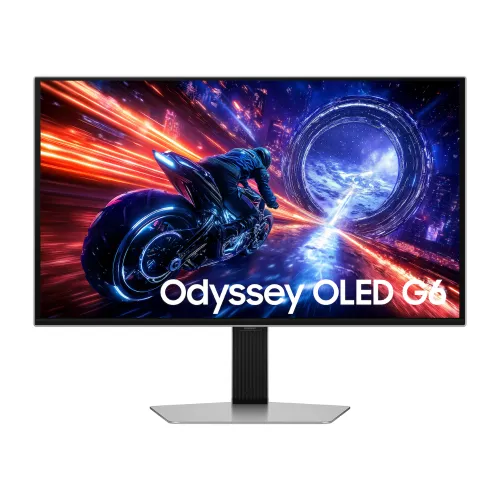
Samsung Odyssey OLED G6 G60SF (LS27FG602S) 27" 2K QHD 500Hz QD-OLED Gaming Monitor
The Samsung Odyssey OLED G6 G60SF (factory model code LS27FG602S / South Asia regional code LS27FG602SWXXL) represents a landmark leap in competitive display engineering as the world's first 500Hz OLED gaming monitor. Built around a 27-inch class (26.7-inch active diagonal) flat Quantum Dot OLED (QD-OLED) panel with a native 2K QHD (2560 × 1440) resolution, the G60SF bridges the gap between ultra-high-framerate esports monitors and reference-grade HDR displays. Paired with a near-instantaneous 0.03ms (GTG) response time, VESA DisplayHDR True Black 500 certification, UL-verified Glare Free surface optics, and Samsung OLED Safeguard+ thermal management, it is purpose-built for tournament-level FPS players, sim racers, and discerning PC enthusiasts who refuse to choose between extreme frame rates and organic per-pixel image quality.
Unprecedented 500Hz Refresh Rate & 0.03ms (GTG) Pixel Response
Samsung lists a 0.03ms GTG response time and a maximum 500Hz refresh rate for the QHD panel. At 500Hz, the display can refresh up to 500 times per second when the input signal supports that mode. Motion clarity also depends on frame rate, settings and the viewer. The QHD resolution is 2560 × 1440 on a flat 16:9 screen.
The combination of QHD resolution and a high refresh ceiling is intended for fast-paced PC gaming, while the 16:9 panel also suits general desktop use and video. The monitor displays only the frame rate delivered by the computer; a high refresh specification does not increase game performance by itself.
Next-Generation QD-OLED Picture Quality & VESA DisplayHDR True Black 500
The QD-OLED panel is self-emissive and Samsung lists a 1,000,000:1 static contrast ratio. Samsung specifies VESA DisplayHDR True Black 500 and HDR10+ Gaming support. Actual HDR appearance depends on the source content, device output and monitor settings.
- Upgraded SDR & HDR Brightness: Delivers 300 cd/m² typical brightness (200 cd/m² minimum guaranteed) in standard dynamic range—a meaningful boost for daytime desktop visibility—alongside sustained 500 nits across a 10% Average Picture Level (APL) window in HDR and up to 1,000 nits peak brightness in 3% specular highlight windows for realistic explosions, sun glints, and neon reflections.
- Pantone-Validated Color Precision: Covers 99% of the DCI-P3 (CIE1976) cinema color gamut with native 10-bit color processing (up to 1 Billion colors). The G60SF carries both Pantone Validated and Pantone SkinTone Validated certifications, confirming accurate reproduction of more than 2,100 Pantone colors and over 110 authentic human skin tone shades straight from the factory.
- Wide viewing angles: Samsung specifies 178° horizontal and 178° vertical viewing angles.
UL-Verified Glare Free Anti-Reflective Technology
Samsung describes the panel finish as Glare Free and states that it is designed to reduce reflections. Reflections and perceived black levels still depend on room lighting, screen placement and viewing conditions.
Samsung OLED Safeguard+ & Pulsating Heat Pipe Cooling
Samsung OLED Safeguard+ combines a Pulsating Heat Pipe with software controls intended to manage panel temperature and static image exposure. These features are designed to reduce OLED wear risk; they do not make burn-in impossible or replace Samsung’s care guidance.
- Pulsating Heat Pipe: Samsung describes this cooling feature as part of OLED Safeguard+. It is intended to help manage panel heat during use.
- Thermal Modulation: Samsung lists temperature management as part of OLED Safeguard+.
- Static Logo & Taskbar Detection: Intelligent image analysis continuously identifies stationary high-contrast interface elements—including game health bars, minimaps, broadcast network logos, and operating system taskbars—and subtly lowers their localized brightness without reducing the dynamic range of moving gameplay.
- Automatic Screen Saver & Pixel Maintenance: When the monitor detects 10 minutes of user inactivity, it smoothly dims the screen and instantly restores full brightness as soon as mouse, keyboard, or controller activity resumes.
Tear-Free Variable Refresh Rate & Competitive Gaming Aids
Samsung lists AMD FreeSync Premium Pro and NVIDIA G-SYNC Compatible support, with a stated 48Hz–500Hz variable refresh range. The active range and behavior depend on the graphics source, connection and settings.
The monitor includes gaming and eye-care options such as Black Equalizer, Virtual Aim Point, Eye Saver Mode and Flicker-Free operation, as listed by Samsung. Their availability and effect depend on the selected mode and user preference.
Inputs, USB Hub & Audio
Samsung lists two HDMI 2.1 inputs, one DisplayPort 1.4 input, a USB hub, a 3.5mm headphone output and HDCP 2.2. Confirm the graphics source, cable and selected mode when planning a particular resolution and refresh rate.
- HDMI: Two HDMI 2.1 inputs are listed by Samsung. Supported output depends on the source device and configured mode.
- DisplayPort: One DisplayPort 1.4 input is listed. Supported output depends on the source device and configured mode.
- USB hub: One USB-B upstream port and two USB-A 3.2 Gen 1 downstream ports are listed.
- 1× 3.5mm Headphone Out Jack: Outputs clean stereo audio passed through from HDMI or DisplayPort sources to wired gaming headsets or external powered desktop speakers. Because the chassis is ultra-slim, the monitor does not include built-in internal speakers.
Sleek Silver Metal Industrial Design, CoreLighting+ & Full Ergonomics
The monitor has a silver finish, a slim panel profile and CoreSync/CoreLighting+ rear lighting, according to Samsung. The display measures 611.7 × 353.8 × 49.2 mm without its stand; the complete set measures 611.7 × 554.2 × 263.5 mm.
The supplied height-adjustable stand supports height, tilt, swivel and pivot adjustments. For an arm or wall mount, Samsung specifies a 100 × 100 mm VESA pattern; check the mount’s capacity and clearance against the 6.9 kg set weight.
- Height Adjustment: 120.0 mm (±5.0 mm) smooth vertical lift
- Tilt Range: -2.0° (±2.0°) forward to +25.0° (±2.0°) backward
- Swivel Range: -30.0° (±3.0°) left to +30.0° (±3.0°) right
- Pivot Rotation: Bidirectional -92.0° (±2.0°) to +92.0° (±2.0°) vertical portrait rotation
- VESA Wall & Monitor Arm Mount: Standard 100 × 100 mm (10.00 cm × 10.00 cm) mounting interface; the panel weighs only 3.8 kg without the stand (6.9 kg with stand), making it effortless to mount on single or dual gas-spring monitor arms
Technical Specifications Summary
Planning a compatible setup
Before choosing the monitor, compare its native QHD resolution and maximum refresh specification with the outputs available on the computer. A capable graphics card and a supported direct connection are needed to select a high refresh mode; a dock, adapter, cable, operating system setting or game can limit the available signal. The monitor displays frames produced by the connected device, so reaching a particular frame rate also depends on the game, graphics settings, processor and workload. Check the source manufacturer’s display-output documentation and use a cable rated for the required mode.
For everyday use, the flat 16:9 panel provides a familiar desktop shape for documents, browsers and video. The stand can be adjusted to suit desk height and viewing position, and portrait pivot can be useful for tall pages when the computer supports display rotation. Leave space for the stand, rear connections and external power adaptor. If using a VESA arm, confirm its 100 × 100 mm plate, weight capacity and clearance before installation.
QD-OLED is a self-emissive display technology. Samsung’s OLED Safeguard+ tools are designed to reduce static-image wear risk, but owners should follow Samsung’s care instructions and avoid assuming any protection makes burn-in impossible. Glare Free treatment can reduce reflections, though results depend on the room and light placement. HDR also depends on compatible content, source output and picture settings. Brightness figures refer to specific test conditions and should not be treated as a promise that every scene remains at the same luminance.
In Bangladesh, sellers list a three-year warranty, but the warranty provider and coverage details can vary. Before purchase, request the warranty card or invoice terms for panel defects, burn-in, dead pixels, service location and claim procedure. The dated retailer range shown on BiponiBD is a market reference only; stock, promotion and seller prices can change. The configured BiponiBD variant price remains separate from this approximate market range, and the page currently has no live store offer.