Product overview
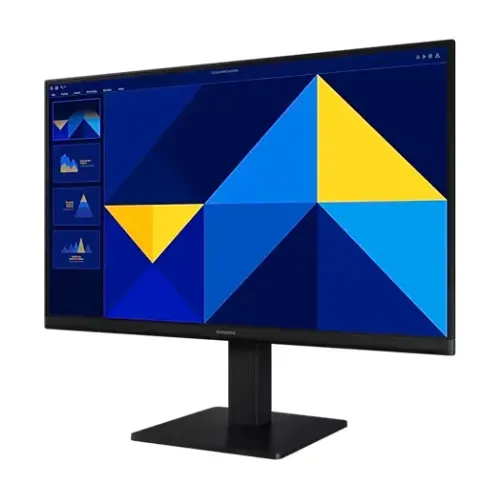
The Samsung S27D300GAC is a 27-inch-class Full HD monitor in Samsung’s Essential Monitor S3 (S30GD) family. It uses a flat IPS panel with a 1920 × 1080 native resolution, a 16:9 shape and a maximum refresh rate of 100Hz. Samsung’s regional product page identifies LS27D300GACXXK as one regional model code; the product family and base model should be kept distinct from screen size, refresh rate and marketing text. This listing uses S27D300GAC as the base model and records the regional code separately so a shopper can compare the product with the label on the actual box.
The monitor is intended for everyday desktop work, web browsing, video playback and compatible PC use. Its larger 27-inch panel gives more physical screen area than a typical 22- or 24-inch office monitor, while the 1080p resolution provides a familiar Full HD workspace. Samsung lists a maximum refresh rate of 100Hz, but a connected device and display mode must support that timing. The listing therefore treats 100Hz as the manufacturer’s maximum, not as a guaranteed performance level for every computer or cable.
Panel, resolution and workspace
Samsung lists a 27-inch screen class, a flat IPS panel and Full HD resolution of 1920 × 1080 pixels in a 16:9 aspect ratio. The official active display dimensions are 597.888 × 336.312 mm. IPS identifies the panel technology; “LED” in retailer catalogues describes the backlighting convention and should not be mistaken for a direct-view LED or OLED panel. For buyers who read documents, work with several browser tabs or use common office software, the wide 16:9 canvas can keep two windows visible side by side, depending on each application’s layout.
A 27-inch screen at Full HD has fewer pixels per inch than a 27-inch QHD display. Text and interface elements may appear larger at default scaling, while fine details and dense spreadsheets may show less information at once. The right choice depends on viewing distance, eyesight, operating-system scaling and work style. This monitor should not be described as QHD, 4K, HDR or a professional color-calibrated display because the reviewed Samsung specifications do not establish those features.
Brightness, contrast and color
Samsung specifies 250 cd/m² typical brightness and 200 cd/m² minimum brightness. These manufacturer values describe the stated measurement points; perceived brightness changes with room lighting, reflections, viewing angle and the selected picture settings. Positioning the display away from direct window glare can make office work more comfortable. Samsung lists a typical static contrast ratio of 1000:1 and separately uses “Mega” for dynamic contrast. The dynamic marketing term should not be presented as the static contrast measurement.
Samsung lists support for up to 16.7 million colors and 72% color gamut measured under the CIE 1931 / NTSC 1976 labeling shown on its specifications page. Those figures are useful for a general office monitor description, but they do not establish coverage of a particular Adobe RGB or DCI-P3 workflow, a color-calibration certificate or a factory accuracy result. Buyers doing color-critical photography, print production or grading should seek a measured color profile and a suitable display before relying on a monitor for final color decisions.
Refresh rate and response time
The S27D300GAC is listed for a maximum 100Hz refresh rate and a 5ms gray-to-gray response time. A supported higher refresh rate can make pointer movement, scrolling and supported motion look smoother than a 60Hz setting. To use a 100Hz mode, the computer’s graphics output, selected resolution, cable and monitor input must all support the desired signal. The actual available modes can differ between VGA and HDMI and across operating systems or graphics hardware; check the display settings after connecting the monitor.
A refresh-rate number does not mean the monitor creates frames that the computer has not rendered. The source device and application still determine the frame rate. Samsung’s listed response time is a manufacturer measurement using a gray-to-gray method; it is not a guarantee that every transition or picture mode will behave identically. The specifications reviewed do not list FreeSync, G-Sync or another variable-refresh technology, so the catalog does not promise adaptive sync.
Ports and device connections
The monitor has one D-Sub connector, commonly called VGA, and one HDMI 1.4 input. D-Sub and VGA describe the same analog connection, so the single VGA/D-Sub port must not be counted twice. Samsung lists HDCP version 1.4 for HDMI. There is no DisplayPort, USB hub or USB-C input in the official specification reviewed. A computer with a different output may need a compatible active adapter; check that the adapter supports the target resolution and refresh rate rather than assuming every connector converter can pass 100Hz.
HDMI is usually the straightforward digital connection for modern desktop computers and compatible media devices. VGA can be useful with older equipment but carries an analog video signal. The monitor has no built-in speakers and no headphone or speaker output listed by Samsung, so audio should be connected to the source computer or a separate sound device. The manufacturer’s regional page lists an HDMI cable in the accessory section, but package contents can vary by region or seller; confirm what is in the delivered box.
Eye comfort and everyday features
Samsung lists Eye Saver Mode and Flicker Free among the monitor’s features. Star Tech describes Low Blue Light as a feature, while Samsung’s page names Eye Saver Mode; this listing uses Samsung’s own feature label and notes the seller wording where relevant. Eye-comfort settings can change the screen’s appearance, so warmer color or reduced brightness may be noticeable when enabled. Users can choose settings that suit their room and work habits, and should take regular breaks during long sessions.
Samsung also lists Eco Saving Plus and Off Timer Plus. Eco Saving Plus is presented as a power-management feature, while Off Timer Plus supports an automatic shutoff schedule. The monitor’s feature list includes Game Mode and Image Size; these are picture/display options rather than a claim of gaming-grade adaptive sync or HDR. The S27D300GAC is a general-purpose monitor whose documented refresh maximum is 100Hz and whose input set is VGA plus HDMI 1.4.
Stand, placement and mounting
The regional Samsung page calls the included stand “Simple” and lists tilt adjustment from approximately −2° (±2°) to +21° (±2°). It does not list stand height adjustment, swivel or pivot rotation. Buyers who need their screen higher or at eye level can use an appropriately rated desk riser or a compatible VESA arm. Samsung lists a 100 × 100 mm VESA wall-mount pattern; confirm the wall or desk mount, fasteners and load rating before installing the monitor.
The manufacturer lists dimensions with the stand as 612.7 × 470.0 × 200.4 mm (width × height × depth), and without the stand as 612.7 × 360.9 × 36.2 mm. Those measurements help check desk clearance, shelf space and mounting plans. The package is larger than the assembled display, so do not use package dimensions as the screen dimensions. Leave room for the power lead and video cable behind the monitor, particularly if the stand is positioned close to a wall.
Weight and power
Samsung lists the set weight as 2.9 kg with the stand and 2.4 kg without it. The package weight is 4.3 kg, which includes packaging and accessories and should not be confused with the monitor’s net weight. When installing the unit on an arm or wall mount, use the monitor weight and mount load specification rather than the shipping weight. The external adaptor and attached cables add to the load handled by a desk arrangement but do not alter the published display weight.
The power section lists AC 100–240V input, an external power adapter and 25W maximum power consumption. Maximum consumption is not the same as typical use in every picture mode. Samsung lists a 1.5m power cable and an HDMI cable in the accessory section. Confirm the power adapter and cable supplied with the local stock, and use the adapter intended for the display. The catalog does not infer a plug type, adapter wattage, energy label or standby consumption beyond the values established by the source.
Package contents and region identification
Samsung’s regional product page lists a 1.5m power cable and HDMI cable. That accessory list is a useful reference for the LS27D300GACXXK listing but should be confirmed against the package supplied in Bangladesh. Retailers may handle different regional stock or bundle items differently. The regional model code is separate from the base model: S27D300GAC is the base name used by the Bangladesh seller, while LS27D300GACXXK appears on the Samsung Hong Kong product page. Read the carton label if the buyer needs to confirm the exact regional suffix.
The box weight and package dimensions are shipping references rather than product dimensions: Samsung lists 710.0 × 100.0 × 403.0 mm and 4.3 kg. This catalog distinguishes those values from the monitor’s assembled and stand-free sizes. If a local retailer includes an extra cable or offers a local service package, that should be recorded as a seller-specific inclusion rather than a manufacturer-wide promise.
Warranty and Bangladesh seller context
Star Tech advertises a three-year warranty on its Bangladesh product page. That is a retailer claim for its own listing and does not establish the warranty provider or coverage for stock sold by another merchant. Samsung’s regional product page reviewed here does not establish a Bangladesh distributor warranty for this catalog item. Buyers should confirm the local warranty provider, coverage period, adapter coverage, required proof of purchase and claim process in writing with the actual seller.
The listing should avoid presenting Star Tech’s warranty as an unconditional BiponiBD guarantee. Warranty length, service location and parts coverage can vary by source of stock and distributor. If BiponiBD has a documented local warranty for the unit it sells, that evidence can be added separately; until then, seller-specific information remains attributed and qualified. This keeps the product description useful while avoiding a promise that the available sources do not support for the BiponiBD offer.
Bangladesh price and availability context
The catalog variant stores ৳17,200 as an MSRP/reference value. It is not a current BiponiBD checkout price. When checked on 4 November 2026, Star Tech’s page showed “Price to be announced” and “Out Of Stock” in its live listing area, while its descriptive text still stated ৳17,500 and its regular/historical price field showed ৳18,500. A previous catalog capture from 14 September 2026 recorded ৳17,200 as the lower endpoint and ৳18,500 as the upper endpoint.
Because the retailer page is out of stock and its price fields conflict, no reliable live market range can be asserted from that page on the check date. The stored catalog reference should remain separate from a live offer, and the old range should not be presented as a verified current market price. Before purchase, check the actual seller’s stock, checkout price, delivery terms and warranty. The current source conflict is documented so a later price update can be made from an in-stock, dated source.
Pros, limitations and who it suits
The larger Full HD IPS screen, 100Hz maximum refresh rate, VGA plus HDMI connections, tilt stand, Eye Saver Mode and VESA compatibility make the S27D300GAC a practical option for general home or office computing. Its simple feature set may suit users who need a spacious desktop display for documents, websites and video without requiring USB-C docking or integrated audio. The standard mounting pattern also provides a path to a separate arm when desk ergonomics require a different height.
The main trade-offs are its 1920 × 1080 resolution at 27 inches, tilt-only stand and limited input set. It has no speakers, headphone output, USB hub, DisplayPort or documented adaptive sync. A buyer who needs sharper text at the same screen size, a wide color gamut, built-in audio, a full ergonomic stand or a modern one-cable USB-C dock should compare other monitors before choosing. The best fit depends on the buyer’s actual computer ports, desk setup and desired screen density.
Setup checklist
Before setup, verify that the monitor and adapter correspond to the model label on the carton. Choose HDMI 1.4 for a digital source when available, or VGA for compatible older equipment. Connect the source, power on the display and select the correct input. In the computer’s display settings, confirm that the resolution is 1920 × 1080 and check whether 100Hz is offered for the selected port and cable. If that mode is absent, verify the source graphics output, cable specification and driver settings before assuming that the monitor is defective.
Adjust the tilt to reduce glare and place the display at a comfortable viewing height. Since the simple stand does not list height adjustment, use a stable riser or a compatible 100 × 100 mm VESA mount if needed. Connect audio equipment to the computer because the monitor has no built-in speaker or audio-out jack. Keep the rear ventilation area clear, route cables without tension and retain the invoice and warranty documentation supplied by the actual seller.
Source notes and final buyer guidance
Samsung Hong Kong’s page is the primary technical source used for the LS27D300GACXXK specification. Star Tech’s Bangladesh page is used for the local product code, retailer warranty claim and market/availability context. Star Tech presently shows an out-of-stock status and price-to-be-announced message while the descriptive paragraph retains ৳17,500 and an old regular-price reference of ৳18,500. The catalog’s ৳17,200 variant MSRP remains a separate internal reference.
The Samsung page lists the monitor as black and specifies its display, ports, mounting, power and dimensions. The manufacturer source does not support HDR, USB-C, built-in audio or variable refresh claims. The exact carton suffix, actual local warranty and any current BiponiBD price remain matters to verify with the seller. This entry presents documented specifications and clearly labels retailer-only statements so shoppers can identify the monitor without treating stale price or warranty text as a confirmed offer.