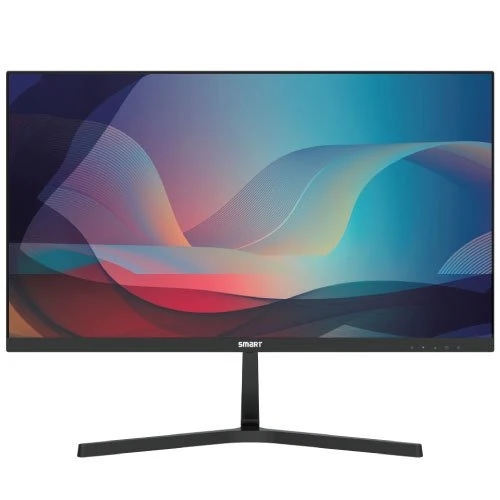
Smart SM2425U 23.8-Inch 120Hz IPS Full HD Monitor
Overview and model identity
The Smart SM2425U 23.8-inch 120Hz IPS Full HD Monitor is a desktop display for home, study and office use. Smart Technologies (BD) Ltd. publishes the model code as SM2425U on its Bangladesh brand page. That page lists a 23.8-inch IPS panel with LED backlight, Full HD resolution and a 120Hz refresh rate. Exact local product listings repeat those core details. The product is known here by the manufacturer’s model code; no separate formal part number is published in the reviewed sources. Retailer codes and the BiponiBD variant SKU are not manufacturer part numbers.
Some shop headings round the size to 24 inches, while the manufacturer/distributor page gives 23.8 inches. The more specific 23.8-inch value is used in this product title and specifications. This description refers to the SM2425U model and its listed configuration. It does not imply that every monitor sold under the Smart brand shares the same ports, stand or timing capabilities.
IPS Full HD screen and 16:9 workspace
The monitor uses an IPS (In-Plane Switching) panel with LED backlighting and a native resolution of 1920 × 1080 pixels. This is Full HD in a 16:9 widescreen format. It provides a familiar canvas for browser windows, documents, video calls, spreadsheets and Full HD video. The diagonal size is listed as 23.8 inches. At this size and resolution, screen text and interface scale depend on the operating system settings, viewing distance and the user’s preference.
Smart Technologies lists 16.7 million colors and a brightness rating of 250 cd/m². Exact Bangladesh listings report a 72% NTSC color gamut. These are published specifications, not results from calibration or measurement of the individual unit. The model is described as IPS, which is useful when people view the screen from different seats. The listed viewing angle is 178 degrees horizontally and vertically; actual appearance can still depend on room lighting, panel settings and the viewing position.
The product pages identify a flat screen. The gallery shows a slim black display with a narrow-looking frame and a V-shaped desk stand. Those visual features describe the supplied product images; they do not establish a bezel measurement or a color-accuracy certification.
120Hz refresh rate and the published response claim
The SM2425U is listed at 120Hz. A refresh rate describes how many times each second the display can refresh its image. Compared with 60Hz, 120Hz can make cursor movement, scrolling and supported game motion appear more fluid when the computer can output the matching mode. The result depends on the graphics hardware, operating system, application, cable and the input timing accepted by the monitor.
The manufacturer/distributor and retailers list 5ms OD, meaning an overdrive response claim. The pages reviewed do not define whether this number is measured using gray-to-gray (GtG), moving-picture response time (MPRT), or another method. It is therefore shown as 5ms OD rather than being relabeled as a specific GtG or MPRT result. Buyers comparing response figures across monitors should check whether the stated methods and test conditions match.
The sources reviewed confirm the model-level 120Hz listing but do not supply a full timing table by HDMI and VGA. They also do not document the accepted refresh range for each port, color depth at 120Hz, adaptive-sync operation or console-specific modes. Connect a suitable source and check the operating system’s display settings. If 120Hz over a particular port is essential, confirm the exact mode and cable with the seller or the delivered manual before purchase.
Contrast, brightness and color information
Smart Technologies displays the contrast field as 1300:01:00, while exact Bangladesh listings express the same ratio as 1300:1. The latter is the normalized catalog value. The odd punctuation in the brand page is preserved as a source-format note in the audit evidence; it is not interpreted as a time or as a different contrast specification. No dynamic-contrast figure is added because the reviewed model pages do not establish one.
The listed brightness is 250 cd/m². Retailers report 72% NTSC color coverage and 16.7 million supported colors. These values can help compare product sheets, but they do not by themselves prove factory calibration, a measured sRGB coverage result or color suitability for color-critical work. The sources reviewed do not provide a calibration report, uniformity result, HDR certification or a measured gamut test for the individual monitor.
For normal web use, study, office applications and entertainment, the listed IPS Full HD specifications describe the intended display class. For professional photo or print work, compare measurement reports and calibration features rather than relying only on marketing gamut values. Brightness perception also changes with room lighting, user settings and the age of the panel.
Inputs and computer compatibility
The published input list is one HDMI port and one VGA port. This combination gives a digital connection for a compatible modern computer and an analog option for older desktop equipment. The brand page does not state a version number for HDMI, and the pages reviewed do not give per-port timing tables. The product should therefore be described as having one HDMI and one VGA input, without claiming a specific HDMI revision or guaranteeing 120Hz through either connector.
Before connecting a system, check the video outputs available on the computer and select an appropriate cable. A laptop may need an adapter if it lacks a full-size HDMI socket; an adapter’s supported refresh rate depends on the device and adapter. VGA carries analog video and does not carry digital audio. The reviewed product interface description does not list DisplayPort, USB-C, a USB hub or an audio output. Do not assume those connections are present based on another Smart monitor’s specifications.
After connection, use the display settings on the computer to select 1920 × 1080 and the highest refresh rate both the source and monitor connection expose. If a mode is absent, check the graphics driver, port, cable and the product manual. This is a practical compatibility step, not a guarantee that every device or connector combination will achieve 120Hz.
Power use and the included adapter
The Smart Technologies product page lists a DC 12V, 2A input and an external adapter in the standard package. It gives typical on-mode consumption below 24 watts and standby consumption below 0.5 watt. Use the adapter supplied with the product or a replacement approved for the exact model. The label on the actual adapter is the right reference for polarity, connector and electrical ratings; do not select a substitute from voltage alone.
The published consumption values are product-sheet figures, not a measurement of the user’s wall outlet. Actual energy use can vary with brightness and operating state. The product page does not provide a separate off-mode figure in the specifications captured for this audit. Keeping the monitor in standby or switching it off when not in use can reduce idle use, depending on the setup.
The manufacturer’s standard package list includes one HDMI cable, a quick guide, pedestal and adapter. Retail packaging may vary across batches and stores, so inspect the carton and invoice at delivery. A VGA cable is not listed as included in the brand package specification. Confirm whether one is required for the intended setup.
Stand, dimensions and mounting
The brand page lists product dimensions of 539.2 × 320.4 × 41.3 mm and a net weight of 2.82 kg; it does not clearly label whether the dimensions are measured with the stand attached. The package dimensions are listed as 612 × 101 × 405 mm, and gross package weight as 3.84 kg. These are catalog values from the brand page, not a custom measurement of the delivered unit. Allow extra desk space for the stand and cables, and check the physical monitor before planning a tight enclosure.
Bangladesh retailer pages list a basic tilt range of approximately −5° to +15° and a 75 × 75 mm VESA mounting pattern. The reviewed brand specification table does not list height, swivel or pivot movement, so those adjustments are not claimed for the included pedestal. Use a compatible mount and verify its screw pattern, weight range and installation instructions before removing the stand.
The two catalog images show a front-facing view and an angled front view of the black monitor on its V-shaped stand. The images do not show a clear rear I/O panel or VESA mounting holes. Their alt text is updated to match what is visibly present rather than to describe unseen ports or mounting points.
Warranty and ownership support
Smart Technologies (BD) Ltd. and local retailers list a three-year warranty for the SM2425U. Warranty conditions are commercial terms and should be confirmed on the dated purchase invoice and warranty documentation. The seller or distributor can confirm the service location, start date, panel or pixel policy, required proof of purchase and what accessories must accompany a claim.
Online listings may differ in price, stock status or promotion. External shop prices are used only as market context in the audit evidence and are not represented as BiponiBD’s price, inventory or offer. No customer review, rating or availability claim is added. The product’s current Active status and existing variant and price fields are preserved as catalog data.
Keep the carton, adapter, cable, invoice and warranty card until the product has been checked. Confirm that the received label identifies model SM2425U and that the display, stand and adapter match the order. If the packaging or included items differ from the published list, ask the seller to confirm the exact warranty and accessory terms.
Practical use and setup notes
The combination of a 23.8-inch Full HD IPS screen and listed 120Hz refresh rate makes the SM2425U suitable to consider for everyday office work, study, web browsing and casual gaming. These use cases assume a connected computer or console that supports the chosen resolution and refresh mode. The monitor does not improve a source’s frame rate by itself; the computer, game or application must generate the images to display.
For a first setup, place the monitor on a stable surface, attach the supplied pedestal according to the guide, connect the included or approved adapter, and connect the preferred video input. Set the operating system to its recommended 1920 × 1080 resolution. If available, choose 120Hz in advanced display settings, then confirm that the image remains stable. For VGA, check the analog signal and resolution separately. Use the on-screen display controls to adjust the picture to the room.
These steps describe general monitor setup, not a promise that every connection reaches 120Hz. If a particular laptop, graphics card or console is central to the purchase, verify its output and supported timings against the manual or seller before ordering. A different cable or output mode may be needed depending on the equipment.
Known limits and facts not confirmed
The source pages do not publish an exact port-by-port timing table, HDMI version, response-time measurement method, built-in audio output or official stand-adjustment details. They do not provide an independent color-calibration report, HDR rating or a measured panel brightness test. These items are left unclaimed. Seller-reported matte finish, low-blue-light and flicker-free features are mentioned only where the referenced product pages list them; they are not treated as medical benefits.
The 5ms OD figure should not be compared directly with a separately measured GtG or MPRT figure unless the test methods match. The 72% NTSC gamut listing is not described as calibrated sRGB coverage. The 1300:01:00 string is normalized to 1300:1 because the exact local listings and model context support that ratio. The physical dimensions are retained as published while noting their unclear stand condition.
The model code is SM2425U. Neither Star Tech’s shop code nor the BiponiBD SKU is a manufacturer part number. The formal MPN field is blank because the reviewed brand source publishes a model code and no distinct part number. These boundaries keep the listing informative without filling source gaps with assumptions.
Who should compare this model
Compare the Smart SM2425U with other monitors by checking size, resolution, refresh rate, input type, stand movement, speaker availability, warranty and the exact connection modes your computer supports. A 23.8-inch Full HD IPS monitor offers a different balance than a smaller 100Hz screen, a higher-resolution QHD panel or a monitor with a height-adjustable stand. Choose according to desk space, typical viewing distance, desired text sharpness and the devices you plan to connect.
For a simple desk setup, the supplied pedestal and HDMI input may be sufficient. If the computer only has VGA, the VGA input may help, subject to that computer’s output and cable. If speakers are important, plan separate audio equipment because no integrated speakers are listed. If you need a flexible ergonomic position, confirm the tilt range and consider a compatible 75 × 75 mm arm after verifying the exact mounting hardware and weight rating.
For game use, check that the graphics card or console and connection can output the intended 1920 × 1080 mode. The model is listed at 120Hz, but the manufacturer pages reviewed do not show exact per-port timing limits. Confirm the required mode with the seller if it is a deciding factor.
Source-backed specification summary
Smart Technologies (BD) Ltd. lists model code SM2425U, a 23.8-inch IPS LED display, 1920 × 1080 resolution, 120Hz refresh rate, OD 5ms, 250 cd/m² brightness, 1300:01:00 contrast formatting, 16.7 million colors, 178° horizontal/vertical angles, one HDMI and one VGA input, 75 × 75 mm VESA, DC 12V 2A, below-24W on-mode consumption, below-0.5W standby, dimensions, net/gross weights, package contents and three-year warranty.
Exact Bangladesh retailers independently list the 1300:1 contrast formatting, 72% NTSC gamut, ports, input voltage, response claim, physical dimensions, weights and three-year warranty. The retailer code 51182 belongs to Star Tech and is not the model code. The official source’s 23.8-inch value is preferred over the rounded 24-inch headline found at some retailers.
All 23 existing catalog attributes are mapped in the field matrix, with field names and record IDs retained. The product title, brand, model, MPN handling, short and long descriptions, SEO metadata, feature lists, FAQs and image alt text are updated. Product status, slug, category, variant ID, SKU, MSRP, variant status and both media IDs remain unchanged.
Installation and maintenance
Place the display away from water, excessive heat and unstable edges. Leave space for airflow and avoid pulling the monitor by its panel or cable. Use the supplied power adapter and a suitable wall outlet. To clean the screen, follow the instruction guide and use a soft, clean cloth; avoid spraying liquid directly on the panel. The product source pages do not specify a chemical-safe cleaning solution, so follow the delivered documentation.
When adjusting the display, use the stand and its listed tilt movement without forcing the hinge. A VESA arm should match the 75 × 75 mm pattern and safely support the monitor’s weight. If you mount it, use suitable fasteners and follow the arm and monitor instructions. The front images do not show rear holes; inspect the actual unit and guide before attempting installation.
Keep the adapter and cables accessible, especially if the monitor is placed close to a wall. If the image flickers, check the cable, selected resolution, refresh mode and graphics driver. A different cable or port may help isolate a connection issue. Contact the seller or authorized service channel if the problem persists while using a documented supported mode.
Local package and warranty checklist
At delivery, match the carton and invoice to model SM2425U and record the purchase date. Check the panel for physical damage, confirm that the stand and adapter are present, and verify that the HDMI cable and quick guide are included if the package list applies to the sold batch. Retailers may bundle or substitute accessories, so an invoice or seller confirmation is useful if the delivered package differs.
Keep the serial label, warranty card and purchase invoice. Ask the seller who handles warranty service and whether registration is required. Confirm how the three-year period is counted and how service works for panel defects, adapter issues or missing accessories. The brand page lists the warranty duration, but the detailed terms should come from the current official policy and the seller’s documentation.
These checks help buyers compare exact product identity and support conditions. They do not change the catalog offer or imply that any particular stock is available. Confirm current retailer terms directly before purchase.