BiponiBD
All categories

All categories

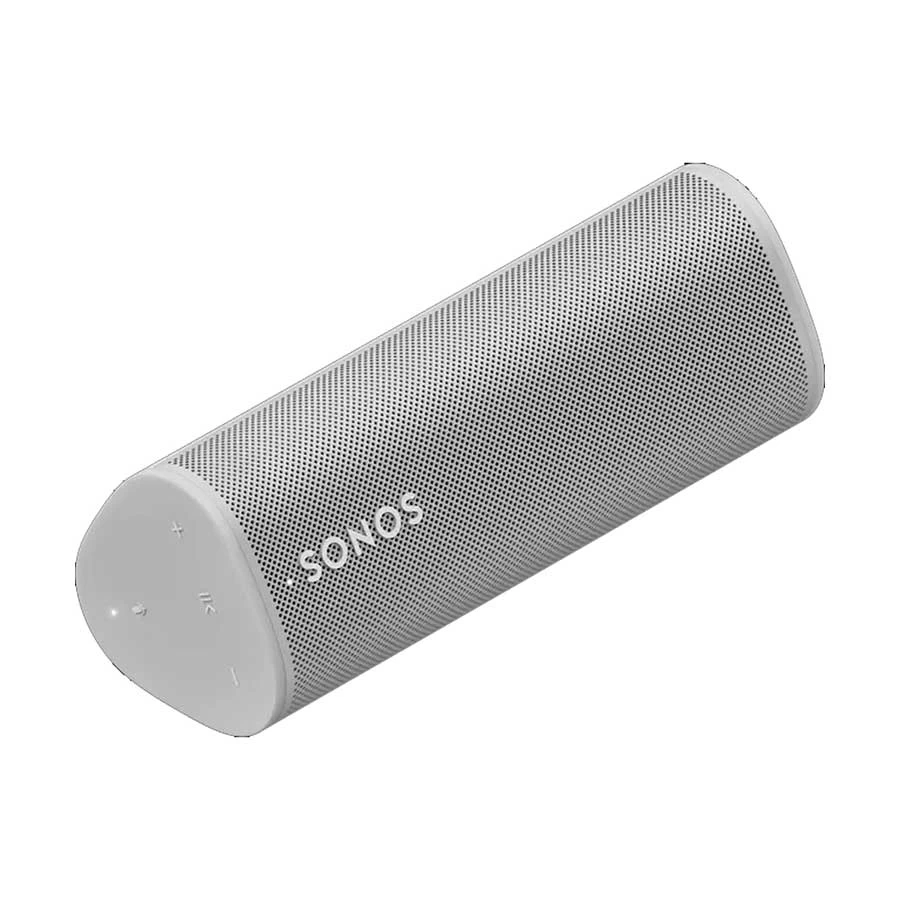
Sonos Roam Lunar White speaker lying horizontally at an angleNew condition

Headphones & Speakers

Sonos Roam

Sonos · Roam

Sonos Roam rechargeable portable speaker with Wi-Fi, Bluetooth, IP67 protection and USB-C or Qi charging. Initial Bluetooth use requires setup in the Sonos app on Wi-Fi.

Compare now

Price unavailable

Price range updating

No verified price is available yet. Store offers will appear when merchants publish them.

Buying options
  • Brand: Sonos
  • Model: Roam (original)
  • Weight: Approximately 430 g
  • Battery: 18 Wh; up to 10 hours playback under Sonos conditions

Compare store prices

Buying options

0 live offers

Variant

Choose the exact model

No live offers for this variant

Offers will appear when merchants publish them.

Observed price history

Loading history…

Product story

Details worth knowing

Sonos Roam portable speaker in two finishes

Sonos Roam is a portable rechargeable speaker for listening at home or away from a Wi-Fi network. This catalog record has Lunar White and Shadow Black color variants; select the actual finish before ordering. The original Roam model is distinct from Roam SL and Roam 2, so accessories, controls and specifications should be matched to the exact unit. Sonos lists one tweeter, one midwoofer and two Class-H amplifiers. One Roam is a single speaker; a second compatible Roam can form a stereo pair only under the supported network conditions.

Wi-Fi setup and Bluetooth listening

Sonos requires initial setup through the Sonos app on a Wi-Fi network before the original Roam can connect to a device by Bluetooth. Once set up, hold the rear power button for about two seconds to enter Bluetooth pairing mode, then select Roam in the phone or computer Bluetooth list. The front light flashes blue while ready to pair and becomes steady blue after connection. On Wi-Fi, the Sonos app can group it with compatible Sonos speakers and adjust equalization. A stereo pair playing Bluetooth must remain connected to Wi-Fi; stereo pairing is unavailable away from that network. Compatible Apple devices can use AirPlay 2 on Wi-Fi.

Controls, voice and battery

Roam uses physical playback and volume buttons rather than a touch surface. Press Play/Pause to control playback; double or triple presses skip forward or back. A microphone button can enable supported voice features and Automatic Trueplay tuning. Voice assistant availability depends on service, region and account setup, so the presence of a microphone does not guarantee a particular assistant in Bangladesh. Sonos rates the 18 Wh battery for up to ten hours of continuous playback under its conditions. USB-C is a charging input, not an analog audio line-in. A compatible USB power adapter must supply at least 7.5 W, with 10 W recommended. Sonos also supports Qi-certified wireless chargers and its separately sold Roam Wireless Charger. Check whether a power adapter is included with the seller's specific package.

Outdoor use and purchase checks

The IP67 enclosure is dust resistant and can withstand immersion in up to one metre of water for up to 30 minutes under the rating conditions. Sonos advises against playing audio while immersed and recommends drying the speaker before charging or storing it. IP protection does not replace normal care around salt water, drops or damaged seals. Roam can stand upright or lie horizontally, which helps placement on a desk or shelf. Sonos lists dimensions of 168 × 62 × 60 mm and an approximate 430 g weight. Confirm the chosen color, charger and local warranty terms with the Bangladesh seller. Read the Sonos setup guide before using Bluetooth for the first time.

Features

  • Portable speaker with rechargeable battery and two listed color variants
  • Wi-Fi and Bluetooth 5.0 after required Sonos app setup
  • USB-C and compatible Qi wireless charging
  • IP67 dust and water protection under rated conditions
  • Physical controls, microphone switch and Automatic Trueplay when enabled

Pros

  • Works on Wi-Fi at home and by Bluetooth after first-time setup
  • Physical playback buttons can be operated without opening the app
  • USB-C and Qi charging give two supported charging routes
  • IP67 rating helps with normal outdoor exposure when seals are intact

Cons

  • Initial Wi-Fi and Sonos app setup is required before Bluetooth pairing
  • A second Roam stereo pair cannot be used away from Wi-Fi
  • USB-C is for charging rather than analog line-in
  • Local warranty, included power adapter and live seller stock need confirmation

Helpful answers

Frequently asked questions

Product-specific answers maintained with the catalog information.

Can the original Sonos Roam use Bluetooth before Wi-Fi setup?

No. Sonos says Roam must first be set up through the Sonos app on Wi-Fi before Bluetooth pairing.

Does Sonos Roam have touch controls?

No. The original Roam has physical playback and volume buttons, a microphone button and a rear power/Bluetooth button.

Can Roam charge wirelessly?

Yes. Sonos supports compatible Qi chargers and its separately sold Roam Wireless Charger. USB-C charging is also supported with a suitable power source.

Is the original Roam waterproof?

It carries an IP67 rating for dust and water protection under specified test conditions. Sonos advises drying it and not playing audio while submerged.

Customer community

Reviews & product Q&A

No ratings yet

Choose your own rating. BiponiBD never adds a default rating or review.

Be the first customer to review an available Store offer.
Back to all products

Become a merchant

Put your store in front of ready buyers.

Join BiponiBD, publish accurate offers and start free.

Start free