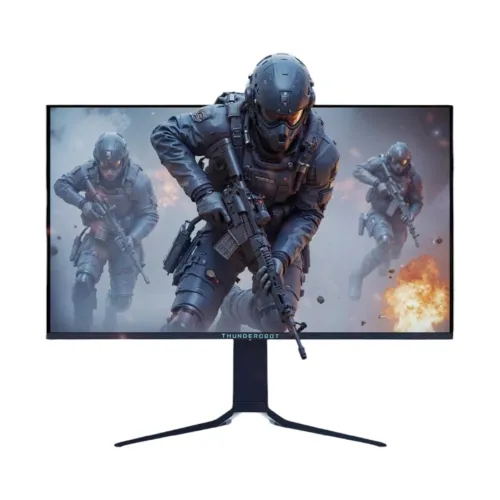
ThundeRobot DQ27F500E overview
The ThundeRobot DQ27F500E is a high-refresh gaming monitor built around a QD-OLED panel and a 2560 × 1440 QHD image. The official product page calls the panel 26.5 inches; Bangladesh listings commonly round that to a 27-inch class display. It is a flat 16:9 screen rather than a curved ultrawide. Its defining feature is a maximum refresh rate of 500Hz, paired with a stated 0.03ms panel response time. Those figures are most relevant to competitive play when a powerful computer can render high frame rates and the selected input can transmit the chosen mode. The model also lists modern connectivity including USB-C with up to 90W Power Delivery, USB hub connections, dual HDMI 2.1, DisplayPort and a 3.5mm audio output. This listing retains the product’s existing URL and variant while clarifying its model number, QD-OLED panel size and port capabilities. Regional seller price, stock, warranty and box details should be checked at the time of purchase.
Panel technology, pixel structure and resolution
The DQ27F500E uses Samsung QD-OLED technology according to ThundeRobot’s official product page. Launch coverage identifies the panel as a fourth-generation Samsung Display QD-OLED design. Native resolution is 2560 × 1440 pixels, often called QHD or 2K in seller listings, with a standard 16:9 aspect ratio. The manufacturer describes the physical panel as 26.5 inches viewable, while local product titles use 27 inches as the rounded class size. QD-OLED combines self-emissive pixels with quantum-dot color conversion; each pixel controls its own light, which supports deep dark scenes and high contrast. The display is flat. The official page’s stated viewing angle table should be read according to its own measurement convention; retailer listings typically translate it to 178 degrees horizontal and vertical. Use 2560 × 1440 as the source resolution for clear text and game interfaces. A PC can select lower resolutions, but image scaling can reduce sharpness compared with native output.
500Hz refresh and motion response
ThundeRobot specifies a maximum refresh rate of 500Hz and a 0.03ms response figure for this model. A 500Hz screen can refresh up to 500 times per second when the input signal and system are set to a supported mode. A high refresh rate can make motion updates more frequent, but it does not guarantee a specific frame rate or lower end-to-end latency on its own. The graphics card, processor, game engine, display mode, cable and selected connector all contribute. A user should check the monitor’s regional timing table and the computer’s output settings before expecting 2560 × 1440 at 500Hz. The 0.03ms figure is a panel response specification, not the time it takes a mouse action to appear on screen. Game settings, frame rate, input lag and display processing also matter. If 500Hz is unavailable, use the graphics driver’s display settings and the monitor’s on-screen menu to check the selected input, color depth, refresh mode and cable capability.
Color, contrast and HDR picture modes
The official product page lists 99% DCI-P3 and 100% sRGB color coverage, a 1,500,000:1 contrast ratio and 10-bit color. Launch materials report a Delta E≤2 target, which is a color-accuracy claim; buyers doing critical work should still check the supplied calibration information and manage color in supported applications. Local seller pages report an HDR peak brightness of up to 1,000 nits and VESA DisplayHDR True Black 400. The official product page is less specific in its HDR summary, so this listing treats the certification as a reported model feature and advises confirmation for regional stock. Peak brightness is measured under limited HDR highlight conditions; it should not be confused with full-screen SDR brightness. QD-OLED’s per-pixel light control can show dark scenes with strong contrast, but ambient lighting, settings, content mastering and OLED protection behavior affect the image. Select HDR mode only when the game, video or operating system supplies compatible HDR content.
Adaptive-Sync and gaming compatibility
ThundeRobot lists Adaptive-Sync for variable refresh operation. Local sellers may additionally describe the display as G-Sync or FreeSync compatible, but a compatibility statement should not be confused with a separate certification unless the exact product documentation names that certification. Variable refresh requires a compatible graphics source, driver, input and game mode. It can help align the display refresh with the rendered frame cadence within the supported range, which may reduce tearing in supported conditions. Users should enable the feature in both monitor and graphics settings where required, then confirm the operating range in the manual. The 500Hz headline maximum is a top timing capability, not a required setting for every game. Lower refresh modes can be appropriate when a system cannot maintain high frame rates, when using a console, or when prioritizing quieter power use. A high-refresh OLED is aimed at motion clarity and contrast; it does not substitute for a fast system or accurate network connection in online games.
Ports, USB-C docking and KVM
Bangladesh retail specifications list two HDMI 2.1 inputs, one DisplayPort 1.4 input, one USB-C port, one USB-B upstream connection, two USB-A downstream ports and a 3.5mm audio output. The USB-C port is listed for video/data and up to 90W Power Delivery. A laptop must support DisplayPort Alt Mode over USB-C to send video through that cable, and actual charging is limited by the host, cable and monitor’s negotiated power. USB-B is a separate upstream data path for the hub and is not the Type-C video/charging connection. Product materials also list KVM, which can route connected keyboard/mouse peripherals between two hosts when the upstream links and selected input are configured correctly. Check the exact unit manual before planning a one-cable desk. Port labels and supported input timings can vary by region; inspect the monitor’s own OSD and documentation if a mode is not available. The audio jack provides a path to compatible external headphones or speakers; the checked data does not confirm integrated speakers.
Ergonomic stand, mounting and desk fit
The published stand adjustments include up to 120mm of height travel, swivel of approximately 45 degrees in either direction, tilt from −6 to +23 degrees and a 90-degree pivot in either direction. The monitor lists a 75 × 75mm VESA mount pattern. Confirm that a third-party arm supports this pattern, the monitor’s load and the correct fasteners. The stand can raise or rotate the screen for a centered eye-level position or portrait tasks, while pivoting an OLED panel should be done carefully to avoid twisting the display. Measure the desk footprint and cable clearance before purchase, especially if the screen will share space with speakers, a keyboard tray or another display. The product page does not provide a verified net weight or local package dimensions in the sources used for this update, so those figures are not guessed here. Follow the regional setup guide when attaching the base or a VESA bracket and lift the display without pressing on the panel.
OLED care and long-term use
QD-OLED care functions are intended to reduce image-retention risk by managing static screen elements and panel maintenance. This does not make permanent burn-in impossible. Avoid leaving bright fixed interface elements on screen for long uninterrupted periods, use the operating system’s screen timeout, keep the monitor’s supported panel-care features enabled and follow any pixel-refresh instructions in the user manual. Do not interrupt a panel maintenance cycle if the manual tells you to let it complete. Warranty wording can differ by market, and a general three-year seller warranty does not automatically establish coverage for burn-in, accidental damage or every panel condition. Ask the retailer to confirm OLED-specific coverage in writing for the serial-numbered unit and retain the invoice. Hardware care practices are especially relevant for a monitor used for static desktop dashboards or all-day office software; gaming and video content with changing imagery generally present a different usage pattern. Follow the manufacturer’s cleaning instructions and avoid applying liquid directly to the panel.
Bangladesh price, stock and warranty
The reviewed Bangladesh market snapshot has a wide spread. Ultra Technology’s search-indexed product listing showed ৳99,800, while TechLand and Star Tech pages showed ৳119,500. A PCPartsBD comparison page also listed multiple local sellers and a range, but its displayed retailer values differed between cached snapshots. The product’s catalog variant is currently ৳119,500 and has been preserved; this amount is not represented as a live BiponiBD store offer. The market estimate is informational and checked on Nov 6, 2026, so confirm today’s stock, final payable price, cash discount and delivery charge with the seller. Local listings state three years of warranty, but they may not describe the same service provider or exclusions. Ask who handles service, whether OLED burn-in is included, whether the monitor is new and sealed, and which cables/accessories come with the Bangladesh unit. The Chinese official product page lists its own regional price and support channel; those terms do not establish local Bangladesh warranty coverage.
Who should consider the DQ27F500E
This display may suit competitive PC gamers who have hardware capable of rendering fast-moving titles at high frame rates and who want a QHD OLED image. Its 500Hz maximum, low stated pixel response, Adaptive-Sync and QD-OLED contrast form a performance-focused combination. Color coverage and the Delta E≤2 claim can also interest users who play and create content on one monitor, though professional work should be calibrated and checked against a specific workflow. The USB-C dock and KVM are useful for desks shared between a laptop and desktop, provided each computer’s ports support the planned connection. It may be less suitable for buyers who primarily need inexpensive office display space, have a PC that cannot benefit from high refresh, or leave fixed content on screen for long periods without OLED care. Compare the actual regional warranty and burn-in terms, exact monitor dimensions, arm compatibility and local stock before choosing. Confirm the 26.5-inch viewable panel versus 27-inch class marketing terminology when comparing it with other screens.
Buying and setup checklist
Before checkout, verify the carton and rear label say DQ27F500E, confirm the local invoice warranty and ask specifically about OLED burn-in coverage. Check whether the graphics card supports 2560 × 1440 at the intended refresh rate over HDMI 2.1 or DisplayPort 1.4, and use a cable rated for the selected mode. If you plan laptop docking, confirm USB-C DisplayPort Alt Mode and whether 90W is enough for the computer under load. For KVM, connect both video inputs and the monitor’s USB upstream links as required by its manual. Inspect the stand’s 75 × 75mm mounting pattern and confirm table or arm capacity. Set native resolution, choose the highest mode supported by the source, and enable Adaptive-Sync only when the graphics driver and game setup support it. Use the monitor’s OLED protection features and avoid long static images. Finally, compare seller prices, availability, delivery and return terms on the same day; the BDT range is a snapshot and retailer listings can change.