Overview
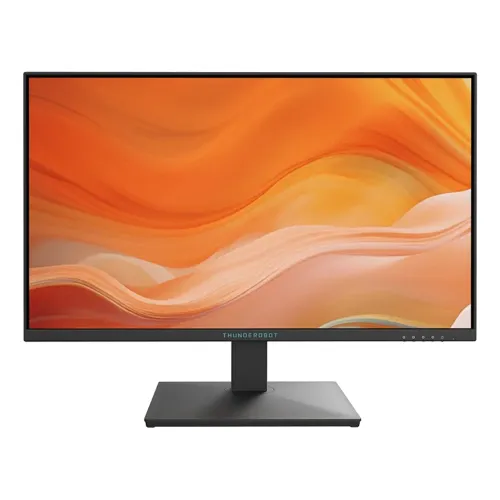
The ThundeRobot ZF27F144-BD is a 27-inch desktop gaming monitor listed with a Full HD Fast IPS panel and 144Hz refresh rate. Its size and resolution make it a straightforward choice for users who want a large screen for games, video and everyday work without the graphics load of QHD. Available information for this exact model comes mainly from Bangladesh retailer specifications. We did not locate a model-specific manufacturer technical sheet, so technical values such as contrast, response time, color gamut and physical dimensions are presented with that source limitation. The exact model code is retained so buyers can distinguish it from other ThundeRobot displays.
Screen size and resolution
The listed active screen diagonal is 27 inches, with a 16:9 aspect ratio and Full HD resolution of 1920 × 1080 pixels. This is compatible with common PC and console output modes and provides a broad image area for games, streaming, documents and browser windows. Because those pixels are spread across a larger panel than a typical 24-inch Full HD monitor, text and fine lines may look less dense at close viewing distances. Buyers who prioritize sharper small text or more workspace can compare 27-inch QHD options. The preferred screen depends on eyesight, desk depth, viewing distance, application layout and graphics performance.
Fast IPS panel
Retailers identify the panel as Fast IPS. IPS panel technology is often selected for broad viewing angles and color consistency when the viewer shifts position. The exact-model listings state 178° horizontal and 178° vertical viewing angles; these are manufacturer-style specification figures repeated by retailers and do not mean brightness or color remain perfectly unchanged at all angles. Fast IPS is a product class description rather than an independent measurement of every pixel transition. Actual motion behavior depends on the panel, response setting, frame rate and game. The monitor is listed as flat and with a non-glare surface, which can help reduce reflections in a bright room.
144Hz refresh behavior
The ZF27F144-BD is listed as a 144Hz monitor. Compared with a 60Hz screen, a supported 144Hz mode can update the image more frequently and make motion appear smoother in compatible games or desktop movement. The benefit depends on the source producing enough frames and the monitor receiving a supported timing. A high refresh screen does not raise a game’s frame rate by itself. Check the operating-system display menu or graphics software after connecting the monitor, select the intended resolution and refresh rate, and use a cable and output that support the chosen mode. Some console devices may be limited to their own output options.
Response-time qualification
Local retailers advertise a 1ms response time for this model. The sources checked do not specify whether that number is gray-to-gray, MPRT, a best-case overdrive mode or another method. Response-time figures are not directly comparable unless measurement method and settings match. The value also does not describe input lag, guarantee that all transitions take one millisecond, or promise that motion blur and overshoot will never appear. If a monitor OSD exposes response or overdrive settings, the user can choose a mode that balances blur reduction and inverse ghosting. The product copy keeps the 1ms claim qualified as retailer-rated and method-unspecified.
Brightness, contrast and color
Exact-model Bangladesh listings state typical brightness of 250 cd/m², contrast ratio of 1500:1 and 99% sRGB color gamut. Multiple local pages repeat these figures, but we did not find an exact-model technical document from ThundeRobot to confirm the measurement conditions. Brightness describes light output under a stated test; room lighting and picture settings affect the perceived result. A gamut percentage describes coverage, not factory calibration or color accuracy. For gaming, streaming and normal desktop use these values give a rough specification reference. For professional photography, print or color grading, buyers should seek independent measurement results and a documented calibration process.
Inputs and legacy support
The local specifications list one HDMI 2.0 input, one DisplayPort 1.4 input and one VGA input. They also list one audio-out port. Retailer timing information says HDMI and DP can carry 1920 × 1080 at up to 144Hz, while VGA is listed up to 1920 × 1080 at 75Hz. The VGA connection can be useful for older equipment, though it is an analog signal and can look different from a digital connection. Confirm the port labels and exact input behavior on the offered unit, and use the display menu to select the correct source. Cables are not confirmed as included accessories.
Adaptive sync and comfort
Some local exact-model pages mention Adaptive Sync, FreeSync support, flicker-free behavior and low-blue-light functions. These claims are not consistently documented across the retrieved listings, and an exact-model manufacturer guide was not available, so the content treats them as retailer-listed features rather than fully verified certifications. Adaptive refresh behavior requires a compatible source, supported input and correct settings. Eye-comfort options can alter color or brightness and should be treated as display settings, not medical guarantees. Room lighting, glare, viewing distance and breaks also affect comfort during long sessions. Check the actual OSD menu for supported options on the exact regional unit.
Stand and mounting
Retailer specifications list tilt adjustment from approximately −5° to +20° and no height adjustment. Tilting can help aim the display and manage glare, but the supplied stand does not provide the range of an ergonomic height, swivel or pivot stand. A 100 × 100 mm VESA pattern is also listed. A separately purchased arm may provide more adjustment if the exact monitor has the same mount and the arm is rated for its weight. Follow the product instructions, check screw dimensions and do not mount the display by relying on a retailer summary alone.
Audio
The exact-model listings mark the built-in speaker field as N/A or indicate no speakers. The rear audio-out connection can feed compatible external headphones or speakers, depending on the connected source and audio routing. Buyers who need sound should plan an external audio device and verify whether the selected HDMI or DisplayPort source sends audio to the monitor output. An audio-out jack is not a built-in speaker and does not provide wireless audio. The catalog uses an explicit no-speaker statement so the port is not mistaken for integrated sound.
Dimensions and desk fit
Local listings report dimensions of 613.8 × 456.5 × 208 mm and weight of 4.4 kg. The pages do not consistently clarify whether those measurements include the stand or represent a packaged unit. They therefore provide a retailer-reported reference for desk planning, not verified shipping measurements. Leave space for the base, cable bends and ventilation. Variant logistics are left unset because courier weight and box dimensions must refer to the actual packaged unit. A product weight without a net/gross label is not sufficient to calculate package volume or shipping charges.
Warranty and seller terms
Several Bangladesh retailers advertise three years of warranty for the ZF27F144-BD. That is evidence of local seller warranty wording, not proof that the same provider backs a specific BiponiBD offer. Before purchase, confirm the distributor or service provider, eligible serial number, invoice requirements, start date, service location, dead-pixel policy and any carton-retention rule. The warranty duration is kept as a qualified catalog reference. A seller’s published price or stock status can change and does not establish the price or physical inventory of another seller.
Price and availability context
The saved variant MSRP is BDT 17,000 and remains unchanged. Retailer pages showed differing competitor prices during this review, including sale and regular prices. Those figures are market observations, not BiponiBD prices, inventory quantities or checkout availability. Product copy therefore avoids publishing a transient sale price as a permanent product fact. Buyers should inspect the current BiponiBD offer for seller, payable amount, delivery, stock and warranty. The variant SKU is an internal commerce identifier and remains unchanged because it may be tied to inventory and order history.
Gallery and model code
The six supplied images were visually inspected. They show the monitor from the front, angled side, edge profile, top or rear, full rear with the brand mark and a close view of rear connectors. The images support visual descriptions such as black casing, flat panel, central stand and visible input layout. They cannot establish technical measurements, panel response method, current stock, warranty or exact in-box contents. The public slug remains unchanged to avoid breaking existing links. Check the label on the physical monitor and carton to confirm the ZF27F144-BD model code before relying on regional specification differences.
Who may consider it
This product may suit a user seeking a relatively large Full HD screen with a listed 144Hz refresh rate, Fast IPS panel, multiple input types and VESA mounting. It can be used for compatible PC gaming, console play, streaming and general desktop work. It may be less suitable for someone who expects QHD sharpness at 27 inches, height adjustment from the supplied stand, integrated speakers, a verified 1ms measurement method, or a manufacturer-published color-calibration report. Compare the actual local seller offer and confirm the box, warranty and exact unit details when those factors matter.
Specification summary
Features
- 27-inch flat Fast IPS LCD with Full HD 1920 × 1080 resolution and 16:9 aspect ratio.
- 144Hz listed refresh rate for compatible source devices configured for supported Full HD timing.
- 250 cd/m² typical brightness and 1500:1 contrast ratio are stated by multiple Bangladesh listings; an exact manufacturer datasheet was not located in this review.
- 99% sRGB gamut claim appears across exact-model retailer pages; it does not by itself certify factory calibration or color accuracy.
- One HDMI 2.0, one DisplayPort 1.4 and one VGA input are listed, along with audio out.
- Retailers list HDMI and DisplayPort for up to 1920 × 1080 at 144Hz, and VGA up to 1920 × 1080 at 75Hz.
- Local listings describe a non-glare surface and 178° horizontal/vertical viewing angles.
- Retailers list 1ms response time; the measurement method and operating mode are not stated in available exact-model pages.
- A 100 × 100 mm VESA pattern and tilt range from −5° to +20° are listed by Bangladesh sellers.
- No built-in speakers are listed; the rear audio-out connection can feed compatible external headphones or speakers.
- Adaptive Sync, flicker-free and low-blue-light features are mentioned by local product sources; exact implementation and certification were not independently confirmed.
- Retailers list a three-year warranty reference; the responsible provider and coverage conditions depend on the specific local offer.
Advantages
- A 27-inch screen provides a larger viewing area than compact 24-inch displays while retaining Full HD compatibility.
- The 144Hz listing can produce smoother motion when the computer delivers compatible frame rates and output timings.
- Fast IPS, wide listed viewing angles and a 99% sRGB retailer claim provide a useful mixed gaming and general-use specification set.
- HDMI, DisplayPort and VGA inputs support a mix of newer and legacy source devices.
- VESA 100 × 100 mm mounting and tilt adjustment offer desk placement options beyond the basic stand position.
Points to consider
- Full HD on a 27-inch panel has lower pixel density and less fine-detail workspace than a 27-inch QHD display.
- The included stand is listed for tilt only; height, swivel and pivot adjustments are not listed.
- The 1ms response figure has no published measurement method in the checked local pages, so it cannot be compared directly with GTG or MPRT claims.
- The 99% sRGB, 1500:1 and 250 cd/m² values rely on multiple retailer pages because a model-specific manufacturer technical sheet was not found.
- No built-in speakers are listed; external audio equipment is needed for sound.
- Package weight, carton size, included cables, seller warranty provider and exact origin label are not independently verified.
Frequently asked questions
What is the exact model?
The product is the ThundeRobot ZF27F144-BD, also styled Thunderobot by some local retailers. The model code should remain ZF27F144-BD; similar ThundeRobot monitor codes can describe different sizes and refresh rates.
What are the resolution and refresh rate?
Bangladesh exact-model listings state Full HD 1920 × 1080 at up to 144Hz. The source computer, selected input, cable and display settings must all support the desired timing.
Which ports does the monitor have?
Exact-model local specifications list one HDMI 2.0, one DisplayPort 1.4, one VGA input and one audio-out connection. Retailer timing tables list HDMI and DP up to Full HD 144Hz and VGA up to Full HD 75Hz.
Does it have built-in speakers?
Local exact-model specification pages state N/A or no built-in speaker. An audio-out port is listed for compatible external audio equipment.
What does the 1ms response time mean?
Retailer pages advertise 1ms but the reviewed listings do not define GTG, MPRT, overdrive mode or test method. Treat it as an unqualified seller-rated figure, not a guarantee of one-millisecond performance for every pixel transition.
Is the panel QHD?
No. The listed native resolution is Full HD 1920 × 1080. At 27 inches it gives a large image, but less pixel density than a 27-inch QHD screen.
What is the contrast ratio?
Multiple Bangladesh exact-model listings state 1500:1. We did not locate a ThundeRobot manufacturer technical document for this exact suffix, so this remains a retailer-corroborated specification rather than manufacturer-verified data.
What is the color gamut?
Local listings report 99% sRGB. That percentage is a retailer-published coverage claim and does not prove factory calibration, measured accuracy or suitability for color-critical publishing.
Can I use a monitor arm?
Retailer specifications list a 100 × 100 mm VESA mount pattern. Check the physical unit, screw fit, arm load rating and installation instructions before mounting.
Does the stand adjust in height?
Local exact-model specifications list tilt from approximately −5° to +20° and no height adjustment. A separate VESA arm may offer more ergonomic movement if compatible.
What are the dimensions and weight?
Bangladesh listings give 613.8 × 456.5 × 208 mm and 4.4 kg. They do not consistently state whether those measurements are for the monitor with stand or the packaged unit, so shipping weight and carton dimensions are left unfilled.
What warranty applies?
Local retailer pages show a three-year warranty reference. Confirm which seller or distributor backs the actual BiponiBD offer, warranty start date, serial eligibility, service location and any carton or invoice requirements.
Technical claims are based on multiple Bangladesh exact-model retailer pages. No model-specific ThundeRobot manufacturer specification document was located; verify the exact unit, seller offer, warranty and package before purchase.