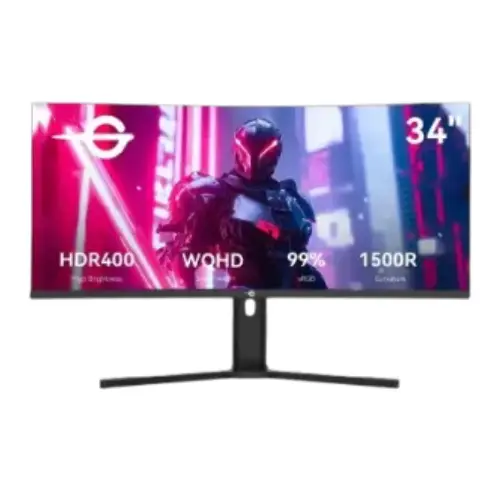
A 34-inch ultrawide for gaming and work
The Titan Army C34A1R is a 34-inch curved monitor built around a 3440 × 1440 WQHD resolution and a 21:9 ultrawide aspect ratio. Its VA panel, 165Hz refresh rate and 1500R curve are aimed at PC users who want a broad game view and room for several desktop windows. The model number C34A1R appears consistently in the catalog images and Bangladesh retailer listings reviewed for this page. This listing describes the exact C34A1R configuration and does not borrow specifications from similarly named C34A1R+ or other Titan Army models. Storefront prices and stock change over time, so treat any dated comparison as a snapshot rather than a guaranteed offer.
WQHD resolution and 21:9 workspace
The native 3440 × 1440 resolution supplies 4,953,600 pixels across a wide 21:9 canvas. Compared with a standard 2560 × 1440 16:9 monitor, the extra horizontal space can show more of a game scene where ultrawide support is available, or keep two application windows side by side with fewer interruptions. Video and games that do not support 21:9 may show black bars or be stretched depending on source settings; the monitor cannot create genuine ultrawide image detail from every format. For sharp output, set the connected computer to 3440 × 1440 and choose a scaling level suited to desk distance. Rendering this many pixels at high frame rates requires a capable graphics card, and performance varies by game, quality settings, and system cooling.
165Hz refresh for responsive motion
The C34A1R is listed with a maximum 165Hz refresh rate through DisplayPort. A high refresh panel can redraw the image more frequently than a conventional 60Hz screen when the graphics source provides matching frames. That can make supported games, camera movement, and pointer motion appear smoother, but it does not increase the frame rate a computer can render. Connect using a suitable DisplayPort cable and verify the selected 3440 × 1440, 165Hz mode in the operating system or graphics settings. Retailer specifications state DisplayPort 1.4 with 48–165Hz and HDMI 2.1 with 48–120Hz; the actual mode depends on the input, cable, source hardware, color settings, and driver. Check the on-screen display if a newly connected computer defaults to a lower refresh rate.
VA panel, contrast and viewing
The monitor uses a VA panel with a stated 4000:1 contrast ratio, 350 cd/m² typical brightness and 178-degree horizontal and vertical viewing angles. VA panels are commonly selected for their stronger native contrast than many IPS displays, which can help dark scenes look deeper in a dim room. The 178-degree figures describe a nominal viewing-angle specification; brightness and color can still shift as the viewer moves off-axis. The anti-glare surface helps reduce reflections from nearby lights but does not eliminate glare in every room. Brightness is a stated typical value, not a promise that every scene reaches that level. Desk placement, ambient light, picture mode, and the individual unit affect perceived black level and color, so adjust the OSD for the actual room instead of relying on a promotional image.
1500R curve and viewing distance
A 1500R curvature means the screen follows a curve with a nominal 1,500 mm radius. On a wide 34-inch display, the curve can bring the left and right edges closer to the viewer and make a large desktop feel more continuous when sitting near the center. It is a viewing preference rather than a guarantee of immersion or reduced eye strain. A centered position and a suitable viewing distance help keep the full panel in view; users who regularly share the display from the side should consider that a curved screen presents the edges at different angles. The catalog photographs show the curved panel and included stand. Consider desk width, keyboard placement, speaker position, and the monitor's footprint before choosing an ultrawide format.
1ms MPRT and motion settings
Bangladesh retailer specifications describe a 1ms MPRT response time. MPRT is a motion-picture response measurement and should not be confused with a guaranteed 1ms gray-to-gray transition for every pixel and setting. Motion clarity can vary with refresh rate, overdrive level, frame rate, and the scene. Aggressive response settings may create bright or dark overshoot artifacts, so compare the available modes with the games you play and choose a balanced setting. A fast refresh panel still depends on the graphics source delivering frames at an appropriate rate. For competitive play, keep the monitor at its supported high-refresh mode and test adaptive sync with your graphics driver. Do not infer an unlisted response-time certification from the 1ms headline alone.
HDR400 and color reproduction
The exact-model listings and the first catalog product image identify HDR400 support. Retailer specifications state 16.7 million colors at 8-bit, 99% sRGB, 86% NTSC, 89% Adobe RGB and 90% DCI-P3 color coverage, alongside larger color-volume figures. Color volume and color coverage describe different measurements, so they should not be mixed into one claim. HDR appearance depends on compatible content, source output, the monitor's HDR mode, and room lighting. The provided information does not establish a specific VESA certification document or a measured HDR performance result for every unit; buyers who require certified HDR performance should request the local product documentation. For color-critical work, use a suitable color mode and calibration process, since a wide-gamut listing alone does not guarantee accurate output in every application.
Adaptive sync and eye comfort features
Retailer listings state FreeSync and G-Sync support, as well as flicker-free and low-blue-light features. Adaptive sync can coordinate compatible graphics output with the display refresh cycle to reduce tearing when frame delivery varies. Actual compatibility depends on the graphics card, driver, input, and configuration; the feature does not promise a fixed frame rate. Enable the relevant options in the monitor menu and graphics software, then confirm that the intended refresh range is active. Flicker-free and low-blue-light modes may suit some users for extended sessions, but comfort is personal and depends on brightness, breaks, viewing distance, and room lighting. These features do not replace sensible screen breaks or proper desk ergonomics.
Inputs, audio output and setup
The C34A1R listing provides two DisplayPort 1.4 inputs, two HDMI 2.1 inputs and one 3.5mm audio output. Retailer-published input ceilings are 165Hz over DisplayPort and 120Hz over HDMI at the stated operating range; confirm the mode for the particular source device and cable. The audio jack is an output for compatible headphones or external speakers, not evidence of built-in speakers. Connect the graphics card to the desired input, select that input in the on-screen menu, and choose the corresponding sound output if sending audio through the display. For a desktop PC with a dedicated graphics card, use its video output rather than an unused motherboard port. If the monitor does not show 165Hz, verify resolution, cable, input selection, driver, and operating-system display settings.
Adjustable stand and VESA mounting
The included stand is specified with tilt from approximately −5 to +15 degrees, swivel of 40 degrees with a ±2-degree tolerance, and 100mm of height adjustment. This gives users options for aligning the screen with a chair and desk without relying on books or fixed risers. A 100 × 100mm VESA pattern is listed for compatible arms and wall mounts. Before mounting, check the bracket's supported load, screw length, installation instructions, and clearance for cables. Published package dimensions are 924 × 468 × 193mm and the listed package weight is 9.37kg; those package figures should not be mistaken for the monitor-only size or weight. Allow enough desk depth for the curved panel and stand, and avoid lifting the monitor by the screen surface.
Power, warranty and local buying checks
Retailer specifications list 50W typical and 70W maximum power consumption, with a 19V, 3.42A power supply and less than 0.5W in power-saving mode. The catalog warranty field states three years, matching the current exact-model listings reviewed at Star Tech, TechLand and Ultra Technology; confirm the written warranty on the invoice because service terms and exclusions are seller-specific. Check that the sealed unit, invoice, serial number, supplied adapter, stand, and cables match the seller's terms. Local listings captured on 5 November 2026 showed ৳44,500 at PQS, ৳45,000 at Star Tech and ৳47,000 at TechLand. These are observed listing prices, not a promise of stock, cash discount, delivery cost, or final checkout amount. The existing catalog MSRP remains ৳45,000.
Who should compare this monitor
The C34A1R can suit PC gamers who want a wide QHD canvas, a high refresh rate, a curved VA panel, and a stand with height adjustment. It can also help productivity users who place multiple broad windows side by side, provided their desk has room for a 34-inch display. Buyers should compare it with standard 16:9 screens if their games or video sources do not support ultrawide output, and with higher-brightness or documented HDR alternatives if HDR is a priority. VA contrast and an ultrawide view are useful traits, while edge viewing, desk footprint, and graphics-card load deserve consideration. There is no need to assume that a higher numerical refresh or HDR label alone makes a monitor the right fit; match the connection, content, workstation, and warranty to the intended setup.
Summary of the exact C34A1R configuration
This Titan Army C34A1R listing covers a 34-inch, 3440 × 1440, 21:9 VA monitor with a 1500R curve, 165Hz maximum refresh, 1ms MPRT, HDR400, adaptive-sync claims, and dual DisplayPort and HDMI inputs. The height-adjustable stand, swivel and VESA 100 × 100mm mounting support give it several desk setup options. The most useful buying checks are whether your device can drive 3440 × 1440 at the desired refresh through the chosen input, whether your workspace fits an ultrawide screen, and what written local warranty applies. Compare the dated price range with the seller's current checkout details. Product specifications in this catalog were cross-checked across multiple Bangladesh retailer pages because a manufacturer-hosted C34A1R specification page was not located during this review.