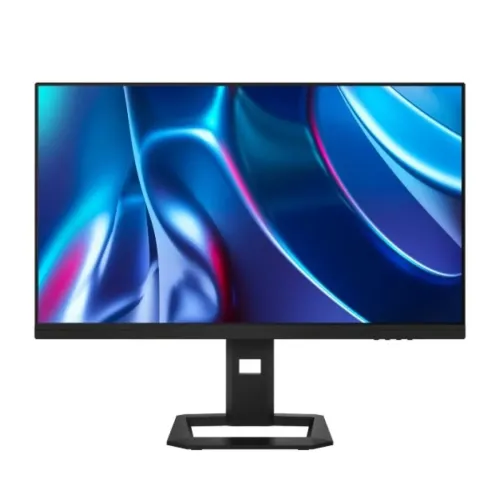
Titan Army P2711V: a 27-inch dual-mode 4K gaming monitor
The Titan Army P2711V is listed in Bangladesh as a 27-inch Fast IPS monitor built around two different gaming priorities. Its headline mode is 3840 × 2160 4K UHD at up to 144Hz, which gives detailed images for story games, racing titles, strategy games, streaming and desktop work. The second advertised mode is 1920 × 1080 Full HD at up to 288Hz, intended for players who prefer a higher frame-rate ceiling and reduced pixel load in competitive games. The dual-mode feature makes one monitor adaptable to different genres and PC performance levels. Because the manufacturer’s product page was unavailable when checked, the detailed figures in this description are identified as retailer-listed specifications.
Dual mode: choosing detail or motion
At 4K, the P2711V presents four times the pixel count of Full HD. On a 27-inch screen that can make fine interface text, distant objects, high-resolution textures and desktop windows appear more defined, provided the connected computer can render the selected game at a useful frame rate. The listed 144Hz maximum offers smoother motion than standard 60Hz displays when the graphics system delivers matching frames. This mode suits visually rich single-player games, simulations, media playback and mixed work where sharpness matters.
The advertised Full HD mode trades spatial detail for speed, with a listing of up to 288Hz. Competitive shooters, rhythm titles and esports games can benefit from more frequent updates when the PC consistently renders high frame rates. A lower rendering resolution can also reduce GPU load, giving older or mid-range systems a more attainable performance target. The monitor does not make a game run faster by itself: results depend on the graphics card, processor, game settings, cable, selected input and the screen’s own mode configuration.
Retail pages use the term dual mode but do not consistently explain how to switch modes or which port reaches each maximum. One listing’s port table gives DisplayPort 1.4 a 48–165Hz range and HDMI 2.1 a 48–120Hz range, while its headline advertises 288Hz Full HD. These figures may describe different modes or input conditions, but the checked pages do not resolve that. Buyers should ask the seller for the exact revision manual and confirm the required input, cable, timing and settings before planning around 288Hz.
Fast IPS panel and response-time details
Bangladesh listings describe a Fast IPS panel. IPS technology is commonly chosen for broad viewing angles and consistent color when the viewer is not directly centered. Retailers list 1ms response time, with some specifying 1ms MPRT. MPRT and GtG are different measurement methods: MPRT relates to perceived motion persistence, while GtG measures a pixel transition between gray levels. The listing should therefore be understood as a retailer-published MPRT claim where specified, not a verified 1ms GtG result for every overdrive setting.
Retailer specification tables give typical brightness of 350 nits and a contrast ratio around 1500:1. These values are useful for ordinary indoor gaming and work in a reasonably controlled room. Strong sunlight or direct reflections can still make a 350-nit screen harder to view. IPS contrast also means dark scenes will not look like OLED or a local-dimming Mini-LED panel; a black screen in a dim room may appear gray rather than perfectly black. Positioning the display away from bright reflections and adjusting room lighting can improve perceived contrast without changing the hardware.
HDR, color and eye-comfort features
Several local sellers list HDR 400, 8-bit + FRC color processing and 95% DCI-P3 coverage. Star Tech’s product description also lists ΔE below 2 color accuracy. These are retailer-published descriptions; the manufacturer data sheet could not be retrieved during this review, so certification details and measurement conditions remain unconfirmed. HDR playback requires compatible content, a supported connection, suitable graphics settings and an application that actually outputs HDR. A retailer’s HDR 400 label should not be read as a promise of the peak brightness or black depth of premium HDR monitors.
The listed 95% DCI-P3 coverage can help show a wider range of colors than a basic narrow-gamut office display. The ΔE < 2 claim suggests factory color adjustment according to the seller, but color-critical print or video work should still be checked with a measurement device and the appropriate color profile. 8-bit + FRC uses temporal dithering to represent more tonal steps than native 8-bit signaling alone. Results may vary with the selected picture preset and signal configuration.
Retailers also list low-blue-light and flicker-free support. These modes can be helpful to users who prefer a warmer picture or want to reduce visible flicker, but individual comfort differs. A lower blue-light setting changes the screen’s color appearance, so use a neutral picture mode when judging color. Regular breaks, sensible room lighting and a comfortable viewing distance remain useful for long sessions.
Inputs, KVM and multitasking tools
The P2711V is listed with two HDMI 2.1 inputs, two DisplayPort 1.4 inputs and one 3.5mm audio output. Multiple inputs make it practical to leave several sources connected, such as a gaming PC, work computer and console. The maximum refresh available depends on the selected resolution, port, graphics device, cable and monitor mode. HDMI 2.1 branding by itself does not guarantee that every source will reach every advertised timing.
Star Tech lists a built-in OSD, KVM, picture-in-picture (PiP), picture-by-picture (PbP) and GamePlus tools. PiP can show a second source in a smaller area while the primary source remains full size; PbP can place two inputs side by side. A KVM lets a keyboard and mouse be switched between computers, but the retailer listing does not describe the required USB connections or supported combinations. Check the on-screen menu and connection diagram in the unit’s manual before purchasing extra USB cables or assuming seamless switching.
The 3.5mm jack is described as an audio output. It can feed compatible headphones or powered speakers when audio is sent to the monitor over a supported input. The pages reviewed do not clearly confirm built-in speakers, so buyers who need room-filling sound should plan external audio and verify the exact box contents with the seller.
Stand adjustment, mounting and desk fit
Retailer listings describe height adjustment, tilt, swivel and pivot. Ultra Technology lists up to 120mm of height travel, -5° to +20° tilt, approximately ±25° swivel and portrait rotation. The included stand can help align the screen to eye level and reduce the need to prop the monitor on books. Pivot can be useful for coding or long documents, although users should confirm cable slack and clearance before rotating the screen.
Local specifications list a 100 × 100mm VESA mount. Before ordering a monitor arm, compare this pattern with the arm’s supported spacing and screw requirements, and confirm that the exact delivered revision has the same rear mounting layout. Desk clearance also matters: leave room for the stand base, cable bends and ventilation. The provided listing does not describe the monitor’s full carton dimensions, so measure the desk area and ask the seller about the supplied stand and accessories.
Who the Titan Army P2711V may suit
- Mixed-genre PC gamers: Use the advertised 4K high-resolution mode for detailed games and Full HD high-refresh mode for competitive play, after checking the input-specific limits.
- Multi-device desks: Four video inputs and listed KVM/PiP/PbP features can simplify a setup with more than one computer, subject to the manual’s supported connection combinations.
- Work and study: The 27-inch 16:9 panel, adjustable stand and 4K desktop space can support documents, spreadsheets, browsing and media when connected to a suitable computer.
- Console users: HDMI 2.1 inputs are listed, but confirm console resolution, refresh, HDR and VRR compatibility for the exact monitor revision.
Setup checklist and buying notes for Bangladesh
For a new setup, first check that the graphics card has a compatible output and use a certified cable appropriate for the desired resolution and refresh mode. Open the monitor’s on-screen display to select the intended mode, then set the operating system and game to the same resolution and refresh rate. If a refresh option is missing, check the graphics driver, cable, source port and monitor mode before assuming a defect. Avoid promising 288Hz until the seller confirms which exact input and signal timing provide it.
Local retailer pages checked for this audit listed the Titan Army P2711V between BDT 42,500 and BDT 44,500, while the existing catalog variant remains at its recorded BDT 44,000 price. Market listings can change, and the lowest online price may have different stock or payment conditions. Confirm the current selling price, physical availability, invoice details and return procedure before ordering. Bangladesh seller pages state a three-year warranty; retain the invoice and confirm the warranty provider and coverage in writing.
As the manufacturer product page returned 404 at review time, buyers should request the current manual or an official distributor specification sheet when exact port bandwidth, VRR range, HDR certification or accessories matter to their purchase. This audit avoids treating unanswered details as guaranteed features. The product identity, existing slug, commercial variant, warranty field and media files remain tied to the catalog record.
Specification summary
- Model: Titan Army P2711V; 27-inch Fast IPS; 16:9.
- Advertised modes: 3840 × 2160 at up to 144Hz; 1920 × 1080 at up to 288Hz.
- Retailer-listed picture values: 350 nits typical, 1500:1 contrast, HDR 400, 8-bit + FRC, 95% DCI-P3, ΔE < 2.
- Response claim: 1ms MPRT where stated by local sellers.
- Inputs: 2 × HDMI 2.1, 2 × DisplayPort 1.4, 3.5mm audio out; verify port-specific refresh limits.
- Tools: FreeSync/G-Sync support, KVM, PiP/PbP, OSD, GamePlus, low-blue-light and flicker-free modes (retailer-listed).
- Stand and mount: Height, tilt, swivel and pivot adjustment; 100 × 100mm VESA mount listed.
- Local warranty: 03 years as carried in the existing catalog and shown by local sellers.