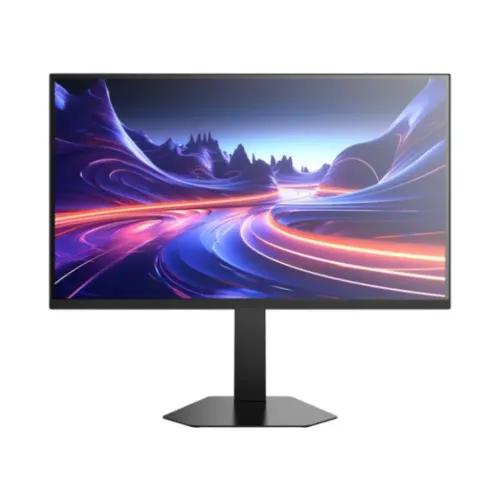
A 27-inch 4K gaming monitor with two refresh modes
Titan Army P276MV is a 27-inch flat gaming monitor listed in Bangladesh with a 4K UHD mode reaching up to 160Hz and a Full HD mode reaching up to 320Hz. That dual-mode design gives the user a choice between finer image detail and a higher refresh ceiling. The 4K mode uses 3840 × 2160 pixels for games, video and desktop work where detail matters. The FHD mode uses 1920 × 1080 pixels and is aimed at games where a very high frame rate and frequent screen updates are the priority. The two figures describe different modes; 320Hz is not available at native 4K according to the exact-model seller listings reviewed.
The product name must remain exact. This listing covers P276MV without the word Ultra. Titan Army’s official P276MV Ultra page describes another model version with different native and overclocked refresh rates, HDR, brightness and ports. P275MV, P275MV Plus, P275MV Max and P276MV Ultra are not interchangeable names. Check the product label on the box and the model line on the invoice before buying or comparing specifications.
Panel technology and visual presentation
Retailers describe this monitor as Fast IPS with Quantum Dot Mini LED backlighting. The IPS panel type is associated with broad viewing angles, while quantum-dot color conversion and the Mini LED backlight are intended to produce a wide color range and more controlled illumination than a basic edge-lit LCD. Sellers list a typical brightness of about 450 cd/m² and a typical contrast ratio of 1500:1. Those values are retailer specifications and do not establish a measured color volume, peak HDR brightness or local-dimming performance for every regional unit.
Several local pages list a 16:9 screen, flat panel and 27-inch diagonal. One page lists 163 pixels per inch, which is consistent with the high pixel density of a 27-inch 4K panel. A 4K desktop can show fine text and detailed images, but individual apps may need display scaling to keep controls comfortable to read. At 1080p on the same physical panel, the image is visibly less detailed than at native 4K; the lower pixel count is the trade-off for the seller-listed 320Hz mode.
Choosing between 4K detail and FHD speed
The 4K 160Hz profile suits users who want a sharper image in supported games, productivity software and video. Rendering a game at 3840 × 2160 is demanding, especially when targeting frame rates near 160 frames per second. The graphics card, game engine, visual-quality preset and cooling all affect the achievable result. A display capable of refreshing at 160Hz cannot create 160 unique game frames when the PC renders fewer frames, so choose settings that balance image quality and performance.
The FHD 320Hz profile is aimed at fast competitive games. It can present a new refresh opportunity more often when the computer delivers a suitably high frame rate. Since 1920 × 1080 contains one quarter as many pixels as 3840 × 2160, the lower mode can be easier for a graphics card to drive. It also makes text and fine interface details softer on a 27-inch 4K panel. Competitive players should check that their preferred games support the selected resolution and that the monitor menu, operating system, graphics driver and cable expose the intended high-refresh mode.
QD Mini LED, HDR and local dimming claims
Local retailers describe the P276MV as a QD Mini LED display and mention HDR support. Star Tech and Potaka IT list HDR400, while PC House has HDR1000 wording in its key details and product prose. The official P276MV Ultra page presents a different HDR tier for the Ultra model. These entries cannot be combined into one guaranteed HDR specification. For this non-Ultra catalog product, HDR400 is the more conservative repeated local listing, while the disagreement is called out so a customer can confirm the exact carton and manual. HDR labels alone do not communicate how the monitor maps brightness, tone and dark scenes in each game.
PC House lists 180 local dimming zones in its specifications. Further down that page, its description gives a 1,152-zone count, 1,000,000:1 dynamic contrast and other information that may be copied from related P275MV Plus or Max descriptions. Those statements conflict within the same page and are not adopted as guaranteed P276MV specifications. Zone count, peak brightness and HDR certification should be treated as unconfirmed until the seller provides documentation for the exact non-Ultra unit.
Response time, motion and variable refresh
Local product pages describe a 1ms overdrive response rating, often written as 1ms OD. Overdrive adjusts pixel transitions to reduce visible smearing at selected settings, but a headline rating does not mean every transition takes one millisecond or looks equally clear. Aggressive overdrive can create bright or dark inverse trails, so try the available response settings at the refresh mode you actually use. Motion clarity also depends on source frame rate, game frame pacing, refresh rate and the viewer’s sensitivity.
Adaptive-Sync is listed by several Bangladesh sellers. On a compatible graphics card and supported connection, variable refresh can align the monitor’s update timing with the rendered frame rate and help reduce tearing. It does not increase the frame rate produced by the computer. Enable the feature in the monitor menu where applicable and in the graphics software, then test a game within the mode’s supported range. Features and compatibility may vary by GPU, driver and exact input.
Inputs and connection details to verify
Port information is one of the most inconsistent parts of the current P276MV product pages. Star Tech, Ultra Technology and Potaka IT list one DisplayPort 1.4, two HDMI 2.0 and a 3.5mm audio output. PC House instead lists one DisplayPort 1.4 and two HDMI 2.1 in its specifications. A secondary PCPartsBD comparison table repeats a different two-DisplayPort description that appears to be generic monitor copy. To avoid promising a port configuration that may not match the box, this listing identifies the common retailer configuration and states the conflict explicitly.
Some seller pages list one USB-B upstream connection and two USB-A ports, which may provide a basic USB hub when connected to the computer with the right upstream cable. Confirm the port labels, included cables and supported functions on the exact unit before planning a hub, KVM or high-bandwidth workflow. A 3.5mm output can connect headphones or external speakers where fitted. Use a certified cable appropriate for the selected resolution and refresh rate, and check the actual mode shown in the monitor and operating-system menus after setup.
Ergonomics, mounting and physical setup
Retailer specification tables list a stand with height, tilt, swivel and pivot adjustments, plus a 100 × 100mm VESA mounting pattern. The product photographs show an adjustable-style stand and a rear accent around the mounting area, but image appearance alone cannot prove which movements are included with every regional bundle. Verify the stand functions in the manual. If using an arm or wall mount, check the monitor’s weight, VESA screw length and arm capacity rather than relying on the image. Leave enough space for the stand base, rear ports, cables and ventilation.
A 27-inch flat display usually fits desks that have room for the screen and viewing distance, but the correct distance depends on eyesight, desk depth and whether the user keeps the panel at native 4K scaling. Align the center of the screen around a comfortable eye line and avoid twisting the neck to view it. Use the height and tilt controls to reduce glare from windows and overhead lights. A monitor arm can free desk area, but only when it matches the exact product weight and mounting requirements.
Eye comfort and daily use
Local sellers list anti-glare, flicker-free and low-blue-light features. These options can make the display easier to use in varied rooms, but they do not guarantee that every user will avoid eye fatigue. Set brightness close to the room’s ambient level, use a comfortable text scale and take breaks during long gaming or work sessions. Warm color modes may be useful in the evening, although they change the appearance of colors and are not appropriate for every color-critical task.
The same screen can support gaming, streaming, editing and office applications, but a gaming feature does not by itself make the monitor a calibrated reference display. People who need dependable color matching for print, photography or broadcast should check measured factory calibration, uniformity, color-space coverage and calibration support for the exact unit. Those details are not consistently available in the retailer specifications gathered for this listing, so they are not presented as confirmed professional-monitor capabilities.
Bangladesh prices, stock and warranty
Four exact-model Bangladesh retailer pages checked on 6 November 2026 displayed asking prices from ৳52,500 to ৳56,000: Ultra Technology at ৳52,500, Potaka IT at ৳54,000, Star Tech at ৳55,000 and PC House at ৳56,000. Seller prices, stock labels, payment plans and promotional discounts can change without notice. This reference is an observed market range, not a BiponiBD store offer or a promise that any seller will honour the same amount later.
The catalog MSRP is ৳55,000 and its warranty field says three years; these catalog commercial values are preserved. The local seller pages also show a three-year warranty, but exact service coverage, importer, parts availability, dead-pixel rules and claim process can vary by seller and regional unit. Ask for written warranty terms, an invoice, the exact model name and serial number, and confirmation of available stock before placing an order. Do not treat the seller’s offer price as a change to the BiponiBD variant MSRP.
Strengths for different users
The strongest reason to consider the P276MV is its choice of two very different display modes. Native 4K at 160Hz can offer detailed visuals at a high refresh rate when the PC can drive it. Full HD at 320Hz prioritizes fast refresh for esports play and may be more practical for systems that cannot render a demanding game at 4K and very high frame rates. The Fast IPS and QD Mini LED descriptions, Adaptive-Sync listing and adjustable stand can complement either use case.
A person who mainly edits 4K video, works across detailed desktop windows or plays visually rich games may prefer the native mode. Someone focused on competitive shooters may prefer FHD and a 320Hz ceiling, accepting reduced image sharpness. Mixed users can switch based on the application. Before choosing, compare the games and applications actually used, the graphics-card outputs, the expected frame rate, desk distance and the availability of local service. Choose based on documented modes rather than an ambiguous product-family name.
Limitations and version identification
There are important specification caveats. Retailer pages disagree on HDMI version, DisplayPort count, HDR class and the number of local dimming zones. A PC House description mixes P276MV with related P275MV Plus or Max family claims; those extra figures have not been repeated as confirmed facts. Titan Army’s official page reviewed during this audit is specifically for P276MV Ultra, a distinct higher specification model. It cannot be used to infer the non-Ultra P276MV’s actual hardware.
For an informed purchase, ask the seller for a photograph of the model label, the I/O panel, the manual’s supported timing table and the local warranty statement for the individual unit. Compare those details with the carton and invoice at delivery. Check for stuck pixels, backlight uniformity and each input while the return window is open. These checks are sensible for a Mini LED gaming monitor, especially when third-party listings do not fully agree.
Installation and mode setup
Place the monitor on a stable surface, connect power and select the intended source. For the 4K profile, use a compatible GPU and input/cable combination, then select 3840 × 2160 and the highest supported refresh in the operating system. For the FHD profile, select 1920 × 1080 and confirm whether the 320Hz option appears in both the monitor’s information display and the graphics settings. If a refresh option is missing, check the cable, port, driver, menu configuration and source-device limitations rather than assuming the monitor is faulty.
Enable Adaptive-Sync only after verifying compatibility with the source. Choose a moderate overdrive level and inspect motion in the games you play. Set brightness and color mode for the room, then adjust screen scaling for comfortable reading. Keep ventilation openings clear and route cables so they do not pull against the monitor when the stand is raised or rotated. Use the supplied installation guide and avoid forcing a VESA screw or stand latch.
What is included and support questions
Package contents were not independently confirmed for the exact Bangladeshi batch. Before purchase, ask which power cable, DisplayPort or HDMI cable, USB upstream cable and stand parts are included. Check whether any retail bundle changes the listed price. Keep the box, foam and invoice until the return period and initial inspection are complete.
For support, provide the seller with the model exactly as printed on the rear label, the serial number, a description of the issue, selected resolution and refresh, input used, graphics-card model and a short reproduction of the problem. Do not rely on settings intended for P276MV Ultra or P275MV variants unless the manufacturer support team confirms they apply to this unit. The catalog’s three-year warranty field is not a substitute for the seller’s written service procedure.
Summary
Titan Army P276MV is a 27-inch QD Mini LED monitor listed with dual modes: 4K UHD up to 160Hz and FHD up to 320Hz. Retailers describe Fast IPS, around 450 nits typical brightness, 1ms OD and Adaptive-Sync. The catalog record has been corrected to use the Titan Army brand, exact P276MV model code and a 4K 160Hz / FHD 320Hz title. Where retailer specifications disagree, the listing states that they need confirmation instead of treating one seller’s conflicting claims as certain.
The catalog MSRP ৳55,000, three-year warranty value, status, category, slug, SKU, variant pricing and all existing product-image URLs remain intact. Check the label for P276MV without Ultra, verify the port and HDR details for the exact regional unit, and confirm the current Bangladesh price and written warranty before ordering.