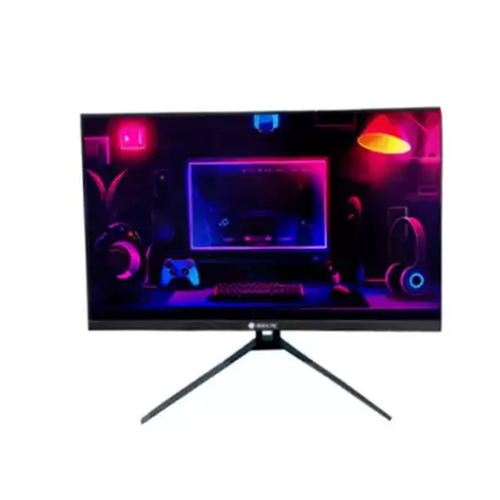
TrendSonic TS22IPS120B: compact Full HD IPS viewing
The TrendSonic TS22IPS120B is a black, 22-inch class LED monitor with an IPS panel and native 1920 × 1080 Full HD resolution. Retailer specification pages list a 16:9 aspect ratio, a 478.656 × 260.28 mm viewable area, 16.7 million colours and a 0.2493 × 0.241 mm pixel pitch. This combination fits study, home office and general desktop setups where text, web pages and video are viewed at a relatively compact desk distance.
Several Bangladesh listings identify the exact TS22IPS120B as a 120Hz overclocked model. A TrendSonic family catalogue lists lower baseline timing for a generic 22-inch series entry but does not identify this exact model or its overclocking mode. Treat 120Hz as an exact-model retailer claim: check the product label, supported HDMI mode, cable, graphics output and display settings with the seller before relying on it. A compatible PC and correctly configured connection are required to reach the advertised maximum.
Image quality and motion
Bangladesh retailer specifications list IPS viewing angles of 178 degrees horizontally and vertically, typical maximum brightness of 250 cd/m², a 1,000:1 contrast ratio and 16.7 million colours. These values describe ordinary SDR use; brightness is not a guarantee of good visibility in direct sunlight, and the colour-count figure does not certify factory calibration for professional colour work. The flat display surface and Full HD resolution are practical for everyday work, media and casual gaming.
Retailer pages advertise 1ms response time, but the measurement method and operating mode are not consistently stated. Do not treat this number as a guaranteed grey-to-grey time for every pixel transition. Some pages also list AMD FreeSync, Flicker-Free and Low Blue Light features; confirm the exact OSD options and graphics-card compatibility on the delivered unit. These features can support smoother playback and adjustable viewing comfort, but they do not eliminate eye fatigue. Set brightness for the room, reduce reflections and take regular breaks.
Connections and built-in audio
Exact-model retailer listings describe one HDMI input, one VGA input and an audio-in jack. HDMI is the digital connection for a modern computer; VGA can connect older desktop systems. Confirm the supported refresh rate for the particular input, since the advertised 120Hz overclocked mode may depend on the selected port, resolution, graphics card and cable. The listings do not establish DisplayPort or USB-C connectivity, so check before buying if your laptop requires either input.
Several listings specify dual built-in speakers. This can be convenient for basic system sounds and video calls, although small monitor speakers are not a replacement for dedicated speakers or headphones when fuller sound is needed. Retailer pages vary in how they describe the audio jack as audio-in or a headphone/audio connection. Verify the physical connector and whether it carries audio in or out on the unit being sold rather than assuming these descriptions are interchangeable.
Desk fit, mounting and power
The product is listed in black and supports a 75 × 75 mm VESA mounting pattern, which may suit compatible monitor arms or wall brackets. Check the mount's screw size and load rating before installation. Retailer dimensions are listed around 379.3 × 171.45 × 168 mm, but the measurement orientation and whether the stand is included are not consistently explained. One local listing reports 2.27 kg while other listings show a higher figure; verify stand configuration and actual shipping weight with the seller before planning a mount or delivery.
Retailer listings describe an external adapter and commonly state 12V / 3A output. A listing also cites up to 36W power consumption. These are seller-published figures, not a directly verified exact-model manufacturer datasheet; inspect the adapter label supplied with the monitor and confirm local plug and input requirements. Do not substitute a power adapter unless its voltage, polarity, connector and current rating match the manufacturer-supplied unit.
Who may consider this monitor?
The TS22IPS120B may suit a compact workstation, student desk or budget gaming setup that values IPS viewing angles, Full HD resolution, built-in speakers and the retailer-advertised 120Hz mode. Its HDMI and VGA combination can support newer and older computers, while the VESA pattern allows compatible mounting options. Check your PC's ability to output the desired refresh rate at 1920 × 1080 and confirm which audio functions the monitor provides.
Consider alternatives if you need QHD or 4K detail, USB-C docking, DisplayPort, an ergonomically adjustable stand, a calibrated wide-gamut panel, high brightness for a sunlit room or professionally measured response-time guarantees. A 22-inch Full HD panel is compact and affordable, but it offers less workspace than larger or higher-resolution displays.
Bangladesh price, warranty and buying checklist
At the time of this catalog check, a Bangladesh retailer listed the exact model in stock at BDT 10,499, while a TrendSonic listing on Star Tech showed BDT 11,000. BiponiBD displays BDT 10,499–11,000 as a dated informational comparison only. It is not a BiponiBD store offer, a guarantee of current stock, or a promise about delivery, taxes or warranty eligibility. Check the seller page and final checkout total before purchase.
Local retailer listings advertise a three-year warranty, but coverage may vary by seller, import channel and serial number. Ask for the written warranty provider and service location, confirm the warranty period on the invoice, and check dead-pixel and return policies. Before paying, verify the exact TS22IPS120B model, new condition, advertised refresh mode, port layout, speakers, adapter rating, stand and included cables. Some retailer specifications conflict, so the delivered unit and seller's written confirmation should guide setup.