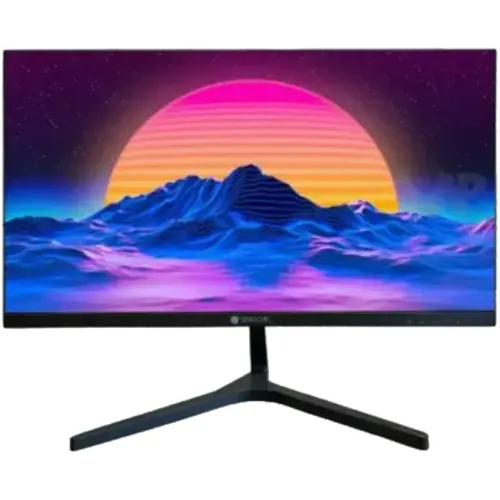
TrendSonic TS5322 is a 21.5-inch flat VA LED monitor with Full HD 1920 × 1080 resolution. Star Tech lists 60–75Hz, 7ms, 3000:1 contrast, 220 cd/m² brightness, HDMI, VGA, 2 × 3W speakers, flicker-free, Low Blue Light, FreeSync, 75 × 75mm VESA and a three-year warranty. Its page currently says Out Of Stock / To be announced; verify any seller’s current offer and exact-unit terms.
Product overview and intended role
The TrendSonic TS5322 is a 21.5-inch flat VA LED monitor listed with Full HD resolution. Its conventional screen size and HDMI plus VGA connections can suit a home computer, study desk, office workstation or retail counter that needs one everyday display. Star Tech lists a 3000:1 contrast ratio, 60–75Hz refresh capability, 7ms response time, 220 cd/m² maximum brightness and built-in speakers rated at 2 × 3W. It also lists flicker-free, Low Blue Light and FreeSync functions. These details describe a general-purpose display rather than a specialized creator panel or high-refresh esports monitor. The exact-model page currently marks the unit out of stock and the price as To be announced. Older descriptive copy and search-result prices should not be treated as a live offer. Before buying, confirm the exact revision, actual stock, included adapter, current price and warranty conditions with the selected Bangladesh seller.
Full HD resolution and useful desktop area
The correct model resolution is 1920 × 1080 pixels in a 16:9 Full HD format. The existing catalog value of 1920 × 108 was missing a zero and was corrected. At 21.5 inches, Full HD supports standard document work, browser windows, video playback and common desktop applications. The practical workspace depends on operating-system scaling, the video source and the application. Users who keep several spreadsheets or editing panels open may prefer a larger screen, while a compact desk may benefit from the smaller footprint. Set the computer to the display’s native 1920 × 1080 mode where available to avoid unnecessary scaling softness. The graphics output must support the selected resolution and refresh mode. For older computers, VGA may work, but HDMI is usually the simpler digital connection when available. Verify the source device’s actual output and cable before troubleshooting image quality.
VA panel, contrast and viewing environment
Star Tech identifies a flat VA panel and lists a 3000:1 contrast ratio. VA technology is commonly selected when users value visible contrast for mixed desktop work and entertainment; actual image appearance still depends on the exact panel, settings, source material, room light and seating position. The retailer does not publish a measured colour gamut or factory calibration report for this listing, so the monitor should not be described as professionally calibrated or colour-reference grade. A 220 cd/m² maximum brightness is modest compared with brighter displays. It is better suited to regular indoor conditions than direct sunlight or a very bright window. Adjust the screen angle and room lights to reduce reflections and glare. For photo, print or video colour work, compare a monitor with published gamut coverage and calibration documentation. The TS5322 may still be adequate for ordinary media and office tasks where critical colour matching is not required.
Refresh rate and response time differences
The Star Tech specification table lists a refresh range of 60 to 75Hz and a 7ms response time. Google’s focused results also surfaced another local seller description saying 60Hz and 5ms, while several seller snippets describe up to 75Hz and 7ms. Because response figures can vary by measurement method, overdrive mode or product revision, this review preserves the exact Star Tech value and flags the seller difference instead of combining them into a guaranteed claim. The refresh rate shown by the computer can depend on the chosen input, cable, graphics output and operating-system configuration. A 60–75Hz screen is suitable for standard desktop motion and casual games but is not a high-refresh gaming monitor. A response-time number alone cannot guarantee blur-free motion in every transition. Check the exact unit documentation if a particular refresh or response threshold is important to your use.
HDMI, VGA and connecting equipment
The exact-model listing shows one HDMI port and one VGA port. HDMI carries digital video and can also carry audio to compatible display speakers. VGA is an analog video connection for older PCs and equipment; it does not carry sound. The built-in speakers may receive sound over a compatible HDMI connection, while VGA users should route audio separately through the computer or another sound device. The page does not list DisplayPort, USB-C, an integrated USB hub or multiple HDMI inputs. A laptop with only USB-C or DisplayPort may require a suitable adapter, and compatibility should be checked before purchase. If two computers will share the display, the single HDMI and single VGA inputs provide two possible sources but do not imply automatic switching or a KVM function. Confirm which input is selected in the monitor menu when no picture appears, then verify the cable and source output.
Speakers and everyday audio
Star Tech lists built-in speakers and gives a 2 × 3W speaker output. This can provide basic audio for system sounds, calls or casual viewing without placing external speakers on a small desk. It should not be assumed to reproduce deep bass or replace a dedicated speaker system for music and films. The source device, selected input and operating-system audio output must be configured correctly. HDMI can transmit audio when the computer and display support it; VGA cannot. If audio is not heard, confirm that the HDMI input is active, the operating system has selected the monitor as an output, and the display volume is raised. The listing does not establish microphone or webcam hardware, so the TS5322 is not a complete video-conferencing solution by itself. Users who need clearer voice pickup or fuller sound should plan for separate peripherals.
Flicker-free, Low Blue Light and FreeSync
The Star Tech page lists Flicker Free and Low Blue Light as supported functions, plus FreeSync support. These features may provide useful display or image-setting options, but their effect depends on implementation, enabled menu settings, the content and individual comfort. They are not a medical guarantee and do not remove the need for sensible breaks, appropriate viewing distance or suitable room lighting. FreeSync operation requires compatible graphics hardware and software, a supported connection and the correct driver or display setting. It should not be interpreted as a promise of a particular variable-refresh range because no exact range is published on the listing. Check the monitor menu and source-device settings after setup. For eye comfort, set brightness to match the room instead of using maximum output continuously, and position the screen to avoid glare.
Mounting, dimensions and desk setup
The exact-model page lists a 75 × 75mm VESA mount pattern. Before buying an arm or wall bracket, check that it supports this pattern and the monitor’s weight, and confirm the correct screw length with the documentation. The listed dimensions with stand are 492 × 380 × 168mm, and the listed weight is 2kg. These measurements can help with desk planning, but confirm the delivered revision and the stand footprint when space is tight. Leave room behind the unit for the adapter and HDMI or VGA cable, and keep ventilation openings clear. Adjust chair and display height so the screen is comfortable to view without persistent neck tilt. A light monitor can be easier to reposition, but a securely attached stand or compatible mounting plate remains important. The product page does not confirm every package accessory, so ask the seller what is included.
Power adapter and safe setup
Star Tech lists an external adapter and a 12V/2A voltage specification, with maximum power consumption stated as 24W. Use the adapter supplied with the exact monitor and verify voltage, current, connector polarity and plug dimensions from its printed label. Do not substitute a similar-looking power unit without checking compatibility. The retailer listing is useful evidence but does not replace the label on the shipped unit or a manufacturer manual. Place the adapter where air can circulate and protect it from liquids, pinching and excessive heat. Connect the video cable to the selected input and set the computer to a supported mode. If the screen remains blank, check the power indicator, selected input, cable seating and computer output before concluding that the panel is faulty. Keep the invoice and packaging until the monitor has been inspected and tested.
Warranty, seller stock and Bangladesh pricing
Star Tech lists a three-year warranty for the TS5322, but its direct product page currently shows Out Of Stock and the main price field says To be announced. Older body text and Google result snippets can retain a prior figure after a seller changes availability. Other search snippets show mixed stock and amounts, which were not independently checked as current in-stock offers during this review. No market price range is therefore published, and no old price is presented as the current BiponiBD price. Warranty length, service provider, exclusions, dead-pixel policy and claim procedure may depend on the seller and supplied unit. Ask the seller to confirm the exact model, current stock, final payable price, delivery cost, warranty document, return terms and box contents in writing. Retain the dated invoice and check the display, ports, speakers, stand and adapter soon after delivery.
Who should consider this monitor
The TS5322 may suit users looking for a compact Full HD screen for ordinary office tasks, browsing, study, point-of-sale work or casual viewing. The 21.5-inch size, HDMI and VGA inputs, listed speakers and 75 × 75mm mounting pattern make it adaptable to several straightforward desk setups. Users with a bright room should consider that the listed 220 cd/m² brightness is modest. Competitive players seeking very high refresh, people who need USB-C or DisplayPort, and creators who need published colour-gamut measurements may want a different class of monitor. If response time is important, resolve the 5ms versus 7ms seller discrepancy with the actual manufacturer or unit documentation. If the exact Star Tech stock remains unavailable, compare only current offers for the same TS5322 model and verify that the stated warranty and revision match.
Specification provenance and accuracy notes
This review used the exact TrendSonic TS5322 listing opened in Chrome on Star Tech, together with a focused Google search results page showing additional Bangladesh seller descriptions. Star Tech’s exact page identifies 21.5 inches, VA LED, flat surface, 1920 × 1080 in its key features, 3000:1 contrast, 60–75Hz, 7ms, 220 cd/m², one VGA, one HDMI, 2 × 3W speakers, flicker-free, Low Blue Light, FreeSync, 75 × 75mm VESA, 492 × 380 × 168mm with stand, 2kg, 12V/2A, up to 24W and a three-year warranty. Its specification table repeats resolution as 1920 × 108 due to a likely omission, so the Full HD value is cross-checked against its own key-feature text and other exact-model results. No manufacturer data sheet was located during this pass. These remain retailer-derived claims and seller-specific warranty and availability facts.
Buying checklist and setup summary
Before placing an order, compare the TS5322 model code on the product page, invoice and carton. Confirm that the seller has an actual unit, states the complete 1920 × 1080 resolution, explains the 60–75Hz range and response-time basis, and provides the written warranty terms. Check whether the HDMI or VGA cable, stand, adapter and any mounting screws are included. Confirm that the computer has a compatible output and that its graphics settings can drive Full HD at the intended refresh rate. After installation, use native resolution, select the correct input, test sound over HDMI if needed, and adjust brightness for the room. Inspect pixels, ports, speakers, stand and adapter promptly under the seller’s return policy. The current Star Tech stock and price fields do not establish a purchase offer, so verify the final price and availability directly with a seller before committing.
Frequently asked questions
What is the exact model?
It is the TrendSonic TS5322 21.5-inch FHD LED monitor. The product code on the Star Tech page is 30838.
What is the correct resolution?
The exact-model page and multiple local listings identify Full HD 1920 × 1080. The old catalog value 1920 × 108 was incomplete and has been corrected.
What panel type and contrast are listed?
Star Tech identifies a flat VA LED panel with a 3000:1 contrast ratio.
What refresh rate and response time should I expect?
Star Tech lists 60 to 75Hz and 7ms. A different local seller snippet says 5ms. Check the exact carton or manufacturer sheet for the revision you will receive.
Which display connections are available?
Star Tech lists one HDMI input and one VGA input. It does not list DisplayPort or USB-C.
Does this monitor include speakers?
Yes. Star Tech lists built-in speakers with 2 × 3W output for basic audio. External speakers may provide fuller sound.
Does it support flicker-free or Low Blue Light modes?
Both functions are listed by Star Tech. Their comfort benefit varies with brightness, settings, room light and individual sensitivity.
Does it support FreeSync?
Star Tech lists FreeSync support. Adaptive sync also depends on the computer graphics hardware, driver, cable/input and enabled settings.
What are the brightness and refresh limitations?
The listing specifies maximum 220 cd/m² and 60–75Hz. These are conventional indoor-use specifications, not a high-brightness or high-refresh gaming setup.
Can it be mounted on a monitor arm?
A 75 × 75mm VESA pattern is listed. Check the arm’s supported pattern, screw length and the physical monitor before mounting.
What are the dimensions and power requirements?
Star Tech lists 492 × 380 × 168mm with stand, 2kg, and an external 12V/2A adapter. Use and verify the adapter supplied with your unit.
What is the warranty and current Bangladesh price?
Star Tech lists a three-year warranty, but its exact-model page currently shows Out Of Stock and To be announced. Confirm current stock, final price and written warranty with the seller before ordering.