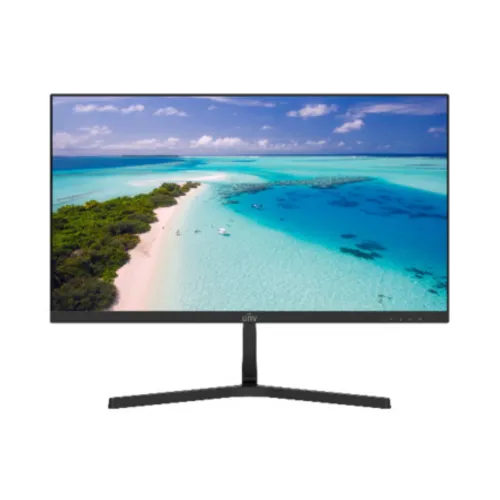
Uniview UNV MW-LC22-G 22-inch 120Hz Full HD IPS Monitor
A 22-inch class IPS monitor with a precise active-area figure
The Uniview (UNV) MW-LC22-G is a flat LED-backlit IPS monitor marketed as a 22-inch IT display. Uniview lists the active display area as 486.1 × 265.5 mm, which works out to approximately 21.45 inches diagonally. That is why a product page may use “22-inch class” while a measurement of the visible panel gives a slightly smaller number. The native resolution is Full HD, 1920 × 1080, in a 16:9 layout. The manufacturer lists a pixel pitch of 0.24 × 0.24 mm, 178-degree horizontal and vertical viewing angles, and 16.7 million supported colors. These details make the monitor suitable for everyday documents, browser work, study, video playback and general desktop use. They do not establish HDR support, calibration accuracy, professional color-proofing performance or a particular color-uniformity tolerance.
Understand the 120Hz panel rating and the actual input timings
The main point that needs careful wording is refresh rate. Uniview lists the panel refresh rate as 120Hz. In the same official specification, however, the interface table gives HDMI at 1920 × 1080 and 100Hz, and VGA at 1920 × 1080 and 60Hz. The panel capability and the input timing table are different facts, so a buyer should not read “120Hz panel” as a guarantee that every source will send 120 frames per second to this display. The dependable published connection figures are Full HD at 100Hz over HDMI and Full HD at 60Hz over VGA. The source computer, graphics settings, cable and the unit revision also affect the available mode. If 120Hz input is essential, confirm the exact monitor revision and an approved timing with the seller before purchase.
Response time, color and brightness for normal desk use
Uniview lists 5ms response time. Bangladesh exact-model retailer pages label the measure as GtG, so that description is retained as a market cross-reference. No reviewed primary source supports a 1ms response-time promise. Brightness is listed at 250 cd/m² and static contrast at 1000:1. The official gamut figure is 72% NTSC. UCC’s Bangladesh listing describes approximately 104% sRGB color area; “area” is not the same wording as 104% sRGB coverage, and it should not be converted into a broader coverage claim. The manufacturer says 16.7 million colors but does not specify native panel bit depth. TechLand lists 8-bit (6-bit plus FRC), which is useful as a reseller note but remains distinct from a manufacturer-confirmed panel-depth statement. The 250-nit brightness is intended for regular indoor environments rather than direct sunlight, HDR mastering or high-brightness signage.
HDMI, VGA and the missing audio connections
The official MW-LC22-G interface table lists one HDMI input and one VGA input. HDMI is the digital connection and is documented at 1920 × 1080@100Hz; VGA is analog and is listed at 1920 × 1080@60Hz. The official specification does not list DisplayPort, USB-C, USB hubs, a 3.5mm audio jack or built-in speakers. Star Tech marks the speaker field as N/A, consistent with the manufacturer interface list. Connect headphones, speakers or a headset to the computer or another audio device rather than expecting the monitor to provide audio output. Before buying, check that the computer has HDMI or VGA and use the port that supports the refresh mode you need. If an adapter is required, confirm its direction and supported resolution; the presence of a plug converter alone does not guarantee a specific refresh rate.
A narrow bezel, tilting pedestal and VESA mounting
Uniview specifies a 3.3mm bezel on the top, left and right, with a 15.2mm lower border. The supplied product image shows a black screen with a centered UNV mark and a V-shaped desktop pedestal, which visually matches this model family rather than the thicker-bezel MW3222 surveillance line. The Bangladesh distributor and retailer list approximately -3° to +20° tilt adjustment. Height adjustment, swivel and portrait pivot are not listed for the included pedestal. For an arm or wall bracket, the official VESA pattern is 75 × 75mm with four M4 threaded holes and an 8mm deep thread. Use a compatible bracket and correct screw length; overly long screws can intrude into the casing. The stand is appropriate for a basic fixed desk installation, while users who need height or pivot adjustment can check a compatible VESA arm.
Dimensions, weight, power and standard accessories
With the pedestal attached, the official product dimensions are 492.70 × 379.40 × 168.60mm (width × height × depth). Without the pedestal they are 492.70 × 284.00 × 41.20mm. Uniview lists carton dimensions as 598 × 366 × 99mm. The manufacturer’s weight table gives 2.18kg net and 3.12kg gross. TechLand lists an alternate batch at 2.07kg net and 2.88kg gross, so packaging and hardware revisions can affect the reseller figures. The external adapter input is DC 12V, 2A. Typical power consumption is listed at no more than 22W, with standby consumption no more than 0.5W. The standard accessory list names an HDMI cable, quick guide, pedestal and adapter. Check the delivered carton for revision-specific packaging and included accessories. These published ratings are not a measurement of the power drawn in every user’s setup.
Operation rating and reliability figures
The official product specification lists an 18/7 operation rating, a 30,000-hour backlight lifetime and 50,000-hour MTBF. Those are manufacturer ratings that describe specified operating and reliability conditions; they are not a promise that every individual monitor will run continuously for that many hours or remain free from wear. The sheet also lists an operating range of 0°C to 40°C and 10% to 85% relative humidity without condensation. Storage is specified from -20°C to 60°C and 5% to 90% relative humidity without condensation. The OSD languages are Chinese, English, French, Italian, Spanish, Portuguese, Turkish, Japanese, Korean, Russian and Czech. CE and FCC are the listed certifications. For routine office use, follow the manual, keep ventilation clear and protect the panel from impact and moisture.
How it differs from MW-LC22-E and MW3222 surveillance displays
The MW-LC22-G is the 120Hz IPS member of Uniview’s MW-LC22 IT monitor family. Do not confuse it with MW-LC22-E listings, which represent a separate office revision and may show different panel technology or refresh-rate batches. Also keep it separate from the MW3222-V, MW3222-V-DT and MW3222-X surveillance models. Those surveillance products can use VA panels, 60Hz timing, 100 × 100mm VESA mounting and integrated speakers, depending on model. Those characteristics do not transfer to the MW-LC22-G. The current BiponiBD record is categorized as a monitor and belongs with IPS and high-refresh display filters; it should not be categorized as a monitor with speakers. Confirm the rear model label and packaging if the delivered item does not match the narrow-bezel image or if its stand, audio or mounting hardware differs.
Bangladesh price and warranty references
During this audit, public exact-model listings showed prices around ৳8,500 at TechLand, ৳9,200 on the Star Tech page and ৳10,300 on UCC’s Uniview monitor listing. Public listing prices and availability can change, so this range is only a snapshot for comparison. It does not represent BiponiBD’s current selling price, promotion, inventory or delivery commitment. Several Bangladesh sellers state a three-year warranty. That does not prove which importer supplied BiponiBD stock, who will service a particular serial number, whether the adapter has separate coverage or how a claim must be submitted. Use the current BiponiBD offer and invoice for those terms. The record’s existing SKU and MSRP remain unchanged until the seller checks its own inventory and purchase documents.
Choosing the right connection and setup
For a recent desktop or laptop with HDMI, connect directly to the monitor and check the display settings after installation. The official timing table identifies Full HD at 100Hz for HDMI, while VGA is listed at 60Hz. If Windows or another operating system initially selects a lower refresh rate, inspect the graphics control panel and available display modes; never force an unsupported custom timing. VGA carries video, not digital audio, and this model’s reviewed specification does not include an audio system. Place the pedestal on a stable, level desk and adjust the screen tilt to reduce reflections. If you plan to use an arm, verify the mount supports 75 × 75mm and use the specified M4 thread depth. Make sure the power adapter label matches DC 12V, 2A before connecting it.
A grounded model summary for shoppers
The core facts for the Uniview UNV MW-LC22-G are a 22-inch class, approximately 21.45-inch viewable, Full HD IPS screen; 120Hz panel refresh rating; manufacturer-listed 5ms response; 250 cd/m² typical brightness; 1000:1 static contrast; 72% NTSC gamut; HDMI and VGA inputs; tilt stand; 75 × 75mm VESA; and DC 12V, 2A external power. The official source’s HDMI timing is 1080p at 100Hz and VGA timing is 1080p at 60Hz, so those details should accompany the panel refresh headline. The product does not have verified built-in speakers or a 3.5mm audio jack. Its published operational ratings and official physical specifications are unusually complete, while the actual BiponiBD unit identity, warranty route, live offer and image rights still require internal confirmation. A product listing should preserve these distinctions instead of filling gaps with assumptions.