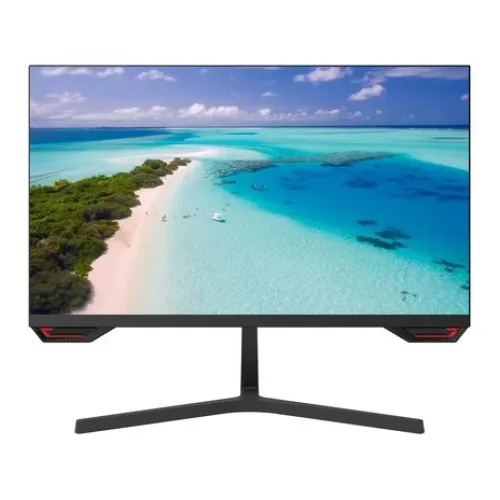
Exact product identity
The Uniview MW-LC27-G is a 27-inch Full HD IPS monitor. The manufacturer positions it among its 27-inch gaming monitors and specifies a 144Hz refresh rate with 5ms response. The catalog previously contained an incomplete model string and a wrong physical measurement; this revision normalizes the model and uses the manufacturer’s product page and datasheet for core technical details. Local seller observations are kept separate where they differ, particularly on static contrast and warranty. The saved record remains active and its storefront slug and offer identity are preserved.
Full HD resolution and 27-inch workspace
The panel uses 1920 × 1080 pixels in a 16:9 format. At 27 inches, the screen provides a broad viewing area for desktop applications, browser windows, video and casual gaming. Full HD is compatible with a wide range of computers and can be easier to drive at higher frame rates than QHD. Pixel density is lower than a 24-inch Full HD screen or a 27-inch QHD monitor, so small text and fine detail may look less crisp at close range. Buyers who do detailed design or keep many windows open should compare higher resolutions and consider their viewing distance.
IPS technology and viewing angles
Uniview specifies an IPS panel with horizontal and vertical viewing angles of 178 degrees. IPS is commonly used for wider off-axis viewing characteristics, which can be useful when sharing a screen or moving slightly around a desk. The published viewing-angle rating is a technical criterion and does not mean color and brightness remain identical from every position. The manufacturer lists the active display area as approximately 597.888 by 336.312 millimeters, a flat panel and 25% haze with 3H surface treatment. Place the screen to reduce reflections and view it near the center for consistent results.
144Hz refresh rate
The manufacturer lists a 144Hz refresh rate. A display can refresh its image up to 144 times per second when the connected computer and selected input mode support that timing. Higher refresh can make compatible motion and scrolling appear smoother than 60Hz, but it does not increase the frame rate generated by the computer. The graphics card, cable, software and game settings all affect the result. After connecting, check the operating system’s display settings and choose the supported refresh option. If the monitor is connected through an adapter or dock, confirm that it can carry the required signal.
Response time and gaming expectations
Uniview lists a 5ms response time. This figure describes a panel transition rating, but the product page does not explain every test condition or provide an independent measurement. It should not be confused with refresh rate or treated as a guarantee that all pixel transitions complete in exactly five milliseconds. Motion clarity also depends on refresh, game frame rate, overdrive settings and individual sensitivity. For casual games and general use, the main gaming specification is the 144Hz refresh. Users seeking very low-latency competitive performance should compare measured response behavior from independent testing.
Brightness, contrast and color
The manufacturer specifies 250 cd/m² brightness, 1500:1 static contrast and 16.7 million colors. It also lists a typical 72% NTSC color gamut. Star Tech lists a lower 1300:1 contrast ratio, so the manufacturer figure is used here while the seller discrepancy remains documented. These specifications do not substitute for measurements of the exact retail unit or prove factory calibration. Brightness perception depends on room lighting; adjust it for comfort. The color-gamut figure does not establish color error, uniformity or professional calibration, so color-critical workflows should use measured calibration data.
Inputs and source compatibility
The MW-LC27-G has one HDMI input and one VGA input according to Uniview. HDMI is suited to many current computers and VGA provides compatibility with older equipment. The manufacturer page does not list DisplayPort, USB, a hub or a headphone output. If a computer has a different connector, a suitable adapter may be required, and an adapter can limit the available resolution or refresh rate. Confirm that the selected input, cable and graphics device support the desired 1920 × 1080 mode at 144Hz before installing the monitor permanently.
VESA mounting and stand
The monitor supports VESA 75 × 75 mm mounting with four M4 threaded holes 8 millimeters deep. A compatible arm can provide greater positioning flexibility than the supplied pedestal, but the arm must support the monitor and use an appropriate screw length. The manufacturer product data identifies a pedestal but does not provide the tilt range in the technical table captured for this review. Bangladesh retailers list a tilt range around −3 to +20 degrees; this is identified as seller information and should be checked against the exact unit. Height adjustment is not documented.
Dimensions and desktop fit
Uniview lists the product dimensions with pedestal as 614.1 × 459.3 × 183.9 millimeters and package dimensions as 694 × 464 × 114 millimeters. The net weight is 3.91 kilograms and gross packaged weight 5.4 kilograms. These dimensions replace the malformed catalog measurement that mixed unlike axes. Leave room for the base, power connection and video cable behind the display. If desk depth is limited or the monitor will sit inside a shelf, confirm physical fit against the actual carton and stand because packaging or regional revisions can differ.
Power and efficiency
The manufacturer lists a DC 12V, 2.5A input, typical power consumption of no more than 30W and standby consumption of no more than 0.5W. Use the supplied adapter and check its output label before connecting it. A generic supply with the same nominal voltage may still have the wrong connector or polarity. Actual energy use varies with brightness and operating state. The published maximum or typical values are useful for comparison but do not determine a monthly electricity bill; that calculation also requires the hours of use and local tariff.
Standard accessories
The manufacturer lists one HDMI cable, one quick guide, one pedestal and one adapter in the standard package. This manufacturer bundle is a useful reference, but the exact contents of a Bangladesh retail carton should still be checked. Keep the box and invoice while testing the monitor and confirming warranty terms. If a particular cable length or regional plug is important, ask the seller before purchase. Accessories may vary with stock batch or region, and seller bundles do not change the monitor’s official model identity.
Warranty and local service
Bangladesh retailers list three years for this model, but that does not prove the warranty provider or serial eligibility of BiponiBD’s unit. Confirm the written coverage period, service location, start date, dead-pixel policy and documentation requirements before ordering. The product page retains the catalog’s three-year claim with an explicit local verification note. Keep the invoice and carton label and record the full model and serial numbers. A manufacturer technical page establishes product specifications; it does not automatically establish which local distributor services a particular imported unit.
Who may prefer this monitor
The MW-LC27-G may suit a user seeking a large Full HD panel with IPS viewing angles and a 144Hz refresh rate for general desktop work and casual gaming. Its HDMI and VGA inputs provide basic connectivity, while VESA mounting offers an alternative to the pedestal. It may be less suitable for buyers who need QHD detail at 27 inches, DisplayPort, multiple HDMI inputs, a USB hub, built-in speakers or a height-adjustable stand. Compare those requirements with the exact model and available warranty before deciding. The 144Hz mode is most useful when the computer can supply compatible frames.
Setup checklist
Check that the carton label identifies MW-LC27-G and inspect the display, pedestal, adapter and cable for damage. Attach the base securely or use a compatible VESA mount, connect the supplied adapter and HDMI cable, then select 1920 × 1080 in the computer settings. Choose 144Hz only when the source device and connection support it. Adjust brightness for the room and position the panel to limit glare. Test the HDMI and VGA inputs if needed, retain the invoice and packaging, and confirm the local warranty provider and serial eligibility before discarding the box.
Specification-source notes
The manufacturer product page is the primary source for panel, refresh, brightness, contrast, inputs, VESA, power, dimensions, weight and accessories. Star Tech lists a 1300:1 contrast value while the manufacturer states 1500:1; this page follows the manufacturer. Tilt range and three-year warranty are retained only as Bangladesh seller claims. The product images do not confirm every port or accessory in the exact carton, so use the written specifications and check the delivered product. This separation helps prevent a retailer’s inconsistent specification table from overriding the manufacturer’s model data.
Specification summary
Key features
- 27-inch IPS panel with Full HD 1920 × 1080 resolution and 16:9 aspect ratio.
- 144Hz refresh rate and 5ms response time per manufacturer specification.
- 250 cd/m² brightness, 1500:1 contrast ratio and 16.7 million colors.
- Manufacturer lists 72% NTSC color gamut and 178° horizontal/vertical viewing angles.
- One HDMI input and one VGA input.
- 75 × 75 mm VESA mounting with four M4 threaded holes.
- 12V DC, 2.5A input; typical power up to 30W and standby up to 0.5W.
- Official manufacturer page lists HDMI cable, quick guide, pedestal and adapter in the standard bundle.
Advantages
- 27-inch FHD IPS size is useful for general desktop work and casual gaming.
- 144Hz is smoother than standard 60Hz when the PC can provide compatible frames.
- Manufacturer confirms 1500:1 static contrast and 72% NTSC gamut.
- HDMI and VGA cover common digital and older video sources.
- Standard VESA 75 × 75 mm mounting offers an alternative to the included pedestal.
Points to consider
- Full HD at 27 inches is less pixel-dense than QHD at the same screen size.
- 5ms response rating is slower than many purpose-built esports alternatives.
- Only one HDMI input is listed and DisplayPort is not provided.
- No built-in speakers or height-adjustable stand are documented.
- Local three-year warranty claims need BiponiBD provider and serial confirmation.
Frequently asked questions
What is the model number?
The manufacturer identifies this monitor as Uniview MW-LC27-G. The product name has been normalized to that exact model.
What are the screen size and resolution?
It has a 27-inch IPS panel with Full HD 1920 × 1080 resolution and a 16:9 format.
Does it support 144Hz?
Yes. Uniview specifies a 144Hz refresh rate. The computer, graphics output, cable and selected mode must also support the intended resolution and refresh rate.
What is the response time?
The manufacturer specifies 5ms. The document does not clarify a separate overdrive measurement method, so this remains the published response rating.
What is the contrast ratio?
Uniview lists 1500:1 static contrast. One Bangladesh retailer lists 1300:1, so the manufacturer specification is used and the seller discrepancy is recorded.
Which ports are available?
The manufacturer lists one HDMI input and one VGA input. DisplayPort and USB ports are not listed.
Does it have speakers?
The manufacturer specification does not list built-in speakers. The monitor has no documented internal audio output in the reviewed sheet; plan to use computer audio or external equipment.
Can I mount it on a monitor arm?
Yes. The manufacturer lists VESA 75 × 75 mm with four M4 threaded holes, 8mm deep. Confirm the arm rating and screw fit before installation.
What are its dimensions and weight?
With pedestal, the manufacturer lists 614.1 × 459.3 × 183.9 mm. The package is 694 × 464 × 114 mm. Net weight is 3.91kg and gross weight 5.4kg.
How much power does it use?
The manufacturer specifies DC 12V, 2.5A input, typical consumption no more than 30W and standby consumption no more than 0.5W.
What comes in the box?
The manufacturer lists one HDMI cable, quick guide, pedestal and adapter. Confirm the contents of the exact BiponiBD carton.
What warranty applies in Bangladesh?
Bangladesh sellers list three years, but BiponiBD coverage depends on the unit and provider. Confirm written terms, service center, start date and serial eligibility before purchase.
Specifications sourced from Uniview’s exact-model MW-LC27-G page and Bangladesh listings. Manufacturer contrast is used; retailer tilt and warranty claims need exact-unit confirmation.