Product overview
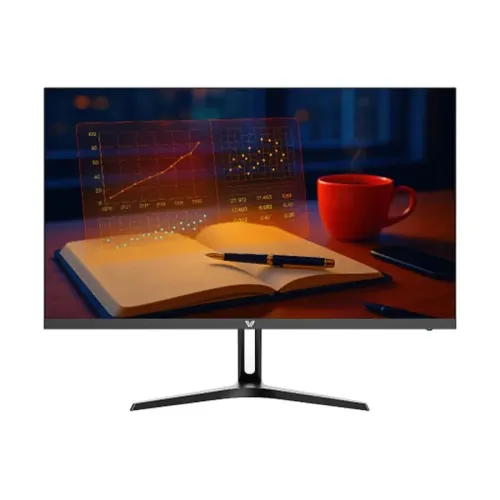
The Value-Top X24IFR120 is a 23.8-inch Full HD IPS monitor with a 120Hz mode over HDMI 1.4. It is intended for general desktop work, study, web browsing and compatible video or games. Its 1920 × 1080 resolution uses the common 16:9 format. The manufacturer lists a USB-C port with 2.5W charging, a tilt stand and 75 × 75mm VESA mounting. The word “USB-C” alone does not mean laptop docking: this port’s documented power output is low and its video/data functions are not specified in the official listing. The content below separates those confirmed features from functions that should be verified with the seller.
Display size and resolution
The official product is X24IFR120 with a 23.8-inch diagonal IPS panel. The native resolution is 1920 × 1080 Full HD, with a 16:9 aspect ratio. The stated viewable area is 527.04 × 296.46mm, and the pixel pitch is 0.2745 × 0.2745mm. Use the native resolution for the sharpest image. Full HD is a common format for office tasks, browser windows, video and everyday desktop use; users who need more workspace for large spreadsheets or high-resolution creative work may prefer a higher-resolution display. The panel is flat. Manufacturer specifications call it an A+ grade IPS panel; that grade designation does not replace a separate calibration report.
Panel, brightness and contrast
Value-Top lists 250 nits brightness, 1500:1 static contrast and 178° horizontal and vertical viewing angles. It supports 16.8 million colors using 8-bit color. The product page states sRGB 110% area. Area is a gamut-size comparison and must not be represented as 110% sRGB coverage. The manufacturer does not publish an individual calibration certificate or an exact coverage report in the cited listing. Buyers doing print or color-critical work should confirm the relevant coverage and calibration requirements independently. The 23.8-inch viewing area and IPS technology make it a general-purpose display; perceived brightness and contrast still depend on room lighting and chosen settings.
Refresh rate and response-time claims
The official model page specifies a 120Hz refresh rate. The X24IFR120 inputs are listed as HDMI 1.4 and USB-C rated at 2.5W. Value-Top’s page identifies HDMI 1.4 as the monitor interface, while third-party listings describe Type-C as a charging output; the maker does not clearly publish a port-by-port timing table in the page inspected. Therefore, rely on HDMI for the documented 120Hz mode and confirm any USB-C video input with the seller before buying. The manufacturer lists 5ms with overdrive, 1ms MPRT and 14ms GtG. Those figures describe different methods/settings and should not be merged into a single guaranteed response time. Overdrive and motion settings may change the image behavior.
USB-C power and other connectivity
USB-C is listed as 2.5W charging. That is a small output suitable only for low-power charging use; it is not equivalent to the 65W or higher charging often expected for a laptop. The official product page does not establish USB data hub behavior, video over USB-C, or one-cable docking. Do not choose this monitor on the assumption that it powers a laptop or accepts USB-C video unless the seller can verify the specific unit and manual. The manufacturer also lists one HDMI 1.4 port. It does not list DisplayPort or built-in speakers. For audio, use the connected computer or separate speakers/headphones. Confirm cable and adapter compatibility before setup.
Color and everyday screen use
The monitor offers 8-bit color with 16.8 million colors and an sRGB 110% area figure. That percentage describes gamut area rather than covered color space; coverage can be below or above the area figure. No factory calibration report is stated in the source. For office work, online classes, documents, media and general use, the IPS panel and wide viewing angles provide a practical baseline. For photo editing or print proofing, compare a verified coverage measurement such as sRGB coverage and consider an appropriate calibration tool. Avoid describing the panel as professionally calibrated unless that evidence is available.
Stand, tilt and VESA mounting
The included stand provides tilt from −5° to +15° with a stated ±3° tolerance. Height adjustment is not listed. The monitor supports 75 × 75mm VESA mounting with four M4 × 8mm screw holes. Check the wall bracket or arm manual, load limit, screw length and clearance before installation. A VESA arm can provide additional positioning if its specification matches. The product listing gives dimensions of 541 × 419 × 197mm and package dimensions of 597 × 107 × 391mm. Measure desk depth and cable clearance before placement. The manufacturer page’s dimension notation should be checked against the physical carton if precise fit is important.
Power, adapter and consumption
The monitor uses an external adapter rated at 12V DC and 2.5A. Maximum power consumption is listed as 30W or less, and standby consumption is below 0.5W. Use the supplied adapter or an approved replacement with matching voltage, polarity and current requirements. Do not substitute an adapter based only on connector shape. Manufacturer listings give net weight as 2.7kg and gross packed weight as 3.9kg. Keep ventilation areas open and place the adapter where it can dissipate heat. Actual power varies with brightness and operating state.
In the box and warranty
The manufacturer’s product information lists an HDMI cable, external adapter and user manual as accessories. Box contents can differ by seller or region, so check the actual carton before purchase. The Value-Top product page states a three-year warranty. Confirm which Bangladesh seller or service provider honors the warranty, whether the exact serial number is eligible, what the dead-pixel policy covers and what proof of purchase is required. A retailer’s advertised warranty should be treated as local service terms, while the manufacturer page provides the source for the model’s stated warranty duration. Keep the invoice and serial details for any service claim.
Who may choose this monitor
The X24IFR120 may suit someone looking for a 23.8-inch Full HD IPS monitor with a manufacturer-listed 120Hz HDMI mode, tilt adjustment and VESA mounting. It can serve study, general productivity, web use and everyday media. It may be less suitable if you require high-power USB-C laptop charging, guaranteed USB-C video, an integrated USB hub, built-in speakers, a height-adjustable stand or a verified wide-gamut calibration workflow. The most important practical check is the computer connection: use HDMI for the documented refresh-rate capability and verify whether USB-C supports the specific function you need. Confirm local warranty service and unit contents before purchase.
Complete technical specifications
Key features
- 23.8-inch flat IPS panel with Full HD 1920 × 1080 resolution and 16:9 aspect ratio.
- 120Hz maximum refresh rate through HDMI 1.4; no separate port-specific 120Hz claim is assumed for USB-C.
- USB-C port provides up to 2.5W charging; it is not described as a full-power laptop charging or docking port.
- Official timing claims distinguish 5ms with overdrive, 1ms MPRT and 14ms gray-to-gray.
- 250-nit brightness, 1500:1 static contrast and 178° horizontal/vertical viewing angles.
- 8-bit color with 16.8 million colors; sRGB 110% area (not sRGB coverage).
- Viewing area 527.04 × 296.46mm; pixel pitch 0.2745 × 0.2745mm.
- HDMI 1.4 plus USB-C 2.5W; built-in speakers are not included.
- Tilt adjustment −5° to +15° with stated ±3° tolerance; 75 × 75mm VESA mount.
- External 12V/2.5A adapter; maximum power consumption ≤30W; standby below 0.5W.
- Manufacturer lists 541 × 419 × 197mm unit dimensions and 597 × 107 × 391mm package size.
- Net weight 2.7kg; gross weight 3.9kg; official bundle includes HDMI cable, adapter and user manual.
Advantages
- Full HD IPS image and a 120Hz HDMI mode suit general productivity and compatible smoother-motion use.
- The official data separates response methods, helping buyers avoid treating MPRT, OD and GtG as equivalent.
- USB-C offers a small 2.5W charging output alongside HDMI input.
- 75 × 75mm VESA support provides an alternative to the included tilt stand.
- Manufacturer documentation states a three-year warranty; confirm the local service provider and serial eligibility.
Things to consider
- USB-C is only specified for 2.5W charging; do not assume laptop charging, USB data hub or video input without confirmation.
- The stand provides tilt only; no height adjustment is listed.
- The three response-time figures use different methods and settings; they are not directly comparable.
- No built-in speakers are listed.
- Confirm exact carton accessories, dead-pixel policy and warranty terms with the Bangladesh seller.
Frequently asked questions
What is the Value-Top X24IFR120?
It is a 23.8-inch Full HD 1920 × 1080 IPS monitor with a 120Hz maximum refresh rate over HDMI 1.4.
Does the monitor support 120Hz?
The manufacturer lists 120Hz for the HDMI 1.4 connection. Use a compatible computer output, cable and 1920 × 1080 setting.
What does the USB-C port do?
The official product page lists USB-C with 2.5W charging. This low-power specification does not establish full laptop charging, data hub functionality or USB-C video input.
What are the response-time specifications?
Value-Top lists 5ms with overdrive, 1ms MPRT and 14ms GtG. These are different measurement methods/settings; compare like with like.
What panel and resolution does it use?
The monitor uses a flat IPS panel with Full HD resolution, 1920 × 1080, in a 16:9 format.
How bright and contrasty is the display?
The manufacturer lists 250 nits brightness and 1500:1 static contrast.
What is the color gamut?
The official page lists sRGB 110% area. Area percentage is not the same as 110% coverage; no individual calibration result is stated.
Which inputs are available?
The manufacturer lists one HDMI 1.4 connection and one USB-C port rated at 2.5W charging. It does not list DisplayPort or built-in speakers.
Does it have speakers?
No. Built-in speakers are not listed. Use the computer or separate audio equipment.
Can the X24IFR120 be mounted?
Yes. It has a 75 × 75mm VESA pattern with four M4 × 8mm screw holes. Confirm the mount instructions and load rating.
Does the stand adjust for height?
The listed adjustment is tilt from −5° to +15° with ±3° tolerance. Height adjustment is not listed.
What warranty is provided?
Value-Top lists a three-year warranty. Confirm the local Bangladesh warranty provider, service process, serial-number coverage and invoice requirements with the seller.
Specifications are based on Value-Top manufacturer material for X24IFR120. Confirm local warranty, accessories and USB-C behavior with the seller.