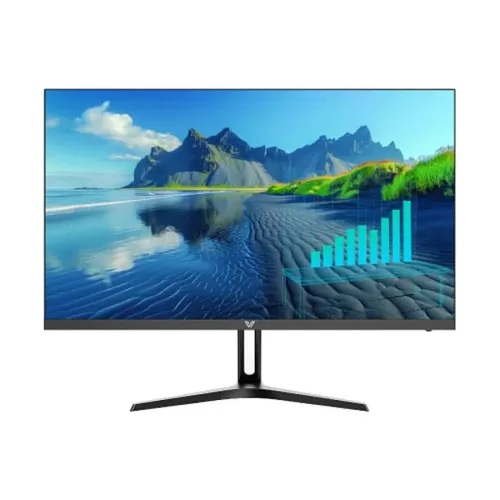
A 27-inch Full HD monitor for everyday desks
The Value-Top X27IFR120 is listed as a 27-inch flat IPS monitor with a native resolution of 1920 × 1080 and a 16:9 aspect ratio. This format is compatible with a wide range of desktop computers, laptops with external display outputs and common video sources. Its published viewing area is 527.04 × 296.46 mm, with a 0.3114 mm pixel pitch. Those measurements help compare screen size and layout, but they do not determine how sharp text will look to each person; viewing distance, eyesight and operating-system scaling all matter.
What Full HD means at this screen size
Full HD means the panel displays 1,920 pixels across and 1,080 pixels vertically. On a 27-inch screen, this often makes text, buttons and menus physically larger than on a smaller Full HD monitor, which some users prefer for reading or general desktop work. The same pixel count spread across a larger area provides less pixel density than a 24-inch FHD model or a 27-inch QHD display. Buyers who inspect fine photographs, work with dense tables or want extra side-by-side workspace should compare those options before deciding.
120Hz refresh rate and what determines the actual result
The product datasheet and local listings state a 120Hz refresh rate. Refresh rate describes how often a display can update its image in a second; it is separate from the frame rate a computer can render. Smoothness depends on the computer, graphics hardware, signal connection, cable and chosen operating-system mode. A capable system can make compatible games and scrolling feel smoother than a conventional 60Hz setup, but this specification alone does not guarantee a particular game frame rate, response or competitive result. Check that the monitor is configured at the desired mode after installation.
Keep response-time measurements distinct
The listing reports three response figures: 5ms with overdrive, 1ms MPRT and 14ms gray-to-gray. These are different measurement descriptions and should not be condensed into a single interchangeable claim. MPRT relates to moving-picture response, while GtG describes a pixel transition between gray levels; overdrive is a display setting that can alter transitions. The published figures do not predict every transition or all motion artifacts. If you are sensitive to motion blur or overshoot, inspect independent testing of the exact model and revision rather than relying on one headline number.
IPS panel and viewing angles
The datasheet identifies an A+ grade IPS panel and 178-degree horizontal and vertical viewing angles. IPS panels are often selected for their wider off-center viewing characteristics compared with narrow-angle alternatives. The stated angles are a specification convention, not a promise that brightness and color remain identical at every position. The datasheet also lists 16.8 million colors and an sRGB area coverage value of 110%. Because no independent calibration data is available here, that coverage figure should not be interpreted as factory color accuracy or a professional color-certification result.
Brightness and contrast values
The technical sheet and exact-model Bangladesh listings specify brightness of 300 cd/m² and a static contrast ratio of 1500:1. These published figures can help compare displays, but an individual panel’s observed performance may differ and room lighting changes perceived brightness. For ordinary use, users can adjust the backlight to avoid excessive brightness in a dim room. For color-critical work, brightness and contrast numbers alone are not enough; look for measured uniformity, calibrated color accuracy, gamut coverage method and the exact panel revision. No such measurements have been established for the unit in this catalog.
Color support and gamut wording
The product sheet states 16.8 million colors using an 8-bit description and 110% sRGB area coverage. Coverage above 100% can mean that the measured or claimed gamut extends beyond the reference space in some regions; it does not necessarily mean every color is reproduced more accurately. The available source does not explain the measurement method or provide a calibration report. This page retains the supplier-stated figure with its source context and avoids promising specific Delta E, professional grading suitability or factory calibration. Choose a monitor for design by checking independent measurements and workflow needs.
HDMI 1.4 connection
One HDMI 1.4 port is listed. HDMI is the documented video connection in the catalog and is the simplest starting point for connecting a modern PC or supported media device. The actual refresh mode depends on source-device support, cable quality, display settings and any limits of the graphics output. The listing does not specify HDCP version, audio pass-through behavior or a certified maximum timing table, so those details should not be inferred. Use a known-good cable and confirm the expected resolution and refresh rate in display settings after connecting.
USB Type-C needs clarification
The specifications list one Type-C port rated at 2.5W. They do not explain whether this connector accepts video over DisplayPort Alt Mode, supports data transfer, or provides only limited power. The 2.5W figure is not evidence of laptop charging capability and is far below what most notebooks need for charging. Before planning a one-cable setup, ask the seller or manufacturer to verify the port function for the exact X27IFR120 revision. For now, connect video using the documented HDMI input unless a reliable source confirms another supported mode.
Built-in speakers: conflicting retailer information
Speaker status cannot be stated confidently from the available material. The product datasheet labels the speaker specification “N/A,” while TechLand BD lists two 2.5W built-in speakers. Star Tech does not show a speaker specification in its captured product details. This could reflect a seller listing error, product revision or incomplete datasheet, but the evidence does not resolve the conflict. Buyers who need sound from the monitor should confirm the exact model label and test the unit or obtain a written seller confirmation before relying on built-in audio.
Stand adjustment and ergonomics
The listing states a tilt range from −5 degrees to +15 degrees with a ±3 degree tolerance. TechLand describes height adjustment as unavailable. A tilt-only stand can help aim the panel, but it does not raise or lower the screen; a separate riser or compatible arm may be useful for ergonomic placement. Adjust the monitor so the top of the screen and viewing distance feel comfortable for your desk setup. The published range is a seller specification and should be checked against the supplied stand and exact unit.
VESA mounting and physical fit
The datasheet lists a 100 × 100 mm VESA mounting pattern with four M4 × 8 mm screw holes. Check that the bracket or arm supports the monitor’s weight and uses appropriate screws before installation. Listed unit dimensions are 615 × 461 × 195 mm, while packed dimensions are 677 × 104 × 438 mm. The source does not clearly define the orientation of every physical dimension or whether the stand is attached for all measurements; use these as planning references and verify desk clearance against the actual unit if space is tight.
Power adapter and energy figures
The datasheet lists an external adapter rated 12V/3A, consumption up to 36W and standby under 0.5W. A compatible power adapter must match the unit’s voltage, connector and required current; do not substitute one based only on a generic retailer description. Check the label on the included adapter. Actual electricity use depends on brightness, refresh mode, use hours and standby behavior. The listed maximum power provides a comparison point, not a household cost estimate; a cost estimate also requires local tariffs and a usage schedule.
What is listed in the carton
The datasheet names an HDMI cable, power adapter and user manual as accessories. That list is a published specification and cannot verify the contents of a particular BiponiBD carton or whether local packaging includes additional paperwork, screws or warranty documents. Retailers may bundle different items, and regional package contents can vary. Confirm the exact bundle with the seller before purchase, especially if the cable length, adapter type or documentation matters. Keep packaging and invoices until the monitor has been checked and any warranty process is understood.
Warranty, price and local purchase checks
Bangladesh retailers list a three-year warranty, but that does not establish the provider, start date, service location or serial eligibility for BiponiBD’s unit. Likewise, retailer prices and stock labels are independent market observations and do not verify BiponiBD availability or checkout price. Review the current price and status shown by BiponiBD and ask which service center covers the exact serial. Request written terms on the invoice and inspect the model label, screen, ports, stand and included accessories after delivery. This avoids treating a third-party listing as a promise for a different seller.
Who may find this monitor suitable
The X27IFR120 may suit a desk user seeking a large Full HD screen with a published 120Hz refresh rate, IPS viewing angles, VESA mounting and HDMI connectivity. It may also fit casual gaming or general work when the host computer supports the desired refresh mode. It may be less suitable for buyers who need QHD detail at 27 inches, documented USB-C video, confirmed built-in speakers, height-adjustable stand or independently measured color accuracy. Compare those requirements with the exact model, check the conflicting speaker information, and verify the port function before selecting it over alternatives.
Setup checklist after delivery
Before powering on, confirm that the carton and monitor label show X27IFR120 and check the screen, stand, adapter, cable and documentation for visible damage. Use the supplied power adapter, connect HDMI first, and choose 1920 × 1080 at the refresh rate supported by both the computer and monitor. Inspect the picture for dead pixels or unusual marks according to the seller’s return policy. Test the Type-C port only after its function is confirmed, and test speakers rather than assuming they are present. Keep the invoice, serial number and packaging while you confirm the seller’s warranty and return instructions.
Specification summary
Key features
- 27-inch IPS panel with Full HD 1920 × 1080 resolution and 16:9 image format.
- 120Hz refresh rating listed for supported input and compatible host devices.
- Published brightness of 300 cd/m² and static contrast ratio of 1500:1.
- 16.8 million colors (8-bit) and 110% sRGB area coverage as stated in the datasheet.
- One HDMI 1.4 port and one Type-C port rated at 2.5W; Type-C signal function is undocumented.
- MPRT, overdrive and GtG response figures are listed separately: 1ms, 5ms and 14ms respectively.
- 100 × 100 mm VESA mounting pattern using four M4 × 8 mm screw holes.
- External 12V/3A adapter; power consumption listed at up to 36W and standby below 0.5W.
Advantages
- 120Hz is a useful step up from 60Hz for compatible everyday scrolling and gaming.
- IPS panel and wide listed viewing angles suit shared viewing and desk use.
- Full HD resolution is broadly compatible with common office computers and graphics outputs.
- VESA 100 × 100 mm support offers an alternative to the supplied tilt stand.
- The listed HDMI and Type-C ports provide two connection types, subject to confirming Type-C function.
Points to consider
- Full HD at 27 inches is less pixel-dense than QHD at the same screen size.
- The USB-C port is listed at 2.5W, and its video/data capabilities are not documented.
- Speaker information conflicts: datasheet says N/A while TechLand says dual 2.5W speakers.
- Tilt-only stand offers no height adjustment according to the local listing.
- Three-year warranty and box contents remain retailer claims that need exact-unit confirmation.
Frequently asked questions
What is the Value-Top X27IFR120?
It is a 27-inch Full HD IPS desktop monitor with a 120Hz refresh rating. The captured catalog lists one HDMI 1.4 and one Type-C connection rated at 2.5W. Confirm the exact USB-C function, speakers, included items and warranty for the BiponiBD unit before purchase.
What resolution does the monitor use?
Its listed native resolution is 1920 × 1080 pixels (Full HD) at a 16:9 aspect ratio. At 27 inches, Full HD provides larger interface elements than a smaller Full HD screen, while fine text and images are less dense than on a same-size QHD display.
Does it support 120Hz?
The datasheet and exact-model Bangladesh listings specify 120Hz. The connected computer, graphics output, cable and selected display mode must support the required signal. Check the operating system display settings after connecting the monitor.
What does 1ms MPRT mean?
The product listing states 1ms MPRT, 5ms with overdrive and 14ms GtG. These are distinct response-time methods and should not be treated as interchangeable. Actual motion clarity depends on the selected mode, content, graphics output and viewing conditions.
Is it an IPS display?
Yes, the datasheet identifies a 27-inch A+ grade IPS panel with 178° horizontal and vertical viewing angles, a 527.04 × 296.46 mm viewing area, and 0.3114 mm pixel pitch. The grade wording is a seller/datasheet label, not an independently verified panel-quality certification.
How bright and high-contrast is it?
The datasheet and local listings state 300 cd/m² brightness and 1500:1 static contrast. These are published specification values, not a measurement of the individual unit. Perceived brightness and contrast vary with room lighting and display settings.
Does the Type-C port carry video?
The listing specifies one Type-C port rated at 2.5W, but the available datasheet does not document whether it carries video, data, or power delivery beyond that rating. Confirm the function with the seller before planning a laptop single-cable setup.
Does it have built-in speakers?
Sources disagree. The ComCity-hosted datasheet marks the speaker specification as N/A, while TechLand BD lists two 2.5W speakers. Star Tech does not state speaker details. Ask BiponiBD to confirm the exact X27IFR120 revision before relying on monitor audio.
Can I mount it on a wall or monitor arm?
The datasheet lists a 100 × 100 mm VESA pattern with four M4 × 8 mm screw holes. Check that the mount supports the monitor weight and that its screws match the specified length. The supplied stand is listed with tilt adjustment only.
How far can the stand tilt?
The datasheet and local listing state −5° to +15° with a ±3° tolerance. The product information says height adjustment is not available. Use a riser or compatible VESA arm if you need more height or a different range of motion.
What power adapter does it use?
The listed power type is an external 12V/3A adapter. Maximum power consumption is listed as 36W and standby as under 0.5W. Verify that the included adapter is present and matches the unit label; do not substitute an adapter based only on a retailer listing.
What are the warranty and box contents?
Local retailer listings state a three-year warranty and the datasheet lists an HDMI cable, adapter and user manual. These claims do not prove the contents, warranty provider or serial eligibility of the BiponiBD stock. Confirm the exact carton and written warranty before checkout.
Sources include a retailer-hosted Value-Top datasheet and exact-model Bangladesh listings. The sources conflict on speakers; local warranty, stock, price, carton contents and USB-C function require exact-unit confirmation.