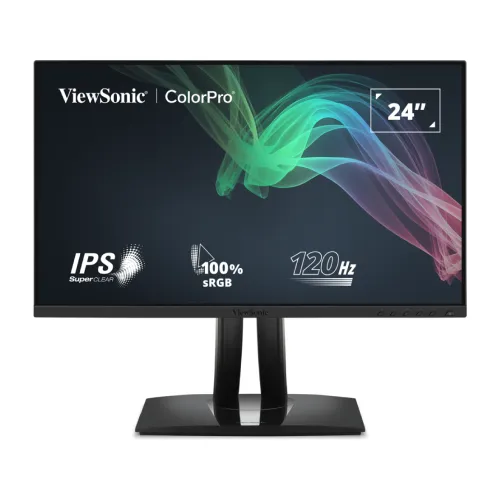
ViewSonic ColorPro VP2456A 24-Inch 120Hz Full HD IPS Monitor Overview
The ViewSonic ColorPro VP2456A is a 24-inch-class professional monitor built around a 23.8-inch viewable Full HD IPS panel. It combines a native resolution of 1920 × 1080, a 120Hz refresh rate, variable refresh rate support and an ergonomic stand. Its design is aimed at people who spend their day reviewing photographs, editing social and marketing artwork, building presentations, checking layouts, coding, reading documents and switching between many on-screen windows. The VP2456A can also handle video and casual games, but its core strengths are calibrated color, a useful USB-C hub and flexible positioning rather than esports-focused speed or a high-resolution canvas.
ViewSonic identifies the model as Pantone Validated and specifies 100% sRGB coverage, factory calibration and Delta E below 2. Each unit is supplied with a personalized color calibration report. That combination gives a creator a documented starting point for color work instead of relying only on a vivid showroom preset. It does not remove the need for a color-managed application, suitable ambient lighting or periodic calibration when color consistency is critical, but it helps make the monitor relevant to a home studio, design desk or business workstation.
ColorPro Accuracy for Photography, Design and Everyday Content
Color is the most distinctive part of the ColorPro VP2456A proposition. Pantone validation, 100% sRGB coverage and factory calibration to Delta E <2 are designed to help reproduce common web and office color spaces faithfully. ViewSonic includes a calibration report for the individual unit, so the buyer can retain a record of its measured color performance. The monitor also lists a 16.7-million-color display with 8-bit support using 6-bit plus FRC, a 1,500:1 typical static contrast ratio and 250 cd/m² typical brightness.
The published gamut table includes sRGB at 104% gamut size and 100% coverage, Rec.709 at 104% size and 100% coverage, EBU at 103% and 98%, Adobe RGB at 77% and 76%, DCI-P3 at 76% and 76%, and NTSC at 72% size. Gamut size and coverage are not interchangeable: coverage describes how much of a target color space is reproduced, while size compares the panel gamut area with that reference. For web graphics, product images and social media work, full sRGB coverage is useful because sRGB is a common delivery space. For print or a specialized cinema workflow, the narrower listed Adobe RGB and DCI-P3 coverage should be considered when choosing a display.
A 23.8-inch viewable area and 1920 × 1080 resolution provide familiar, readable desktop scaling and fit comfortably on many standard desks. The pixel pitch is approximately 0.275mm. The anti-glare finish with 3H hard coating helps limit reflections and surface wear during normal office use. IPS technology supports wide listed viewing angles of 178 degrees horizontally and vertically, which helps when the screen is viewed slightly off-center or when a colleague reviews an image beside the operator. The 250-nit typical brightness is intended for ordinary indoor spaces; intense sunlight or very bright studio windows may require careful placement and room-light control.
Smoother 120Hz Motion for Work, Browsing and Video
The 120Hz refresh rate updates the image more often than a conventional 60Hz office monitor. That can make scrolling long documents, moving windows, navigating timelines and watching supported video feel smoother. Variable refresh rate technology is also listed, which can help synchronize the display with compatible systems in supported applications. The typical gray-to-gray response time is 5ms, while the ViewSonic specification lists 5.394ms with overdrive. These figures describe different test conditions and should not be read as a guarantee that every pixel transition will take exactly the same time.
The VP2456A remains a Full HD professional monitor. Its 120Hz refresh is useful for a responsive desktop and casual play, but the product is not positioned as a dedicated high-refresh gaming display with a gaming-oriented feature suite. Buyers who prioritize competitive gaming may prefer a monitor with a higher refresh ceiling, while users who need fine detail across large spreadsheets, complex design canvases or 4K footage should compare a QHD or 4K model. In a mixed-use workstation, the balance here is a relatively compact 23.8-inch viewable screen, accurate common color, smooth motion and a broad connection hub.
USB-C One-Cable Setup, HDMI, DisplayPort and USB Hub
For a compatible laptop, the USB-C upstream port can carry DisplayPort Alt Mode video, data and up to 90W USB Power Delivery. Connecting one USB-C cable can therefore send the laptop’s display to the monitor, charge the computer and connect it to the monitor’s downstream USB devices. The actual charging rate depends on the laptop’s supported power profile, and the host must support both DisplayPort Alt Mode and USB Power Delivery. Check the computer’s documentation and USB-C port markings before planning a single-cable setup; a USB-C connector by itself does not guarantee video output or charging at 90W.
The monitor also has one HDMI 1.4 input and one DisplayPort 1.2 input for desktops, docks and other video sources. Its hub includes three USB 3.2 Type-A downstream ports and a second USB-C downstream port that supports up to 15W charging and data. That downstream USB-C port serves connected accessories or devices; it is separate from the upstream USB-C port used for the laptop’s video and 90W charging. The VP2456A includes 2W × 2 stereo speakers for system audio and everyday playback. It also has an internal power supply, a standard AC power input and a Kensington lock slot.
To use the hub through USB-C, connect the upstream port to a compatible computer. If using HDMI or DisplayPort for video, a separate USB upstream connection may be needed for the USB hub and related data functions. Route the cables through the stand’s cable-management path to keep the desktop tidy. The monitor’s OSD includes input selection, audio adjustment, ViewMode, color adjustment, manual image adjustment and setup controls. Its six physical controls include a power key. Once a preferred color or brightness mode is set, keep the same setting across the work session for a more consistent view.
Ergonomic Stand, Auto Pivot and Mounting
The included stand offers 130mm of height adjustment, tilt from -5 degrees forward to +21 degrees backward, up to 120 degrees of swivel and 90-degree pivot in either direction. Auto Pivot can adjust the screen orientation when the display is rotated. Landscape orientation suits editing, presentations and side-by-side windows; portrait orientation can make long code files, documents, chat feeds and page layouts easier to review. Swivel and tilt are useful when the operator shares a screen or shifts between seated and standing desk positions.
Physical dimensions are listed as 539.2 × 388.46–518.46 × 214.96mm with the stand, and 539.2 × 320.2 × 53.2mm without it. Net weight is approximately 6.5kg with the stand and 4kg without the stand; gross packaged weight is 9.1kg. A 100 × 100mm VESA mounting pattern supports compatible arms and wall brackets. Before mounting, check the arm’s weight rating, screw length and clearance, and make sure the display is supported while the stand is removed. Do not lift or reposition the monitor by holding the panel surface.
ViewModes, Split Screen and Eye-Care Features
ViewSonic lists more than 30 optimized viewing modes for different tasks and media. CAD/CAM mode emphasizes contrast for fine lines and technical illustrations. Eye Care mode combines the hardware low-blue-light solution and flicker-free technology. ViewMode and color controls are accessible from the monitor’s on-screen display. These modes are task-specific starting points; a creative professional should confirm that a selected mode does not override the intended color settings for a calibrated workflow.
Split Screen is available through ViewSonic’s vSplit software and can help arrange windows for multitasking. The software is separate from the monitor panel itself, so check operating-system compatibility and download the current utility from ViewSonic before relying on it in a managed workstation. The display is specified as Windows 10/11 certified and macOS tested, with a maximum PC and Mac resolution of 1920 × 1080. Operating-system testing is not a promise that every USB-C feature will work with every computer; host port capabilities and supported drivers still matter.
The monitor is listed with TÜV Flicker-Free and TÜV Low Blue Light hardware technology. These functions can be useful during long work sessions, but they do not guarantee that every user will avoid eye fatigue. Set a comfortable brightness for the room, reduce reflections, sit at a suitable viewing distance and take regular breaks. The glossy details in some product photographs should not be mistaken for a glossy panel surface: the specification identifies an anti-glare screen with a hard coating.
Who Should Consider the ViewSonic VP2456A?
The VP2456A is a strong fit for graphic designers, photographers, web creators, video editors working in Full HD, small-business offices, home studios, analysts and laptop users who value a tidy USB-C desk. Pantone validation, measured factory calibration and full sRGB coverage are relevant to common digital publishing workflows. The 120Hz panel makes everyday navigation feel fluid, while the USB hub can keep a keyboard, mouse and other peripherals attached to the display rather than directly to a laptop.
It is also practical for people who rotate between wide documents and portrait content. A stand with height, tilt, swivel and pivot can reduce the need for a separate monitor arm, while VESA compatibility keeps that option available. Built-in speakers can cover notifications, calls and basic media playback, though users who need stronger audio should use dedicated speakers or headphones. The HDMI and DisplayPort inputs support conventional desktop setups, and USB-C can provide a one-cable connection when the connected laptop has the required features.
Before buying, decide whether Full HD resolution and 23.8-inch viewing area suit the working distance and application. Editors who need more canvas, small-text detail or native 4K review should compare higher-resolution models. Users needing full Adobe RGB or DCI-P3 coverage should check those gamut figures carefully, since the VP2456A is strongest in sRGB. Laptop owners should verify USB-C DP Alt Mode and PD support and confirm their laptop’s required charging wattage. These checks help avoid paying for a feature that a specific computer cannot use.
Bangladesh Warranty, Price and Purchase Checks
Bangladesh retailer listings show a three-year warranty for the VP2456A, while warranty coverage, claim conditions and included box/accessory requirements are set by the local seller. Confirm the warranty card, serial number, local service route, dead-pixel policy and return terms with the selling shop before payment. Stock and prices can change without notice. Two directly reachable Bangladesh listings checked on 2026-11-05 showed a price range of BDT 37,500 to BDT 39,500; this is a dated market snapshot, not a fixed BiponiBD offer. The stored product variant price remains unchanged.
When the monitor arrives, inspect the panel and stand before installation, retain packaging and warranty documents, and verify the serial number on the invoice. Connect the selected video source, choose the correct input in the OSD and confirm that the operating system offers the expected 1920 × 1080 resolution and up to 120Hz refresh. Then enable USB-C hub features and laptop charging only after connecting the upstream port and confirming host compatibility. Use a supported color mode, adjust brightness for the room and keep the individual calibration report with the product records.
Important Compatibility Notes
- 90W USB-C charging: available through the USB-C upstream port with a compatible laptop; host USB-C must support DisplayPort Alt Mode and USB Power Delivery.
- Second USB-C port: a downstream 15W/data connection for attached devices, not a second laptop video input.
- Video inputs: one HDMI 1.4, one DisplayPort 1.2 and USB-C DisplayPort Alt Mode.
- Color expectations: 100% sRGB coverage and Delta E <2 factory calibration are official specifications; application, room lighting and display mode affect what the user sees.
- Bangladesh offer: seller price, stock and warranty claim terms should be reconfirmed before ordering.