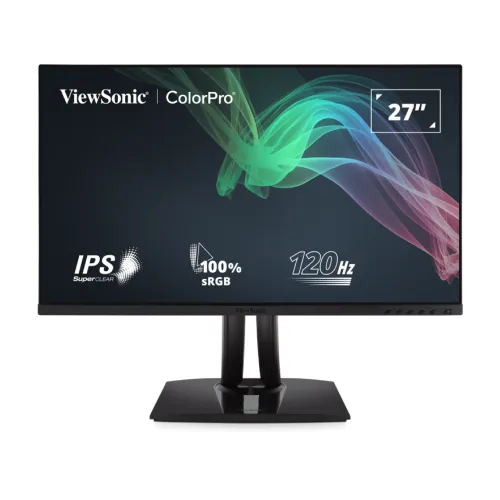
ViewSonic ColorPro VP2756A-2K overview
The ViewSonic ColorPro VP2756A-2K is a 27-inch professional monitor with an IPS panel, native QHD resolution of 2560 × 1440 and a refresh rate of up to 120Hz. Its ColorPro identity and Pantone Validation make it relevant to people who work with photographs, illustrations, layouts, video and other colour-aware creative material. The manufacturer also specifies factory calibration to Delta E below 2, a 100% sRGB coverage claim, a calibration report and factory screen-uniformity adjustment.
This product record now identifies the exact ViewSonic model rather than assigning the generic Others brand. The normalized model and manufacturer part number are VP2756A-2K. The established BiponiBD slug, active listing, Monitors category, variant SKU, ৳55,000 catalog MSRP, three-year warranty, six image URLs and existing product identity remain preserved. Seller price references are recorded separately as a dated market snapshot, not as a BiponiBD store offer.
QHD resolution and 27-inch workspace
The screen measures 27 inches diagonally and uses a 16:9 aspect ratio with 2560 × 1440 pixels. QHD, WQHD and 1440p are common names for this resolution. Compared with Full HD on a screen of the same size, QHD gives applications more desktop area and presents finer detail. Compared with 4K, it requires fewer pixels from the computer to render each frame, which can be useful when a creative task mixes high-resolution source files with many open panels and windows.
ViewSonic lists a pixel pitch of 0.233mm horizontally and vertically, an anti-glare surface with hard coating and 178-degree horizontal and vertical viewing angles. These are specification measurements rather than a guarantee that every image looks identical from every position. The panel is flat, so choose it for a conventional desktop arrangement rather than a curved viewing setup. Operating-system scaling and application zoom can help make interface text more comfortable at the chosen seating distance.
IPS panel, brightness and image behaviour
The SuperClear IPS panel is specified at 350 cd/m² typical brightness and a 1,500:1 typical static contrast ratio. IPS technology is commonly selected for consistent viewing angles and colour presentation across a desktop workspace. ViewSonic lists a dynamic contrast figure as well, but dynamic contrast is different from the static panel contrast and should not be compared as though both were measured in the same way.
The matte anti-glare surface and 3H hard coating are intended for everyday room lighting and handling. They do not make the panel scratch-proof or remove reflections in every environment. Adjust the display angle, brightness and surrounding light to suit the workstation. The product page lists a 30,000-hour minimum backlight life; actual ageing and perceived brightness depend on use, settings and operating conditions.
Pantone Validation and factory colour accuracy
ViewSonic identifies this model as Pantone Validated, meaning it has been assessed for its ability to reproduce colours from the Pantone Matching System. The manufacturer also states factory calibration to Delta E below 2 and supplies a detailed calibration report for sRGB, EBU and SMPTE-C colour spaces. These details can make the VP2756A-2K useful when a team needs a documented colour starting point for creative tasks, review sessions or consistent screen-to-screen work.
The manufacturer states 100% sRGB coverage and also publishes typical gamut figures for Adobe RGB, DCI-P3, EBU, Rec.709, SMPTE-C and NTSC. Gamut size and gamut coverage are not the same measure, so the exact reported percentage matters. A Pantone validation or factory report does not eliminate the need for colour-managed software, suitable ambient lighting, correct profiles, proofing and calibration where a client workflow requires them. Print output can differ because paper, ink, printer and viewing light all affect the result.
Screen uniformity and colour-management workflow
The product overview describes factory-calibrated screen uniformity. ViewSonic says the factory process balances luminance and colour across the panel to reduce uneven areas and colour shifts. Uniformity can help when a designer moves a document or image around the screen, compares details in different regions or reviews a large canvas. The benefit is a more consistent starting display rather than a promise that every individual unit will measure identically under every condition.
ViewSonic provides vDisplayManager software for on-screen display controls and a colour sensitivity feature that simulates selected colour-vision-deficiency views. These tools can help adjust settings and preview accessibility considerations. A simulation is not a substitute for testing a website, graphic or video on real user devices and with assistive tools. The product description also mentions a calibration report, so retain it with project documentation when the workflow depends on the supplied factory state.
120Hz refresh rate and response time
The VP2756A-2K supports a maximum refresh rate of 120Hz and a typical 5ms grey-to-grey response time. A 120Hz screen can update more frequently than a traditional 60Hz display, making scrolling, cursor movement, supported video and compatible games appear smoother when the computer supplies the required signal. The monitor’s maximum supported vertical frequency is 120Hz according to the manufacturer’s specification.
The graphics card, connected device, cable, selected resolution and operating-system display settings determine which refresh rate is available. If the display remains at 60Hz after setup, review the system display control panel and confirm the cable path. The 5ms GTG figure is a typical manufacturer response-time rating, not a promise that all pixel transitions complete in five milliseconds or that motion blur is eliminated. This model is best described as a professional display with a responsive 120Hz mode, rather than an esports monitor.
USB-C single-cable workflow and port details
The upstream USB-C connection supports video, audio, data and up to 90W of power delivery. When a computer supports USB-C DisplayPort Alt Mode and the cable is suitable, one connection can carry the display signal, connect to the monitor’s USB hub and provide laptop charging. This can reduce cable clutter on a compatible laptop desk. The manufacturer lists one HDMI 2.0 input, one DisplayPort input and three USB-A downstream ports in addition to the two USB-C connections.
It is important to distinguish the upstream 90W USB-C connection from the second USB-C port. The monitor specification lists USB Type-C at 90W ×1 and 15W ×1; the latter is a downstream hub quick-charge port rated up to 15W. It should not be described as a second 90W laptop-charging input. One Bangladesh retailer’s prose loosely calls these dual USB-C ports with 90W power, so the manufacturer’s per-port specification is used for this listing. A computer that lacks USB-C video support can connect over HDMI or DisplayPort instead.
Audio, built-in speakers and connections
Two integrated 2W speakers are included. They can provide convenient basic sound for system alerts, video meetings or occasional playback without placing separate speakers on the desk. Their small built-in format is not intended to replace a dedicated audio system for music production, detailed listening or a room that needs louder sound. Confirm audio output selection in the computer and monitor menus after connecting the source.
The rear product images show the monitor enclosure, stand and grouped lower connection area. The six catalog images were inspected individually: front marketing view, two angled front views, rear, side profile and lower connector area. Their existing media IDs, URL order and original source files remain unchanged; each receives alt text that describes the specific visible view rather than repeating only the generic product name.
Ergonomic stand and VESA installation
The supplied stand supports 130mm of height adjustment, swivel through 120 degrees total, portrait pivot up to 90 degrees to the left or right, and tilt from −5 degrees forward to +21 degrees backward. These movements allow a user to align the top of the screen with eye level, reduce glare, share a screen with another person or rotate long documents and code into portrait orientation. Adjustment range is listed by the manufacturer; desk clearance and cable slack still matter.
The monitor also supports a 100 × 100mm VESA mount and has a Kensington lock slot. Before removing the stand or attaching an arm, confirm the mounting pattern, supported load, screw length and instructions for the selected mount. The official dimensions are approximately 613 × 410–540 × 215mm with the stand and 613 × 362.7 × 53.3mm without the stand. The carton is larger at about 740 × 465 × 225mm, which is useful when checking transport or storage space.
Eye-care features and desk setup
ViewSonic lists Flicker-Free and Low Blue Light features. These display options can be useful for configuring a comfortable workspace, especially when a person spends long periods reading or editing. The vDisplayManager software can expose on-screen controls from the computer, and its colour sensitivity mode can simulate selected deficiencies when previewing content. The tools support adjustment and review but do not guarantee a particular comfort outcome or prove that a design is accessible to every viewer.
Comfort also depends on screen height, viewing distance, room lighting, glare, text size and the user’s individual needs. Start with a moderate brightness that suits the room and position the monitor so the neck and shoulders can relax. The active display settings can change how an image appears, so use the intended production colour mode when judging colour-critical work and apply simulation modes as a separate accessibility check.
Power, operating conditions and package contents
The manufacturer lists an internal power supply and universal AC input from 100–240V at 50–60Hz. Its specification page lists power-consumption figures including typical 186W, maximum 200W and 0.3W standby. Power draw varies with brightness, USB devices, selected mode and operating conditions, so treat those as rated specification values rather than a constant meter reading. Keep the ventilation openings clear and use an appropriate grounded power connection.
ViewSonic lists the monitor, a three-pin power plug, HDMI cable, USB Type-C cable, USB A/B cable and quick-start guide as package contents. Package details can vary by region or bundle, so verify what is included in the actual Bangladesh unit before purchase. Keep the invoice, serial information, carton and included documents until the seller’s return and warranty procedures are clear.
Warranty and local market price context
On 6 November 2026, the Ryans Computers and Tech Land BD exact-model pages each displayed an asking price of ৳55,000 and stated a three-year warranty. These listings provide a same-day local price reference, not a promise that stock, delivery, promotions or warranty conditions will stay the same. The catalog’s ৳55,000 MSRP is preserved; the observed seller prices are stored separately in the product’s research notes and are not BiponiBD store offers.
The catalog already listed a three-year warranty, and this value remains unchanged. ViewSonic’s US page describes a three-year limited warranty in its regional terms, while local sellers can apply their own Bangladesh service and claim conditions. Before purchase, confirm the written warranty provider, service location, coverage, dead-pixel policy, original-box requirement and whether the unit is an authorized local import. Do not infer local coverage solely from an overseas manufacturer page.
Who may prefer the VP2756A-2K?
This display may suit photographers, graphic designers, video editors, illustrators, educators and office users who need QHD workspace, factory-reported sRGB accuracy and a flexible stand. USB-C can simplify a compatible laptop desk while the additional hub ports help connect peripherals. The integrated speakers can cover basic playback, and the 120Hz refresh rate makes regular navigation feel more fluid than a typical 60Hz office panel when the host supports it.
A buyer who needs 4K resolution, the highest competitive gaming refresh rate, several HDMI inputs, powerful built-in audio or USB-C power above 90W should compare alternatives before choosing. Colour-critical studios may also require a hardware calibrator and a documented monitor-management workflow even when a factory report is included. Check the exact cable and host-device capabilities for USB-C features, and confirm local warranty details with the seller.
Summary of specifications and listing identity
ViewSonic ColorPro VP2756A-2K is a 27-inch flat IPS monitor with QHD 2560 × 1440 resolution, 120Hz refresh, typical 5ms GTG, 350 cd/m² typical brightness, 1,500:1 static contrast, Pantone Validation, factory Delta E below 2 calibration and 100% sRGB coverage stated by the manufacturer. Connectivity includes HDMI 2.0, DisplayPort, upstream USB-C at up to 90W, another 15W USB-C hub port and three USB-A ports.
The model is identified consistently as VP2756A-2K throughout the product title, model fields, variant MPN, specifications, long description, FAQ, tags, SEO metadata and image alt text. Existing slug, active status, Monitors category, variant SKU, MSRP, warranty, logistics, product identity and image URLs are retained. The local price snapshot is dated, source-linked and clearly separated from BiponiBD offers; ambiguous seller prose about USB-C wattage is corrected to the manufacturer’s per-port values.