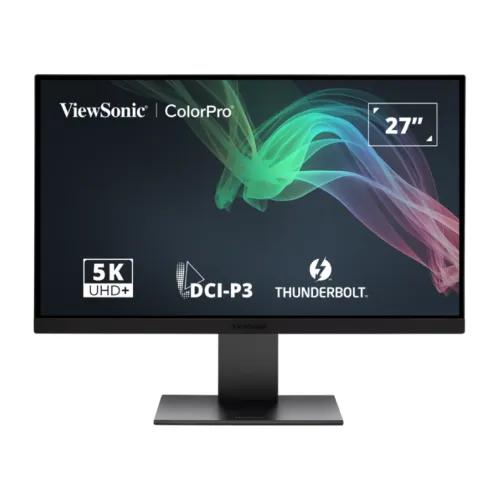
ViewSonic ColorPro VP2788-5K 27-inch professional 5K monitor
The ViewSonic ColorPro VP2788-5K is a 27-inch IPS monitor built for detailed desktop work, design, photography, editing and color-focused tasks. Its native resolution is 5120 x 2880 pixels, commonly called 5K, in a 16:9 layout. The pixel pitch is 0.117 mm in both directions, giving the screen a dense pixel grid for fine text, interface elements and high-resolution imagery. A 5K signal requires a compatible computer and connection, so check your computer's display output, graphics capability, operating-system scaling support and cable specification before planning a native-resolution workflow. The monitor is also designed to connect with modern Mac and PC systems through Thunderbolt 4, USB-C, DisplayPort and HDMI.
The advertised screen diagonal is 27 inches and ViewSonic lists a 27-inch viewable area. The panel technology is IPS, its surface is flat and the aspect ratio is 16:9. High pixel density can make small UI elements look crisp; depending on your visual preference and viewing distance, you may want to adjust operating-system scaling. The monitor itself does not determine which scaling level is most comfortable. Application behavior, graphics hardware and the OS all affect how 5K desktop space appears. A sharp 5K image is most useful when the computer sends a supported native signal and applications can render the resolution cleanly.
Resolution, panel and image characteristics
ViewSonic specifies a typical static contrast ratio of 2,000:1 and a dynamic contrast figure of 20M:1. These are separate manufacturer measurements and should not be treated as equivalent indicators. The viewing angle is listed as 178 degrees horizontally and vertically. The panel supports 1.07 billion colors using 10-bit color (8-bit plus frame-rate control). Screen appearance is influenced by the chosen color mode, application, operating system, ambient lighting and the connected device. For print or professional delivery work, use the intended color-managed workflow and confirm how each application handles color profiles.
The surface treatment is anti-glare with low reflection and a hard 3H coating. This can help reduce reflected light in a bright workspace, but it does not make the screen reflection-proof. Positioning the monitor away from direct windows and strong light sources can still improve comfort. The flat panel is a familiar format for spreadsheets, timelines, photo editing and document layouts. ViewSonic lists an LED light source and IPS panel technology; LED describes the backlight, while IPS describes the panel type.
Color coverage and factory calibration
ViewSonic lists typical color coverage of 99% DCI-P3, 100% sRGB, 100% Rec.709, 100% EBU, 100% SMPTE-C and 88% Adobe RGB. It also lists gamut-size percentages separately, including 101% Adobe RGB size, 136% sRGB size and 100% DCI-P3 size. Gamut size and coverage are different ways of expressing color range; coverage describes the portion of a defined target gamut that is represented. The specific percentage depends on measurement method and should be read with the manufacturer's label. ViewSonic's product material promotes Delta E below 2 and says each unit is factory calibrated with a calibration report. These are manufacturer claims, not a third-party measurement of this particular unit.
Color-focused professionals can use the display's color modes and supported calibration software to prepare a screen for a specific workflow. A factory calibration report can give buyers a starting point, while a calibration instrument may be appropriate when recurring accuracy checks are needed. The monitor includes OSD color modes and ViewSonic ColorPro software control features described in the manufacturer's materials. The results still depend on the computer's color management, the selected profile, the brightness level, room conditions and the user's workflow. Do not assume that every app automatically respects a display profile.
HDR and brightness
The official specification lists typical brightness of 500 cd/m² and VESA HDR400 support. HDR appearance depends on the source, supported content, operating-system configuration, selected picture mode and room lighting. The HDR400 rating is a capability/certification label, not a guarantee that every HDR movie or game will look identical. Set up HDR from the source device and check the monitor's picture mode if the image appears different from standard dynamic range. The 2,000:1 typical static contrast ratio, 500 cd/m² typical brightness and HDR400 designation describe different aspects of the display and should be considered together.
For general office tasks, SDR content remains common. The 500 cd/m² rating can provide useful headroom for brighter rooms, while reflections and direct light still affect perceived contrast. Reduce brightness to a comfortable level for long work sessions. Eye comfort depends on viewing distance, room lighting, breaks, font scaling and individual sensitivity; the monitor's low-blue-light and flicker-free features do not replace good workspace setup.
Refresh rate and response time
ViewSonic specifies a 60Hz refresh rate and a 5ms typical gray-to-gray response time, with a separate 5ms GTG with overdrive figure. The vertical input signal range is listed as 24 to 75Hz. The rated panel refresh remains 60Hz; an input timing range should not be mistaken for a 75Hz maximum refresh claim. A 60Hz monitor can be appropriate for document work, photo editing, video timelines, design software, streaming and everyday desktop use. Buyers seeking a high-refresh gaming screen should compare monitors with a higher rated refresh specification.
Response time is a manufacturer measurement and can vary depending on the transition and overdrive setting. It does not guarantee the same motion appearance in every application. For moving footage, the result also depends on source frame rate, video decoding, graphics output and frame pacing. This model prioritizes a high-detail 5K workspace, color features and Thunderbolt connectivity rather than claiming a gaming-oriented refresh rate.
Thunderbolt 4, display inputs and USB hub
Connectivity includes two Thunderbolt 4 ports, two USB-C 3.2 Gen 2 ports, one HDMI 2.1 input and one DisplayPort 1.4 input in ViewSonic's exact-model specifications. The Thunderbolt 4 upstream connection supports up to 100W Power Delivery, while the Thunderbolt downstream port supports up to 15W. One USB-C 3.2 downstream port also supports up to 15W; the other USB-C port is an upstream connection. These port directions and power limits matter when planning a laptop dock setup. Charging performance depends on the host device, cable and power requirements.
Two USB-A 3.2 downstream ports provide connections for peripherals such as a keyboard, mouse or storage device. A single Thunderbolt cable can carry video, data and power to a compatible laptop, reducing cable clutter. The second Thunderbolt port can support daisy chaining another display; ViewSonic advertises a chain of up to two 5K monitors when the host supports that configuration. Daisy chaining is not guaranteed on every computer. Confirm the host's Thunderbolt support, display stream capability, operating system, cable rating and number of displays before purchasing for a multi-monitor workflow.
ViewSonic's exact-model page lists HDMI 2.1 and DisplayPort 1.4. A Bangladesh Star Tech page labels HDMI as 2.0 in its key-feature and detailed table, while other retailer material and the official specification list 2.1. This is a listing conflict. The catalog uses the manufacturer exact-model specification as the authoritative source and records the retailer discrepancy so buyers can confirm the regional product and cable with the seller. Do not rely on a shortened retailer port summary to plan a maximum-resolution mode.
Speakers, power and included accessories
The monitor includes two 5W internal speakers. They can provide sound for meetings, alerts or casual media playback without a separate speaker set. ViewSonic also lists a separate woofer in feature copy, but the specification table confirms two 5W internal speakers; this description avoids assigning a separate woofer specification without a corresponding detailed technical entry. External headphones or speakers may suit users who need more volume, private listening or a dedicated audio setup.
Power is supplied by an external adapter and the monitor accepts AC 100–240V input. Typical power consumption is 47W, maximum 50W, with two Eco modes listed at 37W and 41W and standby at 0.5W. Actual consumption changes with brightness, connected USB devices and operating mode. The manufacturer lists a C13 three-pin power cord, HDMI 2.1 cable, DisplayPort 1.4 cable, Thunderbolt 4 cable, USB Type-C to Type-A 3.2 Gen 2 cable, external AC/DC adapter and quick start guide in the package. Regional seller packages can vary; confirm the included cables if you need a particular length or connector.
Stand adjustment, mounting and dimensions
The ergonomic stand supports 120 mm of height adjustment, tilt from -5 to +22 degrees, swivel 30 degrees in either direction and pivot 90 degrees left or right. ViewSonic's product materials describe portrait rotation and a fully adjustable stand. A 100 x 100 mm VESA mounting pattern is also available for compatible monitor arms. The monitor includes a Kensington lock slot and cable organization. Keep the display's full weight within the arm's stated limit and use the supplied guide and compatible fasteners when mounting.
With the stand, physical dimensions are 612.94 mm wide, 424.73 to 544.55 mm high depending on stand position, and 209.91 mm deep. Without the stand, dimensions are 612.94 x 367.23 x 57.5 mm. Net weight with stand is 6.4 kg and without stand is 4.2 kg. The carton measures 730 x 515 x 159 mm and gross package weight is 10.6 kg. The assembled monitor, panel without stand and boxed package measurements are different configurations. Measure your desk, arm clearance, shelf depth, delivery path and mounting capacity before ordering.
Color modes, tools and eye comfort
ViewSonic's product materials describe ColorPro Display Manager, Colorbration+, factory calibration, color temperature lighting and several viewing modes. The on-screen menu includes input selection, color mode, ViewMode, audio adjustment and setup options. Product features include modes such as CAD/CAM and a magnifier for specific visual tasks. The exact software behavior may depend on the connected system, supported operating system and installed software version. These tools can help users access display settings, but they do not replace software-specific color management or a verified calibration process when a project requires it.
Eye ProTech features include a hardware low-blue-light solution and flicker-free operation. The screen has a matte anti-glare surface. These features are designed to support comfortable viewing, while comfort varies from person to person. Set a readable scaling level, avoid severe reflections, adjust brightness to room conditions and take breaks during long sessions. No monitor setting can guarantee that a user will avoid eye fatigue in every situation.
Who this 5K monitor may suit
The ColorPro VP2788-5K is intended for people who want a dense 5K workspace, broad color coverage and flexible Thunderbolt connectivity. It may fit photo or design work, video editing timelines, detailed documents, coding and multi-display setups when the computer can drive the required modes. Its 27-inch size keeps a high pixel density on a conventional desktop footprint, while the adjustable stand supports different seated positions. Users working with native 5K content can benefit from having a host that can output 5120 x 2880 cleanly.
Before choosing the display, compare your graphics hardware, Thunderbolt support, cable quality, power delivery needs, rated refresh rate, color workflow and desk dimensions. If high refresh competitive gaming is a priority, note that this model is rated at 60Hz. If laptop charging through one cable is important, check that the laptop accepts up to 100W USB-C/Thunderbolt charging and that its cable supports the required data and power. Local price, stock, warranty and regional configuration should be verified before checkout.
Features
- 27-inch IPS panel with 5120 x 2880 5K resolution, 16:9 aspect ratio and 0.117 mm pixel pitch.
- 60Hz rated refresh rate, 5ms typical GTG response time and 5ms GTG with overdrive in the exact-model specifications.
- 500 cd/m² typical brightness, 2,000:1 typical static contrast, VESA HDR400 and 1.07 billion 10-bit (8-bit + FRC) colors.
- Manufacturer-listed color coverage includes 99% DCI-P3, 100% sRGB, 100% Rec.709 and 88% Adobe RGB coverage (typical).
- One HDMI 2.1 input, one DisplayPort 1.4 input, two Thunderbolt 4 ports and two USB-C 3.2 Gen 2 ports.
- Thunderbolt 4 upstream delivers up to 100W and downstream up to 15W; USB-C downstream also supports up to 15W.
- Two USB-A 3.2 downstream ports, dual integrated 5W speakers and Thunderbolt daisy-chain support for up to two 5K displays.
- Factory calibration and Delta E below 2 are advertised by ViewSonic; 120mm height, tilt, swivel and pivot stand adjustments.
- Eye ProTech features include hardware low blue light and flicker-free operation; matte anti-glare, low-reflection coating with 3H hardness.
- 100 x 100 mm VESA support, Kensington lock, cable organization, external power adapter and three-year limited warranty in the US market.
Pros
- A 5120 x 2880 5K panel packs detailed text and imagery into a 27-inch workspace, useful for high-resolution creative and desktop work.
- The 99% DCI-P3 and 100% sRGB coverage claims, factory calibration and Delta E <2 feature claim suit color-managed workflows, subject to verifying the individual display.
- Thunderbolt 4 offers up to 100W upstream charging and supports a high-bandwidth single-cable connection plus daisy chaining when the host supports it.
- The hub includes USB-A, USB-C, HDMI and DisplayPort connections, dual 5W speakers and an adjustable stand.
- The included VESA pattern, cable organization, HDR400 support and eye-care features cover common desk and content needs.
Cons and purchase checks
- The rated refresh rate is 60Hz, so this is a professional 5K productivity display rather than a high-refresh gaming monitor.
- Driving 5120 x 2880 pixels at native resolution requires a compatible graphics output and suitable cable; not every host reaches the maximum mode.
- Thunderbolt charging and two-monitor daisy chaining depend on laptop, operating system, GPU and cable compatibility.
- A Bangladesh Star Tech listing says HDMI 2.0 while the official exact-model page lists HDMI 2.1; use the manufacturer specification and confirm the regional unit.
- Retailer price, stock, HDMI labeling and warranty terms conflict or have older crawl dates; confirm the live quotation and local service agreement before buying.
Frequently asked questions
1. What resolution and panel does the ViewSonic VP2788-5K use?
ViewSonic specifies a 27-inch IPS display with 5120 x 2880 5K resolution, 16:9 aspect ratio and 0.117 mm horizontal and vertical pixel pitch.
2. What is the refresh rate?
The official specification lists 60Hz refresh and a vertical input frequency range of 24–75Hz. The rated refresh is 60Hz; a higher supported input frequency does not change that rated panel refresh.
3. Is this monitor suitable for color-focused creative work?
ViewSonic lists 99% DCI-P3 coverage, 100% sRGB coverage, 10-bit color (8-bit plus FRC), factory calibration and Delta E below 2 on its product feature material. These are manufacturer claims, not an independent test of this specific unit.
4. What brightness and HDR support does it have?
The official specification lists 500 cd/m² typical brightness and VESA HDR400 support. HDR performance depends on the source, content, settings and ambient light.
5. What are the video inputs?
ViewSonic lists one HDMI 2.1 input, one DisplayPort 1.4 input and two Thunderbolt 4 ports. A product comparison/table on some retailers lists HDMI 2.0, which conflicts with the exact-model manufacturer specifications.
6. Can Thunderbolt 4 charge my laptop?
The Thunderbolt 4 upstream port is rated for up to 100W Power Delivery and the downstream Thunderbolt 4 port for up to 15W. Actual charging depends on the host device and cable.
7. How many USB ports are included?
The official specification lists two USB-A 3.2 downstream ports, two USB-C 3.2 Gen 2 ports (one upstream and one downstream up to 15W), and two Thunderbolt 4 ports (one upstream up to 100W and one downstream up to 15W).
8. Does it have speakers?
Yes. The monitor has two integrated 5W speakers. Check the full official manual or unit specification for audio routing and controls.
9. Can I connect two 5K monitors in a daisy chain?
ViewSonic advertises Thunderbolt daisy chaining for up to two 5K displays. The computer must also support the required Thunderbolt and DisplayPort stream configuration.
10. How adjustable is the stand?
The stand supports 120 mm height adjustment, tilt from -5° to +22°, swivel up to 30° either way and pivot from -90° to +90°. It also supports a 100 x 100 mm VESA mount.
11. What are the dimensions and weight?
With stand the monitor measures 612.94 x 424.73–544.55 x 209.91 mm and weighs 6.4 kg. Without the stand it measures 612.94 x 367.23 x 57.5 mm and weighs 4.2 kg. The carton is 730 x 515 x 159 mm and gross weight is 10.6 kg.
12. What warranty applies in Bangladesh?
ViewSonic states that warranty offers may vary by market. US materials describe a three-year limited warranty, and Bangladesh retailer listings also show three years; confirm the exact local distributor, parts and service terms with the seller.
Specification source: ViewSonic's exact-model VP2788-5K product and specifications pages, accessed 6 November 2026. Bangladesh retailer pages are dated market observations; displayed prices and stock may change and do not represent a BiponiBD offer.