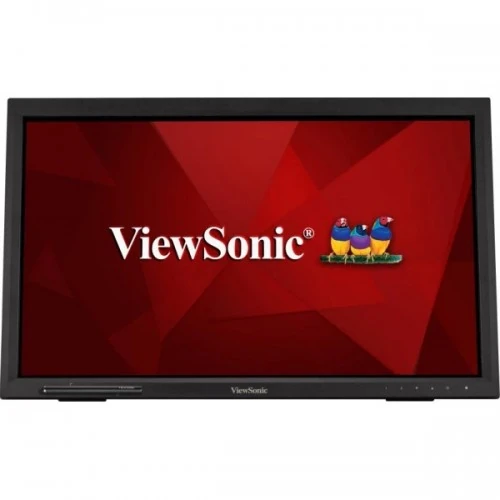
ViewSonic TD2223-2 22-inch Full HD IR Touch Monitor: Product Guide
Model identity and intended use
The ViewSonic TD2223-2 is a 22-inch class Full HD touch monitor designed for interactive desks, retail counters, classrooms and information kiosks. Its viewable diagonal is 21.5 inches, and its panel technology is VA. The TD2223-2 model name matters: specifications from the original TD2223 or other ViewSonic touch displays should not be copied into this listing without checking the exact suffix. ViewSonic identifies this unit as VS19630 in its regulatory information. The catalog product title, URL slug, Monitors category, Active status, variant identity, SKU and ৳33,900 price are retained. The listing’s “Portable” wording can imply battery operation, so the guide clarifies that this is a mains-powered touch monitor with a hinged stand, not a USB-C battery display.
Full HD panel and viewing
The display uses a 1920 × 1080 native resolution at a 16:9 aspect ratio. On a 21.5-inch viewable area, Full HD is appropriate for point-of-sale software, forms, menus, classroom material and everyday desktop applications. The VA panel is specified at 250 cd/m² typical brightness and 178-degree horizontal and vertical viewing angles. ViewSonic’s TD2223-2 specification lists a typical 3,000:1 static contrast ratio and 20,000,000:1 dynamic contrast ratio. Dynamic contrast is a manufacturer mode figure and should not be compared directly with static contrast. The refresh rate reaches 75Hz. Response time is 6.5ms typical in the current TD2223-2 documentation; some retail descriptions show 5ms, a value associated with older or copied listings. This display is best described by its touch capability and flexible connectivity rather than as a high-refresh gaming monitor. At native resolution, text and interface elements are sized for conventional desktop use. Check scaling and application layout on the target computer before installing a public-facing kiosk, since users should be able to read controls at the normal operating distance. Brightness can be adjusted for the room: a counter near a window may need a different setting from a dim classroom. The specification values describe the product design and do not guarantee that every unit has identical visual calibration. If the screen will be used for color-critical work, compare it against a calibrated reference display rather than relying on the touch monitor’s product category or contrast figure alone.
Touch technology and USB connection
The TD2223-2 uses an optical infrared touch frame and supports up to 10 simultaneous touch points. Infrared sensing detects interruptions in the light grid around the display instead of relying on the user’s electrical conductivity through the glass. This makes it useful where operators may use gloves or a passive pointing tool. Touch input needs a USB connection to the host: connect the monitor’s USB 2.0 Type-B upstream port to the computer with the included USB A-to-B cable. The two USB Type-A downstream ports can then serve compatible peripherals through the monitor hub. A video cable alone does not carry the touch events. Operating-system behavior and gesture support depend on the host; confirm compatibility for specialized POS software or managed kiosk devices before deployment.
Surface, brightness and care
The screen surface is glossy glass with a 7H hard coating according to the product specification. Gloss can provide a clear, smooth touch surface, while reflections may be visible near windows or strong overhead lighting. Position the monitor to avoid direct reflections and clean it with a suitable soft cloth. The typical brightness is 250 cd/m², intended for ordinary indoor viewing rather than direct sunlight. ViewSonic lists flicker-free and blue-light filter functions, which can be adjusted for a comfortable working environment. These settings do not replace good room lighting, suitable viewing distance or regular breaks. Because this is a touch display, keep the front glass clear and avoid hard objects that could damage the surface or interfere with the infrared sensing area around the bezel.
Ports, sound and computer compatibility
The monitor provides HDMI 1.4, DVI-D and VGA video inputs. This mix supports newer computers as well as older desktop systems that still use DVI or analog VGA. Select the source from the monitor controls and set the connected computer to 1920 × 1080. The port list also includes a 3.5mm audio input, a 3.5mm audio output, USB Type-B upstream and two USB Type-A downstream ports. ViewSonic specifies built-in stereo speakers rated at 2W per channel. These are convenient for alerts, lessons and basic audio, although external speakers or headphones may be preferable where stronger sound is needed. Verify which audio path the host uses, especially when connecting through VGA or DVI, which do not carry digital audio in the same way as HDMI.
Stand, mounting and placement
The included hinged support is designed for touch use and reclines from roughly 20 degrees to 40 degrees. A more upright position suits regular viewing, while a lower angle can make direct touch interaction easier at a desk or counter. The rear also supports a 100 × 100mm VESA mounting pattern. Follow ViewSonic’s manual for removing the stand and mounting the screen; do not force the hinge or use fasteners that protrude into the chassis. Consider the full monitor weight, arm rating, cable direction and access to rear ports when choosing a mount. The black finish and substantial outer frame are functional design details of an interactive display. Leave room for the USB, video and power leads, and ensure the screen is stable before users begin tapping or swiping.
Power and included accessories
This model has an internal power supply and accepts AC 100–240V at 50/60Hz through a three-pin inlet. It is therefore not powered from USB-C and should be positioned near an appropriate mains outlet. ViewSonic’s package information lists the display, a three-pin power cable, HDMI 1.4 cable, USB A-to-B cable for touch and the USB hub, a 3.5mm audio cable and quick start guide. Box contents can vary by sales region or stock batch, so confirm the actual sealed package with the Bangladesh seller. The product specification lists approximately 4.21kg net weight with stand and about 3.68kg without the stand; gross shipping weight is about 6kg. Published package dimensions are approximately 58.0 × 40.5 × 16.4cm. Keep packaging and the invoice for transport and warranty service.
Price, warranty and purchase checks in Bangladesh
The catalog variant is listed at ৳33,900, consistent with the researched local market reference at the time of this audit. Retailer stock, price and warranty periods may differ by distributor and date. Available Bangladesh listings describe two years of warranty in some cases and up to three years under certain distributor batches. Treat the warranty printed on the invoice or official card for the specific serial number as controlling; do not infer coverage from another seller’s page. Before ordering, confirm the exact TD2223-2 model, new sealed condition, included power and USB cables, return terms, installation needs and service location. The product evidence did not establish a physical box barcode, GTIN or manufacturing country, so those fields remain blank instead of being guessed.
Who should choose this monitor
The TD2223-2 is a strong fit when the workflow benefits from direct interaction: checkout counters, service desks, classrooms, public information points and compatible office applications. Its 10-point IR touch, USB hub, built-in speakers, legacy video inputs, VESA mounting and adjustable stand provide practical deployment choices. Consider a conventional IPS monitor if touch is unnecessary or if a matte finish and slimmer bezel are more important. Choose a higher-resolution display for detailed design work and a high-refresh model for competitive gaming. For a kiosk, verify that the computer, operating system, touch driver and application are compatible, and plan a stable mount and cable route. The screen needs mains power, and touch requires the USB upstream link in addition to HDMI, DVI or VGA video.