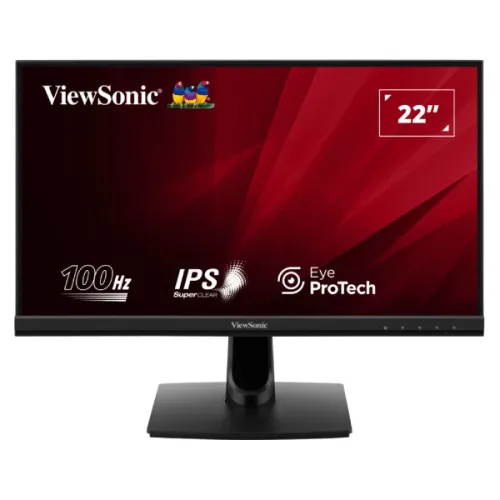
ViewSonic VA2214-H 22-inch Class (21.5-inch Viewable) 100Hz SuperClear IPS FHD Monitor
A 22-inch class Full HD monitor for everyday work
ViewSonic VA2214-H is a 22-inch class desktop monitor with a 21.5-inch viewable SuperClear IPS screen. Its native Full HD resolution is 1920 × 1080 in a 16:9 format. The official model number is VA2214-H; the Value Series “VA” prefix does not describe a Vertical Alignment panel. For Bangladesh buyers, the product is listed by the authorized distributor and major retailers as a 100Hz IPS monitor.
SuperClear IPS panel and image specifications
The flat LED-backlit screen provides 178° horizontal and vertical viewing angles, 250 cd/m² typical brightness and a 1,000:1 typical static contrast ratio. ViewSonic rates dynamic contrast separately at 50,000,000:1. The listed panel output is 16.7 million colors using 6-bit plus FRC, with typical color-space size of 104% sRGB and 72% NTSC. These are manufacturer color-space and panel figures, not a substitute for independent calibration or a promise of color-critical performance in every workflow. The anti-glare surface has a 3H hard coating, with 25% haze listed.
100Hz refresh, VRR and clearly stated response time
ViewSonic specifies 100Hz Variable Refresh Rate over HDMI 1.4, with a 48–100Hz vertical synchronization range. This can make compatible desktop motion and supported gameplay feel smoother when the graphics source is set to the correct mode. The analog VGA input is specified for 50–75Hz, so it cannot deliver the same 100Hz mode. The primary response-time specification is 4ms typical gray-to-gray. Some regional banners refer to 1ms MPRT; that is a separate motion-picture response metric and should not replace the official 4ms GtG specification.
Eye ProTech and on-screen picture modes
The VA2214-H includes ViewSonic Eye ProTech with flicker-free technology and a blue-light filter. On-screen controls provide color-temperature options such as Cool, Normal, Warm and User RGB. ViewMode presets include Game, Movie, Web, Text, Mono and Mac. These are display features and viewing presets; they are not medical treatments. The published environmental range of 0°C to 40°C is the ambient operating temperature and must not be labeled as the screen’s color temperature.
HDMI, VGA and audio out
The rear panel provides one HDMI 1.4 input and one 15-pin VGA input. HDMI supports Full HD at up to 100Hz, while VGA is limited to 75Hz at Full HD. A 3.5mm audio-out jack can route HDMI audio to wired headphones or powered speakers. There are no built-in speakers. If you use VGA, connect audio separately from the computer because VGA carries video only. The product does not list DisplayPort or USB-C inputs.
Connecting a laptop, desktop or older system
For a modern desktop or laptop, connect the HDMI 1.4 cable and select 1920 × 1080 at 100Hz in the computer display settings when the source supports it. Use VGA for a compatible older computer, keeping in mind its 75Hz Full HD limit and separate audio connection. A dock or converter can affect available timings, so verify its supported resolution and refresh-rate range. The monitor has no DisplayPort or USB-C input; a USB-C computer requires a compatible video adapter that outputs HDMI. Connect the supplied IEC C13 power cord to the monitor and a suitable AC outlet or UPS.
Stand, VESA mounting and physical security
The included stand offers tilt adjustment from −5° to +20°; height adjustment, swivel and pivot are not listed. For an adjustable setup, remove the stand and use the standard 100 × 100 mm VESA mounting pattern, following the manual’s screw requirements. A Kensington lock slot is present for compatible security cables in shared or managed work areas. The display measures 493.36 × 385.28 × 206.32 mm with the stand and 493.36 × 290.11 × 50.1 mm without it. Net weight is 2.7 kg with stand or 2.4 kg without; the packaged gross weight is 3.8 kg.
Internal power supply and energy modes
The monitor uses an internal power supply rated for AC 100–240V at 50/60Hz. A standard 3-pin IEC C13 power cord is supplied, so a separate external DC power brick is not required. ViewSonic lists 17W typical consumption and 21.3W maximum, with Eco Optimized at 15W, Eco Conserve at 13W and standby at 0.3W. Actual use varies with picture mode and settings.
What comes in the box
The manufacturer package list includes one VA2214-H display, one 3-pin IEC C13 power cord, one male-to-male HDMI 1.4 cable and a quick-start guide. Check the delivered carton and invoice for local warranty information. Bangladesh distributor UCC and major local listings report a three-year official brand warranty; the applicable seller, provider and claim route should be confirmed on BiponiBD’s current offer.
Best fit and practical limitations
This monitor suits office desks, school or university work, home computing and general Full HD media. The 21.5-inch viewable screen is a compact option where desk width is limited. Its HDMI connection supports the advertised 100Hz variable-refresh range, while VGA extends compatibility to older systems. The fixed-height stand may be less comfortable for users who need frequent ergonomic adjustment; a VESA arm is the available route to height or pivot flexibility. Since the display has no internal speakers, include external audio equipment in the setup if sound is needed. The 3.5mm output is useful with HDMI audio but does not turn the monitor into a speaker.
Reading the color and contrast figures accurately
The sRGB and NTSC figures are listed as color-space size, and should not be confused with a claim that the monitor is factory hardware-calibrated for professional proofing. The 1,000:1 figure describes typical static contrast; the much larger 50,000,000:1 figure is the separate dynamic contrast rating. Brightness is specified as 250 cd/m² typical. ViewSonic lists 16.7 million colors with a 6-bit plus FRC implementation. Together these details describe the panel class while helping shoppers compare it with displays that use different measurement types.
Environmental operating conditions and safe setup
ViewSonic lists an ambient operating temperature from 0°C to 40°C and relative humidity from 20% to 90% non-condensing. Those are environmental conditions for operating the device, not the monitor’s color temperature or a screen adjustment. Leave the monitor in a dry, ventilated position and route the AC cable so it is not sharply bent or pinched. Use the included compatible power cord and follow the quick-start guide when assembling the stand or attaching a VESA mount. These steps help avoid confusing a specification label with an on-screen picture setting.
Technical summary and model clarity
Model VA2214-H; ViewSonic Value Series; 22-inch class, 21.5-inch viewable SuperClear IPS; 1920 × 1080, 16:9; HDMI 1.4 at up to 100Hz with VRR and VGA up to 75Hz; 4ms typical GtG; 250 cd/m² typical; 1,000:1 static contrast; 104% sRGB size, 72% NTSC typical; 178°/178°; HDMI, VGA and 3.5mm audio out; no integrated speakers; tilt −5° to +20°; 100 × 100 mm VESA; Kensington lock; internal AC power; 17W typical. The “VA2214-H-2” regional suffix does not identify a separately specified panel in the reviewed sources.
Key specifications
- 22-inch class display with a 21.5-inch viewable SuperClear IPS panel, Full HD 1920 × 1080 and 16:9 format.
- 100Hz variable refresh rate over HDMI 1.4; VGA supports up to 75Hz at Full HD.
- 4ms typical gray-to-gray response time; separate regional 1ms MPRT promotions are not the same metric.
- 250 cd/m² typical brightness, 1,000:1 static contrast, 178°/178° viewing angles, and 104% sRGB size (72% NTSC typical).
- ViewSonic Eye ProTech flicker-free and blue-light-filter features, with six ViewMode presets.
- HDMI 1.4, VGA, and 3.5mm audio out; no built-in speakers.
- 100 × 100 mm VESA pattern, −5° to +20° tilt stand and Kensington security slot.
- Internal 100–240V power supply; 17W typical and 13W Eco Conserve mode.