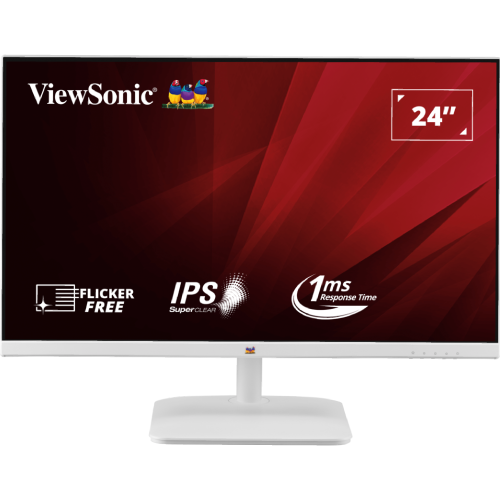
A white Full HD monitor for work and home
The ViewSonic VA2432-H-W is a 24-inch-class IPS monitor with a 23.8-inch viewable area, Full HD resolution and a 100Hz maximum refresh rate through HDMI. The “W” model is presented with a white enclosure and stand, giving it a lighter visual profile than the black monitors common in office setups. It combines HDMI and VGA, a 3.5mm audio output, flicker-free and low-blue-light features, and VESA mounting. The official ViewSonic product page and datasheet are used as the primary specification references for this entry.
Screen size and Full HD layout
The panel displays 1920 × 1080 pixels in a 16:9 aspect ratio. Its 23.8-inch viewable diagonal and active area of 527.04 × 296.46 mm fit a typical home or office desk without requiring a large stand footprint. Full HD is compatible with a broad range of desktop computers, laptops and streaming sources. It is suitable for documents, browser tabs, class material, video calls and general entertainment. Users who rely on several dense windows or detailed video/photo timelines may prefer QHD or 4K because those panels provide more workspace and finer detail.
IPS viewing and color
ViewSonic specifies a SuperClear IPS panel with 178-degree horizontal and vertical viewing angles. The wide-angle rating can help when the display is shared or viewed slightly off-centre, although the image will not remain perfectly unchanged from every angle. The datasheet lists 16.7 million colors, 8-bit signal processing using 6-bit plus FRC, 99% sRGB coverage and 105% sRGB gamut size. It also lists NTSC at 75% size. Coverage and size measurements describe different aspects of gamut; none of these figures is a calibration report. Color-critical work should use an appropriate calibrated display and workflow.
Refresh rate and input limitations
The display can refresh at up to 100Hz through HDMI 1.4. ViewSonic lists an HDMI vertical range of 48–100Hz and VGA’s range at 48–75Hz. Choose HDMI to use 100Hz. The graphics source, cable, adapter and operating-system settings must all support the requested 1920 × 1080 mode. A 100Hz screen can show up to 100 refreshes per second, but the computer must still render frames at the corresponding rate for games or animations. If the system offers only 60Hz, check the adapter/dock, source output and active display mode before assuming the monitor cannot support 100Hz.
Understanding 1ms MPRT
ViewSonic lists 1ms MPRT on the VA2432-H-W datasheet. MPRT describes a motion-blur-reduction mode and is not a Gray-to-Gray pixel response figure. The official datasheet does not provide a GtG number for this model. MPRT modes can involve backlight behavior that changes the perceived brightness or introduces flicker for some users. The 1ms value should therefore be presented together with the MPRT label and used as an optional feature, not as a universal response time for every transition and display setting.
Contrast, brightness and picture modes
The datasheet lists 1000:1 typical static contrast, 50M:1 dynamic contrast and 250 cd/m² typical brightness. These values describe different conditions; the dynamic contrast figure should not be interpreted as static contrast. The monitor uses ViewMode presets for different types of content and an OSD menu with color and manual image adjustments. Typical brightness is intended for ordinary indoor use rather than a high-brightness HDR environment. ViewSonic does not list HDR support for this model.
Ports and audio setup
The rear panel provides one HDMI 1.4 input, one VGA input, a 3.5mm audio output and a DC power socket. HDMI is the preferred input for Full HD at 100Hz; VGA is useful for older equipment but tops out at a 75Hz vertical frequency. There is no DisplayPort or USB-C input. The monitor does not include built-in speakers, so connect headphones or powered speakers to the computer or monitor audio output. A laptop with only USB-C video output needs a compatible HDMI adapter or dock; check whether it supports 1920 × 1080 at 100Hz if that mode matters.
Eye-comfort features
ViewSonic lists Flicker-Free and hardware/software Low Blue Light features. These settings can adjust the display behavior for different users and tasks but do not replace reasonable lighting, viewing distance and regular breaks. The screen has an anti-glare surface with 3H hard coating and 25% haze according to the family user guide. Anti-glare treatment can soften mirror-like reflections in a typical room; bright windows and lamps can still create visible glare. The OSD offers color and picture presets that can be changed as the user moves between text, web, video and other content.
Stand and mounting
The included stand supports tilt from −3 degrees to +20 degrees. ViewSonic does not list height adjustment, swivel or pivot, so a stable riser or an adjustable arm may be useful for users who need more positioning flexibility. The monitor supports a 75 × 75 mm VESA mount and has a Kensington lock slot. Confirm that the arm or wall bracket uses the correct pattern and screw length and can safely carry the monitor. Leave enough clearance behind the unit for its external adapter cable, HDMI lead and airflow.
Physical dimensions and packaging
With the stand, the VA2432-H-W measures approximately 540 × 406 × 185 mm and weighs 2.7 kg. Without the stand, it measures 540 × 322 × 36 mm and weighs 2.4 kg. The package measures 600 × 395 × 112 mm and weighs 3.7 kg gross. These package values include protective materials and accessories and should not be used to size a desk or monitor arm. The white enclosure and stand are visible in the supplied gallery images; exact dimensions and weights may vary slightly by region or production batch.
External power and energy
The monitor uses an external AC/DC power adapter and a centre-positive DC input. ViewSonic lists AC 100–240V input at 50/60Hz, 22W typical consumption, 25W maximum, 15W in Eco Conserve mode, 18W in Eco Optimized mode and 0.3W standby. Actual use varies with screen content, brightness and mode. The package includes an adapter and a country-dependent power plug. Use the supplied or an authorized replacement adapter with the correct output rating and polarity; do not infer adapter output voltage/current from the mains input range.
Package contents
ViewSonic lists the VA2432-H-W monitor, HDMI 1.4 male-to-male cable, AC/DC adapter, quick-start guide and one or two power plugs depending on country. Check the actual carton before setup because the power plug and accessories can vary across regional packaging. The monitor has no built-in speakers and no USB hub. The white stand is included as part of the product, while a VESA arm or wall bracket is optional and must be purchased separately if required.
Who may find it a good fit
The VA2432-H-W can work well for a user who wants a white monitor, a standard Full HD IPS image and a refresh rate above 60Hz through HDMI. Students, home-office users and general-purpose desktop setups can make use of the 100Hz mode, low-blue-light controls and anti-glare surface. Buyers who need USB-C docking, a DisplayPort input, built-in speakers, adjustable screen height or a higher-resolution workspace should compare other models. The 1ms MPRT feature may be useful for moving content, but the user should judge its brightness and flicker trade-offs rather than relying on the headline number alone.
Bangladesh warranty and retail context
Bangladesh sellers list a three-year warranty and current offers in the ৳15,000 range, but local coverage is seller/distributor dependent. ViewSonic explicitly notes that warranty offered can vary by market. Confirm the service provider, warranty card, covered parts, claim process, carton contents and invoice conditions before purchase. Retail prices and stock can change, and this description does not claim a live BiponiBD price, stock quantity, seller offer, review or rating. Verify those details on the live listing before placing an order.
First-time setup
Attach the stand to a stable desk or use a compatible 75 × 75 mm VESA mount. Connect the external adapter and choose HDMI if you want the 100Hz mode. In display settings, select 1920 × 1080 and 100Hz if the computer and connection support it. If the option does not appear, check the source graphics output, adapter, cable, driver and selected input. Set tilt to reduce glare, choose a suitable ViewMode and adjust brightness for the room. Connect external audio to the 3.5mm output or computer because there are no built-in speakers. Keep the adapter ventilated and use only an authorized replacement with matching polarity and electrical ratings.
Technical specifications
Key features
- 23.8-inch viewable SuperClear IPS panel with 1920 × 1080 Full HD resolution and 16:9 aspect ratio.
- 100Hz maximum refresh over HDMI 1.4; VGA vertical frequency is limited to 75Hz.
- 1ms MPRT blur-reduction mode; ViewSonic does not state a GtG response figure on its official datasheet.
- 99% sRGB coverage (105% color-space size) and NTSC 75% size, as measured by ViewSonic.
- 250 cd/m² typical brightness, 1000:1 typical static contrast and 50M:1 dynamic contrast.
- Flicker-Free and hardware/software Low Blue Light features with ViewMode presets.
- One HDMI 1.4 input, one VGA input, one 3.5mm audio output and center-positive DC power socket.
- Tilt adjustment from −3° to +20°, VESA 75 × 75 mm mounting and a Kensington lock slot.
- External AC/DC adapter; 22W typical and 25W maximum power, with 0.3W standby.
- White VA2432-H-W finish; ViewSonic lists an HDMI cable and power adapter in the package contents.
Advantages
- 100Hz HDMI refresh can make compatible desktop movement and casual gaming feel smoother than 60Hz.
- IPS viewing angles and 99% sRGB coverage support shared viewing, study, office work and general web content.
- Flicker-Free and Low Blue Light features provide optional comfort settings for long desktop sessions.
- HDMI and VGA cover a digital source and older analog equipment, with a 3.5mm audio output for external audio.
- VESA mounting and a Kensington lock slot add flexible placement and a basic physical-security option.
Things to consider
- The included stand is tilt-only; no height adjustment, swivel or pivot is listed.
- The VGA input is limited to 75Hz; HDMI is required to use 100Hz.
- There are no built-in speakers, DisplayPort or USB-C input.
- Full HD offers less workspace and detail than QHD/4K monitors, especially for dense multitasking.
- The 1ms number is MPRT, not GtG; exact response can depend on the blur-reduction mode and content.
Frequently asked questions
What is the exact monitor model?
The model is ViewSonic VA2432-H-W. ViewSonic’s official product page and datasheet use this model. The “-W” variant is shown with a white housing in the exact-model product images and Bangladesh seller listing.
How large is the display?
ViewSonic lists a 24-inch product class with a 23.8-inch viewable diagonal. The active image area is 527.04 × 296.46 mm at 1920 × 1080 resolution.
Does the VA2432-H-W support 100Hz?
Yes. ViewSonic lists a 48–100Hz vertical scan range through HDMI 1.4 and supports Full HD at 100Hz. The computer, cable and display settings also need to support the mode.
Can VGA reach 100Hz?
No. ViewSonic specifies a 48–75Hz vertical range for the analog VGA input. Use HDMI when 100Hz is needed.
What does 1ms MPRT mean?
MPRT is a motion-picture response-time blur-reduction mode. It is not a 1ms Gray-to-Gray response value. ViewSonic’s official specification lists MPRT but does not give a GtG figure; use the mode carefully if brightness changes or flicker are distracting.
What are its contrast and brightness figures?
ViewSonic lists 1000:1 typical static contrast, 50M:1 dynamic contrast and 250 cd/m² typical brightness. Dynamic contrast is a processing-dependent figure and should not be substituted for the static contrast value.
What color range does it cover?
The official datasheet lists 99% sRGB coverage and 105% sRGB color-space size, plus NTSC 75% size. Coverage and gamut size are different measurements. These values do not certify factory calibration or guarantee suitability for color-critical mastering.
What connections are available?
The rear inputs are one HDMI 1.4 and one VGA, with one 3.5mm audio output and a center-positive DC power socket. The VA2432-H-W has no DisplayPort or USB-C input listed.
Does it have speakers?
No. ViewSonic does not list built-in speakers for the VA2432-H-W. The 3.5mm connection is an audio output for headphones or external speakers, depending on the connected source and setup.
Can it be mounted on an arm?
Yes. ViewSonic specifies a 75 × 75 mm VESA pattern and a Kensington lock slot. The stand tilts from −3° to +20° but does not list height adjustment, swivel or pivot. Check the mount’s compatible screw pattern and load rating.
What are its dimensions and weight?
ViewSonic lists 540 × 406 × 185 mm and 2.7 kg with the stand. Without the stand it is 540 × 322 × 36 mm and 2.4 kg. Packaging is 600 × 395 × 112 mm and 3.7 kg gross. Use the physical dimensions for a desk or mount; package values include shipping materials.
What is included, and what warranty applies in Bangladesh?
ViewSonic lists the monitor, HDMI 1.4 cable, AC/DC adapter, quick-start guide and region-dependent power plug(s). Its official page says warranty may vary by market. Bangladesh sellers advertise three years; confirm local service provider, coverage, carton contents and invoice terms with the seller.
Specifications are based primarily on ViewSonic’s official VA2432-H-W product page and datasheet. Local warranty and included power plug should be verified on the individual unit.