Overview: a sharper 27-inch QHD workspace
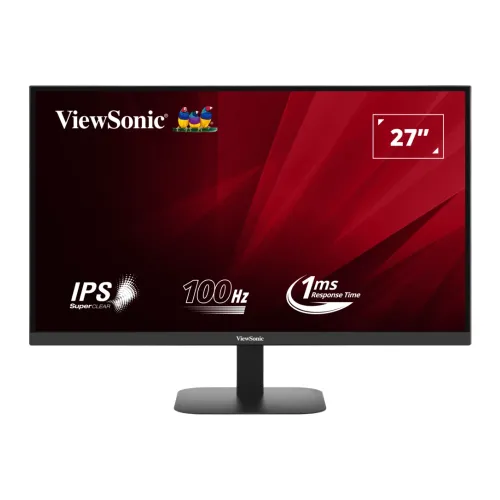
The ViewSonic VA2708-2K-MHD is a 27-inch desktop monitor for office work, study, browsing, video and casual gaming. Its native 2560 × 1440 Quad HD resolution and SuperClear IPS panel provide more desktop detail than a 27-inch Full HD display, and the 100Hz refresh rate can make everyday scrolling and pointer movement feel smoother than a traditional 60Hz screen. The correct manufacturer model code is VA2708-2K-MHD. Some Bangladesh retail specification tables contain cross-model copy errors, so this guide follows ViewSonic's exact-model product sheet and the physical ports visible in the catalog gallery. The model has dual HDMI, DisplayPort, a headphone output, stereo speakers and a tilt-only stand. It does not have USB-C, laptop charging, a USB hub or a height-adjustable stand. Those distinctions matter when comparing it with ergonomic USB-C monitors.
Resolution, pixel density and practical workspace
The 16:9 panel displays 2560 × 1440 pixels across a 27-inch diagonal. That is 3,686,400 pixels, about 1.78 times the pixel count of Full HD 1920 × 1080. With an official pixel pitch of 0.233mm, the panel renders roughly 109 pixels per inch. For documents, spreadsheets and coding, the extra vertical and horizontal workspace can show more rows and place two windows side by side with less horizontal scrolling. At a typical desktop distance, text edges and fine interface details appear denser than on a 27-inch 1080p screen. The native resolution is also a practical fit for modern productivity applications and QHD video. Users who prefer larger interface elements can adjust operating-system scaling; applications and connected hardware determine how much of the available space is useful. The screen is flat, has a 16:9 aspect ratio, and uses slim top and side bezels with a conventional lower chin.
SuperClear IPS picture, brightness and colour
ViewSonic specifies a SuperClear IPS panel with 178-degree horizontal and vertical viewing angles. Typical brightness is 250 cd/m² and static contrast is 1,000:1; the datasheet also lists a 50,000,000:1 dynamic contrast figure, which should not be mistaken for native panel contrast. The matte anti-glare surface and 3H hard coating are suitable for ordinary indoor desk lighting, though they cannot eliminate strong direct sunlight or reflections from every angle. The screen supports 16.7 million colours through true 8-bit colour depth. ViewSonic lists 111% sRGB colour-space size, 99% sRGB coverage and 80% NTSC size as typical values. Size and coverage describe different colour-gamut measurements. These specifications make the monitor useful for web content, general graphics and media viewing, but they do not constitute a factory calibration certificate. For print matching or colour-critical production, calibrate the display and confirm the required colour workflow before relying on it.
100Hz motion, MPRT and variable refresh
The digital vertical-frequency range is 48–100Hz, and the horizontal-frequency range is 30–150kHz. When a computer outputs a supported signal, 100Hz refresh can improve the perceived smoothness of scrolling, window movement and supported games compared with 60Hz. ViewSonic rates the response time at 1ms MPRT. MPRT and GtG are different measurement methods; 1ms MPRT should not be presented as a 1ms GtG pixel-transition time. A product graphic also carries a 1ms response badge. Some retailer tables show 0.5ms in one place and 1ms elsewhere, but the manufacturer specification supports 1ms MPRT. ViewSonic lists Variable Refresh Rate technology, commonly described as Adaptive Sync, for compatible video sources. A retailer's “FreeSync Premium” label is not supported by the manufacturer's exact-model listing and should not be repeated. The feature set is oriented toward fluid everyday and casual gaming rather than a claim of certified premium gaming tiers.
HDR10 input and realistic HDR expectations
The official specification lists HDR10 support, so the monitor can accept HDR10 video signals from compatible HDMI and DisplayPort sources. Signal compatibility does not by itself establish a VESA DisplayHDR certification or guarantee high-brightness HDR highlights. The VA2708-2K-MHD is rated at 250 cd/m² typical brightness and a 1,000:1 static contrast ratio; the product sheet does not list local dimming zones or a VESA DisplayHDR tier. Treat HDR10 as source-format compatibility and expect the panel to display content within its own brightness and contrast limits. If HDR performance is a central buying requirement, compare independent measurements and certification details for other models rather than relying on the HDR10 label alone.
Video connections, device compatibility and audio
The recessed, downward-facing connection bay shown in the fifth product image contains two HDMI inputs, one DisplayPort input, a 3.5mm audio output and a DC power socket. ViewSonic's global product page labels the HDMI connectors as HDMI 2.1 with HDCP 2.2, while local listings commonly call them HDMI 2.0 and the included cable is listed as HDMI v2.0. The monitor's specified maximum signal is 2560 × 1440 at 100Hz; do not infer HDMI 2.1 FRL bandwidth from a connector label. The DisplayPort input is version 1.4 and supports HDCP 2.2. The three digital inputs let a user leave multiple PCs, a laptop or a console connected at once. There is no USB-C input and no USB hub. A USB-C-only laptop needs a compatible USB-C-to-DisplayPort cable or an HDMI adapter, and it must use its own power adapter. The integrated 2W × 2 speakers are convenient for calls, system sounds and casual playback. The 3.5mm output can feed wired headphones or powered speakers; for fuller sound, use an external audio setup.
Tilt-only stand, VESA mounting and desk fit
The included stand permits forward and backward tilt from −5° to +15°. Its fixed-height column does not swivel, pivot to portrait orientation or provide height adjustment. Retailer tables that claim 130mm lift, 90-degree swivel or pivot are inconsistent with the official specification and the catalog's rear and side images. The rear housing has a 75 × 75mm VESA mounting pattern and a Kensington security lock slot. A compatible VESA arm can add height, swivel and portrait adjustment, subject to the arm's load rating and clearance. With the included stand attached, ViewSonic lists dimensions of 613.19 × 449.89 × 190mm (W × H × D) and a net weight of 4.1kg. Without the stand, the monitor measures 613.19 × 362.99 × 52.74mm and weighs 3.3kg. Measure desk depth and viewing distance before purchase; the published dimensions help estimate the footprint, while cable routing adds some additional clearance behind the screen.
Eye-comfort options, controls and power
ViewSonic includes Eye ProTech features, including Flicker-Free backlight control and a software Low Blue Light filter. These settings offer viewing adjustments, but comfort varies from person to person; set a suitable brightness, viewing distance and break schedule for long sessions. The OSD provides ViewMode presets for Game, Movie, Web, Text, Mono and Mac, and a rear five-way joy key is used to navigate settings. An external AC/DC adapter connects to the center-positive DC input and accepts AC 100–240V at 50/60Hz. The published consumption figures are 30W typical, 32W maximum, 26W in Eco Optimized mode, 22W in Eco Conserve mode and 0.5W standby. These are manufacturer specifications, not a promise of identical consumption in every brightness or signal configuration. The catalog image gallery shows the stand, rear housing and connectors; the exact box contents should still be confirmed with the seller.
Package, warranty and Bangladesh buying notes
ViewSonic lists the monitor, an HDMI v2.0 male-to-male cable, an AC/DC adapter, a Quick Start Guide and regional power plug(s) in the standard package. The published carton dimensions are 676 × 458 × 107mm and gross boxed weight is 5.5kg; confirm regional packaging and included cables before ordering. Bangladesh retailers advertise a three-year warranty, but the local provider and claim conditions should be checked on the invoice or with the seller. Price and stock vary by import batch. Listings checked for this audit ranged approximately from ৳22,999 to ৳27,900, while the existing BiponiBD catalog variant price of ৳23,000 is retained as the catalog value. Some matching listings were out of stock or showed historical prices, so the market range is a dated reference, not a guaranteed current offer. Before checkout, confirm the exact model on the carton, the warranty provider, dead-pixel policy, return window and current stock.
Who this monitor suits
The VA2708-2K-MHD is a reasonable match for a desk user who wants QHD detail, a 27-inch IPS workspace, 100Hz refresh and flexible digital inputs without paying for a USB-C dock. It can suit office users, students, developers and home users who keep several HDMI or DisplayPort sources connected. The 75 × 75mm VESA mount provides an upgrade path if the fixed-height stand does not position the display comfortably. The integrated speakers reduce accessory clutter for light audio use. For competitive gaming, check whether 100Hz and 1ms MPRT align with the games and hardware you use; an MPRT figure is not a guarantee of a particular input-lag result. For laptop docking, confirm that you are comfortable using an adapter and a separate laptop charger. The monitor's actual strength is its blend of 1440p clarity, IPS viewing angles, mainstream refresh and connection choice.
Who should compare another model
Choose a different display if your setup depends on one-cable USB-C video and laptop charging, a built-in USB hub, or a fully adjustable factory stand. This model does not provide those capabilities. A VESA arm can address stand ergonomics but adds cost and installation work. Users doing bright-room work beside large windows may prefer a monitor with higher measured brightness. HDR-focused movie viewers should compare models with documented high-brightness performance, local dimming or a relevant DisplayHDR certification instead of treating HDR10 input as equivalent to premium HDR. Colour-critical professionals should look for verified calibration and gamut accuracy data. Also compare total cost: a low listed price with unavailable stock may not represent a purchasable offer, and warranty service can vary by distributor. These are practical limits to weigh against the crisp 27-inch QHD panel, 100Hz refresh, VRR support and dual HDMI plus DisplayPort connectivity.
Setup checklist
For the sharpest desktop image, select 2560 × 1440 in the computer's display settings and choose a refresh rate up to 100Hz when supported by the graphics hardware, operating system, cable and selected input. Use the HDMI cable included in the box if present, or a suitable DisplayPort cable for a desktop graphics card. If the image is blank, verify the selected input, cable seating and source output mode before changing other settings. Configure the monitor's OSD for brightness and a ViewMode preset that suits the task. Keep the power adapter accessible and leave room for the downward-facing connectors when installing the screen close to a wall. If mounting on a monitor arm, use the 75 × 75mm VESA pattern and secure the display according to the arm manufacturer's instructions. Retain the carton and purchase documents until the local warranty and return period are clear.
Specification and listing accuracy note
This guide distinguishes manufacturer specifications from local seller listings and catalog information. ViewSonic's exact-model product page is the primary source for resolution, refresh, brightness, colour, HDR10 input, VRR, ports, dimensions, weight, power and package contents. Local retailer listings help establish Bangladesh pricing and advertised warranty, but some contain obvious cross-model specification errors. In particular, the VA2708-2K-MHD has no USB-C 65W charging, no USB data hub, no height adjustment, no swivel and no pivot. Its correct response figure is 1ms MPRT, typical brightness is 250 cd/m², colour depth is 16.7 million (8-bit true), and included-stand movement is tilt only from −5° to +15°. The monitor accepts HDR10 signals and has VRR/Adaptive Sync, while FreeSync Premium certification is not claimed. These corrections keep product discovery terms useful without promising equipment capabilities the monitor does not contain.