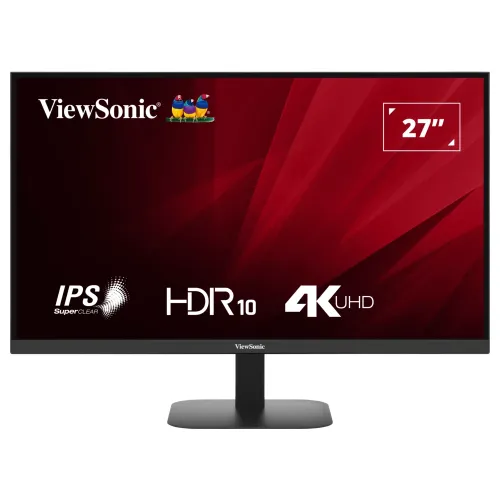
ViewSonic VA2708-4K-MHD 27-Inch 4K UHD SuperClear IPS Monitor Overview
The ViewSonic VA2708-4K-MHD is a 27-inch 4K Ultra HD (3840 × 2160) monitor engineered to bring high-density 4K clarity, wide-angle SuperClear IPS color consistency, and versatile multi-device connectivity to modern business offices, software engineering desks, content creation setups, and home entertainment spaces. Packing 8.29 million pixels—four times the resolution of a traditional Full HD 1920 × 1080 display—into a 3-side borderless 27-inch frame, the VA2708-4K-MHD delivers an ultra-fine 0.155 × 0.155 mm pixel pitch (~163 PPI) that renders small fonts, dense financial spreadsheets, 4K video timelines, and architectural CAD drawings with exceptional crispness.
Equipped with 10-bit (8-bit + FRC) color support for 1.07 billion colors, 104% sRGB color gamut size, a 1,200:1 native static contrast ratio, HDR10 high dynamic range decoding, dual HDMI ports plus DisplayPort 1.4, integrated 2W × 2 stereo speakers, and ViewSonic Eye ProTech eye-care technology, the VA2708-4K-MHD provides a complete 4K UHD desktop upgrade backed by a 3-year warranty in Bangladesh.
True 4K UHD (3840 × 2160) Resolution & SuperClear IPS Panel Performance
Upgrading from a 1080p or 1440p monitor to the ViewSonic VA2708-4K-MHD immediately transforms both visual sharpness and usable screen real estate:
- Four Times Full HD Workspace: With 3840 × 2160 resolution across a full 27-inch viewable area (16:9 aspect ratio), you can tile four 1080p windows simultaneously without overlapping or enable 125%–150% HiDPI scaling in Windows 11 and macOS for razor-sharp, print-like Bangla and English text rendering.
- SuperClear IPS 178° Viewing Angles: ViewSonic’s SuperClear IPS liquid-crystal technology maintains consistent brightness and color fidelity across 178° horizontal and 178° vertical viewing angles, preventing color shifting when reviewing documents or designs with colleagues from the side.
- 1.07 Billion Colors (10-Bit) & 104% sRGB Size: Supporting 10-bit (8-bit + FRC) color depth and a 104% sRGB (72% NTSC) color gamut size, the panel produces smooth tonal gradients across skies, shadows, and photographic backdrops without visible 8-bit banding.
- 1,200:1 Static Contrast & HDR10 Support: Offers a higher-than-standard 1,200:1 static contrast ratio (50,000,000:1 dynamic contrast), 250 cd/m² typical brightness, and HDR10 signal support to enhance highlight detail and shadow depth in HDR-encoded movies, streaming video, and console games.
- 60Hz Refresh Rate with 4ms GtG / 1ms MPRT Response: Combines a stable 60Hz refresh rate with a 4ms Typical Gray-to-Gray response time (rated at 1ms MPRT in regional specification sheets) and a 3H hard-coated anti-glare surface that minimizes room reflections.
Dual HDMI & DisplayPort 1.4 Connectivity with Built-In Stereo Speakers
Whether you work across a desktop PC, a company laptop, and a media streamer or console, the ViewSonic VA2708-4K-MHD eliminates the hassle of swapping video cables:
- 2 × HDMI Ports (HDMI 2.0 / v2.1 TMDS 4K@60Hz): Two high-bandwidth HDMI inputs accept native 3840 × 2160 @ 60Hz digital video and audio from laptops, Mac minis, Blu-ray/streaming players, PlayStation 5, and Xbox Series X/S. An HDMI v2.0 cable is included inside the box so you can connect your primary computer immediately.
- 1 × DisplayPort 1.4 Input: Provides a dedicated 4K 60Hz connection for desktop graphics cards and workstation docking stations (24–140 KHz horizontal / 48–60 Hz vertical frequency).
- Built-In 2W × 2 Stereo Speakers & 3.5 mm Audio Out: Dual integrated 2-watt stereo speakers deliver convenient desktop audio for video conferences, online courses, and system notifications, while the 3.5 mm audio output jack lets you route digital HDMI/DisplayPort audio to headphones or external powered speakers.
ViewSonic Eye ProTech, ViewMode Presets, and Tactile 5-Way Joy Key
To keep your eyes comfortable across extended workdays, ViewSonic integrates its hardware and firmware wellness suite directly into the VA2708-4K-MHD:
- Eye ProTech (Flicker-Free & Low Blue Light): Eliminates invisible LED backlight PWM flicker at all brightness levels and includes an adjustable software Low Blue Light filter to reduce high-energy blue light exposure during late-night reading and spreadsheet work.
- Six Scenario-Tuned ViewMode Presets: Includes dedicated Game, Movie, Web, Text, Mono, and Mac presets that optimize gamma curve, color temperature, contrast, and brightness for each workflow.
- Rear 5-Way Tactile Joy Key: As visible in the side and rear product images, a single 5-direction joystick controller on the back right side replaces awkward multi-button rows, making input switching and ViewMode selection fast and intuitive.
3-Side Borderless Design, 75 × 75 mm VESA Mount, and Eco Power Efficiency
The ViewSonic VA2708-4K-MHD features a clean, space-saving matte-black chassis tailored for modern desks and multi-monitor arrays:
- 3-Side Frameless Bezel & Tilt Stand: Ultra-slim top and side bezels create a nearly seamless transition in dual-monitor 4K setups. The included compact desktop base supports -5° forward to +15° backward tilt and measures 613.19 × 449.89 × 190 mm at a lightweight net weight of 4.1 kg.
- 75 × 75 mm VESA Mount & Kensington Lock: Detaching the stand leaves a slim 613.19 × 362.99 × 52.74 mm panel head weighing just 3.3 kg, ready for installation on 75 × 75 mm VESA monitor arms or wall brackets, complete with a Kensington security lock slot.
- Low-Power Eco Modes: Powered by the included external AC/DC adapter (AC 100–240V), the monitor draws 28W typically (33W max) and drops to 26W in Eco Optimized mode, 21W in Eco Conserve mode, and 0.5W in standby.
Recommended Setup & Scaling Tips for Windows 11 and macOS Users
To get the best visual clarity and performance from the ViewSonic VA2708-4K-MHD on day one:
- Enable 60Hz & HiDPI Scaling: After connecting via the included HDMI 2.0 cable or a DisplayPort 1.4 cable, verify that your OS display settings are set to 3840 × 2160 at 60Hz. On Windows 11, set Scale to 150% (recommended for 27-inch 4K) so UI menus match the physical size of a 27-inch QHD screen while rendering text with twice the pixel density. On macOS, select the Mac ViewMode preset in the OSD and choose your preferred Retina scaling level in System Settings.
- Ergonomic VESA Arm Upgrade: Because the monitor head weighs only 3.3 kg without its stand, pairing its 75 × 75 mm VESA mount with a gas-spring desk arm is an easy way to add full height, swivel, and 90° portrait rotation if your desk setup requires vertical coding or document reading.
- Multi-Device Productivity & Console Pairing: Connect your primary desktop PC via DisplayPort 1.4, your work laptop or Mac mini to HDMI 1, and a media streamer or PlayStation 5 / Xbox Series X to HDMI 2. Using the rear 5-way tactile Joy Key, you can switch between all three 4K 60Hz sources in seconds and toggle HDR10 or dedicated ViewMode presets (Text for office reading, Mac for Apple color matching, Movie for streaming, or Game for console play) without unplugging cables.
Who Should Choose the ViewSonic VA2708-4K-MHD in Bangladesh?
The ViewSonic VA2708-4K-MHD is purpose-built for users who prioritize ultra-sharp 3840 × 2160 pixel density (~163 PPI) and accurate wide-angle IPS color reproduction at a practical 60Hz office and multimedia refresh rate:
- Software Engineers, Analysts & Researchers: View side-by-side IDE windows, terminal consoles, PDFs, and multi-column Excel models with crystal-clear font rendering and minimal eye fatigue thanks to Eye ProTech Flicker-Free and Low Blue Light protection.
- Graphic Designers, Photographers & Video Editors: Edit high-resolution 4K footage and high-megapixel photos at native pixel-for-pixel scale with 10-bit (8-bit + FRC) 1.07 billion colors, 104% sRGB color gamut size, and a 1,200:1 static contrast ratio.
In Bangladesh, the Viewsonic VA2708-4K-MHD 27” 4K UHD IPS Monitor is backed by an official 3 Years Warranty.
4K Desktop Setup, Scaling and Connection Planning
A 3840 × 2160 desktop contains four times as many pixels as a Full HD 1920 × 1080 image. At 27 inches, that extra pixel density is useful when comparing detailed photographs, fitting multiple toolbars beside a document, reading fine spreadsheet grids, reviewing 4K footage at native resolution or keeping a browser and editing application visible together. The trade-off is that menus and text can appear small if the operating system uses 100% scaling at a typical desk distance. Windows and macOS display scaling can enlarge interface elements while keeping the panel at its native resolution; choose a comfortable scaling level for the user and the applications in use rather than lowering the display resolution as the first fix.
For native 4K at 60Hz, connect a computer output and cable that support the required resolution and refresh rate. The monitor lists two HDMI inputs and one DisplayPort input, and the product documentation specifies HDMI 2.0 / TMDS operation up to 3840 × 2160 at 60Hz with DisplayPort 1.4. Some laptops expose lower capabilities on different HDMI or USB-C ports, so check the graphics adapter, dock, cable and port specification as a set. If a dock passes only 4K at 30Hz, connect the computer directly to the monitor or use a compatible dock and certified cable.
HDR10 Expectations and Practical Limits
The VA2708-4K-MHD accepts HDR10 content and can display compatible HDR signals, but its specified 250 cd/m² brightness and typical 1,200:1 static contrast ratio describe a standard office monitor rather than a high-brightness local-dimming HDR display. HDR10 support alone does not guarantee the highlight intensity or dark-scene control of a premium HDR television or creator monitor. For general video playback, HDR material may be recognized by a compatible system; for color-critical grading or demanding HDR mastering, compare luminance, contrast, local dimming and color-volume requirements before choosing this model.
Workspace, Mounting and Maintenance
The supplied stand supports tilt from -5° to +15° and does not provide height, swivel or pivot adjustment. Raise the panel with a stable monitor riser if the fixed stand places the top edge too low, or use a compatible VESA arm if desk space or multi-user positioning calls for more movement. The mounting interface is 75 × 75mm, so confirm the arm includes a 75mm plate and that its load rating covers the approximately 4.1kg monitor with stand. Keep the rear vents clear, use the included external power adapter, and do not pull the adapter or signal cable tight when adjusting the screen.
For a clean image, start with native 3840 × 2160 resolution and a supported 60Hz mode, choose a ViewMode preset appropriate to the task, and adjust brightness for the room. Use the Eye ProTech low-blue-light and Flicker-Free options for extended reading if they are comfortable, while maintaining ordinary breaks and sensible viewing distance. Keep the monitor surface clean with a soft, lint-free cloth and follow the user guide for cleaning; avoid spraying liquid directly on the panel. Retain the invoice, serial number, packaging and warranty paperwork in case the local retailer requests them for a claim.