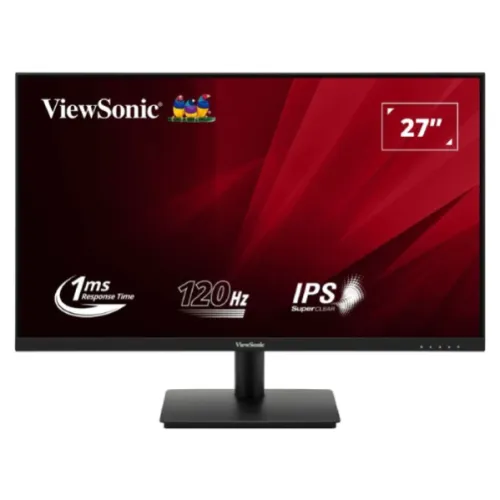
ViewSonic VA270A-H পরিচিতি ও উদ্দেশ্য
ViewSonic VA270A-H হলো 27-inch Full HD IPS monitor, 1920 × 1080 resolution ও সর্বোচ্চ 120Hz refresh rate-সহ। এটি home/office productivity, web browsing, online class, video playback এবং casual gaming-এর জন্য তৈরি। Official ViewSonic page-এ SuperClear IPS, 120Hz variable refresh, 1ms MPRT, HDMI ও VGA inputs এবং Eye ProTech features উল্লেখ আছে। Product record-এ আগে brand “Others” ছিল; সেটি ViewSonic-এ ঠিক করে modelName ও manufacturer part number-এ exact VA270A-H রাখা হয়েছে।
এই model-এর panel native Full HD; 120Hz mode-টি HDMI 1.4 input-এ supported timing হিসেবে manual-এ আছে। VGA analog input-এ refresh সীমা কম, সর্বোচ্চ 75Hz পর্যন্ত। ফলে high refresh পেতে HDMI cable দিয়ে PC বা compatible device যুক্ত করুন, OS/graphics settings-এ 1920 × 1080 at 120Hz নির্বাচন করুন এবং active signal যাচাই করুন। HDMI 120Hz support থাকলেও source device, cable এবং driver-ও mode support করতে হবে।
VA270A-H-কে VA270-H, VA270-H-2, VA270A-MH বা একই পরিবারের অন্য ViewSonic model-এর সাথে গুলিয়ে ফেলবেন না। Panel size 27-inch, IPS, 16:9 এবং flat. Manufacturer model number VA270A-H; device ID/manual-এ VS19972 দেখা যায়। Listing-এ regional warranty ও carton package আলাদা হতে পারে—box label, adapter label এবং warranty card-এ exact model মিলিয়ে নিন।
ছবি, panel ও রঙের পরিমাপ
27-inch IPS display-এর active area প্রায় 597.9 × 336.3mm এবং pixel pitch 0.3114 × 0.3114mm। 1920 × 1080 resolution-এ pixel density প্রায় 82 PPI; সাধারণ কাজ ও video-তে যথেষ্ট space পাওয়া যায়, কিন্তু 27-inch QHD monitor-এর তুলনায় text ও fine detail কম ঘন হবে। Small text পড়তে OS scaling বাড়ান বা monitor থেকে উপযুক্ত দূরত্বে বসুন। Anti-glare coating এবং 3H hard surface reflection ও দৈনন্দিন পরিষ্কারে কিছু সুরক্ষা দেয়, কিন্তু panel scratch-proof নয়।
ViewSonic specification typical brightness 250 cd/m², static contrast 1500:1 এবং dynamic contrast 50M:1 উল্লেখ করে। Star Tech listing-এ static contrast 1000:1, যা official ViewSonic 1500:1 specification-এর সঙ্গে মেলে না; তাই catalog-এ official manufacturer figure অগ্রাধিকার দিয়ে retailer discrepancy evidence-এ রেখেছি। Dynamic contrast content-dependent processing, native static contrast-এর বিকল্প নয়। IPS viewing angle 178° horizontal/vertical বলা হয়েছে।
Color support 16.7 million এবং 8-bit signal (6-bit + FRC); color gamut NTSC 72% area, sRGB 104% area manufacturer-এ তালিকাভুক্ত। “Area” ratio target color space coverage বা factory calibration নয়। Product-এর জন্য Delta-E calibration certificate বা high-gamut color-critical validation পাওয়া যায়নি; professional editing/print proofing-এর জন্য colorimeter দিয়ে unit calibrate করুন। Blue Light Filter/Low Blue Light software solution color temperature-কে উষ্ণ করতে পারে, তাই color-sensitive workflow-এ neutral setting-এ ফিরুন।
120Hz, variable refresh ও motion response
120Hz refresh rate প্রতি সেকেন্ডে 120 screen refresh পর্যন্ত করতে পারে। ViewSonic manual supported HDMI timings-এ 1920 × 1080 at 120Hz অন্তর্ভুক্ত করেছে; VGA timing 48–75Hz range-এ সীমাবদ্ধ। Windows Display settings অথবা GPU control panel-এ 120Hz বেছে নিয়ে monitor OSD information-এ signal verify করুন। 120Hz না দেখালে HDMI input, cable, GPU output, driver এবং selected resolution পরীক্ষা করুন। VGA cable ব্যবহার করলে 120Hz আশা করবেন না।
ViewSonic response figure 1ms MPRT। এটি moving-picture response metric; input latency বা প্রত্যেক pixel transition-এর GTG time নয়। MPRT blur-reduction/strobing style feature-এর সঙ্গে সম্পর্কিত হতে পারে এবং সব brightness/refresh/VRR mode-এ একইভাবে কাজ নাও করতে পারে। Manufacturer এই listing-এ GtG response value উল্লেখ করেনি—তাই কোনো GTG number যোগ করা হয়নি। Fast motion-এ blur বা overshoot দেখলে ViewMode/game settings এবং frame rate পরীক্ষা করুন।
Variable refresh rate বা VRR content frame rate অনুযায়ী refresh বদলাতে পারে, ফলে compatible system-এ tearing/stutter কমে। ViewSonic official page 120Hz VRR উল্লেখ করে। GPU, connection, driver ও software support প্রয়োজন; এটি নিজে game FPS বাড়ায় না। FPS source machine render করে, আর monitor supported refresh-এ frame প্রদর্শন করে। দরকার হলে game FPS cap, V-Sync ও VRR option একসঙ্গে tune করুন।
সংযোগ, power ও mounting
Rear inputs-এ একটি HDMI 1.4, একটি VGA, DC power input এবং Kensington lock slot আছে। HDMI digital picture এবং compatible source audio বহন করতে পারে, কিন্তু monitor-এ built-in speaker তালিকাভুক্ত নয়; আলাদা speaker বা headphone computer-এ সংযুক্ত করুন। VGA analog video দেয় এবং audio বহন করে না। HDMI port দিয়ে 120Hz পেতে 1920 × 1080 mode এবং compatible cable/source ব্যবহার করুন। USB hub, USB-C docking বা DisplayPort input এই model-এ নেই।
Monitor external AC/DC power adapter ব্যবহার করে। ViewSonic specification AC 100–240V input, typical consumption 28W, max 30W এবং standby 0.3W উল্লেখ করে; Eco mode-এ 22W conserve/25W optimized figure দেয়া। Delivered adapter-এর output label (DC voltage, current, polarity ও plug) মিলিয়ে নিন। Universal AC input মানে DC output ইচ্ছেমতো বদলানো যায় না। Adapter বদলানোর আগে manual ও shipped label মিলিয়ে একই voltage/polarity এবং যথেষ্ট current নিশ্চিত করুন।
Tilt stand প্রায় −3° থেকে +15° adjust করে। Height adjustment, swivel এবং pivot নেই বলে manufacturer/retailer specification-এ দেখা যায়নি। VESA 75 × 75mm wall mount/arm support আছে; 100 × 100mm bracket fit হবে না। Arm বা wall mount-এর VESA pattern, load rating, screw length, clearance এবং desk/wall fixing যাচাই করুন। Official package contents-এ monitor, HDMI 1.4 cable, AC/DC adapter, quick-start guide ও regionভেদে power plug আছে।
সুবিধা, সীমাবদ্ধতা ও মূল্য
প্রধান সুবিধা হলো 27-inch IPS Full HD display, 120Hz refresh, variable refresh support, anti-glare coating, HDMI এবং legacy VGA input। 178° viewing angle side-by-side seating-এ সাহায্য করে; HDMI 120Hz compatibility budget PC setup-এ motion smoothness দিতে পারে। VESA 75 × 75mm mounting এবং tilt stand positioning বদলানোর সুযোগ দেয়। ViewMode presets Web/Text/Movie/FPS/RTS/MOBA-র মতো content অনুযায়ী image profile পরিবর্তনের সুবিধা দেয়।
সীমাবদ্ধতা: 27-inch FHD-তে 82 PPI, built-in speakers নেই, stand height-adjustable নয়, VESA pattern 75 × 75mm এবং USB-C/DisplayPort নেই। HDMI-এর বাইরে VGA input কেবল 75Hz পর্যন্ত। 1ms MPRT-কে input lag বা GtG response বলা যাবে না। Brightness 250 nits typical—খুব উজ্জ্বল room-এ বেশি nits monitor তুলনা করা ভালো।
বাংলাদেশে দেখা exact-model offers: Skyland ৳18,399 cash এবং three-year warranty; Star Tech ও Techland ৳18,599; Ryans ৳19,000; আর Monarch IT ৳21,800 তালিকাভুক্ত করেছে। এগুলো seller ও সময়ভেদে বদলায়—BiponiBD price নয়। Variant price ৳18,399-এ রাখা হয়েছে lowest observed in-stock exact-model listing অনুসারে। Local warranty provider, dead-pixel policy, return window, package contents ও serial-based service coverage invoice-এ নিশ্চিত করুন।
সঠিক setup, eye comfort ও care
Monitor unbox করে stand attach করুন এবং সমতল desk-এ রাখুন। External adapter সংযুক্ত করে HDMI cable দিয়ে PC-তে লাগান। OSD-তে HDMI input select করুন। OS display settings-এ 1920 × 1080 এবং 120Hz বেছে নিন; AMD/NVIDIA/Intel control panel-এ active mode verify করুন। যদি শুধু 60Hz দেখা যায়, cable/port বদলে পরীক্ষা করুন, GPU driver update করুন এবং VGA-এর বদলে HDMI ব্যবহার করুন। Console বা streaming device নিজের supported mode সীমিত করতে পারে।
Flicker-Free feature ও software Low Blue Light/Blue Light Filter OSD-তে adjust করুন। Low Blue Light screen color উষ্ণ করে, তাই photo editing বা color check-এ তা বন্ধ রাখুন। Brightness room light অনুযায়ী রাখুন; reflection কমাতে monitor window-এর perpendicular অবস্থানে রাখুন। Screen-এর ওপরের অংশ চোখের level-এর কাছে রাখুন, কিন্তু stand height না বাড়লে VESA arm প্রয়োজন হতে পারে। Long session-এ নিয়মিত বিরতি নিন ও font scaling আরামদায়ক করুন।
Panel বন্ধ করে soft microfiber cloth-এ পরিষ্কার করুন; chemical spray সরাসরি display-তে দেবেন না। Monitor handle করার সময় panel edge ধরুন, screen surface চাপবেন না। VESA mount-এ যাওয়ার আগে original stand খুলতে manual অনুসরণ করুন, screw অতিরিক্ত টাইট করবেন না এবং adapter ventilation খোলা রাখুন। Warranty card, serial number ও invoice সংরক্ষণ করুন; box-এ HDMI cable/adapter/plug রয়েছে কি না delivery-র সময় যাচাই করুন।