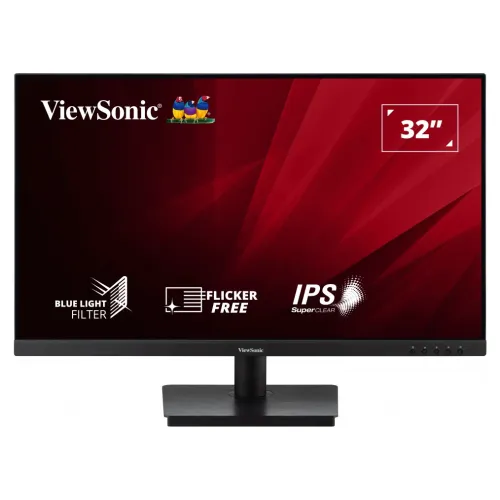
ViewSonic VA3209-MH 32-inch Full HD IPS Monitor: Bangladesh Buying Guide
Exact model and product identity
This catalog item is the ViewSonic VA3209-MH, marketed in the 32-inch monitor class. The active viewable diagonal is 31.5 inches and the regulatory model is VS19151. “32 inch IPS” describes size and panel type; those words do not belong in the manufacturer part number. Normalize modelName and both product and variant MPN to VA3209-MH. Other family models have different inputs or resolutions: VA3209-MHD adds DisplayPort, VA3209-2K-MHD is QHD, and VA3209U-4K is a 4K USB-C model. The exact suffix matters. Keep the existing product name and slug, which already identify the correct model and remain useful to shoppers.
Large IPS screen and viewing angles
The VA3209-MH uses a SuperClear IPS panel with native Full HD resolution of 1920 × 1080 and a 16:9 aspect ratio. ViewSonic documentation lists a 31.5-inch viewable area, 0.3638mm pixel pitch and 178-degree horizontal and vertical viewing angles. The large screen can help when several people need to view a spreadsheet, presentation or security display. At this size, Full HD pixels are less dense than on a smaller Full HD monitor; text and icons appear physically larger at standard scaling, while very fine detail is less crisp close up. Think about seating distance and the size of information you need to read. It is a large general-purpose panel, not a high-resolution substitute for QHD or 4K.
Brightness, contrast and colour
ViewSonic’s product sheet lists 250 cd/m² typical brightness and 1,200:1 static contrast, with 50 million to one dynamic contrast processing. Colour coverage is listed as 104 percent sRGB size and 72 percent NTSC size. These are gamut size specifications, not a factory calibration or Delta E accuracy guarantee. The panel displays 16.7 million colours using 6-bit plus Hi-FRC processing. Its anti-glare surface has a 3H hard coating, helping diffuse reflections in a bright office. For colour-sensitive work, verify the required gamut and use a calibrated workflow. At 250 nits, the screen is intended for normal indoor conditions; avoid placing it opposite intense sunlight.
75Hz motion and Adaptive Sync
The VA3209-MH supports a maximum 75Hz refresh rate at 1920 × 1080 and a typical 4ms gray-to-gray response time. Compared with 60Hz, 75Hz can make scrolling and cursor movement look a little smoother when the computer supplies the frames. ViewSonic lists Adaptive Sync variable refresh support. Use a compatible graphics source and supported connection, then enable the function in the display driver and monitor setup. This feature can help reduce tearing when frame output varies; actual behavior depends on the graphics device, cable, driver, refresh mode and game. The model is a general office and home monitor with modest casual gaming capability, not a high-refresh esports product. Verify the selected signal mode after installation.
Eye ProTech and image modes
ViewSonic lists Flicker-Free and Blue Light Filter technologies as Eye ProTech features. The on-screen display offers ViewMode presets for activities such as Game, Movie, Web, Text, Mono and Mac. These presets adjust image settings and can be selected to suit the task; the blue-light option can change colour temperature. Eye-care features do not remove the need for comfortable brightness, sensible room lighting or screen breaks. The front images show the IPS and eye-care marketing graphics, while the rear buttons let users access the monitor controls. If a neutral colour image matters, return to a standard picture mode and confirm the computer's colour settings rather than assuming a filter mode is colour accurate.
Inputs, speakers and audio routing
This exact model has one HDMI 1.4 input, one VGA (D-Sub) input and a 3.5mm audio output. It does not have DisplayPort or USB-C. The built-in stereo speakers are rated at 2.5 watts each, which can provide basic sound for classes, calls or casual video without external speakers. They are not a substitute for a dedicated speaker system in a large room. HDMI can carry both image and audio; VGA carries analog video only, so route sound separately from the computer when using VGA. The 3.5mm jack is an audio output, not a second video input. Inspect the selected input and operating-system audio device when configuring a multi-device desk.
Stand, VESA and dimensions
The supplied pedestal supports tilt from -5 to +20 degrees and does not provide height, swivel or portrait pivot adjustment. ViewSonic specifies 100 × 100mm VESA mounting, so an appropriate arm can add ergonomic movement. The official product sheet lists dimensions with stand of 714 × 520 × 231mm and without stand of 714 × 428 × 59mm, and net weight of 6.8kg with stand or 5.5kg without it. Plan for the 32-inch class screen and stand footprint on the desk. Check an arm’s size and weight limits before removing the stand, and make sure cables reach the downward-facing ports after installation.
Power and shipping details
The VA3209-MH uses an external power adapter with AC 100–240V, 50/60Hz input. ViewSonic lists consumption of 32W typical, 35W maximum, 27W Eco Optimized and 23W Eco Conserve, with 0.5W standby. The product sheet gives packaging dimensions of 770 × 510 × 125mm and gross package weight of 9.0kg. These are shipping figures, distinct from the assembled monitor’s dimensions and net weight. The variant shipping measurements use 77.0cm as the longest carton side, 12.5cm as depth and 51.0cm as height. Keep the box and serial label together with the invoice because retailers may require original packaging for warranty claims.
Check close model names
ViewSonic’s VA3209 family includes several monitors with similar names. VA3209-MH is Full HD 75Hz, with one HDMI, VGA and built-in speakers. VA3209-MHD has a different digital input configuration; VA3209-2K-MHD is 2560 × 1440 QHD; VA3209U-4K adds a 4K panel and USB-C. Do not copy those models’ ports, resolution, HDR or USB-C features onto this product. Confirm VA3209-MH on the retail box and invoice, then compare the visible rear connectors. The local gallery shows HDMI, VGA, audio out and speaker grilles consistent with the MH variant. This check helps avoid a listing mismatch when multiple VA3209 versions appear in search results.
Bangladesh price and warranty
Bangladesh listings reviewed place the model around ৳31,000–৳32,000, with lower cash promotions and higher regular prices varying by retailer. The product’s ৳31,000 catalog price and recorded price range are preserved. Star Tech and other reviewed retailers list a three-year ViewSonic warranty. Keep the warranty field as “3 years” to match the existing catalog and attribute format; explanatory copy may say three-year official brand warranty. Confirm seller stock, final checkout price, service provider and conditions directly before purchase, since offers change. Retain the purchase invoice, carton and serial label. The catalog’s range is a dated market snapshot rather than a promise that every seller has stock at that amount.
Who should consider it
This 32-inch class display can work well for office dashboards, classes, general browsing, presentations and shared viewing at a longer distance. Built-in speakers simplify a basic setup, and HDMI plus VGA can connect newer and older computers. Adaptive Sync and 75Hz add a modest smoothness benefit for everyday use. It may not fit a buyer who needs sharp fine text at close range, a higher resolution, DisplayPort, USB-C, high-refresh gaming, strong room-filling audio or height-adjustable ergonomics. Compare the cost with smaller QHD options and larger 4K displays, then account for desk depth, screen distance and your usual content. A large panel is useful when the workspace benefits from scale, but size alone does not guarantee extra desktop resolution.
Setup and delivery checklist
Before ordering, confirm the complete VA3209-MH suffix, included stand, 3-year warranty and current price with the seller. On delivery, inspect the screen and carton for damage and retain the box. Connect HDMI for digital video and audio, or VGA for legacy video with a separate computer audio connection. Select 1920 × 1080 at up to 75Hz in display settings, then check the image and speakers. Adjust tilt, brightness, ViewMode and Blue Light Filter to the room. If using a monitor arm, verify 100 × 100mm VESA fit and a suitable load rating. The supplied images do not provide a readable origin label or carton barcode, so those batch-specific details remain unverified.