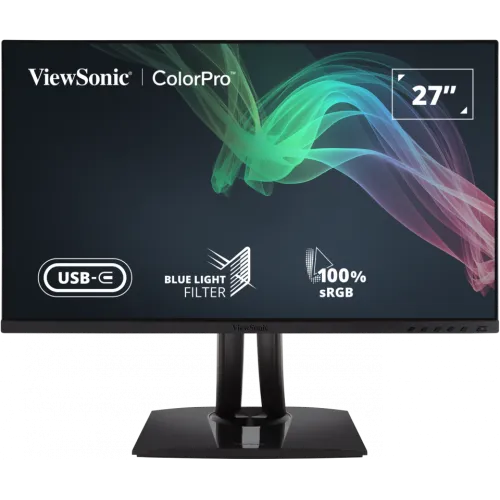
ViewSonic VP2756-4K is a 27-inch 4K UHD IPS monitor with Pantone Validation, factory Delta E below 2 calibration, 100% sRGB and USB-C 60W charging. Compare ViewSonic VP2756-4K price in Bangladesh, full specs, ports, calibration, warranty and live retailer listings on BiponiBD.
Exact model and professional positioning
The ViewSonic VP2756-4K is a 27-inch professional monitor in the ColorPro family. ViewSonic Bangladesh describes it as a 4K UHD, Pantone Validated, 100% sRGB display with factory calibration and USB-C charging. Its main product identity is VP2756-4K; the existing catalog’s longer title and model fields are normalized to that exact model name. The display combines an IPS panel, ergonomic stand, USB hub and colour-oriented factory settings. This positioning is useful for photographers, graphic designers, video editors, office teams and other users who need a detailed image and colour-aware starting point. It does not remove the need to check the requirements of a particular production workflow, source device or local warranty agreement.
4K UHD resolution and 27-inch workspace
The monitor’s native pixel grid is 3840 × 2160, commonly called 4K UHD, across a 27-inch diagonal and 16:9 aspect ratio. ViewSonic lists a 0.155mm horizontal and vertical pixel pitch. The high pixel density can make fine text, photos and interface details appear crisp when operating-system scaling is set appropriately. A 27-inch screen can fit a workstation where a larger panel would take too much desk width, while still providing room for image tools, timelines or multiple windows. The display is flat, not curved. Choose a comfortable scaling level and viewing distance; maximum resolution alone does not guarantee readable interface text or the best working posture.
IPS panel, brightness and contrast
ViewSonic specifies IPS technology, 350 cd/m² typical brightness, 1,000:1 typical static contrast and 20M:1 dynamic contrast. The static figure is the useful baseline for comparing typical panel contrast; the dynamic figure is measured differently and should not be interpreted as the same kind of native contrast. The manufacturer lists 178-degree horizontal and vertical viewing angles, an anti-glare surface and 3H hard coating. These ratings describe the product design and do not guarantee that every unit or viewing environment appears identical. The 350-nit rating is suitable for many indoor desks, though direct sunlight and strong reflections can still make the image harder to see. Adjust brightness and room lighting to suit your workspace.
Pantone validation and factory calibration
ViewSonic identifies the VP2756-4K as Pantone Validated and ColorPro Verified. It states that each unit is pre-calibrated at the factory to Delta E below 2 and supports 100% sRGB coverage. These claims provide a colour-focused starting point for editing, design review and brand work. A factory report can document the shipped calibration state, but it is not a guarantee that every application, computer profile, viewing condition or future panel state will match a print or another display exactly. Colour-critical workflows should use colour-managed software, suitable profiles, controlled ambient light and periodic calibration where required. Retain any supplied calibration report if the workflow depends on traceable factory data.
Gamut figures and colour depth
The official Bangladesh page lists 100% sRGB coverage and additional typical figures for Adobe RGB, DCI-P3, EBU, Rec.709, SMPTE-C and NTSC. The table distinguishes gamut size from gamut coverage: for example, it lists Adobe RGB at 81% size and 78% coverage, DCI-P3 at 80% size and 80% coverage, EBU at 108% size and 98% coverage, Rec.709 at 109% size and 100% coverage, and NTSC at 77% size. Colour space support is described as 10-bit (8-bit + A-FRC), while the detailed table lists 1.07 billion colours. These measures are not interchangeable. The content names the space and whether a number is coverage or size rather than presenting one percentage as universal colour accuracy.
60Hz refresh and 5ms response
ViewSonic lists a 60Hz refresh rate and 5ms typical GtG response time, also listing 5ms with overdrive. A 60Hz panel updates up to sixty times per second, which is appropriate for normal office applications, photography, design, video playback and general desktop use. It is not a high-refresh gaming specification. Response-time figures describe a manufacturer test rating and do not mean every pixel transition occurs in exactly five milliseconds or eliminate all motion blur. The source device, cable and selected resolution determine the available mode. ViewSonic lists vertical input frequency of 24–75Hz while the product refresh rate is 60Hz; confirm the desired resolution and refresh mode in the computer’s display settings after connection.
USB-C video and 60W charging
The upstream USB-C port supports DisplayPort Alt Mode and can provide up to 60W of laptop charging while carrying video and data. With a compatible computer and suitable cable, one connection can drive the display and connect the monitor’s hub, reducing desk clutter. USB-C video support depends on the laptop’s port; a USB-C connector by itself does not guarantee DisplayPort Alt Mode. Sixty watts can be enough for many productivity laptops, but some high-performance computers need more power, especially under heavy load. In that case, use the laptop’s own adapter as well. The manufacturer describes the USB-C port as an upstream connection and lists the separate USB-A and USB-B hub ports in its full specification.
HDMI revision and remaining connections
The ViewSonic Bangladesh product page contains an inconsistency that should remain visible for buyers: its feature overview describes HDMI 2.0, while the expanded full specification table lists two HDMI 2.1 inputs. The same official table lists one DisplayPort 1.2 input, one USB-C upstream with 60W Power Delivery, two USB-A 3.2 downstream ports and one USB-B 3.2 upstream hub connection. Star Tech’s page calls the included HDMI cable version 2.0, which does not settle the monitor input revision. The catalog content therefore records two HDMI inputs and the manufacturer’s differing revision statements, and recommends confirming the exact HDMI revision with ViewSonic if a source device requires a particular standard.
Ergonomic stand and Auto Pivot
The stand provides 130mm of height adjustment, swivel through 120 degrees, tilt from -5 degrees to +21 degrees and pivot through 90 degrees in either direction. ViewSonic also lists Auto Pivot, which can rotate the display orientation in supported setups. These adjustments allow users to place the top of the screen near eye level, share the screen with a colleague or view long pages and portrait photographs vertically. Use a clear desk area so the panel and cables do not collide while turning. Pivot support does not itself guarantee that every operating system or application rotates automatically; confirm the required display settings. The 100 × 100mm VESA mount can be used with a suitable arm or wall bracket when its load rating and fasteners are appropriate.
Eye-care, modes and software
The manufacturer lists Flicker-Free technology, a software-based Low Blue Light solution and several working modes, including CAD/CAM, portrait, landscape, eye-care and ultra-clear. ViewSonic also references TÜV certification for blue-light filtering. These settings can help adapt the image to a task or user preference, but they do not guarantee comfort or replace accessibility testing. Comfort also depends on brightness, text size, ambient light, viewing distance, posture and breaks. ViewSonic provides Colorbration+ software and vDisplay Manager downloads for supported systems, and lists Windows 10/11 certification with macOS tested. Check current software compatibility and instructions on the vendor support page before relying on a specific feature.
Audio and built-in speakers
The expanded official specification lists two internal speakers rated at 2W each. They can provide basic sound for alerts, calls and casual video without adding a separate desktop device. Small integrated speakers are not designed to replace dedicated speakers or headphones for music, editing or louder rooms. The official page does not list a built-in microphone. Confirm which output is selected on the computer after connecting the monitor; some systems continue to play through the laptop until the output device is changed. The monitor’s OSD includes audio adjustment controls, which can manage basic speaker level and settings. Use an external audio device when the task needs clearer voice pickup, stronger bass or more detailed listening.
Power, dimensions and operating conditions
ViewSonic lists an internal power supply with AC 100–240V input. Typical consumption is 24W and maximum consumption is 28W; Eco modes are listed at 19.3W and 21.5W, and standby is 0.3W. These are manufacturer ratings and actual draw varies with brightness and use. The monitor measures about 613mm wide, 410–540mm high and 215mm deep with the stand; without the stand, the listed dimensions are about 613 × 363 × 53mm. The net weight is 7.5kg with stand and 5.1kg without it. The operating range is specified as 0–40°C with 20–90% non-condensing humidity. Keep ventilation clear and use the supplied power connection according to the manual.
Box contents and compliance
ViewSonic lists the monitor, a three-pin power plug, HDMI cable, USB-C cable, USB A/B cable and quick-start guide in the package. The included HDMI cable is described as v2.0 on the Bangladesh product page, while the monitor specification table lists the input as HDMI 2.1; cable revision and input revision are separate questions. Regional packaging can differ, so verify included items with the Bangladesh seller if a particular cable is needed. The manufacturer lists Energy Star, EPEAT and various regional safety and environmental compliance marks. Keep the box, serial label, warranty card and invoice until the return window and service process are understood. Dispose of electronic equipment according to local rules when it reaches end of life.
Bangladesh prices and warranty
On 6 November 2026, Star Tech’s direct exact-model page showed In Stock at ৳72,500, with ৳77,000 crossed price and ৳80,000 regular price. Tech Land’s direct page showed In Stock at ৳76,500 and regular price ৳83,000. These are two seller snapshots, not a promise that an offer, stock, delivery fee or payment discount will continue. The existing catalog MSRP of ৳76,500 remains unchanged. Star Tech and Tech Land each stated three years of warranty; ViewSonic notes that warranty terms may vary by market. Ask which local provider handles claims, what is covered, and whether the original box and invoice are required. Price and warranty should be confirmed on the actual seller checkout page.
Who should consider the VP2756-4K
The VP2756-4K may suit photographers, graphic designers, illustrators and office professionals who want 4K detail, factory-reported sRGB calibration and a stand that pivots for portrait work. USB-C can simplify a compatible laptop desk while the USB hub connects peripherals. Two video inputs of several types can support a multi-device setup, subject to confirming the HDMI revision needed. Buyers who require more than 60Hz, wider verified colour coverage beyond sRGB, stronger HDR, a webcam, higher USB-C power or more powerful speakers should compare other models. Colour professionals should check calibration workflow and the exact gamut coverage required by client output. Make the decision against concrete needs such as source-device ports, desk size, software compatibility and warranty location.
Setup checklist
Before connecting, confirm that the graphics source supports 3840 × 2160 at 60Hz over the selected port. Use USB-C only when the host supports DisplayPort Alt Mode and when 60W charging is enough; connect the upstream path before expecting USB hub ports to work. Select the native resolution in the operating system and use scaling that keeps text readable. Choose the colour mode that matches the application, then use ICC profiles and calibration where required. Adjust height, tilt and swivel to reduce neck movement and glare. For portrait use, rotate the screen and confirm that the operating system’s display orientation follows. Check the HDMI input revision with ViewSonic if the connected device depends on a particular HDMI feature. Keep the serial label and proof of purchase available for local warranty support.
Features
- 27-inch IPS panel with UHD 3840 × 2160 resolution, 16:9 aspect ratio, 60Hz refresh and 0.155mm pixel pitch.
- Pantone Validated, ColorPro Verified and factory pre-calibrated with Delta E below 2 per ViewSonic.
- 100% sRGB coverage, 10-bit color processing (8-bit + A-FRC), and selectable CAD/CAM, portrait, landscape, eye-care and ultra-clear modes.
- USB-C upstream with DisplayPort Alt Mode, data and up to 60W laptop charging.
- One DisplayPort 1.2 input, two USB-A downstream ports, one USB-B upstream hub port and two HDMI inputs; HDMI revision differs across ViewSonic page sections.
- Ergonomic stand supports 130mm height adjustment, tilt, 120-degree swivel and 90-degree pivot in either direction with Auto Pivot.
- 350 cd/m² typical brightness, 1,000:1 typical static contrast, 20M:1 dynamic contrast and 5ms GtG response time.
- Two integrated 2W speakers, anti-glare 3H coating, Flicker-Free and software-based Low Blue Light features.
- 100 × 100mm VESA mounting, Kensington lock slot, cable management and internal power supply.
- ViewSonic lists 24W typical, 28W maximum and 0.3W standby power; Energy Star and EPEAT are listed.
Pros
- 4K UHD resolution on a 27-inch IPS panel provides high pixel density for detailed design, documents and image review.
- Pantone validation, ColorPro verification, factory Delta E below 2 calibration and 100% sRGB coverage support colour-aware workflows.
- USB-C can send video and data while supplying up to 60W to a compatible laptop, helping reduce cables on a desk.
- The ergonomic stand provides height, tilt, swivel and pivot adjustments, with Auto Pivot for portrait use.
- Two HDMI inputs, DisplayPort, USB hub, built-in speakers and VESA mounting cover common professional desk needs.
- On 6 Nov 2026, the exact model was In Stock at Star Tech for ৳72,500 and Tech Land for ৳76,500.
Cons
- The 60Hz refresh rate is intended for office and creative work rather than high-refresh competitive gaming.
- USB-C charging is limited to 60W and may not satisfy some high-performance laptops during demanding workloads.
- The official Bangladesh page describes HDMI 2.0 in its overview but lists HDMI 2.1 ×2 in the full specification table; buyers needing a specific revision should confirm with ViewSonic.
- The integrated speakers are rated at 2W each and are best treated as basic desktop audio.
- The official page lists several gamut size and coverage figures; sRGB is 100% coverage, while some other spaces have lower coverage.
- Retail price, stock, discount, seller warranty and delivery conditions can change; confirm the final checkout details.
Frequently asked questions
What is the ViewSonic VP2756-4K price in Bangladesh?
On 6 November 2026, Star Tech showed ৳72,500 and In Stock, while Tech Land showed ৳76,500 and In Stock. Confirm the live checkout price, delivery fee and stock before ordering.
What is the exact model and resolution?
The exact model is ViewSonic VP2756-4K. It is a 27-inch IPS monitor with UHD resolution of 3840 × 2160 pixels and a 16:9 aspect ratio.
Is this monitor suitable for colour-sensitive work?
ViewSonic identifies it as Pantone Validated and ColorPro Verified, with factory pre-calibration and Delta E below 2. The manufacturer also lists 100% sRGB coverage. A colour-managed workflow and calibration may still be needed for critical production.
What is its refresh rate?
ViewSonic specifies 60Hz and a 5ms GtG response time. It is positioned as a professional productivity and creative monitor rather than a high-refresh gaming display.
Does the USB-C port charge a laptop?
Yes. ViewSonic lists USB-C with DisplayPort Alt Mode and up to 60W charging. The laptop must support video over USB-C, and 60W may be insufficient for some high-power models.
How many HDMI and other ports does it have?
The official full specification lists two HDMI inputs, one DisplayPort, two USB-A downstream ports, one USB-B upstream hub connection and one USB-C upstream port. ViewSonic’s overview calls the HDMI inputs 2.0, while the full table calls them 2.1; verify the revision if it matters to your setup.
What colour gamut and bit depth does it support?
ViewSonic lists 100% sRGB coverage, with typical coverage figures of 78% Adobe RGB, 80% DCI-P3, 98% EBU and 100% Rec.709. Colour space support is listed as 10-bit (8-bit + A-FRC).
Does it have built-in speakers?
Yes. The official full specification lists two integrated 2W speakers. They are suitable for basic sound; use separate speakers or headphones for stronger output.
Can the stand rotate to portrait?
Yes. The stand supports 130mm height adjustment, 120-degree swivel, -5° to +21° tilt and 90-degree pivot to either side. ViewSonic also lists Auto Pivot.
Can I mount it on a monitor arm?
The manufacturer specifies a 100 × 100mm VESA mounting pattern. Check the arm’s load rating, fastener requirements and the monitor’s weight before installation.
What is included in the box?
ViewSonic lists the VP2756-4K, power plug, HDMI cable, USB-C cable, USB A/B cable and quick-start guide. Regional bundles may differ; confirm the Bangladesh unit with the seller.
What warranty applies in Bangladesh?
ViewSonic says warranty terms vary by market. Star Tech and Tech Land each displayed three years on their product pages on 6 November 2026. Confirm the local service provider, coverage and claim rules with the seller.